Short answer: use it for a Mac's existing logins
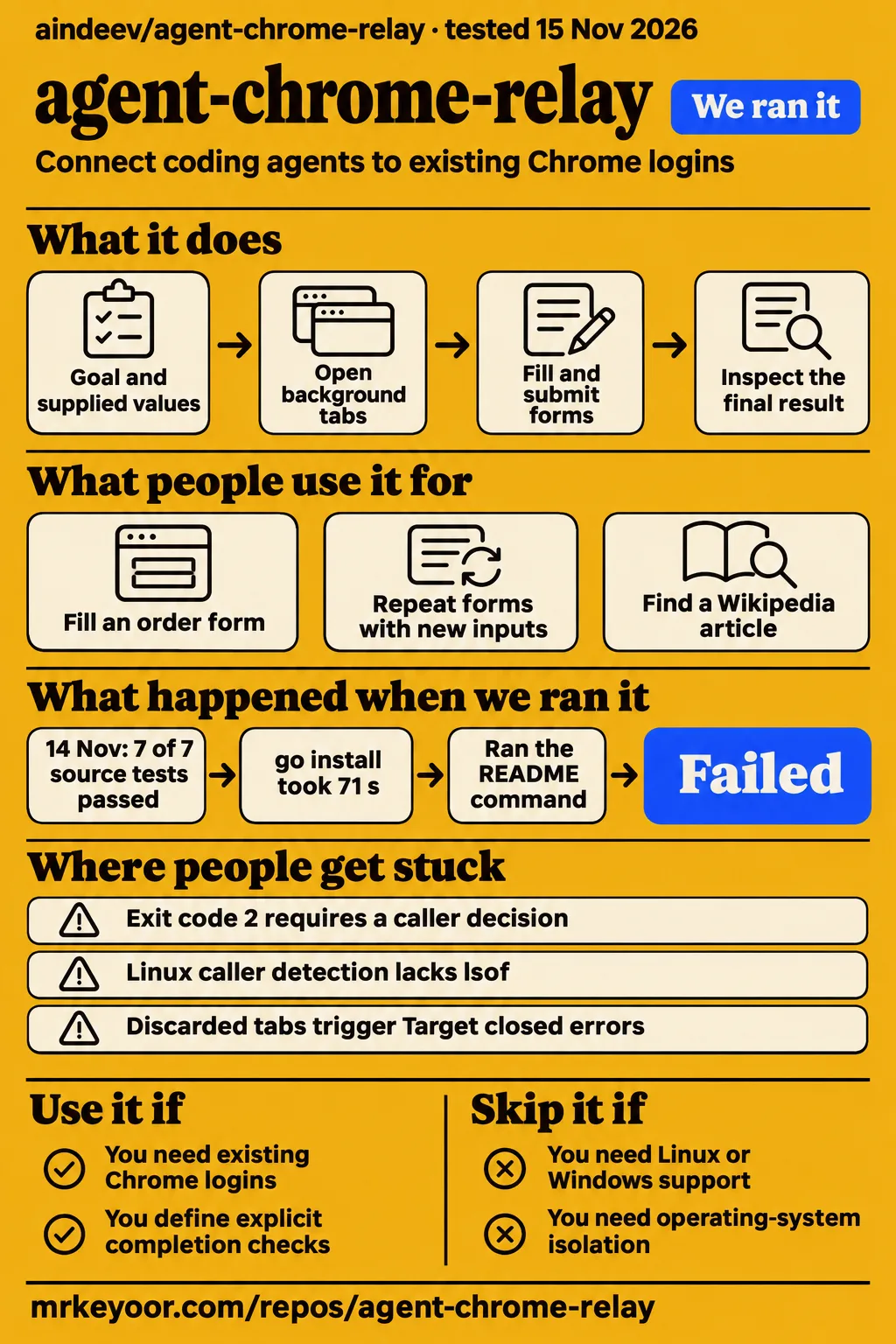
Use agent-chrome-relay if you maintain a Mac and want coding agents to reuse existing Chrome logins with explicit completion checks. Our sandbox installed it in 18 seconds, built it in 35 seconds and completed the recorded Go test step in 14 seconds, with 7 passed and 0 failed. The practical attraction is the selected browser account: an agent can open its own background tabs inside a profile that already has the sessions needed for the task.
Choose another approach if you need documented Linux or Windows desktop support or operating-system isolation between agents. For a first task, choose a report or another reversible workflow whose final result you can inspect. State the account, inputs and completion condition together. That gives the agent a specific job and gives you an acceptance check: whether the expected result exists in the intended account, rather than whether a process merely exited successfully.
What people use agent-chrome-relay for
The author reports a seven-step form task, a repeat through a saved flow and a Wikipedia search task; a separate supplied video reports Linux server testing. These records describe different activities and operators. The browser timings are Alexey Indeev's measurements, while the video describes a testing team's server walkthrough. Their results belong to those operators, separately from our source and CLI checks.
| Who ran it | Task and reported outcome | Source |
|---|---|---|
| Project author Alexey Indeev | Filled and submitted a seven-step order form in 2.5 seconds, using three supplied fields and four Jev decisions; repeated it with other data in 1.2 seconds through a saved flow. | Author's form measurements |
| Project author Alexey Indeev | Found and opened a Wikipedia article through search suggestions in 2.0 seconds using two Jev decisions. | Author's Wikipedia measurement |
| Testing team in the supplied video | Reported approximately 19 minutes to install, a Linux caller-detection fallback, correct HTTP status codes and 12 passing integration tests. | Linux server walkthrough |
Saved flows explain the appeal for repeated forms. The author says a run whose completion checks pass saves the steps and data keys for that site, excluding the values. A later run can replay with new inputs. The Wikipedia example instead exercises choosing a suggestion from a changing page. Both examples connect the mechanism to a specific task rather than treating command latency as a complete workflow result.
What happened when we ran it
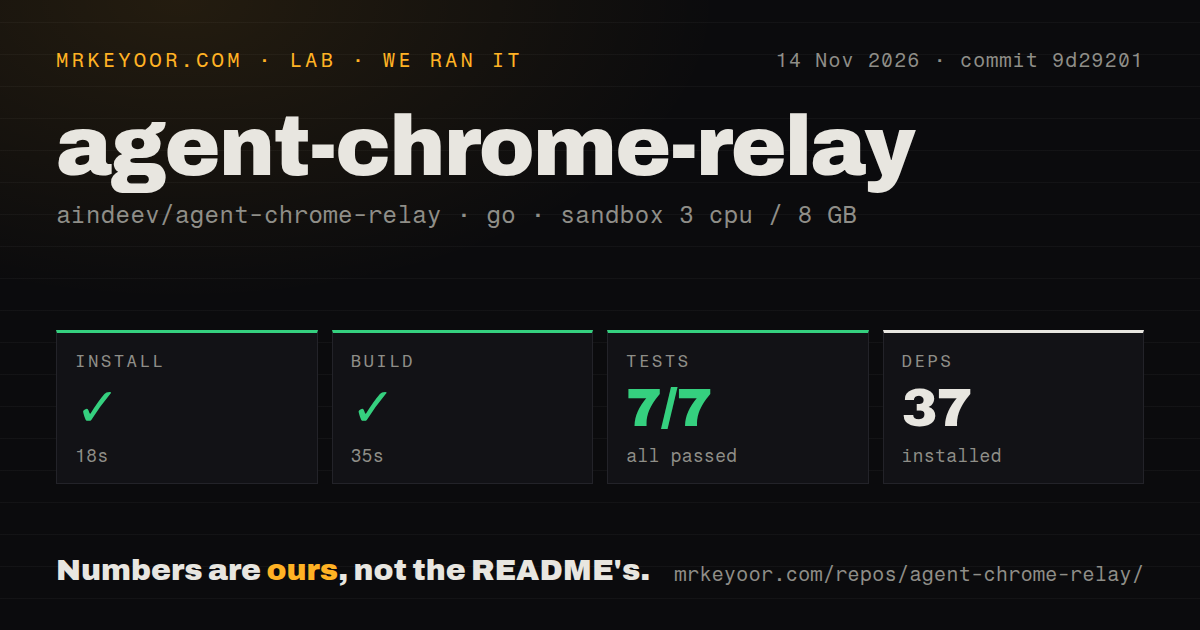
Our November 14 source run at commit 9d29201 completed installation, build and tests. We measured those steps in a sandbox configured with 3 CPUs, 8 GB RAM and image label golang:1.24-bookworm. The checkout contained 143 files, approximately 22,360 source lines and 4.1 MB. The scan recorded one CI workflow, a tests directory and no Dockerfile. These measurements describe the supplied source harness.
| November 14 source-run step | Recorded result |
|---|---|
| Install | Succeeded in 18 seconds; 37 dependencies recorded |
| Build | Succeeded in 35 seconds |
| Tests | Succeeded in 14 seconds; Go test summary: 7 passed, 0 failed of 7 |
The November 15 run recorded checkout revision 9d292011e02e, then installed the CLI through go install github.com/aindeev/agent-chrome-relay/...@latest. The installed CLI version was not identified: installation selected independently of the checkout, and the version probe returned setup guidance. The run used a fresh unprivileged container with 2 CPUs, 4 GB RAM, no published ports and no secrets, under recipe quickstart-cli.
| Hands-on question | Recorded answer | Verdict | Why |
|---|---|---|---|
| Did cloning complete? | The clone step recorded the quickstart-cli recipe in 1 second. | Completed | The supplied clone record reports completion. |
| What did installation do? | It ran go install github.com/aindeev/agent-chrome-relay/...@latest; 29.6 MB installed in 70.7 seconds. |
Completed through the harness route | The harness selected the package route from its manifest, independently of the checkout revision. |
| What did the version probe return? | chrome-relay --version exited 0 in 0.1 seconds and printed setup guidance. |
Version unidentified | The returned text describes setup rather than identifying the executable's revision. |
| What did the help probe return? | chrome-relay --help exited 0 in 0.1 seconds and printed setup guidance. |
Help reached | The output includes the local build and setup sequence. |
| Did the usage step run a browser task? | The usage step failed with the message "no runnable chrome-relay command in the README's usage/examples sections". | Selection failed | The README contains native commands; this record describes the harness's selection failure. |
| Did teardown finish? | The record says "teardown: ok". | Completed | Cleanup returned the recorded OK result. |
The clone record, installation record, version probe, help probe, usage selection record and teardown record supply the individual outcomes. The table attaches behavior to the executable used by that recipe, without assigning it the checkout's revision. Successful help output and release identification are different observations.
Where people get stuck: hand-back needs its own branch
Exit code 2 returns control to the calling agent, while exit code 1 means failure, according to the supplied Bytesize Go analysis. The README describes the information returned at a hand-back: completed actions, current page and candidate controls. A caller should inspect that state and decide what comes next. A loop that treats both statuses as an instruction to restart Chrome discards the distinction the interface provides. Exit-code explanation.
| Situation | Evidence and next action | Attribution |
|---|---|---|
| Goal returns exit code 2 | Inspect returned state and resolve the missing value or decision. | README and Bytesize Go describe deliberate hand-back. |
| Linux caller detection lacks lsof | The video reports a fallback using /proc/net/tcp and process file descriptors. |
Local workaround reported by the video team. |
Old reference or Target closed |
ByteSprint recommends a fresh snapshot before reusing a reference after a long pause. | Guide advice about reported context errors. |
| Service or extension state differs from expectations | Run chrome-relay doctor and check extension installation in the intended profile. |
README diagnostic instructions. |
A missing field value calls for a value; a consequential action outside the stated goal calls for a decision by the caller. The README lists deletes, sends, payments, deployment and authorization among actions that can trigger this stop. Expanding --allow simply to obtain a zero exit status changes the permission granted to the workflow. Keep the requested outcome and permitted action consistent. Native commands and hand-back documentation.
Setup requires macOS and a locally signed build
The documented setup requires macOS, Google Chrome and Go 1.25+, followed by a local build and setup. The README links the local build to macOS Keychain access: macOS associates the relay's Keychain item with the binary's signature. That explains why the instructions begin with the checkout's build script. The generic Go installation used by the CLI recipe and the documented Mac setup are different procedures. README setup instructions.
The documented sequence is to clone the repository, enter its directory, run ./build, then run ./chrome-relay setup. Install and pin the Chrome Relay extension in every profile agents should use, then check the installation with chrome-relay doctor. The Chrome Web Store copy is the normal documented route. Developers inspecting or changing the extension can load the checkout's extension directory instead; the README says to choose one copy rather than install both.
Go-only builds supply the core browser path. Xcode command-line tools add linked Swift components for optional 1Password and Secure Enclave features. The README describes signing with an identity or ad-hoc signing. For Codex and Cursor, it directs users to the same browser skill file used by Claude Code, with a pointer in their global instructions. These are documented setup choices, so decide which optional capabilities the workflow needs before building.
Tab ownership operates within the selected profile
Chrome Relay assigns each agent its own tabs, and those tabs use the selected Chrome profile's signed-in state. The extension opens tabs inactive in a collapsed Agents group. The relay exposes an agent-specific inventory and checks ownership when forwarding commands. Profile selection therefore determines the accounts a task can use: a signed-in administrative application carries the authority that application gives the chosen account. Architecture and caller checks.
The README describes two connection checks: a local secret and identification of a supported calling application through process evidence. It also rejects browser-originated agent connections. Keep token-bearing connection URLs out of logs and chat transcripts. For optional 1Password access, the agent names an op:// reference and the relay resolves its value into a destination field. Setup lets the owner choose the vaults and accounts available to agents.
Local browser control can send page data to a model
The README says the decision model receives shortlisted controls, up to 1,500 characters of visible page text and supplied data values, excluding credential references and their contents. Jev requires a TypeSafe key; Haiku through the user's Claude Code is the documented fallback. Choose the model provider alongside the browser account, because both choices affect where the task's information goes. Decision-model data description.
The author's approach page measures next-action decisions on 23 live steps and 150 Mind2Web steps. Haiku received shortlisted requests containing 15 elements, while the other models received full requests. Those details define the comparison's unit and inputs. Selecting an operation at one page state and completing a workflow are separate outcomes: the latter also requires reaching the requested final state. Author's benchmark method.
agent-chrome-relay vs agent-browser and browser-relay
Native Chrome Relay commands provide checked browser actions; agent-browser adds documented recording tools; reliefeai/browser-relay documents remote access and services across three desktop operating systems. Agent-browser can operate through Chrome Relay, so using it as a client does not require replacing the relay supplying the signed-in browser connection. Choose between these documented capabilities according to the task and the artifacts you need to retain.
| Option | Documented distinction | Pick it when |
|---|---|---|
| Chrome Relay native commands | Native open, snapshot, click and fill commands, plus goal execution with completion checks. | Existing Mac logins and explicit final-state checks are the requirement. |
| agent-browser through Chrome Relay | Chrome Relay documents network recording, traces, video and page diffs as additional tools. | You need those inspection artifacts. |
| reliefeai/browser-relay | Local and remote modes, with service registration on macOS, Linux and Windows. | The calling agent is remote or the desktop fleet spans operating systems. |
| Fresh browser profile | A separate account and session setup rather than reuse of the everyday profile. | You want to provision a separate automation account. |
The global install uses launchd on macOS, systemd-user on Linux, and a current-user Task Scheduler task on Windows. That is the service behavior documented by reliefeai/browser-relay's README, a separate project. Chrome Relay's README documents agent-browser's recording tools. The author's comparison reports 23 successful checked-action pages for native commands versus 21 through agent-browser. Author's checked-action comparison.
What the other reviews get wrong
The supplied README makes agent-browser optional and documents Chrome Web Store installation, correcting older setup descriptions that require agent-browser and an unpacked extension. Grace Morgan's October 12, 2026 audit explicitly covers commit 282ca1ba5d776d2ca3f5fcae4399eb32b666fdb3, whose extension declares version 0.9.4. Its setup description belongs to that revision. Supplied setup documentation, dated implementation audit.
Background operation has a documented user action: clicking a sign-in or passkey notification opens the relevant tab. The README also describes optional 1Password fills and emailed-code assistance before asking the user for help. A password challenge therefore has several documented handling paths. These details replace absolute descriptions of focus and manual login with the actions the project actually documents. Sign-in and notification behavior.
Legit.Show's 100/100 listing averages three measured public-surface frames. Its explanation identifies the frames measured and the dimensions recorded as null. The credential and logging absolutes in that listing also need the historical audit's implementation context, discussed in the final section. OpenClaw videos and its Chrome Extension Relay disconnect issue concern a separate implementation, so their demonstrations and failures belong to that project. Listing methodology.
FAQ
Chrome Relay connects supported coding agents to existing signed-in Chrome profiles through a local macOS service and extension. The supplied questions concern installation, account access, inspection and adoption. Their answers distinguish the project's documented behavior from our recorded source and CLI outcomes. The README lists Claude Code, Codex, Cursor, Paseo and pi, and supplies commands for both individual browser actions and whole goals.
What does agent-chrome-relay do, and how does it connect an agent to signed-in Chrome?
Chrome Relay connects a coding agent to separately tracked tabs in a selected existing Chrome profile. The local service forwards commands through an extension using Chrome's debugger API, and existing sessions supply login state. Native commands cover individual actions, while chrome-relay do accepts a goal, supplied values and completion checks. This is the documented route from the calling agent to the selected account. README architecture and commands.
What do I need to install agent-chrome-relay?
The documented setup requires macOS, Google Chrome and Go 1.25+. Build the service locally, run setup and install the extension in each intended profile. Xcode command-line tools add the optional linked security components. The README also describes choosing a signing identity and checking the resulting build with chrome-relay doctor, letting an operator plan core browser access separately from optional credential features. Requirements and build choices.
Why does agent-chrome-relay require a local build?
The README says macOS ties Chrome Relay's Keychain item to the binary's signature, and the build script signs the binary on your Mac. It describes both an available signing identity and ad-hoc signing. That is the project's stated reason for using its build script before setup; the script's signing work is part of the documented installation procedure. Local signing explanation.
How does agent-chrome-relay handle my logins and passwords?
Existing Chrome sessions supply login state, while optional 1Password integration resolves credential references into destination fields. The README describes matching the item's website, checking the field and masking known filled secrets in returned output. Setup creates or selects shared vault access for agents. Those mechanisms describe the intended credential path and the accounts the owner chooses to expose. Credential handling documentation.
Which password managers does agent-chrome-relay support?
The README lists 1Password as its password-manager integration. That optional integration is separate from reusing sessions already signed in through Chrome. Its setup supplies agents with access to selected shared vaults, while existing browser sessions work through the chosen profile. Decide whether the workflow needs new credential fills or only the account state already present in that profile. Optional features and vault setup.
Can I inspect what an agent did afterward?
The project documents chrome-relay audit for reviewing operational activity. The README describes records for goal starts, goal ends and individual goal actions, with filled fields recorded without their text. That gives operators a documented inspection command and a place to begin reviewing a task. The final section explains the revision and coverage of the supplied independent logging analysis. Operational audit documentation.
Is agent-chrome-relay production-ready?
Our recorded source run passed its seven-test summary, and the CLI recipe's individual outcomes appear in the run table. For an adoption decision, begin with a reversible task whose result has a known answer, then inspect the resulting file or page state and retained activity records. Those checks tie acceptance to the requested result. The evidence boundaries supporting this recommendation appear in the final section.
How can I fix agent-chrome-relay context errors without restarting Chrome?
ByteSprint recommends refreshing snapshots before reusing old references after long pauses. Upstream documents chrome-relay snapshot as a way to obtain current page state for inspection. The guide's recommendation addresses its reported context-error scenario; a deliberate goal hand-back instead provides an exit status and returned state for the caller's next decision. Both paths call for examining the state before choosing another action. Native snapshot documentation.
Can Codex control Chrome and automate browser work?
The README lists Codex as a supported agent and directs it to shared browser skill instructions. It gives an example of adding a pointer to that file in global Codex instructions. In this documented integration, Codex invokes browser commands while Chrome Relay supplies access to the selected profile and tracks the agent's tabs. The owner still chooses which profiles receive the extension. Codex integration instructions.
Repository activity and the documentation rating
GitHub metadata observed on November 15, 2026 records 194 stars, 9 open issues and pull requests combined, and a last push on November 12. The latest-release record is v0.11.0, published October 13, 2026. These are repository and release facts, separate from the source checkout, installed CLI and historical audit revision. Stars measure attention. Repository metadata, latest release metadata.
Documentation receives 4/5 on this editorial rubric: 1 means no usable instructions, 2 means major procedural gaps, 3 means core setup and usage are covered, 4 adds concrete troubleshooting and security boundaries, and 5 adds independent corroboration across those paths. The supplied README earns 4 through its build instructions, native commands, doctor diagnostic, credential setup and hand-back explanations. The other dimensions receive N/A for the evidence gaps below.
What we have not tested yet
Our runs stop short of a completed signed-in Chrome workflow on a supported Mac, Secure Enclave hardware validation and the full paired-iPhone approval path. The configured golang:1.24-bookworm image label does not identify the actual toolchain or operating-system version. Long-duration behavior across idle tabs, extension updates and concurrent agents also remains untested. Setup ease, support quality and production maturity therefore remain unassessed rather than receiving numerical scores.
Current forensic logging coverage lacks version-matched independent evidence. Morgan's October 12, 2026 audit covers commit 282ca1ba5d776d2ca3f5fcae4399eb32b666fdb3, rather than our source checkout or the supplied newer README. That audit reports selective logging and says: Runtime.callFunctionOn is not among the logged methods. It also identifies destination-page scripts and transformed-secret side channels. The README excludes same-user malware from its protection, and per-agent tab tracking supplies no operating-system isolation. Historical logging and credential analysis.
The author's October 2026 approach page says its page reader excludes iframes and closed shadow roots and places canvas apps such as Google Docs out of reach. The newer README claims snapshots can inspect same-site and cross-site frames. These descriptions conflict on frame scope; current iframe, closed-shadow and canvas workflows need version-matched evidence and a completed task. Author's page-reader limits, supplied snapshot description.
The Linux caller-detection workaround's upstream status is unresolved. ByteSprint's memory-pressure diagnosis and proposed snapshot remedy were not independently validated in the supplied runs. Total operating cost, confidential-page data flows and independent comparative reliability also lack measurements. Legit.Show leaves performance, accessibility, privacy and reliability unmeasured. Rendered layout, assets, accessibility, automatic related links, recommendation modules and template content fall outside these supplied checks. A known report download on a Mac, repeated with changed inputs and followed by audit inspection and deliberate hand-back and resume, is a proposed next check.