Our verdict: investigate the download's provenance
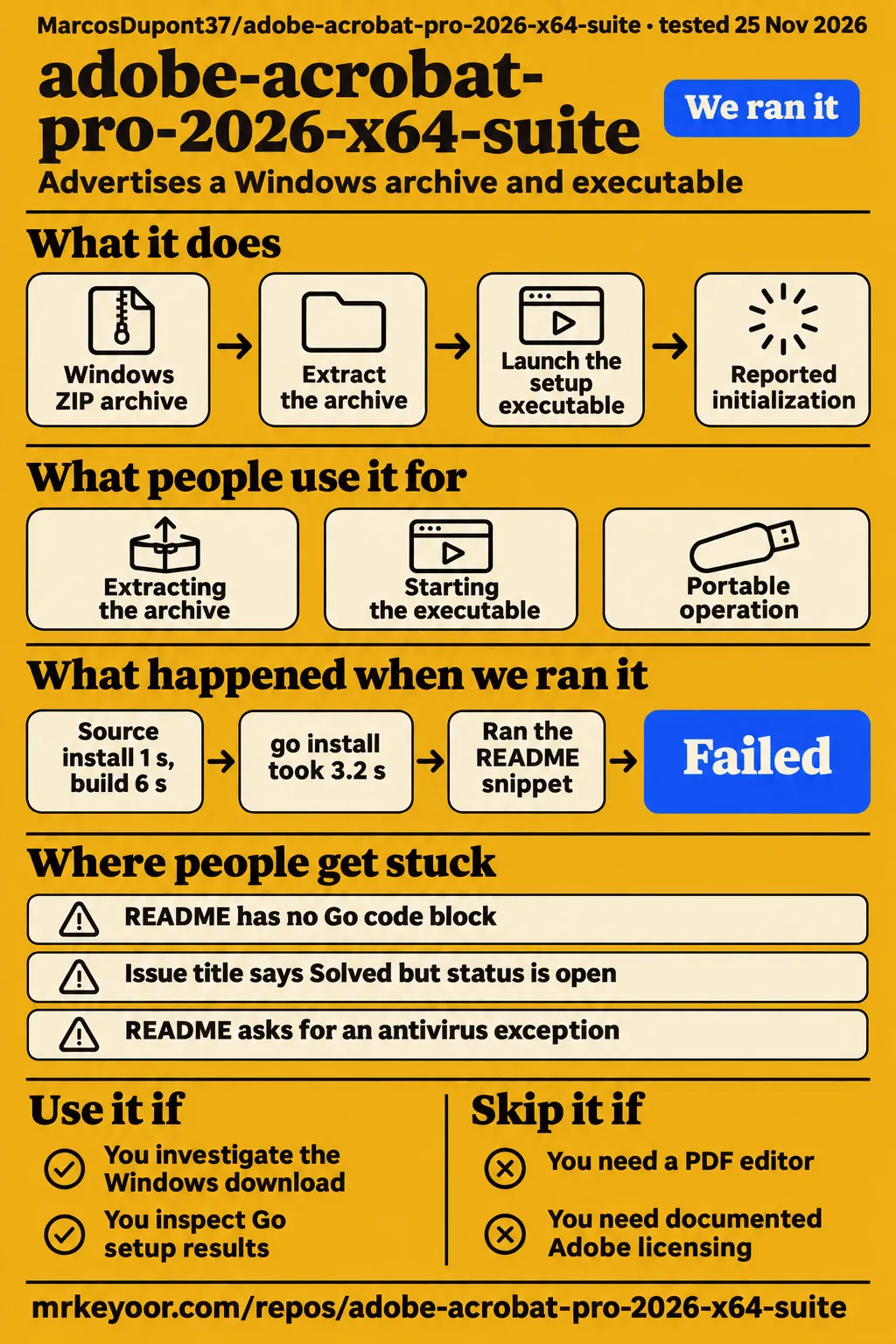
Our source build succeeded in 6 seconds, and the test command counted zero tests. Those November 25 source-check results make this review useful to developers investigating the repository. People choosing a PDF editor for client documents should use Adobe's documented products and access terms. The decision rests on what each record describes: a small Go checkout, a Windows download advertised by the repository author, and two comments about starting a different archive version.
The repository's full name is adobe-acrobat-pro-2026-x64-suite, under MarcosDupont37. Its README advertises a password-protected Windows ZIP, while our source checks identify Go as the ecosystem. A useful investigation starts with those concrete identifiers rather than the Acrobat branding alone. The review therefore follows the source results, the missing example, the release discussion and the installation permissions before comparing Adobe's documented alternatives.
What people use adobe-acrobat-pro-2026-x64-suite for
Two GitHub commenters report starting archive v1.2.2 on Windows 11 24H2 and Windows 10 22H2. Their comments concern initialization, default configuration and portable operation. In issue #1's Windows reports, Raza8756 names a setup executable and config/settings.json; KathrynMitsotakis4322 describes dependency requirements and hot reload. These reports give the repository two specific reported uses, both centered on getting the package running.
| Who reported it | What they did | Reported outcome |
|---|---|---|
| Raza8756 | Extracted the v1.2.2 archive on Windows 11 24H2 x64 and launched the setup executable | Reported clean initialization with the default config/settings.json |
| KathrynMitsotakis4322 | Tried the claimed portable v1.2.2 build on Windows 10 22H2 x64 | Reported zero dependencies and working hot reload |
Raza8756 names Adobe_Acrobat_Pro_2026_X64_Suite_Setup_x64.exe. KathrynMitsotakis4322 calls the package portable and reports that hot reload works out of the box. Those are the commenters' outcomes, rather than measurements from our Go containers. The operating-system releases and executable filename make the reports more useful than an undifferentiated statement that the download works: a reader can identify the particular package and environment each commenter describes.
What happened when we ran it
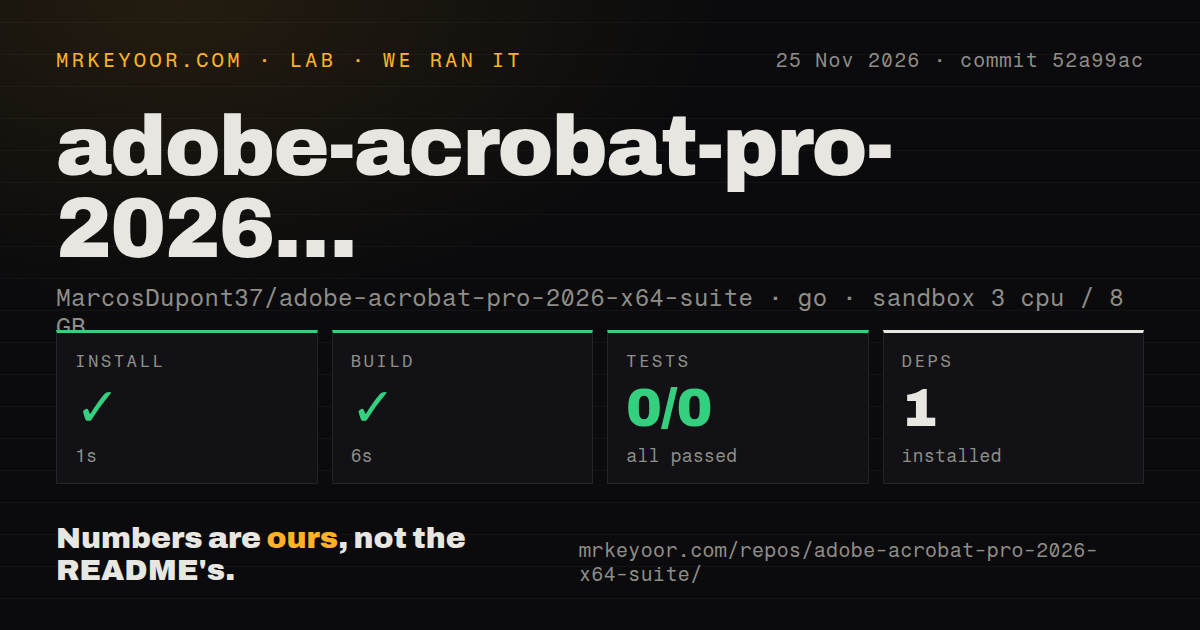
Our November 25, 2026 run at commit 52a99ac recorded a 1-second installation, a 6-second build and a 2-second test step. The source-check measurements count 0 passed, 0 failed of 0 tests. The checkout contained 28 files, approximately 42 source lines and 0.2 MB of material. The harness recorded 10 seconds total, with 1 dependency recorded during installation.
| Question | Answer | Verdict | Why |
|---|---|---|---|
| Did source installation complete? | Yes, in 1 second, with 1 dependency recorded | Completed | The installation step returned success |
| Did the source build complete? | Yes, in 6 seconds | Completed | The build step returned success |
| Did the test step complete? | Yes, in 2 seconds; 0 passed, 0 failed of 0 | Completed with zero counted tests | The command succeeded with zero counted tests |
| What repository signals were present? | 1 CI workflow file; no Dockerfile; no tests directory | Inventory recorded | The scan describes files present in this checkout |
The source-check sandbox was configured with 3 CPUs, 8 GB RAM and image golang:1.24-bookworm. Installation, build and test returned success, with the zero-test count included in the test result. The inventory also recorded one CI workflow file. The measured checkout size and source-line count describe the material examined by this harness, while the Windows archive's advertised size appears in the version reference below.
The separate quickstart run at commit 33ed1e60b30b used recipe quickstart-lib in a fresh unprivileged golang:1.24-bookworm container. Its configuration had 2 CPUs, 4 GB RAM, no published ports and no secrets. Installation used the Go module proxy and selected v1.2.4 through the recorded @latest invocation. The quickstart then reached an example step that failed because the README contained no Go code block.
| Question | Answer | Verdict | Why |
|---|---|---|---|
| How long did the quickstart clone step take? | 1 second | Step recorded | The recipe logged a clone step |
| Which module did installation select? | go get github.com/MarcosDupont37/adobe-acrobat-pro-2026-x64-suite@latest installed v1.2.4 in 3.2 seconds | Installed | The log names the selected module and version |
| How much module-cache space did it use? | 488 KB after installation | Size recorded | The figure describes the module cache |
| How many additional packages were installed? | 0 packages besides the named module | Count recorded | This is the quickstart's package-count observation |
| Could the README example run? | No; the README had no Go code block | Failed | The snippet step had no example to execute |
| Did teardown finish? | Yes; teardown: ok | Completed | Cleanup returned the recorded success status |
Where people get stuck: the quickstart has no Go example
The quickstart's snippet step failed because the README had no Go code block to run. The failed snippet step and no-snippet finding record that obstacle directly. The install command selected v1.2.4, but there is no demonstrated library call to reproduce after installation. A useful documentation contribution would be a Go example naming its module version and commit, with the expected output stated beside it.
Issue #1 has a second, smaller documentation problem: its title includes Solved, while its metadata says open with 2 comments. The exchange contains successful initialization reports. Readers looking for a troubleshooting sequence can instead identify the archive, executable and configuration named by those commenters. The issue's title is the author's label; its open status and two comments are the recorded discussion metadata.
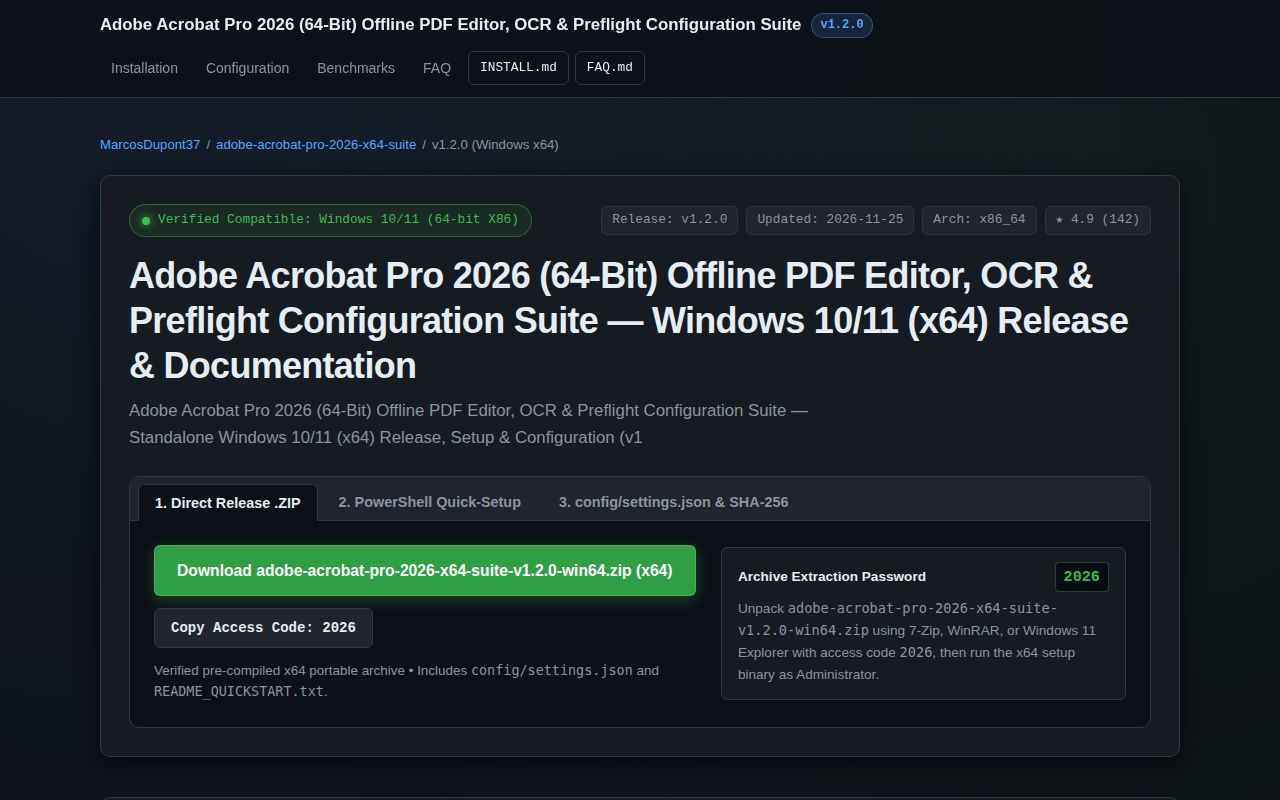
The README offers Windows extraction and launch instructions, including 7-Zip or WinRAR, password 2026 and an Administrator launch. These instructions answer a different setup question from the Go quickstart. For a developer, the immediate missing piece is the callable example after module installation. For someone examining the Windows download, the next relevant details are the requested permissions and the exact distribution labels.
The README asks for administrator access and an antivirus exception
The README tells readers to whitelist the repository directory and run its executable as Administrator after Defender or SmartScreen alerts. Its Windows-warning FAQ attributes the alerts to heuristic checks and calls the executable an independent binary. That explanation is the repository author's account. The exception and elevated launch are advertised installation actions, so they belong beside the download description rather than being treated as incidental setup details.
The README also describes profile selection inside adobe-acrobat-pro-2026-x64-suite-v1.2.0-win64.exe after extraction. Its download instructions advertise a 4.8 MB archive and password 2026. The release discussion adds another distribution detail: issue #1 cross-promotes Trust Wallet Metamask Seed Recovery Pc and Valorant Colorbot Triggerbot Win11. Those names document what else the publisher promotes in the same discussion and give the provenance investigation a concrete lead.
Repository labels and Adobe access terms describe different things
GitHub's November 25 metadata labels the repository MIT and C#, while our source-check record identifies its checkout as Go. The GitHub repository metadata records a push at 2026-11-25T19:37:09Z. The table collects the identifiers used throughout this review in one place, including both measured commits and the author's Windows distribution labels.
| Record | Identifier | What it describes |
|---|---|---|
| Source-check harness | commit 52a99ac | The checkout used for the 1-second install, 6-second build and 2-second test step |
| Separate Go quickstart | commit 33ed1e60b30b; installed module v1.2.4 | The quickstart that stopped at the missing-example step |
| README archive | v1.2.0; 4.8 MB; password 2026 | adobe-acrobat-pro-2026-x64-suite-v1.2.0-win64.zip |
| Latest-release record | v1.2.0; November 25, 2026 | The recorded release tag and date |
| README executable | v3.8.3; 4684D9 | adobe-acrobat-pro-2026-x64-suite-v1.2.0-win64.exe |
| README manifest | v3.8.3; 4684D98A0E | The longer build identifier printed in the manifest |
| Issue #1 | Archive v1.2.2 | The archive discussed by the two Windows commenters |
Adobe says perpetual Acrobat sales ended after Acrobat 2020. Adobe's non-subscription Pro 2024 option is an upfront purchase providing three years of desktop access. Subscriptions instead use monthly or annual fees based on the selected plan. These purchasing terms give buyers a concrete meaning for duration and access, whereas MIT and C# are labels in this repository's GitHub metadata.
adobe-acrobat-pro-2026-x64-suite vs Adobe alternatives
Adobe documents Standard for basic PDF work, Pro 2024 for a three-year desktop purchase and Studio for Pro with additional services. The comparison uses named tasks and access terms as selection criteria. It gives readers choosing document software a route from their requirements to a documented product, alongside the repository investigation above. Each row identifies the source responsible for the product description or recommendation.
| Alternative | Documented scope or terms | Choose it when |
|---|---|---|
| Acrobat Reader / Standard | Redress Compliance recommends Reader or Standard for reading, annotation and signing; Adobe describes Standard's editing, conversion, forms and protection | Those tasks cover your document work |
| Acrobat Pro 2024 | Adobe describes an upfront three-year, non-recurring desktop license | A fixed desktop term fits your purchase requirements |
| Acrobat Studio | Adobe lists Pro, PDF Spaces, AI Assistant for Acrobat and Adobe Express Premium | You need those named services together |
Adobe lists searchable scanned documents, PDF comparison and redaction among Pro's capabilities. Its Pro 2024 terms include quarterly security updates and exclude feature enhancements and Acrobat online services through browsers and mobile devices. That combination makes the three-year desktop option a specific purchasing arrangement. A buyer deciding between it and a subscription can compare access duration, updates and services rather than relying on the word suite in a download name.
FAQ
Issue #1 gives 2026 as the password for its v1.2.2 archive. The README gives the same password for its v1.2.0 ZIP, and the two Windows comments concern v1.2.2. The answers below use the archive password question, Windows 11 question and Adobe plan-comparison question recorded in the release discussion and Adobe documentation, with the relevant version or product named in each answer.
What is the password for the repository's v1.2.2 ZIP archive?
Issue #1 lists 2026 as the archive password. It names adobe-acrobat-pro-2026-x64-suite-v1.2.2-win64.zip and Adobe_Acrobat_Pro_2026_X64_Suite_Setup_x64.exe. Raza8756 reports extracting that archive and starting the executable with the default config/settings.json. The README's separate v1.2.0 instructions also specify 2026 and name 7-Zip or WinRAR for extraction, followed by launching its versioned executable as Administrator.
Does adobe-acrobat-pro-2026-x64-suite support Windows 11 24H2?
Raza8756 reports clean initialization on Windows 11 24H2 x64. The comment describes archive v1.2.2, password 2026 and the default config/settings.json. That is the reported Windows 11 outcome. The same issue contains KathrynMitsotakis4322's Windows 10 22H2 x64 report, which describes the portable v1.2.2 build, zero dependencies and working hot reload. Both answers come from named commenters in the release discussion.
What is the difference between Acrobat Standard, Pro and Studio?
Adobe says Studio includes Pro, PDF Spaces, AI Assistant for Acrobat and Adobe Express Premium. Adobe describes Standard as covering basic editing, conversion, forms and password protection, with Pro adding advanced PDF and signature tools. Its product descriptions identify tasks such as working with scanned documents, comparing PDFs and redaction. Choose among those documented scopes according to the document operations and services you need.
What we have not tested yet
Our measurements cover Go source checks and the separate quickstart; the Windows archive was not executed. Its signatures, hashes, network behavior, administrator actions and antivirus alerts were not examined. Adobe affiliation, the relationship between the measured source and the binary, and Adobe licensing or service entitlement for the download are unresolved. The configured container image label also leaves actual runtime and operating-system versions unknown without raw toolchain logs.
Repository-specific OCR, editing, redaction, signatures, printing and saved-output quality were not measured. Large files, batch operation, recovery after failure and sustained use are also outside the recorded runs. The initialization comments contain no document artifacts, and the video records contain no transcripts supporting demonstrated results. The README's performance percentages, memory figure, worker count, rollback timing and warning explanation were not independently tested; the cross-promotions do not prove malicious behavior.
The Adobe support topics below concern Adobe Acrobat rather than this repository. They are retained as separate reports, with their limited outcomes stated in the table. Yoav's blank-screen extract contains an Answered label but no answer text or successful repair. Adobe's Teams announcement names an administrative workaround but contains no completed resolution. Neither establishes how the repository's Windows archive behaves.
| Situation | What the named source says | Useful next step |
|---|---|---|
| Go quickstart has nothing to execute | Our quickstart reports no Go code block in the README | Request an example tied to the module version and commit |
| Adobe Acrobat shows a blank loading screen after PDF optimization | Yoav says reinstalling did not stop it | Describe the optimization trigger and installed version to Adobe support |
| Adobe Acrobat's Teams summaries stop | Adobe identifies disabled Transcript API access and says an administrator must enable it | Ask the Microsoft 365 or Teams administrator about that setting |
Adobe's design and travel question titles establish topics, without supporting a procedural walkthrough, interface-language requirement, rollout claim, reservation-query result or itinerary-citation promise. Rendered layout, assets, accessibility and recommendation modules were outside this text review. The next useful technical evidence would connect an identified Windows release to inspectable source and demonstrate PDF tasks with output files. The present measurements support investigation of the distribution rather than a PDF feature recommendation.