xlsx review
xlsx is the npm package for SheetJS Community Edition, a JavaScript toolkit that reads spreadsheet formats into workbook objects and writes workbook data back to files or byte arrays. Its parsers cover modern XLSX alongside older Excel formats, CSV, ODS, and several interchange formats. The npm version is still 0.18.5, published in March 2022, so there is no recent npm change to describe. Current SheetJS documentation calls the registry out of date and distributes 0.20.3 from cdn.sheetjs.com instead. Our tested npm build imported successfully but produced one high-severity audit finding.
The format coverage remains useful, but do not treat npm:xlsx as a current SheetJS release. For new work, follow the upstream tarball or vendoring instructions, or choose a narrower package that your registry and audit policy can support.
We installed it
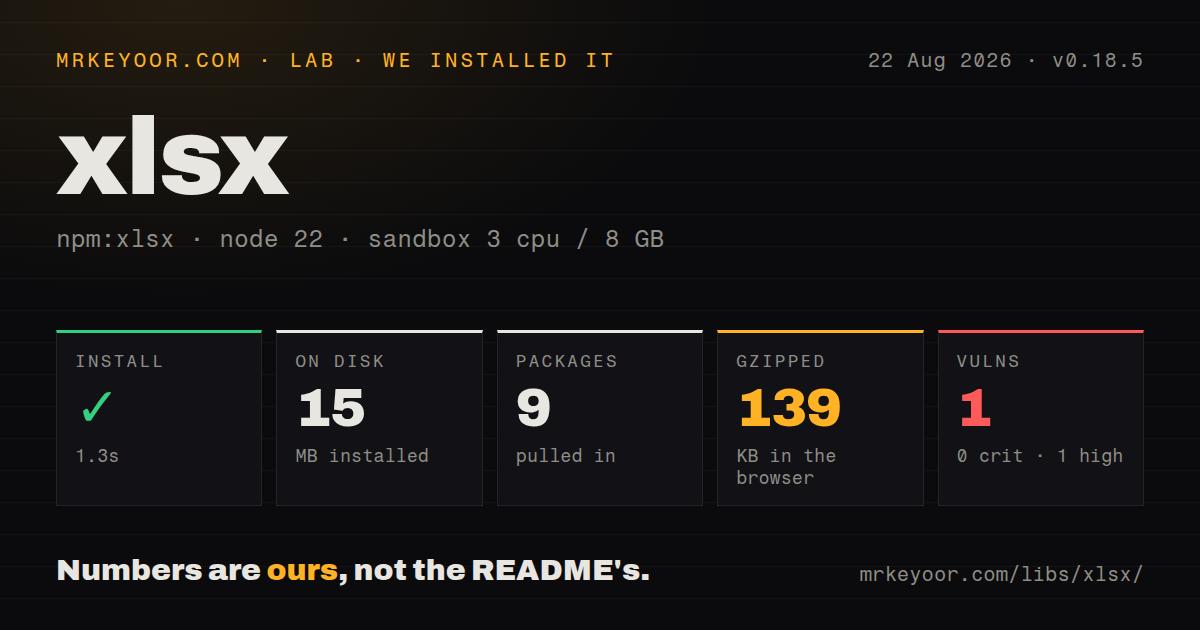

| Install | ✓ · 1.3s | 9 packages on disk · 15 MB |
| Import | ✓ | ESM import works · require() works · CommonJS package |
| Browser | 139 KB | gzipped (422.5 KB minified), bundled with esbuild |
| Types | ✓ | TypeScript types bundled |
| Known vulns | 1 | 0 critical · 1 high · 0 moderate · 0 low (npm audit) |
Answers from our run
Does xlsx install cleanly?
Yes. In a fresh container with an empty cache, npm install xlsx finished in 1 seconds, leaving 9 packages and 15 MB on disk. npm audit reported 1 known vulnerability.
How much does xlsx add to a browser bundle?
139 KB gzipped (422.5 KB minified) when the whole package is bundled for the browser with esbuild. Importing only part of it is usually smaller.
Does xlsx work with both ESM and CommonJS?
Yes. Both import 'xlsx' and require('xlsx') worked in Node 22 in our run. The package is published as CommonJS.
Does xlsx include TypeScript types?
Yes, type declarations ship inside the package, so no @types install is needed.
xlsx or exceljs: which should you use?
exceljs: Use it for generated XLSX reports that need cell styling or a streaming writer. The format coverage remains useful, but do not treat npm:xlsx as a current SheetJS release.
When should you not use xlsx?
Your policy requires a clean npm audit. Our fresh install of xlsx 0.18.5 reported one high-severity known vulnerability, and npm has no later xlsx version available for an upgrade.
Use it if
- Users upload a mix of XLSX, XLS, XLSB, ODS, CSV, or other spreadsheet files and one parser must normalize them.
- The task is extracting tabular values, converting formats, or producing a basic workbook without rich styling.
- The same workbook utilities are needed in Node and a browser, and the bundle cost has been accepted deliberately.
- A migration can install the upstream CDN tarball or a vendored copy instead of relying on npm's stale artifact.
- Your policy requires a clean npm audit. Our fresh install of xlsx 0.18.5 reported one high-severity known vulnerability, and npm has no later xlsx version available for an upgrade.
- You need an ordinary npm registry dependency with normal update automation. SheetJS documents its CDN tarball as authoritative and recommends vendoring for stability.
- The workbook needs rich styles, images, charts, formula calculation, or broad editing fidelity. Community Edition focuses on data extraction and basic file generation.
- Very large XLSX files must stream into or out of bounded memory. Workbook parsing and XLSX writing build in-memory structures; the available stream helpers start from an existing worksheet.
- Browser performance and download size are strict. Our import-all build was 422.5 KB minified and 139 KB gzipped, with parsers for many formats included.
Setup reality
Our clean Node 22 install of npm:xlsx 0.18.5 finished in 1.3 seconds. Nine packages occupied 15 MB on disk. The xlsx package itself was 7,388 KB unpacked, declared seven direct dependencies and zero peer dependencies, used Apache-2.0, and claimed support back to Node 0.8. npm audit found one high-severity known vulnerability and no critical, moderate, or low findings.
The npm artifact is CommonJS, has no exports map, and both require() and ESM import worked in our check. TypeScript declarations are bundled. Our import-all browser build measured 422.5 KB minified and 139 KB gzipped. Bundlephobia's current metadata populates the separate size field, but the lab numbers above are the ones measured in our Node 22 sandbox.
Installation choice is the first real decision. npm install xlsx resolves to 0.18.5. The official Node installation page instead shows a 0.20.3 tarball from cdn.sheetjs.com, calls that CDN authoritative, and recommends copying the tarball into the project for stability. A URL or vendored dependency may need private-registry, lockfile, license, and update tooling changes. Verify its checksum and provenance in your own supply-chain process.
readFile and writeFile use filesystem access in Node, while browser code should pass an ArrayBuffer to read and receive an array from write. Parsing is synchronous and memory-backed, so move large browser uploads into a worker and cap accepted size. Dates need an explicit policy: cellDates can return Date objects, raw mode returns serial values, and spreadsheets do not preserve a useful timezone. Validate sheet names, required headers, row counts, formulas, and cell types before importing user data.
Patterns
Read the first worksheet from disk read-node-workbook
const XLSX = require("xlsx");

const workbook = XLSX.readFile("report.xlsx", { cellDates: true });
const sheetName = workbook.SheetNames[0];
const worksheet = workbook.Sheets[sheetName];
const rows = XLSX.utils.sheet_to_json(worksheet, { defval: null });
Use SheetNames for tab order. readFile loads and parses the workbook synchronously, so keep untrusted file-size limits outside this call.
Parse an uploaded ArrayBuffer read-browser-upload
import * as XLSX from "xlsx";

input.addEventListener("change", async (event) => {
  const file = event.target.files[0];
  const data = await file.arrayBuffer();
  const workbook = XLSX.read(data, { type: "array", cellDates: true });
  const worksheet = workbook.Sheets[workbook.SheetNames[0]];
  const rows = XLSX.utils.sheet_to_json(worksheet, { defval: null });
  console.table(rows);
});
ArrayBuffer avoids older binary-string conversions. Parsing is synchronous after the buffer arrives and can freeze the page for a large workbook, so a worker is safer for user uploads.
Preserve rows as arrays read-header-matrix
const matrix = XLSX.utils.sheet_to_json(worksheet, {
  header: 1,
  defval: "",
  blankrows: false,
  raw: true,
});

const [headers, ...dataRows] = matrix;
header: 1 returns arrays and includes the header row. defval keeps empty positions present, which makes column counts predictable.
Apply controlled keys to imported rows map-known-columns
const rows = XLSX.utils.sheet_to_json(worksheet, {
  header: ["sku", "quantity", "unit_price"],
  range: 1,
  defval: null,
});

for (const row of rows) {
  if (!row.sku) throw new Error("Missing SKU");
}
range: 1 skips the file's first row before assigning your keys. Validate values after conversion because a spreadsheet can mix strings, numbers, and blanks in one column.
Detect and convert numeric date cells handle-excel-dates
const cell = worksheet["B2"];
if (cell?.t === "n" && cell.z && XLSX.SSF.is_date(cell.z)) {
  const parts = XLSX.SSF.parse_date_code(cell.v);
  console.log(parts.y, parts.m, parts.d);
}

const workbookWithDates = XLSX.read(data, {
  type: "array",
  cellDates: true,
});
Excel dates are serial values plus a number format. A Date result has no trustworthy source timezone, so preserve date-only fields as calendar components when timezone conversion would shift them.
Export object rows to XLSX write-json-workbook
const rows = [
  { sku: "A-1", quantity: 3, price: 9.99 },
  { sku: "B-2", quantity: 1, price: 24.5 },
];

const worksheet = XLSX.utils.json_to_sheet(rows);
const workbook = XLSX.utils.book_new();
XLSX.utils.book_append_sheet(workbook, worksheet, "Orders");
XLSX.writeFile(workbook, "orders.xlsx");
On npm version 0.18.5, create the workbook first and append the sheet. Column order follows object keys, so pass consistently shaped objects or an explicit header option.
Create browser-downloadable workbook bytes write-browser-download
const output = XLSX.write(workbook, {
  bookType: "xlsx",
  type: "array",
});
const blob = new Blob([output], {
  type: "application/vnd.openxmlformats-officedocument.spreadsheetml.sheet",
});
const url = URL.createObjectURL(blob);
const anchor = Object.assign(document.createElement("a"), { href: url, download: "orders.xlsx" });
anchor.click();
URL.revokeObjectURL(url);
Revoke the object URL after starting the download. XLSX generation still builds the full output in memory before Blob creation.
Append records below existing data append-sheet-rows
XLSX.utils.sheet_add_json(worksheet, additionalRows, {
  origin: -1,
  skipHeader: true,
});

XLSX.utils.sheet_add_aoa(worksheet, [["Total", total]], {
  origin: -1,
});
origin: -1 uses the end of the worksheet range. A source file with formatting far below its visible data can make that range larger than expected, so inspect worksheet['!ref'].
Write a formula and cached numeric value set-formula-cells
const worksheet = XLSX.utils.aoa_to_sheet([
  ["Quantity", "Price", "Total"],
  [3, 9.99, null],
]);
worksheet["C2"] = {
  t: "n",
  f: "A2*B2",
  v: 29.97,
};
Community Edition writes formula expressions and optional cached values but does not calculate them. Spreadsheet software recalculates after opening; a reader that trusts the cached value may see what you supplied.
Inspect typed cells directly walk-sparse-cells
const range = XLSX.utils.decode_range(worksheet["!ref"]);
for (let row = range.s.r; row <= range.e.r; row++) {
  for (let column = range.s.c; column <= range.e.c; column++) {
    const address = XLSX.utils.encode_cell({ r: row, c: column });
    const cell = worksheet[address];
    if (!cell) continue;
    console.log(address, cell.t, cell.v, cell.f);
  }
}
Worksheets are sparse objects keyed by A1 addresses. Keys beginning with ! hold metadata such as ranges, merges, and column settings rather than normal cells.
Pipe CSV from an existing worksheet stream-csv-output
const XLSX = require("xlsx");
const { Readable } = require("node:stream");
const { createWriteStream } = require("node:fs");

XLSX.stream.set_readable(Readable);
XLSX.stream.to_csv(worksheet).pipe(createWriteStream("output.csv"));
This streams conversion from a worksheet already held in memory. It does not turn XLSX input parsing or XLSX output generation into streaming operations.
Cap rows and skip unused cell metadata limit-untrusted-parse
const workbook = XLSX.read(data, {
  type: "array",
  sheetRows: 1000,
  sheets: ["Data"],
  cellFormula: false,
  cellHTML: false,
  cellStyles: false,
});
sheetRows bounds parsed rows per selected sheet and is useful for previews. Enforce byte limits and time isolation too because a compact compressed workbook can expand substantially while parsing.
Alternatives
| Package | Registry | Pick it when |
|---|---|---|
| exceljs | npm | Use it for generated XLSX reports that need cell styling or a streaming writer. |
| papaparse | npm | Use it when every accepted file is CSV and streaming or worker parsing matters more than Excel formats. |
| read-excel-file | npm | Use it for a narrower XLSX-reading API with schema-based row conversion. |
| xlsx-populate | npm | Use it when editing an existing XLSX workbook and preserving a more workbook-oriented interface fits the task. |
More data guides
numpy · pandas · fsspec · pyarrow · lxml · sqlalchemy · the whole shelf →
How this guide is made: grounded in the library's documentation, release notes, changelog, and issue history, on a fixed rubric — not a hands-on install of every release. The 50 most-downloaded entries are additionally install-verified in clean containers. Corrections: contact the desk.