exceljs review
Our ExcelJS 4.4.0 install produced a working CommonJS package for reading, editing, and writing XLSX or CSV files in Node. Its workbook model exposes sheets, rows, cells, styles, formulas, validation, images, tables, and streaming XLSX I/O. The package is substantial: 22,672 KB unpacked, 9 direct dependencies, and a 926.7 KB minified browser bundle in our test. Version 4.4.0 added inline-string cell support and custom table autofilters, fixed boolean parsing and conditional-format number styles, improved large-workbook writing, and introduced `ignoreNodes` for faster reads when some workbook features are irrelevant.
ExcelJS remains useful for styled Node exports and row-by-row XLSX writing. Do not choose it for formula calculation, charts, a lean browser bundle, or a project that requires a recently released dependency.
We installed it
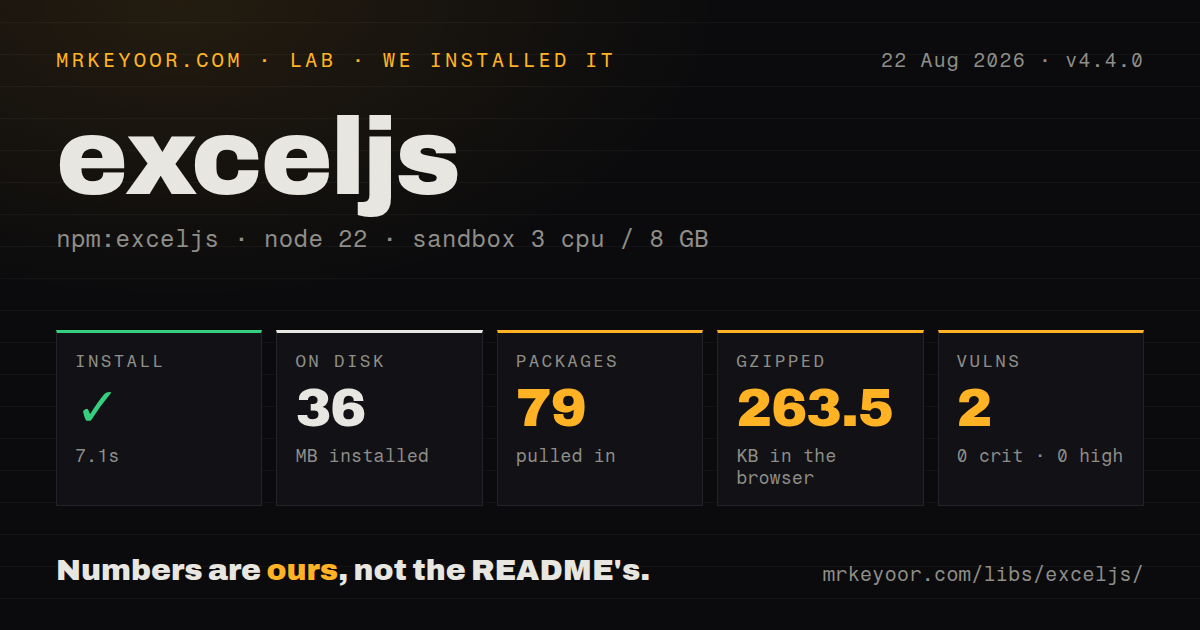
| Install | ✓ · 7.1s | 79 packages on disk · 36 MB · 6 deprecation warnings |
| Import | ✓ | ESM import works · require() works · CommonJS package |
| Browser | 263.5 KB | gzipped (926.7 KB minified), bundled with esbuild |
| Types | ✓ | TypeScript types bundled |
| Known vulns | 2 | 0 critical · 0 high · 2 moderate · 0 low (npm audit) |
Answers from our run
Does exceljs install cleanly?
Yes. In a fresh container with an empty cache, npm install exceljs finished in 7 seconds, leaving 79 packages and 36 MB on disk. npm audit reported 2 known vulnerabilities. The install printed 6 deprecation warnings.
How much does exceljs add to a browser bundle?
263.5 KB gzipped (926.7 KB minified) when the whole package is bundled for the browser with esbuild. Importing only part of it is usually smaller.
Does exceljs work with both ESM and CommonJS?
Yes. Both import 'exceljs' and require('exceljs') worked in Node 22 in our run. The package is published as CommonJS.
Does exceljs include TypeScript types?
Yes, type declarations ship inside the package, so no @types install is needed.
exceljs or write-excel-file: which should you use?
write-excel-file: Use it for generation-only work where a smaller schema-driven writer is enough. ExcelJS remains useful for styled Node exports and row-by-row XLSX writing.
When should you not use exceljs?
The workbook needs formula calculation: ExcelJS stores formula text and an optional cached result, but it does not evaluate formulas
Use it if
- An exported XLSX needs styled headers, number formats, frozen panes, filters, validation, or embedded images
- You must read uploaded workbooks and inspect formulas, merges, comments, or styles alongside cell values
- A server export is too large for an in-memory workbook and needs rows committed through the streaming writer
- The same service must produce CSV and XLSX while sharing its row-building logic
- The workbook needs formula calculation: ExcelJS stores formula text and an optional cached result, but it does not evaluate formulas
- Charts or legacy Excel formats are required: the README documents XLSX and CSV, while chart creation, XLS, XLSB, and ODS are outside this API
- You need a small browser download: our all-package bundle measured 926.7 KB minified and 263.5 KB gzipped, and streaming I/O is a Node feature
- Lossless editing matters: workbook parts ExcelJS does not model may not survive a read-write cycle, and the README warns that splicing rows or columns around merged cells can behave unpredictably
- You need an actively released dependency: npm still serves 4.4.0 from October 2023, the repository's last push was January 2025, and GitHub reports 799 open issues and pull requests
- A clean security scan is mandatory at install time: our fresh npm audit found 2 moderate vulnerabilities, and npm printed 6 deprecation warnings
Setup reality
Our clean install of ExcelJS 4.4.0 completed in 7.1 seconds. npm left 79 packages occupying 36 MB and printed 6 deprecation warnings. Audit found 2 known vulnerabilities, both moderate, with no critical or high findings. The package declares 9 direct dependencies, no peers, and 22,672 KB unpacked. It is CommonJS without an exports map; require() and ESM import both worked on Node 22.23.2. TypeScript declarations ship inside the package.
The ordinary Workbook API keeps the entire document in memory until writeFile() or writeBuffer() finishes. For a large server export, use ExcelJS.stream.xlsx.WorkbookWriter, commit each row, commit the sheet, and await the workbook commit. A committed row cannot be edited again. Streaming has feature gaps: images are unsupported, worksheet removal and unMergeCells() are unavailable, and styles or shared strings must be enabled in the writer options when needed.
Browser use works through the packaged browser build and workbook.xlsx.writeBuffer(). Our esbuild measurement was 926.7 KB minified and 263.5 KB gzipped. That cost arrives before any workbook data. There is no file-system or streaming writer in a tab, so memory grows with the generated file. The package's bundled types make imports pleasant, though the runtime remains CommonJS and has no exports map. Test the exact bundler path rather than importing internal dist files.
Reading can skip expensive XML sections with ignoreNodes, a 4.4.0 option useful when an upload handler only needs values. Cell and worksheet indexes are one-based, while workbook.worksheets is a normal zero-based array; worksheet IDs can have gaps after deletion. Formula cells expose stored formulas and cached results. Set a recalculation flag or provide results if recipients use viewers that do not recalculate on open. Build merges after row insertion because the documented splice behavior around merged ranges is unpredictable.
Patterns
Write a styled workbook to disk create-workbook
const ExcelJS = require('exceljs');

const book = new ExcelJS.Workbook();
const sheet = book.addWorksheet('Orders', {
  views: [{ state: 'frozen', ySplit: 1 }],
});
sheet.columns = [
  { header: 'Order', key: 'id', width: 12 },
  { header: 'Total', key: 'total', width: 14, style: { numFmt: '#,##0.00' } },
];
sheet.addRows(orders);
await book.xlsx.writeFile('orders.xlsx');
Column keys are construction helpers and do not round-trip as workbook metadata. Excel also restricts worksheet names, so validate user-supplied names before calling addWorksheet().
Load an XLSX buffer and visit populated rows read-upload
const book = new ExcelJS.Workbook();
await book.xlsx.load(uploadBuffer, {
  ignoreNodes: ['dataValidations', 'conditionalFormatting'],
});

const sheet = book.getWorksheet('Orders') ?? book.worksheets[0];
sheet.eachRow((row, number) => {
  if (number > 1) consume(row.getCell(1).value, row.getCell(2).value);
});
Cells use one-based indexes. ignoreNodes can speed up value-only imports, but skipped sections will be absent if you write this workbook back out.
Commit a large export row by row stream-export
const book = new ExcelJS.stream.xlsx.WorkbookWriter({
  filename: 'large.xlsx',
  useStyles: true,
  useSharedStrings: false,
});
const sheet = book.addWorksheet('Rows');
sheet.columns = [{ header: 'Id', key: 'id' }, { header: 'Name', key: 'name' }];

for await (const item of source) {
  sheet.addRow(item).commit();
}
sheet.commit();
await book.commit();
Committed rows leave memory and cannot be changed. Keep a row open until every formula, style, and merge involving it has been decided.
Send an XLSX directly through an HTTP response stream-http
res.setHeader('Content-Type', 'application/vnd.openxmlformats-officedocument.spreadsheetml.sheet');
res.setHeader('Content-Disposition', 'attachment; filename=report.xlsx');

const book = new ExcelJS.stream.xlsx.WorkbookWriter({ stream: res });
const sheet = book.addWorksheet('Report');
for await (const item of rows) sheet.addRow([item.id, item.total]).commit();
sheet.commit();
await book.commit();
Once workbook bytes reach the client, an export error cannot become a clean JSON error response. Log stream failures because the user will otherwise receive only a truncated workbook.
Iterate through a large XLSX input read-stream
const reader = new ExcelJS.stream.xlsx.WorkbookReader('input.xlsx', {
  sharedStrings: 'cache',
  styles: 'ignore',
  hyperlinks: 'ignore',
});

for await (const sheet of reader) {
  for await (const row of sheet) processRow(row.values);
}
Caching shared strings resolves text cells for ordinary use. Ignoring styles saves work when the import only cares about values.
Store a formula with a cached result write-formula
sheet.getCell('D2').value = { formula: 'B2*C2', result: 42.5 };
book.calcProperties.fullCalcOnLoad = true;

const stored = sheet.getCell('D2');
console.log(stored.formula, stored.result);
ExcelJS does not calculate the expression. The result is supplied by your code or retained from the input file, and it can be stale until a spreadsheet application recalculates.
Apply a readable header and numeric format style-header
const header = sheet.getRow(1);
header.font = { bold: true, color: { argb: 'FFFFFFFF' } };
header.fill = { type: 'pattern', pattern: 'solid', fgColor: { argb: 'FF1F4E78' } };
header.alignment = { vertical: 'middle', horizontal: 'center' };
sheet.getColumn('total').numFmt = '#,##0.00';
Colors use eight-digit ARGB values with alpha first. Keep numeric cell values as numbers and let numFmt control display, or Excel totals and sorting will treat them as text.
Put a dropdown list on a cell add-validation
sheet.getCell('C2').dataValidation = {
  type: 'list',
  allowBlank: true,
  formulae: ['"Pending,Shipped,Cancelled"'],
  showErrorMessage: true,
  error: 'Select a listed status.',
};
The inline choices are one quoted formula string. For a long list, place values on a worksheet and reference that range because Excel limits inline validation text.
Create a title row and freeze headings merge-and-freeze
sheet.mergeCells('A1:D1');
sheet.getCell('A1').value = 'Quarterly orders';
sheet.views = [{ state: 'frozen', ySplit: 2 }];
sheet.autoFilter = 'A2:D2';
Only the top-left cell owns a merged value. Insert or splice rows before creating merges because the README calls merged-range movement unpredictable.
Place a PNG inside a worksheet embed-image
const imageId = book.addImage({
  filename: 'logo.png',
  extension: 'png',
});
sheet.addImage(imageId, {
  tl: { col: 0, row: 0 },
  ext: { width: 180, height: 60 },
});
Images work in the document workbook and are unavailable in streaming mode. Supply the correct extension because Excel may report a mismatched image part as a damaged file.
Create a browser download from a workbook browser-download
const bytes = await book.xlsx.writeBuffer();
const blob = new Blob([bytes], {
  type: 'application/vnd.openxmlformats-officedocument.spreadsheetml.sheet',
});
const url = URL.createObjectURL(blob);
const link = Object.assign(document.createElement('a'), { href: url, download: 'report.xlsx' });
link.click();
URL.revokeObjectURL(url);
Browser generation holds the workbook and output buffer in tab memory. Our package bundle was 263.5 KB gzipped before application code or workbook data.
Export one worksheet as CSV write-csv
await book.csv.writeFile('orders.csv', {
  sheetName: 'Orders',
  formatterOptions: { delimiter: ',', quoteColumns: true },
});
CSV keeps cell text and values only. Styles, formulas, merges, images, and extra worksheets do not survive this export format.
Alternatives
| Package | Registry | Pick it when |
|---|---|---|
| write-excel-file | npm | Use it for generation-only work where a smaller schema-driven writer is enough. |
| xlsx | npm | Use the npm package when format coverage matters more than rich workbook styling, after checking its distribution and licensing fit. |
| excel4node | npm | Use it for server-side XLSX generation when you never need to parse incoming workbooks. |
More data guides
numpy · pandas · fsspec · pyarrow · lxml · sqlalchemy · the whole shelf →
How this guide is made: grounded in the library's documentation, release notes, changelog, and issue history, on a fixed rubric — not a hands-on install of every release. The 50 most-downloaded entries are additionally install-verified in clean containers. Corrections: contact the desk.