xgboost review
xgboost trains gradient-boosted decision trees for tabular classification, regression, ranking, survival, and forecasting tasks. A compiled C++ core sits behind scikit-learn estimators, a lower-level DMatrix and Booster API, GPU training, external-memory iterators, and Dask or Spark integrations. Version 3.4.1 is a narrow patch: it fixes model slicing when categorical containers are present and repairs JVM batch prediction for SparseVector features. Our Python 3.12 sandbox imported the compiled package successfully, but the installed environment occupied 540 MB.
xgboost 3.4.1 is a strong choice for serious tabular models, especially when GPU, ranking, external-memory, or distributed paths matter. Skip it for small services that cannot justify a 540 MB environment, older Python, or the operational work of feature-schema and model-version control.
We installed it
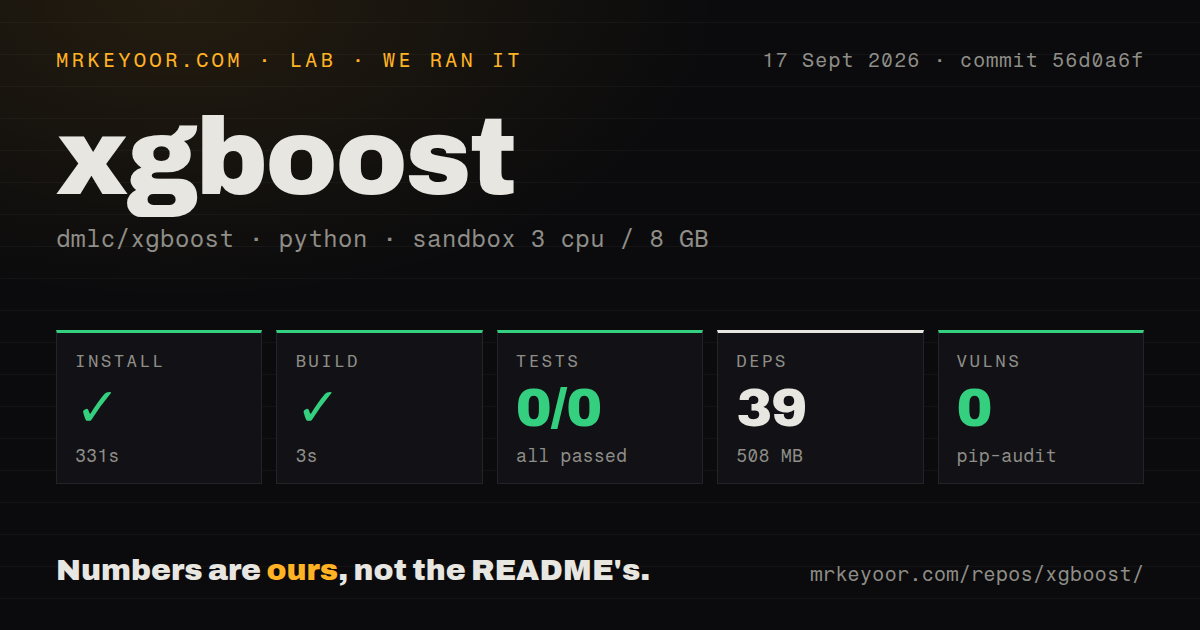
| Install | ✓ · 5.2s | 4 packages on disk · 540 MB |
| Import | ✓ | import xgboost in 1.12s · compiled extensions · py.typed · requires Python >=3.12 |
| Known vulns | 0 | (pip-audit) |
Answers from our run
Does xgboost install cleanly?
Yes. In a fresh container with an empty cache, pip install xgboost finished in 5 seconds, leaving 4 packages and 540 MB on disk. pip-audit reported no known vulnerabilities.
What does xgboost need to run?
Python >=3.12, and a platform wheel with compiled extensions. In our run import xgboost succeeded in 1.12s, and the package ships py.typed for type checkers.
xgboost or lightgbm: which should you use?
lightgbm: Choose it when CPU training throughput and a smaller deployment fit matter more than matching XGBoost APIs. xgboost 3.4.1 is a strong choice for serious tabular models, especially when GPU, ranking, external-memory, or distributed paths matter.
When should you not use xgboost?
The input is raw image, audio, or long-form text. XGBoost consumes engineered features and does not learn those representations itself.
Use it if
- Structured rows with numeric, sparse, missing, or controlled categorical features need a strong boosted-tree baseline.
- A scikit-learn pipeline needs early stopping, class weighting, custom metrics, or probability estimates from a mature tree estimator.
- Large training jobs can use CUDA, QuantileDMatrix, external memory, Dask, or Spark rather than loading one dense matrix into RAM.
- The task is ranking, survival analysis, quantile regression, or another objective already implemented by XGBoost.
- The input is raw image, audio, or long-form text. XGBoost consumes engineered features and does not learn those representations itself.
- Deployment size is constrained. Our clean Linux environment used 540 MB for four installed packages, far beyond a small scikit-learn-only service.
- Python 3.11 or older must remain supported. The 3.4.1 package metadata requires Python >=3.12.
- Categorical values must flow through arbitrary encoders or unsupported dataframe types without schema controls. Native categorical training depends on recognized category metadata and compatible persistence.
- A permissive package license must be proven from installed metadata alone. Our measurement recorded the package license as unknown, so compliance should reconcile the distribution with the repository's license file before release.
- A small dataset needs a transparent baseline more than marginal leaderboard gain. Logistic regression, a shallow tree, or sklearn's histogram boosting can be easier to operate and explain.
Setup reality
We installed xgboost 3.4.1 in a fresh Python 3.12 Bookworm container. Installation completed in 5.2 seconds, left 4 packages, and used 540 MB. The package metadata contains 13 direct requirements across base dependencies and extras and requires Python >=3.12. pip-audit found no known vulnerabilities. The wheel includes compiled shared objects and py.typed. import xgboost succeeded in 1.12 seconds. The installed metadata did not identify a license, so our measurement records it as unknown.
There are no credentials or mandatory config files. The main setup choice is device and data representation. CPU training uses device='cpu'; CUDA training uses device='cuda' with a compatible driver and build. An available GPU does not move pandas or NumPy input there for free, so repeated host-to-device copies can erase gains on small fits. Set n_jobs deliberately inside servers and tuning jobs to avoid each model taking every CPU thread.
Categorical training needs category-aware dataframe columns plus enable_categorical=True and a supported tree method. Train and inference data must preserve the same category encoding. Save such models as JSON or UBJSON because those formats retain categorical metadata; pickle and memory snapshots are tied more closely to library internals. Version 3.4.1 specifically fixes slicing a model with a category container, so 3.4.0 users doing sliced categorical inference should upgrade.
Early stopping in the sklearn API belongs on the estimator constructor in current releases, while the validation set is passed to fit(). Old tutorials using gpu_hist, gpu_id, or fit(early_stopping_rounds=...) describe earlier majors. Use a validation set that is separate from final test data. QuantileDMatrix reduces histogram memory, and its validation matrix should reference the training matrix for matching cut points. Never unpickle a model from an untrusted source; use save_model() artifacts and record XGBoost plus feature-schema versions.
Patterns
Fit a binary classifier train-classifier
from xgboost import XGBClassifier

model = XGBClassifier(
    n_estimators=500,
    learning_rate=0.05,
    max_depth=6,
    tree_method='hist',
    n_jobs=4,
    random_state=42,
)
model.fit(X_train, y_train)
probability = model.predict_proba(X_test)[:, 1]
Multiclass labels must be zero-based integers. Set n_jobs to avoid oversubscribing CPUs in concurrent workers.
Stop against a validation set early-stop
model = XGBClassifier(
    n_estimators=2000,
    learning_rate=0.03,
    eval_metric='logloss',
    early_stopping_rounds=50,
)
model.fit(
    X_train, y_train,
    eval_set=[(X_valid, y_valid)],
    verbose=False,
)
print(model.best_iteration)
In current sklearn wrappers, early_stopping_rounds is a constructor argument. Keep the final test set out of this decision.
Train through DMatrix and Booster train-native-api
import xgboost as xgb

train = xgb.DMatrix(X_train, label=y_train)
valid = xgb.DMatrix(X_valid, label=y_valid)
booster = xgb.train(
    {'objective': 'binary:logistic', 'eta': 0.05, 'max_depth': 6},
    train,
    num_boost_round=2000,
    evals=[(valid, 'valid')],
    early_stopping_rounds=50,
)
probability = booster.predict(xgb.DMatrix(X_test))
The native API returns objective output, such as probabilities for binary:logistic, rather than sklearn-style class labels.
Select CUDA training train-on-gpu
model = XGBClassifier(
    device='cuda',
    tree_method='hist',
    n_estimators=1000,
)
model.fit(X_train, y_train)
device='cuda' replaces older gpu_hist and gpu_id examples. Verify the driver and measure data-transfer overhead on the real dataset.
Preserve native categorical columns train-categorical
X = frame.copy()
for column in ['city', 'plan']:
    X[column] = X[column].astype('category')

model = XGBClassifier(
    enable_categorical=True,
    tree_method='hist',
)
model.fit(X, labels)
Inference must use compatible category definitions. Save with JSON or UBJSON so category information is retained.
Persist a portable model artifact save-model
model.save_model('model.ubj')

from xgboost import XGBClassifier
restored = XGBClassifier()
restored.load_model('model.ubj')
Use save_model() for durable artifacts. Pickles capture Python internals and must never be loaded from untrusted input.
Keep only a range of boosted trees slice-model
booster = model.get_booster()
first_hundred = booster[:100]
first_hundred.save_model('first-100.ubj')
Version 3.4.1 fixes slicing when the model has a category container. Upgrade from 3.4.0 before relying on sliced categorical models.
Weight a rare positive class balance-binary-target
negative = int((y_train == 0).sum())
positive = int((y_train == 1).sum())

model = XGBClassifier(
    scale_pos_weight=negative / positive,
    eval_metric='aucpr',
)
model.fit(X_train, y_train)
Class weighting changes probability calibration. Recalibrate predictions if downstream code treats them as absolute risk.
Estimate the boosting-round count cross-validate-rounds
import xgboost as xgb

data = xgb.DMatrix(X, label=y)
result = xgb.cv(
    {'objective': 'binary:logistic', 'eta': 0.05, 'max_depth': 6},
    data,
    num_boost_round=1000,
    nfold=5,
    metrics='auc',
    early_stopping_rounds=50,
    seed=42,
)
best_rounds = len(result)
xgb.cv returns one row per retained boosting round. Preserve the split and seed details with the chosen count.
Train with QuantileDMatrix reduce-histogram-memory
import xgboost as xgb

train = xgb.QuantileDMatrix(X_train, label=y_train)
valid = xgb.QuantileDMatrix(X_valid, label=y_valid, ref=train)
booster = xgb.train(
    {'tree_method': 'hist'},
    train,
    num_boost_round=500,
    evals=[(valid, 'valid')],
)
Pass ref=train for validation data so both matrices use the same quantile cuts.
Read split gain by feature inspect-feature-gain
scores = model.get_booster().get_score(importance_type='gain')
ranking = sorted(scores.items(), key=lambda item: item[1], reverse=True)
print(ranking[:10])
Built-in importance can favor features with many possible splits. Use held-out permutation or SHAP analysis when decisions depend on the ranking.
Run bounded inference batches predict-in-batches
import numpy as np

parts = []
for start in range(0, len(X), 10_000):
    batch = X.iloc[start:start + 10_000]
    parts.append(model.predict_proba(batch)[:, 1])
predictions = np.concatenate(parts)
Batching limits temporary memory. Preserve column order, dtypes, missing-value treatment, and category metadata from training.
Alternatives
| Package | Registry | Pick it when |
|---|---|---|
| lightgbm | PyPI | Choose it when CPU training throughput and a smaller deployment fit matter more than matching XGBoost APIs. |
| catboost | PyPI | Choose it for datasets dominated by categorical features where ordered category handling should require less preprocessing. |
| scikit-learn | PyPI | Choose its HistGradientBoosting estimators when one existing dependency and a simpler deployment outweigh XGBoost-specific objectives. |
More ai / ml guides
@modelcontextprotocol/sdk · openai · mcp · huggingface-hub · @anthropic-ai/sdk · openai · the whole shelf →
How this guide is made: grounded in the library's documentation, release notes, changelog, and issue history, on a fixed rubric — not a hands-on install of every release. The 50 most-downloaded entries are additionally install-verified in clean containers. Corrections: contact the desk.