vue review
Vue 3.5.41 is a component framework for browser interfaces. Single-file components place an HTML-like template beside JavaScript or TypeScript and optional scoped CSS. `ref`, `reactive`, `computed`, and watchers update the DOM through the component renderer, while directives such as `v-if`, `v-for`, and `v-model` keep common interactions in templates. The package includes the runtime, template compiler, single-file-component compiler, and server renderer; routing and application state live in separate packages. Version 3.5.41 is a corrective release for SSR hydration, async custom elements, very large scheduler queues, Teleport transitions, stable-list lifecycle hooks, and `defineModel` inference. Our whole-package bundle measured 47.8 KB gzipped before application code.
Vue 3.5.41 installed in 4.9 seconds, occupied 19 MB, passed npm audit with 0 findings, and bundled at 47.8 KB gzipped in our whole-package probe. It fits teams that want template-led components and Vue's surrounding tools; skip it for a static page or when a hard React dependency already dictates the stack.
We installed it
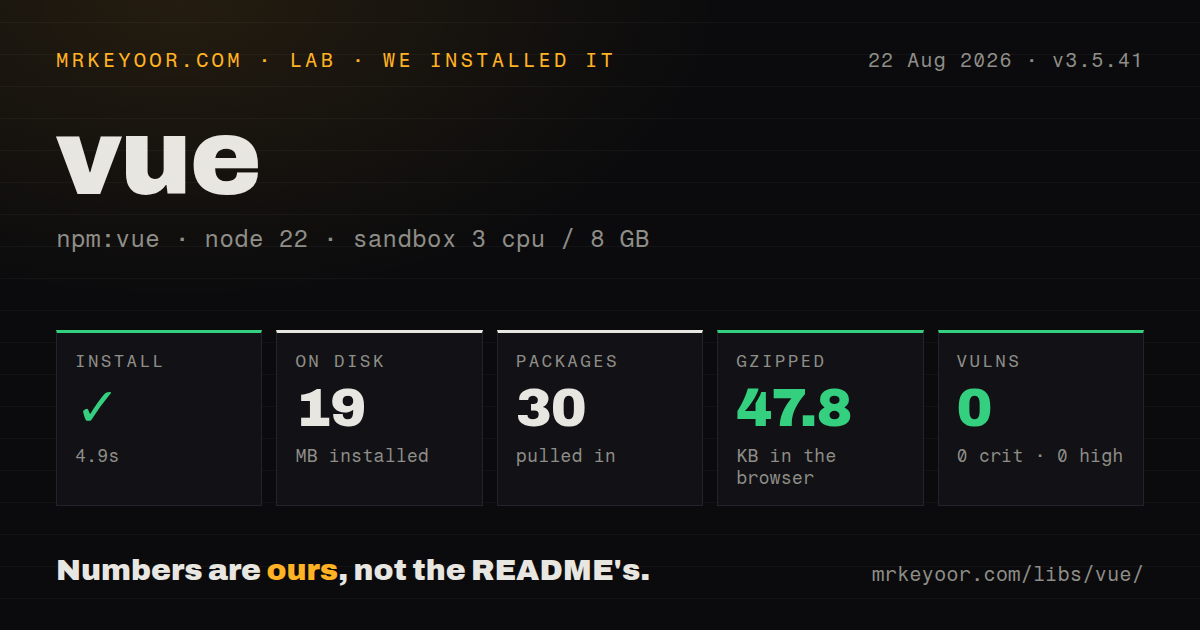
| Install | ✓ · 4.9s | 30 packages on disk · 19 MB |
| Import | ✓ | ESM import works · require() works · CommonJS package with exports map |
| Browser | 47.8 KB | gzipped (122.5 KB minified), bundled with esbuild |
| Types | ✓ | TypeScript types bundled |
| Known vulns | 0 | 0 critical · 0 high · 0 moderate · 0 low (npm audit) |
Answers from our run
Does vue install cleanly?
Yes. In a fresh container with an empty cache, npm install vue finished in 5 seconds, leaving 30 packages and 19 MB on disk. npm audit reported no known vulnerabilities.
How much does vue add to a browser bundle?
47.8 KB gzipped (122.5 KB minified) when the whole package is bundled for the browser with esbuild. Importing only part of it is usually smaller.
Does vue work with both ESM and CommonJS?
Yes. Both import 'vue' and require('vue') worked in Node 22 in our run. The package is published as CommonJS with an exports map.
Does vue include TypeScript types?
Yes, type declarations ship inside the package, so no @types install is needed.
vue or react: which should you use?
react: Use it when required libraries, React Native, or the team's existing component investment decides the ecosystem. Vue 3.5.41 installed in 4.9 seconds, occupied 19 MB, passed npm audit with 0 findings, and bundled at 47.8 KB gzipped in our whole-package probe.
When should you not use vue?
A required component library, SDK, hiring pipeline, or native-mobile application is React-only. An adapter or second frontend stack can cost more than the framework preference saves.
Use it if
- The team prefers template directives and single-file components to JSX as the default component syntax.
- A server-rendered site needs isolated interactive components or a full client application with the same component model.
- Composition API and `<script setup>` fit the project's TypeScript and code-reuse conventions.
- Vue Router, Pinia, Vite, or Nuxt cover the surrounding architecture without forcing many unrelated integration choices.
- A required component library, SDK, hiring pipeline, or native-mobile application is React-only. An adapter or second frontend stack can cost more than the framework preference saves.
- The team will mix Options API and Composition API freely. Both are supported, but neighboring components with different state models raise review and onboarding cost.
- You expect `vue` alone to decide routing, global state, SSR caching, data fetching, or tests. Those remain separate packages and architecture choices.
- A static page needs one click handler and no reusable reactive state. Plain browser JavaScript avoids framework runtime and build setup.
- The performance budget cannot absorb our namespace-import result of 122.5 KB minified and 47.8 KB gzipped before the application's own code.
Setup reality
We installed Vue 3.5.41 in a fresh Node 22 Bookworm sandbox in 4.9 seconds. npm left 30 packages using 19 MB and found 0 known vulnerabilities. The package itself is 2,600 KB unpacked, lists 5 direct dependencies and 1 peer dependency, and bundles TypeScript declarations. It publishes CommonJS and ESM paths through an exports map; both require() and ESM import worked in our check.
A namespace import bundled by esbuild for the browser produced 122.5 KB minified and 47.8 KB gzipped. That is our full-package probe, not a promise for every Vue application. Production output changes with imported APIs, compiler mode, tree shaking, routes, and component libraries. Build the real entry and inspect its chunks. The package lists TypeScript as a peer, while JavaScript-only applications can use Vue without adopting TypeScript.
The official project scaffold asks separately about TypeScript, Vue Router, Pinia, unit tests, end-to-end tests, linting, and formatting because the core package does not settle them. In script code, a ref's value lives at .value; templates unwrap refs. Destructuring primitive properties from reactive() breaks their live connection unless toRef() or toRefs() is used. Choose Composition API with <script setup> or Options API as a team default before the component count grows.
Server rendering uses the included server-renderer entry or a framework such as Nuxt, but hydration still requires matching server and client trees. Version 3.5.41 fixes hidden-state normalization, async setup restoration, and preservation of text entered before hydration. Application code can still create mismatches with dates, random values, browser-only branches, or request-specific state. Give v-for rows stable domain keys, cancel stale watcher work, remove global listeners on unmount, and avoid deep watchers over large objects.
Patterns
Build a typed counter component create-script-setup-component
<script setup lang="ts">
import { ref } from 'vue'

const count = ref(0)
</script>

<template>
  <button type="button" @click="count++">
    Count: {{ count }}
  </button>
</template>
Top-level script bindings are visible in the template, where the ref is automatically unwrapped. Script code still uses `count.value`.
Destructure state with toRefs preserve-reactive-properties
import { reactive, toRefs } from 'vue'

const state = reactive({
  customer: 'Asha',
  paid: false,
})

const { customer, paid } = toRefs(state)
Plain destructuring copies primitive values out of a reactive proxy. `toRefs()` keeps both properties connected to `state`.
Cache an invoice total derive-computed-total
import { computed, ref } from 'vue'

const lines = ref([{ price: 120 }, { price: 80 }])
const total = computed(() =>
  lines.value.reduce((sum, line) => sum + line.price, 0),
)
A computed getter should derive output without modifying `lines`. Vue caches it until a tracked dependency changes.
Abort an outdated search cancel-stale-watcher
import { ref, watch } from 'vue'

const query = ref('')
const results = ref([])

watch(query, async (value, _oldValue, onCleanup) => {
  const controller = new AbortController()
  onCleanup(() => controller.abort())
  results.value = await search(value, controller.signal)
})
Cleanup runs before the watcher starts again, preventing an older request from overwriting a newer result.
Declare a component boundary type-props-and-events
<script setup lang="ts">
const props = defineProps<{ title: string; count?: number }>()
const emit = defineEmits<{ save: [id: number] }>()

function save() {
  emit('save', 42)
}
</script>
`defineProps` and `defineEmits` are compiler macros. Importing them from `vue` is unnecessary.
Back a child input with v-model implement-component-model
<!-- CustomerName.vue -->
<script setup lang="ts">
const model = defineModel<string>({ required: true })
</script>

<template>
  <input v-model="model" autocomplete="name" />
</template>
`defineModel()` creates the model prop and update event. Version 3.5.41 fixes inference when factory defaults are involved.
Focus an input after mount focus-template-element
<script setup lang="ts">
import { onMounted, useTemplateRef } from 'vue'

const searchBox = useTemplateRef<HTMLInputElement>('search')
onMounted(() => searchBox.value?.focus())
</script>

<template><input ref="search" /></template>
The template ref is null before mount and becomes null again if the input is removed by a conditional branch.
Preserve row identity render-keyed-list
<template>
  <p v-if="items.length === 0">No results</p>
  <ul v-else>
    <li v-for="item in items" :key="item.id">
      {{ item.name }}
    </li>
  </ul>
</template>
Use a stable record ID when rows can move or contain local input state. An array index changes identity after insertion or sorting.
Track online status without leaking listeners extract-browser-composable
import { onBeforeUnmount, onMounted, ref } from 'vue'

export function useOnlineStatus() {
  const online = ref(navigator.onLine)
  const update = () => { online.value = navigator.onLine }

  onMounted(() => {
    window.addEventListener('online', update)
    window.addEventListener('offline', update)
  })
  onBeforeUnmount(() => {
    window.removeEventListener('online', update)
    window.removeEventListener('offline', update)
  })
  return online
}
Global listeners survive component removal unless the composable unregisters both of them during unmount.
Split an admin panel lazy-load-component
import { defineAsyncComponent } from 'vue'

const AdminPanel = defineAsyncComponent(() =>
  import('./AdminPanel.vue'),
)
A static import path lets the bundler create a predictable separate chunk. Add loading and error UI for slow or failed downloads.
Share a typed theme ref provide-typed-context
import { inject, provide, ref, type InjectionKey, type Ref } from 'vue'

const themeKey: InjectionKey<Ref<string>> = Symbol('theme')
provide(themeKey, ref('dark'))

const theme = inject(themeKey)
if (!theme) throw new Error('theme provider missing')
A symbol avoids string-key collisions and carries the injected type. Handle the missing-provider case explicitly.
Move dialog markup under body teleport-accessible-dialog
<template>
  <Teleport to="body">
    <div v-if="open" role="dialog" aria-modal="true">
      <button type="button" @click="open = false">Close</button>
    </div>
  </Teleport>
</template>
Teleport changes DOM placement while retaining component ownership. Focus trapping, Escape handling, and focus restoration still need implementation.
Alternatives
| Package | Registry | Pick it when |
|---|---|---|
| react | npm | Use it when required libraries, React Native, or the team's existing component investment decides the ecosystem. |
| svelte | npm | Use it when compile-time component behavior and Svelte's state syntax fit the team better than Vue's runtime model. |
| solid-js | npm | Use it for JSX with fine-grained reactive updates and a smaller conceptual runtime surface. |
More web frontend guides
postcss · react · react-dom · tailwindcss · clsx · htmlparser2 · the whole shelf →
How this guide is made: grounded in the library's documentation, release notes, changelog, and issue history, on a fixed rubric — not a hands-on install of every release. The 50 most-downloaded entries are additionally install-verified in clean containers. Corrections: contact the desk.