solid-js review
solid-js 1.9.15 compiles JSX into DOM creation plus subscriptions that update only the expressions reading changed state. A component function usually runs once; signals are getter functions, and effects track synchronous reads. Our import-all browser build measured 22 KB minified and 8.5 KB gzipped. Version 1.9.15 fixes rejected `lazy()` imports so server Suspense can finish, client hydration can release its pending count, ErrorBoundary receives the error, and a later load may retry. The package also contains stores, resources, context, portals, SSR, and hydration.
solid-js 1.9.15 installed in 1 second and produced an 8.5 KB gzipped import-all build in our sandbox, with bundled types and 0 audit findings. Choose it for precise JSX updates if the team will learn accessor-based reactivity and has a plan for the approaching Solid 2.0 migration.
We installed it
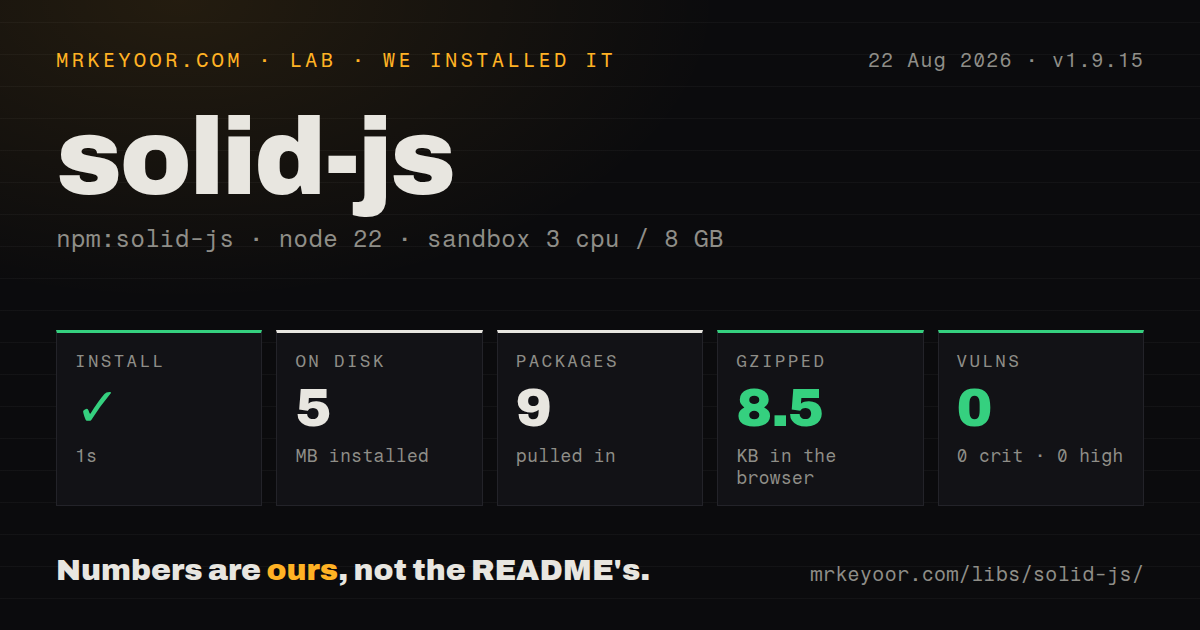
| Install | ✓ · 1s | 9 packages on disk · 5 MB |
| Import | ✓ | ESM import works · require() works · ESM package with exports map |
| Browser | 8.5 KB | gzipped (22 KB minified), bundled with esbuild |
| Types | ✓ | TypeScript types bundled |
| Known vulns | 0 | 0 critical · 0 high · 0 moderate · 0 low (npm audit) |
Answers from our run
Does solid-js install cleanly?
Yes. In a fresh container with an empty cache, npm install solid-js finished in 1 seconds, leaving 9 packages and 5 MB on disk. npm audit reported no known vulnerabilities.
How much does solid-js add to a browser bundle?
8.5 KB gzipped (22 KB minified) when the whole package is bundled for the browser with esbuild. Importing only part of it is usually smaller.
Does solid-js work with both ESM and CommonJS?
Yes. Both import 'solid-js' and require('solid-js') worked in Node 22 in our run. The package is published as ESM with an exports map.
Does solid-js include TypeScript types?
Yes, type declarations ship inside the package, so no @types install is needed.
solid-js or react: which should you use?
react: Choose it when third-party integrations, component inventory, and hiring reach matter more than signal-level updates. solid-js 1.9.15 installed in 1 second and produced an 8.5 KB gzipped import-all build in our sandbox, with bundled types and 0 audit findings.
When should you not use solid-js?
You expect React component bodies and hooks to rerun: Solid components normally set up once, and reading count instead of count() changes the meaning
Use it if
- You want JSX components with signal-level DOM updates instead of a virtual DOM rerender pass
- Your interface has frequent local updates and the team is willing to call signal accessors explicitly
- You need client rendering, streaming SSR, hydration, Suspense, stores, and resources from one core package
- A compiler-aware Vite or Babel step already fits your frontend toolchain
- You expect React component bodies and hooks to rerun: Solid components normally set up once, and reading `count` instead of `count()` changes the meaning
- Your codebase destructures incoming props by habit: Solid props are reactive getters, so plain destructuring can capture one value
- You cannot run a Solid JSX transform: the README requires a Solid compiler integration and TypeScript `jsx: preserve` with `jsxImportSource: solid-js`
- You support Internet Explorer or older frozen browsers: the project targets the latest 2 years of Firefox, Safari, Chrome, and Edge
- You want to avoid a near-term framework migration: Solid 2.0 is at release-candidate stage and removes or replaces several 1.x primitives, including `createResource`, `batch`, and `Index`
Setup reality
Our install of solid-js 1.9.15 finished in 1 second. It left 9 packages and 5 MB on disk, with 3 direct dependencies, 0 peer dependencies, and 0 audit findings. The package is ESM with an exports map, while both require() and ESM import worked on Node 22. TypeScript declarations are bundled. Our import-all browser build came to 22 KB minified and 8.5 KB gzipped.
Use a Solid-aware Vite template or add the Solid plugin; installing the runtime does not convert generic JSX into Solid subscriptions. A manual TypeScript setup keeps JSX for the compiler and sets jsxImportSource to solid-js. Imports are split by job: reactivity from solid-js, DOM mounting from solid-js/web, and stores from solid-js/store. Conditional exports choose server implementations under Node, so browser tests and SSR builds need the intended bundler conditions. No credentials or native build are involved.
The first runtime bugs tend to be tracking mistakes. Read a signal as count(), keep reactive prop access inside tracked expressions, use splitProps instead of ordinary destructuring, and remember that reads after an await are outside the effect's synchronous tracking pass. Use For for keyed lists and Index for stable positions in 1.9.15. For SSR, pair server transforms with hydrate() on the client. Rejected lazy imports now reach ErrorBoundary in this version, but each lazy subtree still needs an intentional loading and failure UI.
Patterns
Mount a signal-backed counter render-counter
import { createSignal } from 'solid-js';
import { render } from 'solid-js/web';

function Counter() {
  const [count, setCount] = createSignal(0);
  return (
    <button onClick={() => setCount(n => n + 1)}>
      Count: {count()}
    </button>
  );
}

render(() => <Counter />, document.getElementById('app')!);
`count` is an accessor in Solid 1.9.15. Call `count()` where the current number is required.
Cache a derived total derive-memo
import { createMemo, createSignal } from 'solid-js';

const [items, setItems] = createSignal<Product[]>([]);
const total = createMemo(() =>
  items().reduce((sum, item) => sum + item.price, 0)
);

<p>Total: {total()}</p>
`createMemo` caches its result until a tracked input changes. A plain function is enough when recalculation is cheap.
Run an effect after one signal changes track-explicit-dependency
import { createEffect, createSignal, on } from 'solid-js';

const [query, setQuery] = createSignal('');
createEffect(on(query, (value, previous) => {
  console.log({ previous, value });
}, { defer: true }));
`defer: true` skips the initial call. `on(query, ...)` tracks the named accessor instead of incidental reads in the callback.
Render rows by item identity render-keyed-list
import { For } from 'solid-js';

<ul>
  <For each={todos()} fallback={<li>No tasks</li>}>
    {(todo, index) => <li>{index() + 1}. {todo.title}</li>}
  </For>
</ul>
`For` keys rows by item identity in Solid 1.9.15, and its index argument is an accessor.
Narrow a conditional value render-conditional-value
import { Show } from 'solid-js';

<Show when={currentUser()} fallback={<a href="/login">Sign in</a>}>
  {user => <p>Welcome, {user().name}</p>}
</Show>
The callback receives a reactive accessor for the truthy value. Reading `currentUser()` into an outside constant would capture one moment.
Load a user when its id changes fetch-reactive-resource
import { createResource, createSignal, Suspense } from 'solid-js';

const [userId, setUserId] = createSignal('42');
const [user] = createResource(userId, async id => {
  const response = await fetch(`/api/users/${id}`);
  if (!response.ok) throw new Error(`HTTP ${response.status}`);
  return response.json();
});

<Suspense fallback={<p>Loading...</p>}>
  <p>{user()?.name}</p>
</Suspense>
`createResource` reruns when `userId` changes in Solid 1.9.15. Solid 2.0 RC replaces this API with async memos.
Change one nested store field update-nested-store
import { createStore } from 'solid-js/store';

const [state, setState] = createStore({
  users: [{ id: 1, name: 'Ada', active: false }]
});
setState('users', user => user.id === 1, 'active', true);
Store values are proxies. Use `setState` paths in Solid 1.9.15 instead of assigning nested properties directly.
Separate local and forwarded props preserve-prop-reactivity
import { splitProps, type ComponentProps } from 'solid-js';

type Props = { label: string } & ComponentProps<'button'>;
function ActionButton(props: Props) {
  const [local, forwarded] = splitProps(props, ['label']);
  return <button {...forwarded}>{local.label}</button>;
}
`splitProps` keeps getter behavior. Ordinary `const { label } = props` may stop later parent updates from reaching the label.
Guard a typed context provide-context
import { createContext, createSignal, useContext, type ParentProps } from 'solid-js';

const ThemeContext = createContext<ReturnType<typeof createSignal<string>>>();
export function ThemeProvider(props: ParentProps) {
  const theme = createSignal('light');
  return <ThemeContext.Provider value={theme}>{props.children}</ThemeContext.Provider>;
}
export function useTheme() {
  const value = useContext(ThemeContext);
  if (!value) throw new Error('ThemeProvider is missing');
  return value;
}
`useContext` returns the context default when no provider exists. With no default here, the helper throws for misplaced consumers.
Remove window listeners on disposal clean-up-listeners
import { createSignal, onCleanup, onMount } from 'solid-js';

function OnlineStatus() {
  const [online, setOnline] = createSignal(navigator.onLine);
  onMount(() => {
    const update = () => setOnline(navigator.onLine);
    window.addEventListener('online', update);
    window.addEventListener('offline', update);
    onCleanup(() => {
      window.removeEventListener('online', update);
      window.removeEventListener('offline', update);
    });
  });
  return <span>{online() ? 'Online' : 'Offline'}</span>;
}
`onCleanup` runs when its owning component scope is disposed. Register cleanup beside the subscription it releases.
Load a component behind Suspense lazy-load-component
import { lazy, Suspense } from 'solid-js';

const Reports = lazy(() => import('./Reports'));

<Suspense fallback={<p>Loading reports...</p>}>
  <Reports />
</Suspense>
Version 1.9.15 forwards a rejected lazy import to ErrorBoundary and permits retry; the imported module must default-export a component.
Reset a failed component subtree recover-render-error
import { ErrorBoundary } from 'solid-js';

<ErrorBoundary fallback={(error, reset) => (
  <section>
    <p>{error.message}</p>
    <button onClick={reset}>Try again</button>
  </section>
)}>
  <Dashboard />
</ErrorBoundary>
ErrorBoundary catches failures in its descendant render and reactive scopes. Unrelated event-handler errors still need their own handling.
Alternatives
| Package | Registry | Pick it when |
|---|---|---|
| react | npm | Choose it when third-party integrations, component inventory, and hiring reach matter more than signal-level updates |
| vue | npm | Choose it for fine-grained reactivity with official routing, state, and single-file component conventions |
| svelte | npm | Choose it when the team prefers compiler-driven single-file components and Svelte 5 runes over JSX accessors |
More web frontend guides
postcss · react · react-dom · tailwindcss · clsx · htmlparser2 · the whole shelf →
How this guide is made: grounded in the library's documentation, release notes, changelog, and issue history, on a fixed rubric — not a hands-on install of every release. The 50 most-downloaded entries are additionally install-verified in clean containers. Corrections: contact the desk.