@tanstack/react-query review
@tanstack/react-query 5.102.5 is a React adapter for a query-keyed cache of promise results. It shares remote results between components, tracks freshness, deduplicates matching work, refetches under configured conditions, and coordinates mutations with invalidation or direct cache writes. It does not fetch by itself or replace local form and UI state. The 5.102.5 coordinated release lists a declaration fix in query-devtools rather than a react-query runtime change. Our measured 5.101.4 full import was 54.8 KB minified and 16.6 KB gzipped.
Our @tanstack/react-query 5.101.4 install took 0.9 seconds, used 6 MB on disk, found 0 audit issues, and produced a 16.6 KB gzipped full import. The current 5.102.5 line earns that cost for shared remote data with real invalidation work; skip it when another framework cache already owns the resource.
We installed it
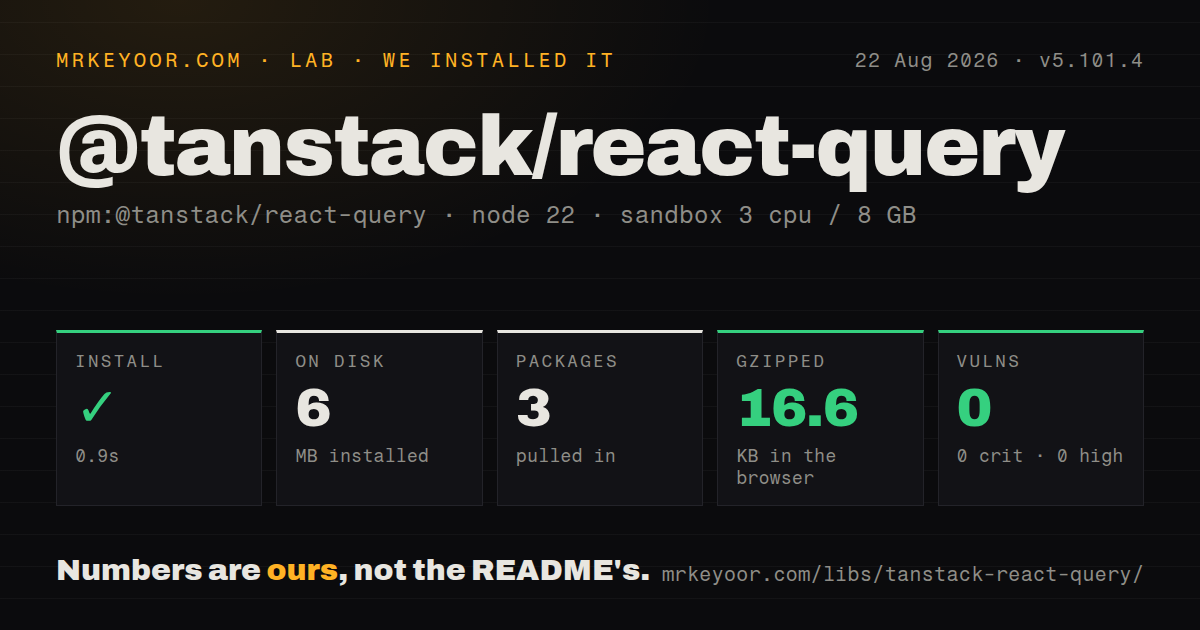
| Install | ✓ · 0.9s | 3 packages on disk · 6 MB |
| Import | ✓ | ESM import works · require() works · ESM package with exports map |
| Browser | 16.6 KB | gzipped (54.8 KB minified), bundled with esbuild |
| Types | ✓ | TypeScript types bundled |
| Known vulns | 0 | 0 critical · 0 high · 0 moderate · 0 low (npm audit) |
Answers from our run
Does @tanstack/react-query install cleanly?
Yes. In a fresh container with an empty cache, npm install @tanstack/react-query finished in 0.9s, leaving 3 packages and 6 MB on disk. npm audit reported no known vulnerabilities.
How much does @tanstack/react-query add to a browser bundle?
16.6 KB gzipped (54.8 KB minified) when the whole package is bundled for the browser with esbuild. Importing only part of it is usually smaller.
Does @tanstack/react-query work with both ESM and CommonJS?
Yes. Both import '@tanstack/react-query' and require('@tanstack/react-query') worked in Node 22 in our run. The package is published as ESM with an exports map.
Does @tanstack/react-query include TypeScript types?
Yes, type declarations ship inside the package, so no @types install is needed.
@tanstack/react-query or swr: which should you use?
swr: Use it for a smaller stale-while-revalidate hook when mutation workflows stay simple. Our @tanstack/react-query 5.101.4 install took 0.9 seconds, used 6 MB on disk, found 0 audit issues, and produced a 16.6 KB gzipped full import.
When should you not use @tanstack/react-query?
The value is a form draft, modal state, or client-only workflow. A server-data cache gives that state the wrong lifecycle.
Use it if
- Several components read the same remote resource and should share loading, error, data, and refresh state.
- The app needs background refresh, request cancellation, retries, cursor pages, or optimistic mutation rollback.
- REST, GraphQL, or another promise-returning client needs a protocol-neutral cache above it.
- The team can own stable query-key factories plus explicit freshness and invalidation rules.
- The value is a form draft, modal state, or client-only workflow. A server-data cache gives that state the wrong lifecycle.
- Framework loaders or server components already provide the authoritative fetch cache, creating two invalidation systems for the same resource.
- The page makes a few isolated requests with no reuse, background refresh, or mutation coordination. A small hook is easier to inspect.
- GraphQL entities must update automatically across unrelated query shapes. Apollo's normalized cache models that relationship directly.
- The team cannot standardize query keys and `staleTime`. Mismatched keys create duplicate cache entries, while zero freshness can trigger unexpected refetches.
Setup reality
We installed @tanstack/react-query 5.101.4 in a fresh Node 22 Bookworm sandbox in 0.9 seconds. The install left 3 packages and 6 MB on disk. npm audit reported 0 vulnerabilities. The package had 1 direct dependency, 1 React peer dependency, and a 1,852 KB unpacked size. It bundles TypeScript declarations, uses ESM with an exports map, and worked through both require() and ESM import. Our full esbuild import measured 54.8 KB minified and 16.6 KB gzipped. Current registry metadata is 5.102.5, so those lab figures apply to 5.101.4.
Create one browser QueryClient and pass it through QueryClientProvider. Query functions own credentials, URLs, and protocol error handling. Native fetch resolves for HTTP 404 and 500, so the function must test response.ok and throw. Define query-key factories before features invent slightly different arrays for the same resource; invalidation matches exact keys or prefixes, and cache identity follows the serialized key.
Default staleTime is 0, so cached data is stale immediately and active queries can refetch on mount, focus, or reconnect. gcTime controls retention after a query becomes inactive and says nothing about freshness. Mutations cannot infer which cached results changed. Call invalidateQueries(), setQueryData(), or a matching-key update yourself. Before an optimistic write, cancel matching in-flight queries so an older server response cannot overwrite the temporary value.
Server rendering needs a new QueryClient per request, prefetching, dehydrate(), and HydrationBoundary; a shared server client can leak one user's cached data to another. Version 5 infinite queries require initialPageParam. A disabled query can have status: 'pending' while fetchStatus is 'idle', so isPending alone may show a false loading spinner. Suspense hooks also require both a Suspense boundary and an error boundary.
Patterns
Fetch one resource by a stable key basic-query
import { useQuery } from '@tanstack/react-query';

async function getTodos() {
  const response = await fetch('/api/todos');
  if (!response.ok) throw new Error(`HTTP ${response.status}`);
  return response.json();
}

function Todos() {
  const { data, isPending, error } = useQuery({
    queryKey: ['todos'],
    queryFn: getTodos,
  });

  if (isPending) return <p>Loading...</p>;
  if (error) return <p>{error.message}</p>;
  return <ul>{data.map((t) => <li key={t.id}>{t.title}</li>)}</ul>;
}
Version 5 uses the object form. Check `response.ok` because `fetch()` resolves ordinary HTTP error statuses.
Set browser-wide cache defaults once provider-setup
import { QueryClient, QueryClientProvider } from '@tanstack/react-query';

const queryClient = new QueryClient({
  defaultOptions: {
    queries: { staleTime: 60 * 1000, retry: 1 },
  },
});

export function App({ children }) {
  return <QueryClientProvider client={queryClient}>{children}</QueryClientProvider>;
}
Choose freshness and retries from product behavior. The default `staleTime: 0` marks data stale immediately.
Invalidate the affected key after a write mutation-invalidate
import { useMutation, useQueryClient } from '@tanstack/react-query';

const queryClient = useQueryClient();
const mutation = useMutation({
  mutationFn: (newTodo) =>
    fetch('/api/todos', { method: 'POST', body: JSON.stringify(newTodo) }).then((r) => r.json()),
  onSuccess: () => queryClient.invalidateQueries({ queryKey: ['todos'] }),
});

mutation.mutate({ title: 'buy milk' });
Prefix matching may refetch several caches. Pick the narrowest visible scope that covers the changed server data.
Wait until a dependent key exists dependent-query
const { data: user } = useQuery({
  queryKey: ['user', email],
  queryFn: () => getUserByEmail(email),
});

const userId = user?.id;

const { data: projects } = useQuery({
  queryKey: ['projects', userId],
  queryFn: () => getProjectsByUser(userId),
  enabled: !!userId,
});
A disabled query can be pending with idle fetch status, so combine those values when choosing the loading UI.
Load cursor pages in order infinite-scroll
import { useInfiniteQuery } from '@tanstack/react-query';

const { data, fetchNextPage, hasNextPage } = useInfiniteQuery({
  queryKey: ['projects'],
  queryFn: ({ pageParam }) => fetch(`/api/projects?cursor=${pageParam}`).then((r) => r.json()),
  initialPageParam: 0,
  getNextPageParam: (lastPage) => lastPage.nextCursor,
});

const items = data?.pages.flatMap((p) => p.items) ?? [];
Version 5 requires `initialPageParam`. Returning `undefined` from `getNextPageParam` ends pagination.
Keep the last page while the next loads paginated-query
import { keepPreviousData, useQuery } from '@tanstack/react-query';

const { data, isPlaceholderData } = useQuery({
  queryKey: ['todos', page],
  queryFn: () => fetchTodos(page),
  placeholderData: keepPreviousData,
});
Version 5 expresses the old keep-previous behavior through `placeholderData: keepPreviousData`.
Rollback an optimistic cache write optimistic-update
useMutation({
  mutationFn: updateTodo,
  onMutate: async (newTodo) => {
    await queryClient.cancelQueries({ queryKey: ['todos'] });
    const previous = queryClient.getQueryData(['todos']);
    queryClient.setQueryData(['todos'], (old) =>
      old.map((t) => (t.id === newTodo.id ? newTodo : t))
    );
    return { previous };
  },
  onError: (err, newTodo, context) => {
    queryClient.setQueryData(['todos'], context.previous);
  },
  onSettled: () => queryClient.invalidateQueries({ queryKey: ['todos'] }),
});
Cancel current reads first, retain the exact prior value, restore it on error, then refetch after settlement.
Hydrate a request-owned server cache ssr-hydration
import { QueryClient, dehydrate, HydrationBoundary } from '@tanstack/react-query';

export default async function Page() {
  const queryClient = new QueryClient();
  await queryClient.prefetchQuery({ queryKey: ['todos'], queryFn: getTodos });

  return (
    <HydrationBoundary state={dehydrate(queryClient)}>
      <Todos />
    </HydrationBoundary>
  );
}
Create a QueryClient for each server request so cached results cannot cross user boundaries.
Reuse a typed query definition shared-query-options
import { queryOptions, useQuery } from '@tanstack/react-query';

export const todoOptions = (id) =>
  queryOptions({
    queryKey: ['todos', id],
    queryFn: () => fetchTodo(id),
    staleTime: 5 * 60 * 1000,
  });

const { data } = useQuery(todoOptions(5));
// also works: queryClient.prefetchQuery(todoOptions(5))
A `queryOptions()` factory keeps key, query function, timing, and inferred result aligned across hooks and prefetching.
Read success data through Suspense suspense-query
import { useSuspenseQuery } from '@tanstack/react-query';

function Todos() {
  const { data } = useSuspenseQuery({ queryKey: ['todos'], queryFn: fetchTodos });
  return <List items={data} />;
}
// <Suspense fallback={<Spinner />}><Todos /></Suspense>
The success data is defined, but Suspense and error boundaries are still required above the component.
Stop polling after completion polling
useQuery({
  queryKey: ['job', jobId],
  queryFn: () => fetchJobStatus(jobId),
  refetchInterval: (query) =>
    query.state.data?.status === 'done' ? false : 2000,
});
Return `false` to stop the interval. Background tabs pause it unless `refetchIntervalInBackground` is enabled.
Warm a detail query before navigation prefetch-on-intent
const options = todoOptions(todo.id);

<Link
  to={`/todos/${todo.id}`}
  onMouseEnter={() => queryClient.prefetchQuery(options)}
  onFocus={() => queryClient.prefetchQuery(options)}
>
  {todo.title}
</Link>
Prefetching uses the same key and function as the destination. The cache's `staleTime` decides whether navigation fetches again.
Alternatives
| Package | Registry | Pick it when |
|---|---|---|
| swr | npm | Use it for a smaller stale-while-revalidate hook when mutation workflows stay simple. |
| @apollo/client | npm | Use it for GraphQL operations whose entities need a normalized cross-query cache. |
| @reduxjs/toolkit | npm | Use RTK Query when Redux already owns application state and one store is the preferred boundary. |
More web frontend guides
postcss · react · react-dom · tailwindcss · clsx · htmlparser2 · the whole shelf →
How this guide is made: grounded in the library's documentation, release notes, changelog, and issue history, on a fixed rubric — not a hands-on install of every release. The 50 most-downloaded entries are additionally install-verified in clean containers. Corrections: contact the desk.