swr review
SWR is a React hook layer for remote data that keys requests, shares an in-memory cache, deduplicates concurrent fetches, and revalidates cached results on events such as focus or network recovery. Separate entry points cover infinite pagination, explicit mutations, immutable resources, and subscriptions. Version 2.5.1 fixes cache hydration for hooks without fetchers, revalidates Suspense cache data after remount, and cleans completed subscription state. Your fetcher still owns HTTP, authentication, parsing, and error construction.
SWR 2.5.1 installed in 1.1 seconds and added an 8.8 KB gzipped browser bundle in our sandbox, with bundled types and 0 npm-audit findings. Install it for React views that benefit from stale-while-revalidate behavior; skip it when server rendering already owns the data or normalized caching is required.
We installed it
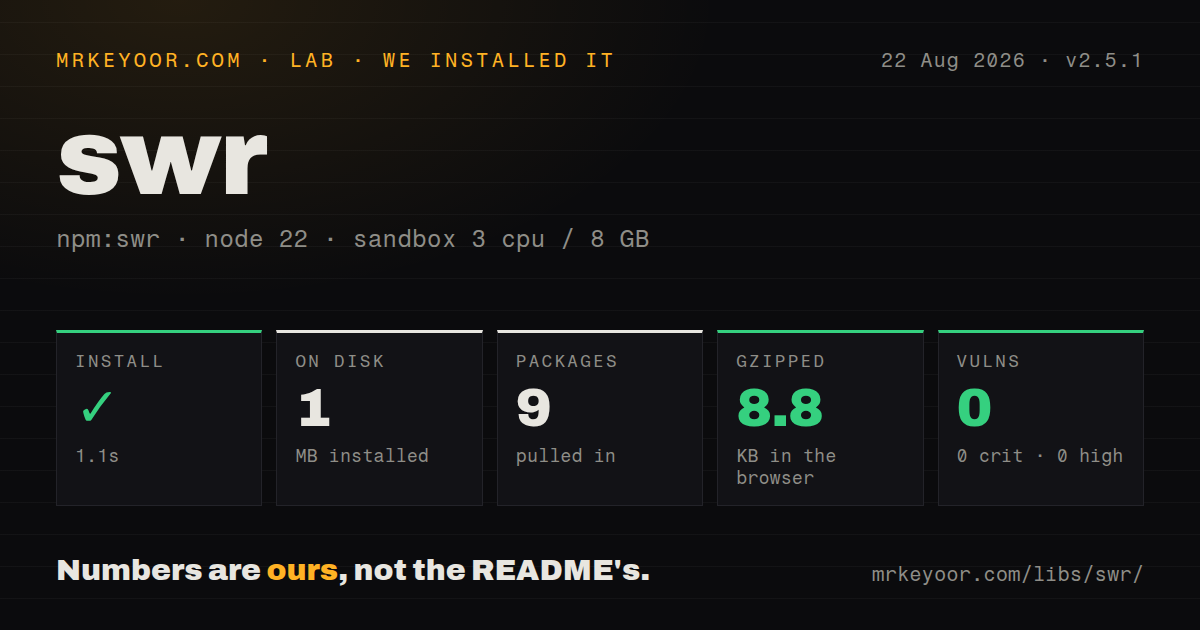
| Install | ✓ · 1.1s | 9 packages on disk · 1 MB |
| Import | ✓ | ESM import works · require() works · CommonJS package with exports map |
| Browser | 8.8 KB | gzipped (21.5 KB minified), bundled with esbuild |
| Types | ✓ | TypeScript types bundled |
| Known vulns | 0 | 0 critical · 0 high · 0 moderate · 0 low (npm audit) |
Answers from our run
Does swr install cleanly?
Yes. In a fresh container with an empty cache, npm install swr finished in 1 seconds, leaving 9 packages and 1 MB on disk. npm audit reported no known vulnerabilities.
How much does swr add to a browser bundle?
8.8 KB gzipped (21.5 KB minified) when the whole package is bundled for the browser with esbuild. Importing only part of it is usually smaller.
Does swr work with both ESM and CommonJS?
Yes. Both import 'swr' and require('swr') worked in Node 22 in our run. The package is published as CommonJS with an exports map.
Does swr include TypeScript types?
Yes, type declarations ship inside the package, so no @types install is needed.
swr or @tanstack/react-query: which should you use?
@tanstack/react-query: Choose it for a larger server-state toolkit with explicit stale and garbage-collection controls, mutations, and devtools. SWR 2.5.1 installed in 1.1 seconds and added an 8.8 KB gzipped browser bundle in our sandbox, with bundled types and 0 npm-audit findings.
When should you not use swr?
Server Components or route loaders already own the data lifecycle; adding a client cache can duplicate requests and invalidation rules.
Use it if
- React components need shared client-side request state with focus and reconnect revalidation.
- A stale cached value may render immediately while a background request refreshes it.
- Optimistic mutations, polling, dependent keys, or incremental pagination fit the interface.
- You want transport-neutral hooks and are willing to define stable cache keys and fetcher behavior.
- Server Components or route loaders already own the data lifecycle; adding a client cache can duplicate requests and invalidation rules.
- You need normalized entities shared across unrelated queries; SWR caches by key and does not maintain a normalized graph.
- A 21.5 KB minified browser import is too much for the interaction; a route-level fetch or a smaller hook may be enough.
- The team cannot define cache-key identity, mutation invalidation, and retry policy; defaults do not know your authorization or data relationships.
- React is not in the application; version 2.5.1 declares React 16.11 through 19 as its peer dependency.
Setup reality
Our fresh Node 22 install of SWR 2.5.1 finished in 1.1 seconds and left 9 packages using 1 MB. npm audit found 0 known vulnerabilities at critical, high, moderate, and low severity. The package declares 2 direct dependencies and 1 peer dependency, ships bundled TypeScript types, and is 552 KB unpacked.
React is the peer dependency, with the published range covering React 16.11, 17, 18, and 19. The package metadata is CommonJS-oriented but has an exports map; both require() and ESM import worked in our sandbox. Import public paths such as swr, swr/infinite, swr/mutation, and swr/immutable. Do not reach into unexported dist files.
Our esbuild test for import * from SWR produced 21.5 KB minified and 8.8 KB gzipped. Real applications can tree-shake differently, so measure the route that ships. A fetcher must reject non-2xx HTTP responses because fetch itself resolves them. Include every input that changes the response, including tenant, user scope, and filters, in the cache key.
The default cache is in memory and belongs to its SWRConfig provider. Focus, reconnect, polling, retries, Suspense, and optimistic writes can all launch requests; set policies deliberately for expensive endpoints. A null key pauses a request. Mutations should update or revalidate every affected key family. Version 2.5.1 corrects remount and subscription cleanup paths, but it cannot infer which lists contain an edited entity.
Patterns
Reject failed HTTP responses in the fetcher fetch-with-http-errors
import useSWR from "swr"

async function fetchJson(url) {
  const response = await fetch(url)
  if (!response.ok) {
    const error = new Error("HTTP " + response.status)
    error.status = response.status
    throw error
  }
  return response.json()
}

const { data, error, isLoading, isValidating } = useSWR("/api/profile", fetchJson)
fetch resolves on 404 and 500. Throw after checking response.ok so SWR exposes the failure through error and applies retry policy.
Set shared request and retry policy configure-cache-policy
import { SWRConfig } from "swr"

export function DataProvider({ children }) {
  return <SWRConfig value={{
    fetcher: fetchJson,
    revalidateOnFocus: false,
    errorRetryCount: 3,
    dedupingInterval: 5000,
  }}>{children}</SWRConfig>
}
SWRConfig applies below this provider. Keep expensive endpoint exceptions close to the hook instead of weakening every request globally.
Wait until the dependent key exists fetch-conditionally
const { data: user } = useSWR("/api/me", fetchJson)
const ordersKey = user ? ["/api/orders", user.id] : null
const { data: orders } = useSWR(ordersKey, ([url, userId]) => fetchJson(url + "?user=" + userId))
A null key pauses fetching. Put every variable that changes the response into the key so different users or filters cannot share data.
Apply an optimistic edit with rollback update-optimistically
await mutate(
  async current => {
    const saved = await updateTodo(nextTodo)
    return current.map(item => item.id === saved.id ? saved : item)
  },
  {
    optimisticData: current => current.map(item => item.id === nextTodo.id ? nextTodo : item),
    rollbackOnError: true,
    revalidate: false,
  },
)
rollbackOnError restores the cached value after failure. Revalidate when the server may transform the saved object or affect related lists.
Send a mutation only after user action trigger-explicit-mutation
import useSWRMutation from "swr/mutation"

async function create(url, { arg }) {
  const response = await fetch(url, { method: "POST", body: JSON.stringify(arg) })
  if (!response.ok) throw new Error("create failed")
  return response.json()
}

const { trigger, isMutating, error } = useSWRMutation("/api/orders", create)
useSWRMutation does not run until trigger is called. The mutation result does not automatically repair every related cache key.
Append pages to an infinite list paginate-infinite-list
import useSWRInfinite from "swr/infinite"

const getKey = (index, previous) => {
  if (previous && previous.items.length === 0) return null
  return "/api/orders?page=" + (index + 1)
}

const { data, size, setSize } = useSWRInfinite(getKey, fetchJson)
Return null when the previous page proves there is no next page. Cursor APIs should include the returned cursor rather than an index.
Poll only while server work is active poll-until-complete
const { data: job } = useSWR("/api/jobs/42", fetchJson, {
  refreshInterval: latest => latest?.status === "running" ? 2000 : 0,
  refreshWhenHidden: false,
})
A function refreshInterval can stop at 0 after completion. Hidden-tab polling is off here to avoid background load.
Remove all cache state explicitly clear-cache-explicitly
import { unload } from "swr"

await unload({ revalidate: false })
unload affects SWR state under the relevant provider. Use it for a deliberate boundary such as logout, then rebuild user-scoped data.
Warm one key before navigation preload-before-navigation
import { preload } from "swr"

function warmOrder(id) {
  return preload("/api/orders/" + id, fetchJson)
}
preload must use the same key and compatible fetcher as the destination hook or the work will not be reused.
Revalidate a family of list keys invalidate-key-family
const { mutate } = useSWRConfig()
await mutate(
  key => typeof key === "string" && key.startsWith("/api/orders"),
  undefined,
  { revalidate: true },
)
A predicate can match several cache keys. Keep key shapes consistent so a mutation can find every affected list.
Keep reference data from auto-refreshing fetch-immutable-resource
import useSWRImmutable from "swr/immutable"

const { data: countries } = useSWRImmutable("/api/countries", fetchJson)
useSWRImmutable disables automatic revalidation for data treated as immutable. Manual mutation can still replace or invalidate it.
Keep prior search results during a key change keep-old-search-results
const key = query ? "/api/search?q=" + encodeURIComponent(query) : null
const { data, isLoading, isValidating } = useSWR(key, fetchJson, {
  keepPreviousData: true,
})
keepPreviousData avoids a blank state while the next query loads. isValidating still tells the UI that the displayed result is stale.
Alternatives
| Package | Registry | Pick it when |
|---|---|---|
| @tanstack/react-query | npm | Choose it for a larger server-state toolkit with explicit stale and garbage-collection controls, mutations, and devtools. |
| @reduxjs/toolkit | npm | Choose RTK Query when server data should live beside an existing Redux store and endpoint definitions. |
| axios | npm | Choose it only when HTTP transport is the problem; it does not replace SWR's React cache and revalidation state. |
More web frontend guides
postcss · react · react-dom · tailwindcss · clsx · htmlparser2 · the whole shelf →
How this guide is made: grounded in the library's documentation, release notes, changelog, and issue history, on a fixed rubric — not a hands-on install of every release. The 50 most-downloaded entries are additionally install-verified in clean containers. Corrections: contact the desk.