superagent review
SuperAgent is an HTTP client for Node and browsers built around a chainable request object. query, send, set, timeout, retry, field, attach, and use configure that object; awaiting it or calling end sends the request. The response exposes status, headers, text, and a parsed body, while HTTP failures reject by default. Our install showed an older distribution shape: CommonJS, no exports map, and no included TypeScript declarations. Version 10.3.0 refreshes dependencies and test tooling and restores a browser-side request.agent compatibility proxy.
Keep SuperAgent where cookie agents, multipart helpers, plugins, or SuperTest make its old fluent API useful. For a new JSON client, fetch or a typed current wrapper costs less.
We installed it
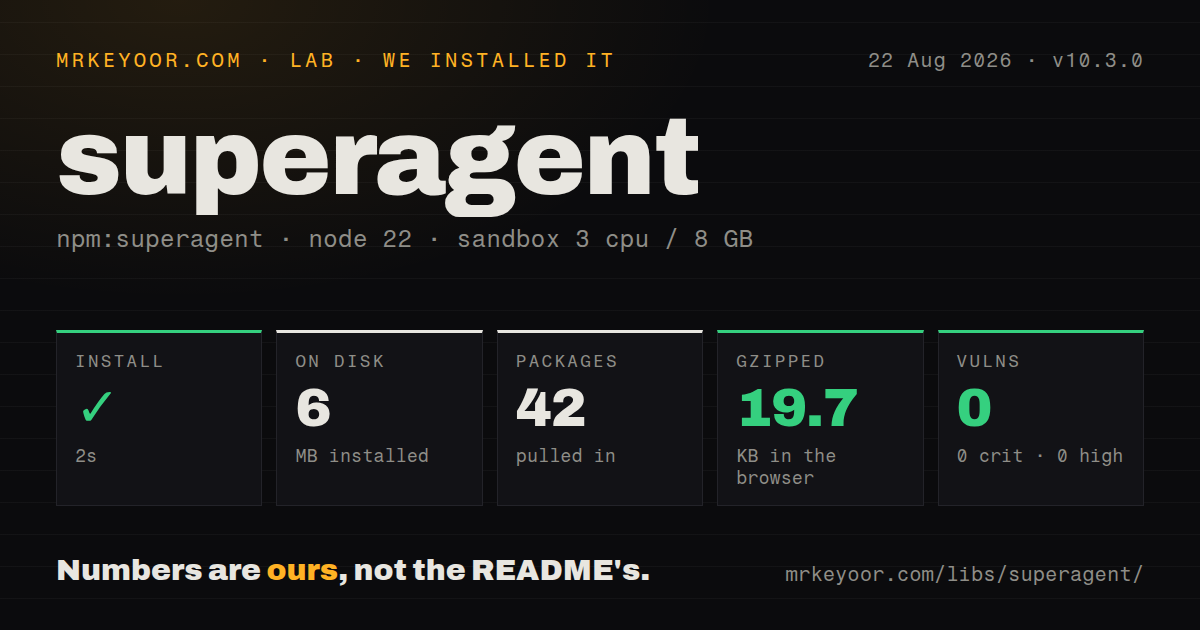
| Install | ✓ · 1.6s | 42 packages on disk · 6 MB |
| Import | ✓ | ESM import works · require() works · CommonJS package |
| Browser | 19.7 KB | gzipped (62.6 KB minified), bundled with esbuild |
| Types | — | no TypeScript types found |
| Known vulns | 0 | 0 critical · 0 high · 0 moderate · 0 low (npm audit) |
Answers from our run
Does superagent install cleanly?
Yes. In a fresh container with an empty cache, npm install superagent finished in 2 seconds, leaving 42 packages and 6 MB on disk. npm audit reported no known vulnerabilities.
How much does superagent add to a browser bundle?
19.7 KB gzipped (62.6 KB minified) when the whole package is bundled for the browser with esbuild. Importing only part of it is usually smaller.
Does superagent work with both ESM and CommonJS?
Yes. Both import 'superagent' and require('superagent') worked in Node 22 in our run. The package is published as CommonJS.
Does superagent include TypeScript types?
No type declarations were found in our install, so TypeScript users need their own declarations.
superagent or undici: which should you use?
undici: Use it for a modern Node HTTP stack and fetch-compatible APIs without browser support. Keep SuperAgent where cookie agents, multipart helpers, plugins, or SuperTest make its old fluent API useful.
When should you not use superagent?
A new application only sends ordinary JSON requests; built-in fetch avoids the 42-package and 6 MB install we measured
Use it if
- An existing SuperAgent or SuperTest codebase already depends on its request chains, response objects, and plugin convention
- A Node client needs multipart fields and file attachments without assembling a form-data stream by hand
- Several Node requests must reuse login cookies through one superagent.agent instance
- One request needs opt-in retries plus separate response and total deadline timers
- A new application only sends ordinary JSON requests; built-in fetch avoids the 42-package and 6 MB install we measured
- The project requires declarations owned by the runtime package, because SuperAgent includes no TypeScript types and relies on @types/superagent
- Package policy requires native ESM and an exports map; version 10.3.0 publishes CommonJS without that boundary
- Client payload is tightly budgeted; our full import produced 62.6 KB minified and 19.7 KB gzipped
- You need rapid feature work or issue turnaround; the last release and repository push were both on 2026-01-06, and GitHub search found 179 open issues excluding pull requests
Setup reality
superagent 10.3.0 installed successfully in 1.6 seconds in our clean Node 22 container. node_modules held 42 packages using 6 MB. The package reports 9 direct dependencies, no peer dependencies, 588 KB unpacked, an MIT license, and a Node floor of 14.18.0. npm audit found 0 known vulnerabilities at all severities. It is CommonJS with no exports map; require() and ESM import both worked. No TypeScript declaration files were present.
Our browser-targeted build succeeded at 62.6 KB minified and 19.7 KB gzipped. Cross-origin browser cookies require withCredentials() on the request plus matching CORS headers from the server. Node cookie sessions use superagent.agent(). No project config file is required, and each request can be modified by a function passed to use(). That is a per-request hook, not a global response interceptor.
A request chain is lazy until it is awaited, piped, treated as a promise, or ended with end(). Pick one completion style. Calling end() and then() on the same object can send twice because the request is thenable rather than a plain native Promise. HTTP 4xx and 5xx failures usually include error.response, while DNS and connection failures do not. Timeouts are disabled until configured. A numeric timeout is an overall deadline; use an object to separate time to first response from total duration. Retries do not make a non-idempotent POST safe.
Patterns
Send query values and read JSON get-json-response
const superagent = require('superagent');

const response = await superagent
  .get('https://api.example.com/users')
  .query({ page: 2, active: true })
  .accept('json');

console.log(response.status, response.body);
Recognized response content types are parsed into body. The original response string is available as text.
Send an object as JSON post-json-body
const response = await superagent
  .post('https://api.example.com/orders')
  .set('Authorization', 'Bearer ' + token)
  .send({ sku: 'A-42', quantity: 2 });

console.log(response.body.id);
A plain object passed to send selects JSON. Later object calls overwrite duplicate properties from earlier calls.
Separate HTTP, timeout, and network errors classify-request-error
try {
  await superagent.get('https://api.example.com/orders/42');
} catch (error) {
  if (error.response) {
    console.error('HTTP', error.status, error.response.body);
  } else if (error.timeout) {
    console.error('timeout', error.code);
  } else {
    console.error('network', error.code);
  }
}
Rejected HTTP responses carry response. DNS and connection failures happen before a response exists.
Treat one 404 as an accepted result allow-expected-status
const response = await superagent
  .get('https://api.example.com/cache/maybe-missing')
  .ok((res) => res.status === 404 || res.status < 400);

const value = response.status === 404 ? null : response.body;
ok replaces the default status test. Keep it narrow so authorization failures and server errors continue to reject.
Limit first response and total duration set-two-timeouts
await superagent
  .get('https://api.example.com/export')
  .timeout({
    response: 5000,
    deadline: 30000,
  });
response covers the wait for initial data. deadline covers the whole request. Neither exists unless configured.
Retry a transient GET failure retry-idempotent-get
const response = await superagent
  .get('https://api.example.com/catalog')
  .timeout({ response: 3000, deadline: 10000 })
  .retry(2);
Retries apply only after you request them. Be cautious with POST when repeating the server action could duplicate work.
Combine form fields with a file upload-multipart-data
const response = await superagent
  .post('https://api.example.com/documents')
  .field('caption', 'signed agreement')
  .field('account', 'A-18')
  .attach('document', '/tmp/agreement.pdf');
Let SuperAgent set the multipart Content-Type and boundary. A manual header can leave the boundary missing.
Keep login cookies in Node reuse-cookie-session
const superagent = require('superagent');
const session = superagent.agent();

await session
  .post('https://example.com/login')
  .send({ email, password });

const account = await session.get('https://example.com/account');
The agent owns a cookie jar. Independent calls on the top-level export do not share that session.
Post a form-encoded token request send-urlencoded-form
const response = await superagent
  .post('https://auth.example.com/token')
  .type('form')
  .send({
    grant_type: 'client_credentials',
    scope: 'orders:read',
  });
type('form') chooses application/x-www-form-urlencoded. A plain object otherwise uses JSON.
Cancel using the request reference abort-inflight-request
const request = superagent.get('https://api.example.com/large-report');
const pending = request.then((res) => res.body);

setTimeout(() => request.abort(), 2000);

try {
  await pending;
} catch (error) {
  if (error.code !== 'ABORTED') throw error;
}
Cancellation is abort() on SuperAgent's request object. Retain that object until the operation finishes.
Configure one request with a plugin apply-request-defaults
function authenticated(request) {
  request.set('Authorization', 'Bearer ' + getToken());
  request.timeout({ response: 4000, deadline: 15000 });
}

const response = await superagent
  .get('https://api.example.com/profile')
  .use(authenticated);
use modifies this request. It does not install a response hook across every future request.
Pipe a response into a file stream-download-node
const fs = require('node:fs');

const request = superagent
  .get('https://downloads.example.com/archive.zip')
  .maxResponseSize(500 * 1024 * 1024);

request.pipe(fs.createWriteStream('/tmp/archive.zip'));
Piping avoids collecting the whole response in body. Do not also await this request or call end on it.
Alternatives
| Package | Registry | Pick it when |
|---|---|---|
| undici | npm | Use it for a modern Node HTTP stack and fetch-compatible APIs without browser support. |
| axios | npm | Use it when bundled types and request or response interceptors fit the application's conventions. |
| got | npm | Use it for Node-only streaming, hooks, pagination, and detailed retry controls. |
More web frontend guides
postcss · react · react-dom · tailwindcss · clsx · htmlparser2 · the whole shelf →
How this guide is made: grounded in the library's documentation, release notes, changelog, and issue history, on a fixed rubric — not a hands-on install of every release. The 50 most-downloaded entries are additionally install-verified in clean containers. Corrections: contact the desk.