stylelint review
Stylelint 17.14.1 parses CSS with PostCSS and applies a project-selected rule set. Built-in rules catch invalid values, unknown properties, duplicate selectors, unsafe specificity, forbidden units, naming violations, and inconsistent modern syntax; many findings support `--fix`. Shared configs choose defaults, plugins add rules, and custom syntaxes extract styles from SCSS, Less, Vue, HTML, Markdown, or CSS-in-JS. Version 17 requires Node 20.19.0, moves the supported programmatic API to ESM, makes fixing strict around syntax errors, and updates selector rules for CSS nesting. Patch 17.14.1 repairs four report and autofix defects.
Stylelint 17.14.1 installed 117 packages and 19 MB in 11.4 seconds in our sandbox, with 0 audit findings and a failed browser bundle. It earns that Node-only footprint in teams with substantial authored CSS or SCSS; formatting-only and utility-class projects should leave it out.
We installed it
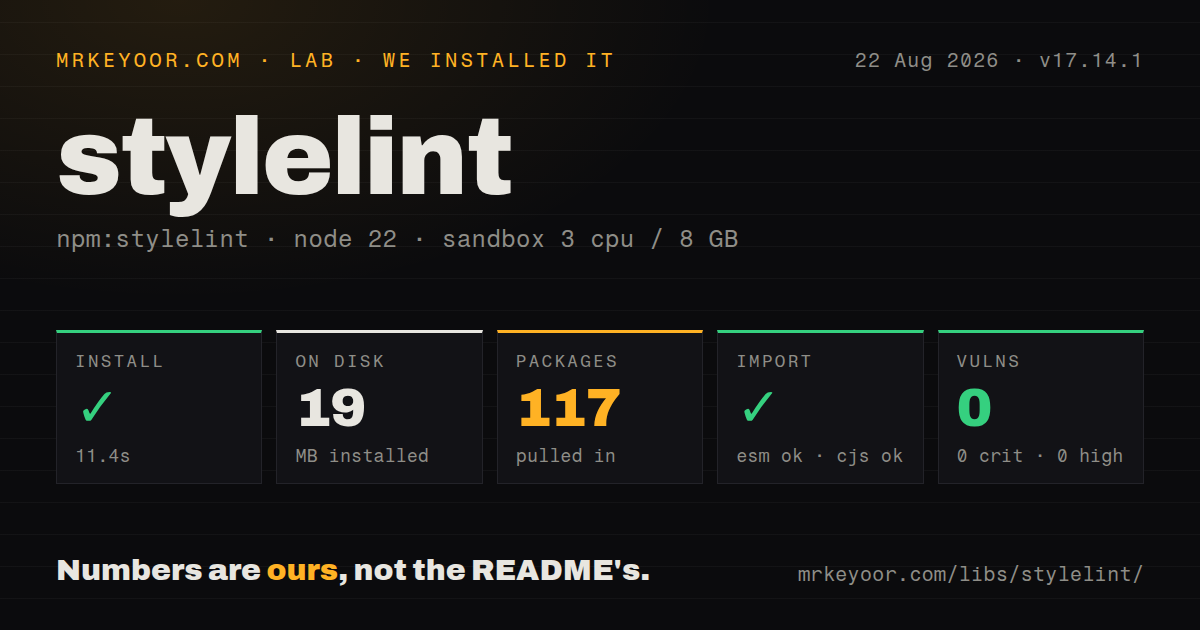
| Install | ✓ · 11.4s | 117 packages on disk · 19 MB |
| Import | ✓ | ESM import works · require() works · CommonJS package with exports map |
| Browser | n/a | could not be bundled for the browser (Node-only code, most likely) |
| Types | — | no TypeScript types found |
| Known vulns | 0 | 0 critical · 0 high · 0 moderate · 0 low (npm audit) |
Answers from our run
Does stylelint install cleanly?
Yes. In a fresh container with an empty cache, npm install stylelint finished in 11 seconds, leaving 117 packages and 19 MB on disk. npm audit reported no known vulnerabilities.
Can stylelint run in a browser?
Not directly: esbuild could not bundle it for the browser in our run, which normally means it depends on Node built-ins. Use it on the server, or find a browser-targeted alternative.
Does stylelint work with both ESM and CommonJS?
Yes. Both import 'stylelint' and require('stylelint') worked in Node 22 in our run. The package is published as CommonJS with an exports map.
Does stylelint include TypeScript types?
No type declarations were found in our install, so TypeScript users need their own declarations.
stylelint or @eslint/css: which should you use?
@eslint/css: Use it when ESLint flat config and one runner matter more than Stylelint's broader CSS and dialect ecosystem. Stylelint 17.14.1 installed 117 packages and 19 MB in 11.4 seconds in our sandbox, with 0 audit findings and a failed browser bundle.
When should you not use stylelint?
The application only emits generated CSS or utility classes inside markup. Without source styles or a suitable extractor, there is little for Stylelint to inspect.
Use it if
- A codebase contains maintained CSS or SCSS and needs invalid values, selector mistakes, and stylesheet policy checked in CI.
- Class names, custom properties, vendor prefixes, units, or color notation must follow rules the team can review and version.
- Known-safe autofixes can remove part of an established stylesheet backlog before manual review.
- Embedded or CSS-like syntax has a maintained custom parser and a shared config compatible with Stylelint 17.
- The application only emits generated CSS or utility classes inside markup. Without source styles or a suitable extractor, there is little for Stylelint to inspect.
- Only whitespace, wrapping, quote, and layout formatting matters. Core stylistic rules were removed, and maintainers recommend a formatter such as Prettier beside the linter.
- Node is older than 20.19.0 or programmatic tooling must retain the supported CommonJS API from older majors. Version 17 drops that contract.
- One JavaScript tool and one configuration file are non-negotiable. Stylelint brings separate config, cache, plugins, globs, and CI behavior.
- The team cannot triage a first shared-config run. Standard configs make policy choices that can produce a substantial backlog in older stylesheets.
Setup reality
We installed Stylelint 17.14.1 in a fresh unprivileged Node 22 Bookworm sandbox. npm completed in 11.4 seconds, leaving 117 packages and 19 MB on disk. Our package check counted 35 direct dependencies, 0 peer dependencies, and 2,516 KB unpacked. npm audit reported 0 known vulnerabilities at every severity. The probe found no TypeScript types. Both require() and ESM import worked, though the supported version 17 Node API is ESM.
The package does nothing useful until a config selects rules. Install a shared config such as stylelint-config-standard or define rules, then add stylelint.config.mjs. Node 20.19.0 is the minimum. Version 17 documents ESM for the programmatic API, configuration, plugins, and local locator paths, so treat our successful require() probe as package behavior rather than a supported integration promise. Keep the config near the files whose globs and ignore paths it controls.
SCSS, Less, Vue, HTML, Markdown, and CSS-in-JS each need a matching custom syntax, often pulled in by a community config. Scope that syntax to precise file patterns with overrides; applying an SCSS parser to every file changes what ordinary CSS means. Quote shell globs so Stylelint expands them consistently on different platforms. The esbuild browser bundle failed in our sandbox, matching a Node-only CLI and filesystem tool. Do not put it in application bundles.
Use --cache for repeated full-tree work and --max-warnings 0 when warnings must fail CI. Strict fix mode in version 17 refuses to edit a file containing syntax errors, which protects code around invalid nesting; lax mode is explicit. Let Prettier handle layout. If adoption needs exceptions, require rule-scoped disable comments with descriptions and turn on reports for needless, unscoped, or descriptionless disables so temporary gaps stay visible.
Patterns
Start from the standard config configure-standard-css
// stylelint.config.mjs
/** @type {import('stylelint').Config} */
export default {
  extends: ['stylelint-config-standard'],
  rules: {
    'declaration-no-important': true,
    'selector-class-pattern': '^[a-z][a-z0-9-]+$',
  },
};
Install `stylelint-config-standard` separately; without rules or an extended config, the linter reports nothing.
Add cached lint and fix scripts add-package-scripts
{
  "scripts": {
    "lint:css": "stylelint \"src/**/*.{css,scss}\" --cache --max-warnings 0",
    "lint:css:fix": "stylelint \"src/**/*.{css,scss}\" --cache --fix"
  }
}
Quoted globs reach Stylelint unchanged. Ignore its cache file and keep strict fix mode unless lax recovery is tested.
Lint SCSS through its shared config configure-scss
// npm add -D stylelint-config-standard-scss
export default {
  extends: ['stylelint-config-standard'],
  overrides: [
    {
      files: ['**/*.scss'],
      extends: ['stylelint-config-standard-scss'],
    },
  ],
};
The SCSS config brings syntax and rules; limit it to `.scss` so plain CSS keeps its own parser.
Extract styles from Vue files configure-vue-styles
// npm add -D postcss-html
export default {
  extends: ['stylelint-config-standard'],
  overrides: [
    {
      files: ['**/*.vue'],
      customSyntax: 'postcss-html',
    },
  ],
};
`postcss-html` is separate. Add Vue pseudo-class exceptions only when compiled selector behavior supports them.
Document a narrow inline exception disable-one-warning
/* stylelint-disable-next-line declaration-no-important -- vendor widget uses an inline declaration */
.vendor-widget { color: var(--brand) !important; }
Naming one rule and a reason prevents the comment from hiding unrelated findings later.
Report stale and broad disables audit-disable-comments
npx stylelint "src/**/*.css" \
  --report-needless-disables \
  --report-descriptionless-disables \
  --report-unscoped-disables
Patch 17.14.1 fixes report warnings that quiet mode previously suppressed.
Lint a source string programmatically use-node-api
import stylelint from 'stylelint';

const result = await stylelint.lint({
  code: 'a { color: #ffffff }',
  codeFilename: 'virtual.css',
  config: { rules: { 'color-hex-length': 'short' } },
  fix: true,
});

console.log(result.errored, result.report, result.code);
Version 17 returns formatted text in `report` and fixed source in `code`; the old `output` property is removed.
Read structured warning data inspect-warnings
const result = await stylelint.lint({
  files: ['src/**/*.css'],
});

for (const file of result.results) {
  for (const warning of file.warnings) {
    console.log(file.source, warning.line, warning.column, warning.rule, warning.text);
  }
}
Provide either `code` or `files`, and consume structured warnings instead of parsing a human formatter.
Exclude generated and vendor files ignore-generated-css
// stylelint.config.mjs
export default {
  extends: ['stylelint-config-standard'],
  ignoreFiles: [
    '**/*.min.css',
    'dist/**',
    'src/vendor/**',
  ],
};
Ignore built and vendor output at its source; confirm path resolution when monorepo configs live at different levels.
Introduce a rule as a warning set-rule-severity
export default {
  extends: ['stylelint-config-standard'],
  rules: {
    'color-function-notation': [
      'modern',
      { severity: 'warning' },
    ],
  },
};
A warning fails only when the CLI warning threshold says it should; promote after clearing the existing backlog.
Inspect the config for one file print-resolved-config
npx stylelint --print-config src/components/button.scssPass one real file so merged extensions and matching overrides can be inspected for that exact input.
Register a namespaced local rule write-local-plugin
// stylelint.config.mjs
import noPxFontSize from './stylelint/no-px-font-size.js';

export default {
  plugins: [noPxFontSize],
  rules: {
    'local/no-px-font-size': true,
  },
};
Rule names need a namespace, and version 17 requires full local paths for plugin and extended-config locators.
Alternatives
| Package | Registry | Pick it when |
|---|---|---|
| @eslint/css | npm | Use it when ESLint flat config and one runner matter more than Stylelint's broader CSS and dialect ecosystem. |
| @biomejs/biome | npm | Use it for combined formatting and linting when its CSS rules cover the project and SCSS is unnecessary. |
| prettier | npm | Use it when consistent output formatting is the requirement and semantic CSS policy is not. |
More web frontend guides
postcss · react · react-dom · tailwindcss · clsx · htmlparser2 · the whole shelf →
How this guide is made: grounded in the library's documentation, release notes, changelog, and issue history, on a fixed rubric — not a hands-on install of every release. The 50 most-downloaded entries are additionally install-verified in clean containers. Corrections: contact the desk.