sphinx review
Sphinx compiles a documentation tree into HTML, LaTeX/PDF, EPUB, man pages, plain text, and other formats. Its advantage over a generic site generator is semantic cross-referencing: Python classes, C functions, glossary entries, citations, and symbols in other projects can become indexed links that the builder checks. Bundled extensions import Python docstrings, parse Google or NumPy sections, run doctests, and check external links. Version 9.1.0 requires Python 3.12, adds add_static_dir() for extension assets, and fixes MyST compatibility plus several autodoc and LaTeX cases. Our import completed in 0.10 seconds with py.typed present.
Sphinx 9.1.0 installed 22 packages totaling 66 MB in 0.8 seconds in our sandbox, imported in 0.10 seconds, and produced 0 audit findings. Use it for checked cross-references and several output formats; a small Markdown site rarely needs this build model or extension stack.
We installed it
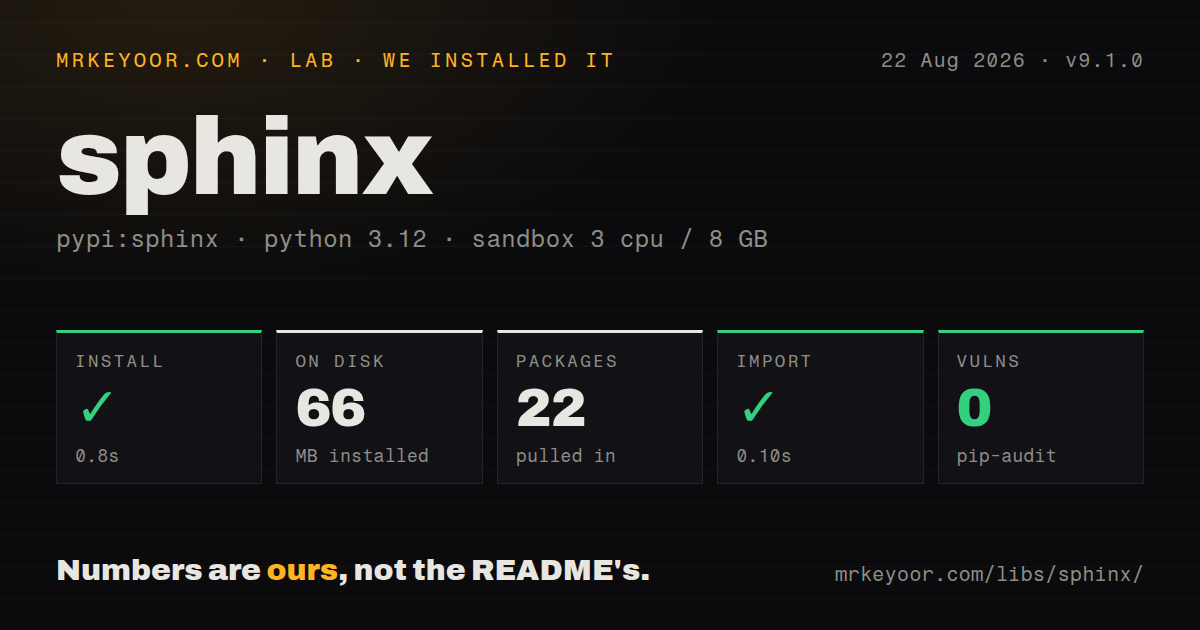
| Install | ✓ · 0.8s | 22 packages on disk · 66 MB |
| Import | ✓ | import sphinx in 0.10s · pure Python · py.typed · requires Python >=3.12 |
| Known vulns | 0 | (pip-audit) |
Answers from our run
Does sphinx install cleanly?
Yes. In a fresh container with an empty cache, pip install sphinx finished in 0.8s, leaving 22 packages and 66 MB on disk. pip-audit reported no known vulnerabilities.
What does sphinx need to run?
Python >=3.12, and nothing compiled: it is pure Python. In our run import sphinx succeeded in 0.10s, and the package ships py.typed for type checkers.
sphinx or mkdocs-material: which should you use?
mkdocs-material: Use it for a Markdown-first documentation website with a polished theme and search. Sphinx 9.1.0 installed 22 packages totaling 66 MB in 0.8 seconds in our sandbox, imported in 0.10 seconds, and produced 0 audit findings.
When should you not use sphinx?
Your team wants a polished Markdown product-docs site and has little need for symbol-aware links; MkDocs Material reaches that target with less configuration
Use it if
- A Python library needs docstrings turned into linked API pages with inheritance, signatures, source links, and cross-project references
- One source tree must produce a website plus PDF, man pages, EPUB, or another non-web builder output
- CI should fail on unresolved references, stale doctest examples, missing toctree pages, or dead external links
- Your project needs custom domains, directives, roles, builders, or extensions beyond ordinary Markdown pages
- Your team wants a polished Markdown product-docs site and has little need for symbol-aware links; MkDocs Material reaches that target with less configuration
- You only need a small Python API reference from docstrings. pdoc avoids conf.py, toctrees, domains, and extension setup
- The docs environment must stay on Python 3.11 or older; Sphinx 9.1.0 requires Python 3.12 or newer
- Importing the documented package is unsafe or impractical. autodoc imports modules, so side effects, unavailable native libraries, and optional services can break the build
- PDF output must work from pip alone. The LaTeX builder still relies on an external TeX toolchain and its fonts and packages
Setup reality
Our clean install of Sphinx 9.1.0 succeeded in 0.8 seconds on Python 3.12. Twenty-two packages used 66 MB, and pip-audit reported no known vulnerabilities. The distribution declares 17 direct dependencies, is pure Python, and includes py.typed. import sphinx worked in 0.10 seconds. The installed metadata did not state a license, so confirm the repository's terms in your own compliance process instead of inferring them from this install.
sphinx-quickstart creates conf.py, an index document, and build helpers. The real contract is the source tree's toctree: a page omitted from every tree may build but remain unreachable, while a missing entry becomes a warning. Choose reStructuredText or add myst-parser for Markdown. Themes such as Furo or PyData are separate installs, and each non-bundled extension must exist in the same environment as the build.
Autodoc imports your package. Install the project into the docs environment, including native requirements that import at module load, or list carefully chosen names in autodoc_mock_imports. Mocking too much can produce false signatures and ugly annotation paths. Keep credentials and network calls out of import time. Intersphinx downloads inventory files unless you provide local copies, and linkcheck performs real requests that can be rate-limited.
Adopt sphinx-build -W --nitpicky early, when the warning list is short. Incremental builds reuse an environment; use a clean build after extension, config, or object-inventory changes if output looks stale. The HTML builder needs no service, while PDF through LaTeX needs a separate TeX installation. Sphinx 9 rewrote parts of autodoc and 9.1 fixed edge cases, so custom extensions that touch autodoc internals need upgrade tests rather than an assumption that deprecation warnings cover every behavior change.
Patterns
Create and build a documentation tree scaffold-build-project
sphinx-quickstart docs
sphinx-build -W -b html docs docs/_build/html
Choose separate source and build directories if generated output should stay out of the authored tree. -W makes warnings fail the build.
Enable API and cross-project extensions configure-core-extensions
# docs/conf.py
project = "acme"
extensions = [
    "sphinx.ext.autodoc",
    "sphinx.ext.napoleon",
    "sphinx.ext.intersphinx",
    "sphinx.ext.viewcode",
]
intersphinx_mapping = {"python": ("https://docs.python.org/3", None)}
Modules under sphinx.ext ship with Sphinx. Themes and third-party extensions need separate installation.
Render module members from docstrings document-python-module
.. automodule:: acme.client
   :members:
   :show-inheritance:
   :member-order: bysource
autodoc imports acme.client in the build environment. Import-time network calls or unavailable optional libraries will fail documentation builds.
Generate recursive API stub pages generate-api-stubs
# conf.py
extensions += ["sphinx.ext.autosummary"]
autosummary_generate = True

# api.rst
.. autosummary::
   :toctree: generated
   :recursive:

   acme
The generated directory is build-derived. Decide whether to commit it and keep that policy consistent across local and CI builds.
Put pages into the navigation tree build-navigation-tree
.. toctree::
   :maxdepth: 2
   :caption: Guides

   install
   quickstart
   api
Entries are document names relative to this file without the source extension. Unreferenced pages produce warnings and lack normal navigation.
Add Markdown pages through MyST write-myst-markdown
# install myst-parser, then in conf.py
extensions += ["myst_parser"]
myst_enable_extensions = ["colon_fence", "deflist"]
MyST changes author syntax but keeps Sphinx concepts such as directives, roles, domains, and toctrees. Sphinx 9.1.0 includes a specific MyST compatibility fix.
Fail CI on unresolved references check-references-ci
sphinx-build -W --nitpicky -b html docs docs/_build/html

# conf.py
nitpick_ignore = [("py:class", "thirdparty.MissingType")]
Use nitpick_ignore for known missing inventory entries, not as a broad warning suppressor. A clean baseline makes later broken links visible.
Run code examples as doctests test-document-examples
# conf.py
extensions += ["sphinx.ext.doctest"]

# command
# sphinx-build -b doctest docs docs/_build/doctest
The doctest builder is a separate build target. Run it in CI alongside HTML, and control external state so examples remain deterministic.
Resolve symbols in other projects link-external-symbols
# conf.py
intersphinx_mapping = {
    "python": ("https://docs.python.org/3", None),
    "numpy": ("https://numpy.org/doc/stable/", None),
}

# in rST use the py:class role for pathlib.Path
None tells Sphinx to fetch objects.inv from the remote root. Use local inventory files when builds must work offline.
Check outbound links separately check-external-links
sphinx-build -b linkcheck docs docs/_build/linkcheck

# conf.py
linkcheck_ignore = [r"http://localhost:\d+/"]
linkcheck performs network requests and can hit rate limits. Run it on a schedule or retry policy instead of making every documentation edit depend on the public internet.
Mock one unavailable autodoc dependency mock-optional-import
# docs/conf.py
autodoc_mock_imports = ["optional_native_driver"]
Mock as little as possible. A mock can distort annotations and signatures, and it may hide a real packaging failure in the documented module.
Generate a command manual page build-man-pages
# conf.py
man_pages = [
    ("cli", "acme", "Acme command reference", ["Acme maintainers"], 1),
]

# command
# sphinx-build -b man docs docs/_build/man
The source document must be reachable and suitable for a terminal manual. Install or package the generated file separately; Sphinx only builds it.
Alternatives
| Package | Registry | Pick it when |
|---|---|---|
| mkdocs-material | PyPI | Use it for a Markdown-first documentation website with a polished theme and search |
| pdoc | PyPI | Use it for a small Python API reference generated directly from modules |
| myst-parser | PyPI | Use it with Sphinx when semantic references are needed but authors prefer Markdown |
| mkdocstrings | PyPI | Use it to add API pages to an MkDocs site |
More cli & tooling guides
commander · chalk · typescript · esbuild · yargs · click · the whole shelf →
How this guide is made: grounded in the library's documentation, release notes, changelog, and issue history, on a fixed rubric — not a hands-on install of every release. The 50 most-downloaded entries are additionally install-verified in clean containers. Corrections: contact the desk.