sharp review
Our Node 22 sandbox loaded sharp 0.35.3 through both `require()` and ESM `import`, while the attempted esbuild browser bundle failed. Sharp is a Node-API binding to libvips that reads image paths, buffers, streams, raw pixels, or generated images, then resizes, crops, composites, changes colour, and encodes JPEG, PNG, WebP, GIF, AVIF, or TIFF output. Current version 0.35.4 caps resize and composite coordinates, rounds palette bit depth correctly, honours TIFF sub-IFDs, fixes limited-page counts, and accepts input streams that finish before output is requested.
Sharp 0.35.3 installed in 2.4 seconds and left 10 packages occupying 29 MB in our sandbox; both Node module loaders worked, npm audit found 0 known vulnerabilities, and the browser bundle failed. Install 0.35.4 for server image pipelines only when the build can retain the correct native package for its deployment target.
We installed it
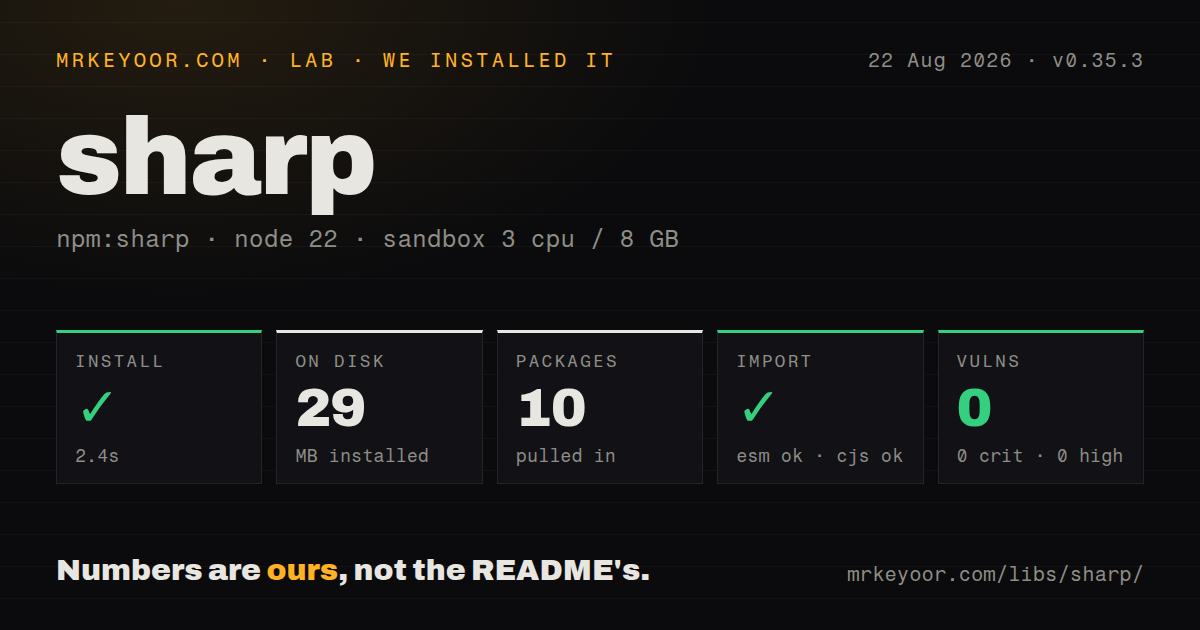
| Install | ✓ · 2.4s | 10 packages on disk · 29 MB · native build step |
| Import | ✓ | ESM import works · require() works · CommonJS package with exports map |
| Browser | n/a | could not be bundled for the browser (Node-only code, most likely) |
| Types | ✓ | TypeScript types bundled |
| Known vulns | 0 | 0 critical · 0 high · 0 moderate · 0 low (npm audit) |
Answers from our run
Does sharp install cleanly?
Yes. In a fresh container with an empty cache, npm install sharp finished in 2 seconds, leaving 10 packages and 29 MB on disk, after a native build step. npm audit reported no known vulnerabilities.
Can sharp run in a browser?
Not directly: esbuild could not bundle it for the browser in our run, which normally means it depends on Node built-ins. Use it on the server, or find a browser-targeted alternative.
Does sharp work with both ESM and CommonJS?
Yes. Both import 'sharp' and require('sharp') worked in Node 22 in our run. The package is published as CommonJS with an exports map.
Does sharp include TypeScript types?
Yes, type declarations ship inside the package, so no @types install is needed.
sharp or jimp: which should you use?
jimp: Choose it when your edits fit Jimp's JPEG, PNG, and GIF set and zero native dependencies matter more than AVIF output or libvips speed. Sharp 0.35.3 installed in 2.4 seconds and left 10 packages occupying 29 MB in our sandbox; both Node module loaders worked, npm audit found 0 known vulnerabilities, and the browser bundle failed.
When should you not use sharp?
The image code runs in a browser. Our esbuild browser build failed, and the official WebAssembly instructions state that browser use is unsupported.
Discussed on
Use it if
- A Node upload service must turn one photo into fixed crops, responsive widths, or modern formats without writing an intermediate file.
- You receive buffers or streams and need one backpressured decode-transform-encode pipeline.
- Your pipeline must apply EXIF orientation, control ICC colour conversion and alpha, or keep every animated GIF and WebP frame.
- The deployment target has a supported Node-API runtime and can ship the optional binary chosen for its OS, CPU, and libc.
- The image code runs in a browser. Our esbuild browser build failed, and the official WebAssembly instructions state that browser use is unsupported.
- Your install policy omits optional dependencies or rejects native packages; sharp uses optional `@img/*` packages for the matching binary and bundled libvips.
- One npm lockfile must move between macOS, glibc Linux, and Alpine without target flags; the install guide warns about shared-lockfile failures and requires OS, CPU, and libc selection for cross-target installs.
- The job is primarily a drawing surface for fonts, vector paths, and chart primitives. `@napi-rs/canvas` exposes a Canvas 2D API, while sharp centers its API on image pipelines and composites.
- A Windows process also has to load `canvas`; sharp documents a possible `The specified procedure could not be found` conflict when both native modules share that process.
Setup reality
We installed sharp 0.35.3 with npm in a fresh, unprivileged Node 22 Bookworm container with 3 CPUs and 8 GB of RAM. Installation succeeded in 2.4 seconds after a native/compile step, leaving 10 packages and 29 MB on disk. The package itself had 3 direct dependencies, 0 peers, 1,048 KB unpacked, bundled TypeScript declarations, and an Apache-2.0 license. npm audit returned 0 findings across the four reported severity levels. Both require() and ESM import loaded; an esbuild browser build failed.
No account, API key, or config file is part of sharp 0.35.4. Installation is the configuration point: Node must be 20.9.0 or newer, optional dependencies must remain enabled, and the selected @img/* binary must match the production OS, CPU, and libc. npm offers --os, --cpu, and --libc for cross-target work, while Yarn and pnpm have supported-architecture settings. Exclude sharp from esbuild or webpack server bundles so Node can find its native package at runtime.
Sharp reads headers through metadata() without decoding compressed pixels, then performs the queued transforms when a terminal call such as toBuffer() or toFile() asks for output. The constructor reads 1 page by default, so set animated: true when every GIF or WebP frame belongs in the result. Default output strips EXIF and other metadata, including orientation; call autoOrient() before resizing and retain metadata only when the result needs it. For multiple sizes, clone one input and give each clone its own output chain.
libvips keeps a process-level operation cache; the documented defaults are 50 MB, 20 open files, and 100 cached operations. sharp.concurrency() controls native threads for each image, not the number of uploads your service accepts. On glibc Linux without jemalloc, sharp defaults that value to 1 to reduce allocator fragmentation, and AVIF encoders can create threads outside the setting. Put a bounded application queue in front of CPU-heavy requests, retain the input-pixel guard, and use stream.pipeline() so upstream and destination failures reject together.
Patterns
Resize a photo without enlarging it resize-photo
import sharp from 'sharp';

await sharp('source.jpg')
  .autoOrient()
  .resize({ width: 1600, withoutEnlargement: true })
  .jpeg({ quality: 82, mozjpeg: true })
  .toFile('photo-1600.jpg');
`withoutEnlargement` can produce an image narrower than 1,600 pixels when the source is smaller. `autoOrient()` applies the EXIF rotation before resize.
Crop a square thumbnail around image detail crop-thumbnail
await sharp(photoBuffer)
  .resize(360, 360, {
    fit: 'cover',
    position: sharp.strategy.attention,
  })
  .webp({ quality: 78 })
  .toBuffer();
`cover` crops to exactly 360 by 360 pixels. The attention strategy scores luminance, saturation, and skin-tone cues rather than using a fixed center crop.
Fit an image inside a fixed canvas pad-to-frame
await sharp(input)
  .resize({
    width: 1200,
    height: 630,
    fit: 'contain',
    background: { r: 248, g: 248, b: 248, alpha: 1 },
  })
  .png()
  .toFile('social-card.png');
`contain` preserves aspect ratio and fills unused pixels with the supplied background; the default background would be opaque black.
Encode a buffer and inspect the result convert-buffer
const { data, info } = await sharp(uploadBuffer)
  .autoOrient()
  .resize({ width: 960 })
  .avif({ quality: 55 })
  .toBuffer({ resolveWithObject: true });

console.log(info.format, info.width, info.height, info.size);
`resolveWithObject: true` returns encoded bytes in `data` and output facts in `info`; those dimensions describe the AVIF result, not the source header.
Read dimensions before decoding pixels inspect-metadata
const meta = await sharp(fileBuffer).metadata();

console.log({
  format: meta.format,
  width: meta.width,
  height: meta.height,
  orientation: meta.orientation,
  pages: meta.pages,
});
`metadata()` reads uncached headers without decoding compressed pixels. Width and height describe stored orientation unless you use its auto-oriented dimensions.
Convert every animation frame preserve-animation
await sharp(animatedGif, { animated: true })
  .resize({ width: 480 })
  .webp({ quality: 76 })
  .toFile('animation.webp');
The constructor reads 1 page by default; `animated: true` is equivalent to requesting all pages with `pages: -1`.
Place a watermark after resizing add-watermark
await sharp('original.jpg')
  .resize({ width: 1400 })
  .composite([{
    input: 'watermark.png',
    gravity: 'southeast',
    blend: 'over',
  }])
  .jpeg({ quality: 84 })
  .toFile('watermarked.jpg');
Composite runs after resize and extract, and the overlay must be no larger than the processed 1,400-pixel canvas at that stage.
Cut an avatar with an SVG mask round-avatar
const circle = Buffer.from(
  '<svg width="256" height="256"><circle cx="128" cy="128" r="128" fill="white"/></svg>',
);

await sharp(avatarBuffer)
  .resize(256, 256, { fit: 'cover' })
  .composite([{ input: circle, blend: 'dest-in' }])
  .png()
  .toFile('avatar.png');
The `dest-in` mask leaves transparent corners, so use PNG, WebP, or another alpha-capable output instead of JPEG.
Transform an upload with stream backpressure stream-upload
import { pipeline } from 'node:stream/promises';
import { createWriteStream } from 'node:fs';

await pipeline(
  requestStream,
  sharp().autoOrient().resize({ width: 1024 }).webp({ quality: 80 }),
  createWriteStream('upload.webp'),
);
Sharp is a Node Duplex stream. Awaiting `pipeline()` carries source, transform, and destination errors into one rejected promise.
Create two formats from one input generate-variants
const base = sharp(sourceBuffer).autoOrient();

const [smallWebp, largeAvif] = await Promise.all([
  base.clone().resize({ width: 480 }).webp({ quality: 78 }).toBuffer(),
  base.clone().resize({ width: 1280 }).avif({ quality: 55 }).toBuffer(),
]);
Each `clone()` inherits the same input and starts its own transform chain; one pipeline honours only its final resize call.
Cap untrusted image work bound-untrusted-input
const output = await sharp(uploadBuffer, {
  failOn: 'warning',
  limitInputPixels: 40_000_000,
})
  .resize({ width: 2000, withoutEnlargement: true })
  .timeout({ seconds: 5 })
  .webp()
  .toBuffer();
The documented default pixel limit is 268,402,689. Set a lower application limit and a processing timeout when uploads come from users.
Set process-wide cache and thread limits tune-native-work
sharp.cache({ memory: 32, files: 0, items: 64 });
sharp.concurrency(2);

console.log(sharp.cache());
console.log(sharp.counters());
`sharp.concurrency(2)` allows up to 2 libvips threads for each image; it does not cap simultaneous requests. The cache settings also affect the whole process.
Alternatives
| Package | Registry | Pick it when |
|---|---|---|
| jimp | npm | Choose it when your edits fit Jimp's JPEG, PNG, and GIF set and zero native dependencies matter more than AVIF output or libvips speed. |
| @napi-rs/canvas | npm | Choose it when Canvas 2D drawing, text, paths, and chart rendering are the main operation. |
| image-js | npm | Choose it for programmatic pixel analysis and image manipulation through a JavaScript API. |
| image-size | npm | Choose it when you only need image dimensions and will not transform the pixels. |
More utils guides
lru-cache · type-fest · ajv · zod · p-limit · find-up · the whole shelf →
Related reading
How this guide is made: grounded in the library's documentation, release notes, changelog, and issue history, on a fixed rubric — not a hands-on install of every release. The 50 most-downloaded entries are additionally install-verified in clean containers. Corrections: contact the desk.