jimp review
Our sandbox installed a full JavaScript image pipeline rather than a thin decoder. Jimp 1.6.1 reads PNG, JPEG, BMP, GIF, and TIFF into an RGBA bitmap, then supplies resizing, cropping, compositing, text, color, blur, hashing, quantization, and pixel-level edits before encoding a result. It avoids native addons and works in Node, browsers, and workers. That portability shifts codec and transformation work onto JavaScript, so large or concurrent images can consume the same CPU and memory as the application serving them.
Jimp 1.6.1 took 14.7 seconds and 34 MB across 65 packages in our sandbox, despite having no native build. Choose it when pure-JavaScript portability beats throughput; use Sharp or an isolated image service for busy production pipelines and modern formats.
We installed it
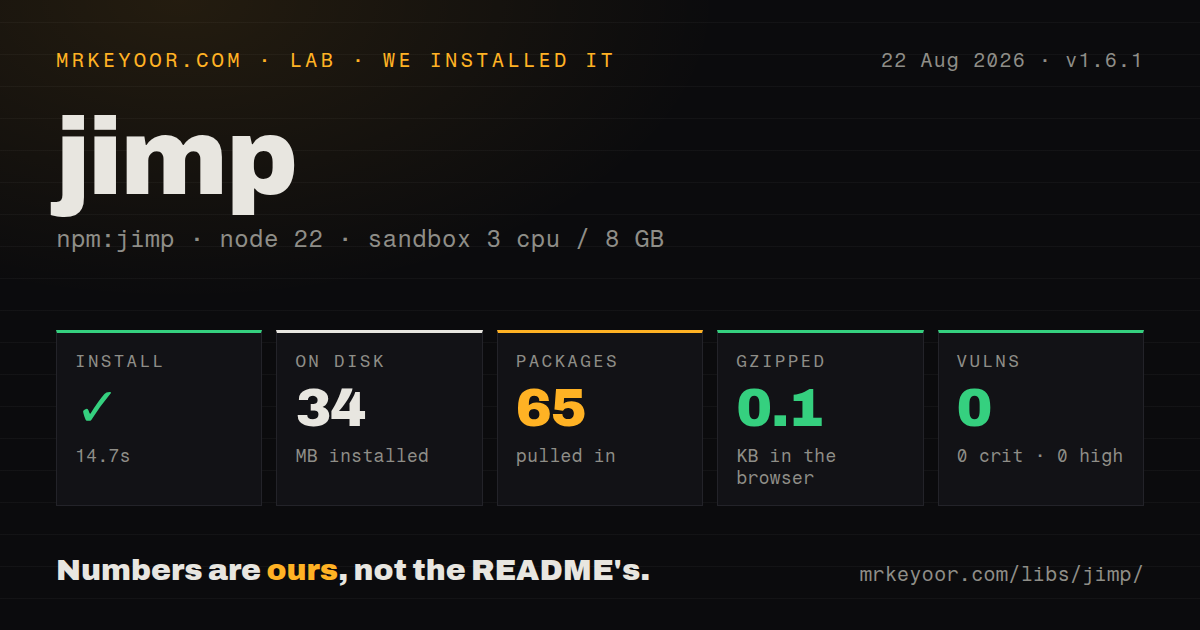
| Install | ✓ · 14.7s | 65 packages on disk · 34 MB |
| Import | ✓ | ESM import works · require() works · ESM package with exports map |
| Browser | 0.1 KB | gzipped (0 KB minified), bundled with esbuild |
| Types | ✓ | TypeScript types bundled |
| Known vulns | 0 | 0 critical · 0 high · 0 moderate · 0 low (npm audit) |
Answers from our run
Does jimp install cleanly?
Yes. In a fresh container with an empty cache, npm install jimp finished in 15 seconds, leaving 65 packages and 34 MB on disk. npm audit reported no known vulnerabilities.
How much does jimp add to a browser bundle?
0.1 KB gzipped (0 KB minified) when the whole package is bundled for the browser with esbuild. Importing only part of it is usually smaller.
Does jimp work with both ESM and CommonJS?
Yes. Both import 'jimp' and require('jimp') worked in Node 22 in our run. The package is published as ESM with an exports map.
Does jimp include TypeScript types?
Yes, type declarations ship inside the package, so no @types install is needed.
jimp or sharp: which should you use?
sharp: Use it for high-throughput server resizing, modern codecs, streaming, and libvips-backed memory behavior. Jimp 1.6.1 took 14.7 seconds and 34 MB across 65 packages in our sandbox, despite having no native build.
When should you not use jimp?
Large images or request-time throughput matter; Jimp's own setup guide warns that its JavaScript codecs are not optimized for performance and may use substantial memory
Use it if
- Native addons cannot be installed in the target Node 18+, browser, or worker environment
- The workload is modest, such as test fixtures, avatars, social cards, or occasional thumbnails
- You need direct RGBA access plus built-in bitmap transformations in JavaScript
- Both CommonJS and ESM consumers need the same API with bundled TypeScript declarations
- Large images or request-time throughput matter; Jimp's own setup guide warns that its JavaScript codecs are not optimized for performance and may use substantial memory
- You need AVIF, HEIF, SVG rendering, color-profile handling, or default WebP support; the standard package documents PNG, JPEG, BMP, GIF, and TIFF
- Your codebase depends on pre-1.0 tutorials using a default import, positional resize calls, quality(), or writeAsync(); version 1 changed each of those APIs
- A small browser payload is required: the convenience package declares 27 direct codec, core, utility, and plugin packages
- Untrusted decoding must be isolated: oversized or malformed inputs consume CPU and memory inside the same JavaScript process
Setup reality
Our clean Node 22 install of Jimp 1.6.1 took 14.7 seconds and left 65 packages using 34 MB on disk. The top-level package has 27 direct dependencies, no peers, and 3,360 KB unpacked. npm audit reported 0 known vulnerabilities. It requires Node 18 or newer, ships MIT-licensed TypeScript declarations, and supports both require() and ESM import through an exports map.
No compiler, system image library, credential, or config file is required. Version 1 uses import { Jimp } from 'jimp', new Jimp({ width, height }), and options objects for resize, crop, contain, cover, flip, and print. write(), getBuffer(), and getBase64() are the async output methods; older Async suffixes and the quality() mutator are gone. Encoder options now travel with the output call.
Decoded files become uncompressed RGBA bitmaps, and codecs may allocate more working memory. Enforce byte and pixel limits before Jimp reads an upload, cap concurrency, and move expensive batches to worker threads or a job process. Our esbuild import probe produced 0 KB minified and 0.1 KB gzipped, an unusable indicator of real browser cost because conditional browser exports and runtime-loaded pieces prevented that probe from representing the installed 34 MB graph.
Remote browser reads still obey CORS, uploads must be converted to ArrayBuffer or Buffer data, and bitmap fonts must be loaded as assets. WebP is a custom assembly using @jimp/wasm-webp with @jimp/core, defaultFormats, and defaultPlugins; installing jimp alone does not add it. Output format follows the MIME passed to getBuffer or the write destination, while metadata preservation needs a fixture test for each codec you care about.
Patterns
Read, resize, and save one image read-resize-write
import {Jimp} from 'jimp';

const image = await Jimp.read('./input.png');
image.resize({w: 320});
await image.write('./output.png');
This read resize write example follows Jimp 1.6.1. Check the current option types because pre-1.0 positional examples use a different API.
Encode an in-memory image as JPEG convert-buffer-to-jpeg
import {Jimp, JimpMime} from 'jimp';

const image = await Jimp.fromBuffer(uploadBuffer);
const jpeg = await image.getBuffer(JimpMime.jpeg, {
  quality: 80,
});
This convert buffer to jpeg example follows Jimp 1.6.1. Check the current option types because pre-1.0 positional examples use a different API.
Allocate a blank RGBA bitmap create-empty-image
import {Jimp} from 'jimp';

const canvas = new Jimp({
  width: 1200,
  height: 630,
  color: 0xffffffff,
});
await canvas.write('./card.png');
This create empty image example follows Jimp 1.6.1. Check the current option types because pre-1.0 positional examples use a different API.
Crop with a version 1 options object crop-region
const image = await Jimp.read('./photo.jpg');
image.crop({x: 100, y: 60, w: 800, h: 600});
await image.write('./crop.jpg', {quality: 85});
This crop region example follows Jimp 1.6.1. Check the current option types because pre-1.0 positional examples use a different API.
Fill a fixed thumbnail with cover make-cover-thumbnail
const image = await Jimp.read('./photo.jpg');
image.cover({w: 400, h: 300});
await image.write('./thumbnail.jpg', {quality: 82});
This make cover thumbnail example follows Jimp 1.6.1. Check the current option types because pre-1.0 positional examples use a different API.
Fit an image inside a background contain-with-letterbox
const image = await Jimp.read('./logo.png');
image.background = 0xffffffff;
image.contain({w: 512, h: 512});
await image.write('./logo-square.png');
This contain with letterbox example follows Jimp 1.6.1. Check the current option types because pre-1.0 positional examples use a different API.
Composite a watermark at explicit coordinates composite-watermark
const [photo, mark] = await Promise.all([
  Jimp.read('./photo.jpg'),
  Jimp.read('./watermark.png'),
]);

mark.resize({w: 180}).opacity(0.6);
photo.composite(mark, photo.width - mark.width - 24, photo.height - mark.height - 24);
await photo.write('./watermarked.jpg', {quality: 85});
This composite watermark example follows Jimp 1.6.1. Check the current option types because pre-1.0 positional examples use a different API.
Render text with a loaded bitmap font print-bitmap-text
import {Jimp, loadFont} from 'jimp';
import {SANS_32_WHITE} from 'jimp/fonts';

const image = await Jimp.read('./banner.png');
const font = await loadFont(SANS_32_WHITE);
image.print({font, x: 24, y: 24, text: 'Release 1.6'});
await image.write('./labeled.png');
This print bitmap text example follows Jimp 1.6.1. Check the current option types because pre-1.0 positional examples use a different API.
Visit each pixel in the bitmap edit-pixels
const image = await Jimp.read('./input.png');

image.scan((x, y, idx) => {
  image.bitmap.data[idx] = 255 - image.bitmap.data[idx];     // red
  image.bitmap.data[idx + 1] = 255 - image.bitmap.data[idx + 1]; // green
  image.bitmap.data[idx + 2] = 255 - image.bitmap.data[idx + 2]; // blue
});

await image.write('./inverted.png');
This edit pixels example follows Jimp 1.6.1. Check the current option types because pre-1.0 positional examples use a different API.
Apply several color operations in sequence chain-color-filters
const image = await Jimp.read('./input.jpg');
image
  .greyscale()
  .contrast(0.2)
  .brightness(0.1)
  .rotate(90)
  .flip({horizontal: true});

await image.write('./processed.png');
This chain color filters example follows Jimp 1.6.1. Check the current option types because pre-1.0 positional examples use a different API.
Clone before making an alternate edit preserve-original-branch
const original = await Jimp.read('./source.png');
const small = original.clone().resize({w: 320});
const large = original.clone().resize({w: 1280});

await Promise.all([
  small.write('./small.png'),
  large.write('./large.png'),
]);
This preserve original branch example follows Jimp 1.6.1. Check the current option types because pre-1.0 positional examples use a different API.
Assemble a Jimp build with WebP add-webp-format
import {createJimp} from '@jimp/core';
import {defaultFormats, defaultPlugins} from 'jimp';
import webp from '@jimp/wasm-webp';

const WebpJimp = createJimp({
  formats: [...defaultFormats, webp],
  plugins: defaultPlugins,
});

const image = await WebpJimp.read('./input.webp');
await image.write('./output.webp');
This add webp format example follows Jimp 1.6.1. Check the current option types because pre-1.0 positional examples use a different API.
Alternatives
| Package | Registry | Pick it when |
|---|---|---|
| sharp | npm | Use it for high-throughput server resizing, modern codecs, streaming, and libvips-backed memory behavior |
| pureimage | npm | Use it for a pure-JavaScript Canvas-like drawing surface without Jimp's complete plugin set |
| canvas | npm | Use it when server-side Canvas 2D paths, fonts, and drawing semantics justify a native dependency |
More utils guides
lru-cache · type-fest · ajv · zod · p-limit · find-up · the whole shelf →
How this guide is made: grounded in the library's documentation, release notes, changelog, and issue history, on a fixed rubric — not a hands-on install of every release. The 50 most-downloaded entries are additionally install-verified in clean containers. Corrections: contact the desk.