class-variance-authority review
We measured class-variance-authority 0.7.1 at 1.1 KB minified and 0.6 KB gzipped in our browser build. CVA turns a closed set of component choices, such as `intent` and `density`, into one class string. The definition is an ordinary object, `VariantProps` derives the caller's TypeScript shape, and `compoundVariants` attaches classes to exact combinations. It creates no CSS and has no React or Tailwind peer dependency. Version 0.7.1 added Apache-2.0 license headers and changed its sole dependency from `clsx` 2.0.0 to `^2.1.1`. The exported CVA logic gained no styling feature. The separate `cva` package carries the 1.0 beta, so examples written for that beta do not describe this package.
Our class-variance-authority 0.7.1 install took 0.3 seconds, occupied 1 MB across 2 packages, bundled to 0.6 KB gzipped, and returned 0 audit findings. Install it for typed variant tables and compound class rules. Keep `clsx` alone for short conditions, and choose a slots-aware tool when one component needs several class outputs.
We installed it
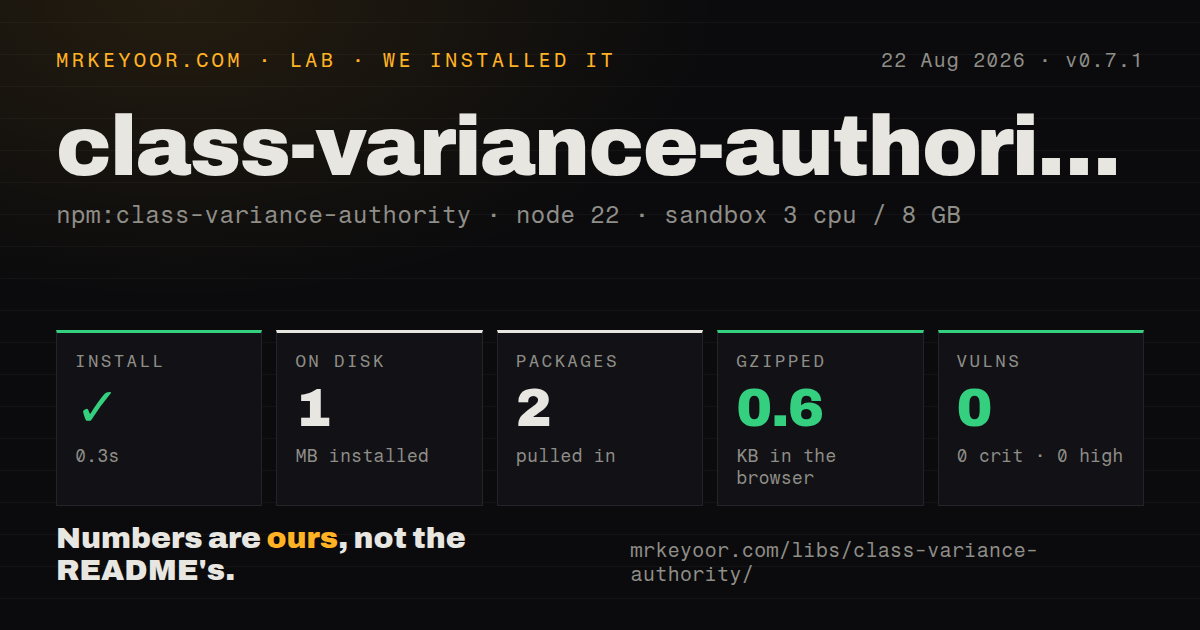
| Install | ✓ · 0.3s | 2 packages on disk · 1 MB |
| Import | ✓ | ESM import works · require() works · CommonJS package with exports map |
| Browser | 0.6 KB | gzipped (1.1 KB minified), bundled with esbuild |
| Types | ✓ | TypeScript types bundled |
| Known vulns | 0 | 0 critical · 0 high · 0 moderate · 0 low (npm audit) |
Answers from our run
Does class-variance-authority install cleanly?
Yes. In a fresh container with an empty cache, npm install class-variance-authority finished in 0.3s, leaving 2 packages and 1 MB on disk. npm audit reported no known vulnerabilities.
How much does class-variance-authority add to a browser bundle?
0.6 KB gzipped (1.1 KB minified) when the whole package is bundled for the browser with esbuild. Importing only part of it is usually smaller.
Does class-variance-authority work with both ESM and CommonJS?
Yes. Both import 'class-variance-authority' and require('class-variance-authority') worked in Node 22 in our run. The package is published as CommonJS with an exports map.
Does class-variance-authority include TypeScript types?
Yes, type declarations ship inside the package, so no @types install is needed.
class-variance-authority or clsx: which should you use?
clsx: Choose clsx 2.1.1 for direct boolean and conditional class joining when a typed variant vocabulary would add ceremony. Our class-variance-authority 0.7.1 install took 0.3 seconds, occupied 1 MB across 2 packages, bundled to 0.6 KB gzipped, and returned 0 audit findings.
When should you not use class-variance-authority?
Skip 0.7.1 when the component has one boolean or a couple of short conditions. The included clsx function can express that directly, without a variant table.
Discussed on
Use it if
- Version 0.7.1 fits a component with fixed choices such as intent, density, or emphasis when those values should become TypeScript unions for callers.
- A class should appear only for a particular combination, such as a compact destructive button that also has an icon.
- The same style selector needs to run in React, Vue, Svelte, a server template, or a static build without taking a framework dependency.
- Your design system benefits from keeping defaults and every allowed class branch in one reviewable table beside the component.
- Skip 0.7.1 when the component has one boolean or a couple of short conditions. The included `clsx` function can express that directly, without a variant table.
- Callers need first-class responsive values such as `{ size: { sm: 'small', lg: 'large' } }`. The stable FAQ says responsive variants are unsupported.
- Caller-supplied Tailwind utilities must reliably replace defaults. CVA concatenates both classes. Conflict resolution requires a separate rule or `tailwind-merge`.
- One selector must return named classes for a root, icon, label, and other parts. Version 0.7.1 returns one string and has no slots API.
- A variant must be mandatory in the inferred type. `VariantProps` leaves every variant optional, and the official recipe rebuilds required fields with TypeScript utility types.
Setup reality
We installed class-variance-authority 0.7.1 in our measurement setup: a fresh, unprivileged Node 22 Bookworm sandbox with 3 CPUs and 8 GB of RAM. npm succeeded in 0.3 seconds and left 2 packages using 1 MB on disk. Our package inspection found 1 direct dependency, 0 peer dependencies, and 52 KB unpacked under Apache-2.0. npm audit found 0 known vulnerabilities at every severity. The browser check produced 1.1 KB minified and 0.6 KB gzipped.
Version 0.7.1 needs no credentials, environment variables, provider account, or package-specific config file. TypeScript declarations come in the package. Its exports map worked with both CommonJS require() and ESM import in our sandbox. Tailwind is optional. If you want class autocomplete inside cva() calls, the stable docs provide editor regex settings, which affect the editor rather than runtime output.
At runtime, CVA passes class inputs through its sole dependency, clsx, and returns synchronously. It appends a caller's class or className after the configured branches, but it does not decide which conflicting Tailwind utility wins. Tailwind's generated CSS order still controls the result. The stable documentation wraps the final string with tailwind-merge when deterministic utility replacement is part of the component contract.
In 0.7.1, an omitted or undefined variant uses its configured default, while null suppresses that default for one call. Every condition in a compound entry must match. An array means any value in that array may match. Stable CVA has no built-in responsive variant, slot result, or composition method. Combine independent selectors with cx, and use Required, Pick, and Omit when the public prop type must require a choice.
Patterns
Map named choices to classes define-variant-selector
import { cva } from 'class-variance-authority';

const linkClasses = cva('inline-flex items-center rounded', {
  variants: {
    intent: {
      primary: 'bg-blue-700 text-white',
      danger: 'bg-red-700 text-white',
    },
    density: {
      compact: 'h-8 px-3 text-sm',
      roomy: 'h-11 px-5 text-base',
    },
  },
});

linkClasses({ intent: 'primary', density: 'compact' });
In 0.7.1, `cva()` returns a selector function. Calling that selector produces one string containing the base classes and each matched branch.
Apply defaults when props are absent set-variant-defaults
import { cva } from 'class-variance-authority';

const badgeClasses = cva('inline-flex rounded-full', {
  variants: {
    tone: { quiet: 'bg-slate-100', info: 'bg-cyan-100' },
    size: { sm: 'px-2 py-0.5 text-xs', md: 'px-3 py-1 text-sm' },
  },
  defaultVariants: {
    tone: 'quiet',
    size: 'md',
  },
});

badgeClasses();
This call receives both 0.7.1 defaults because neither `tone` nor `size` was supplied. An explicit value replaces its corresponding default.
Represent a boolean styling state model-boolean-state
import { cva } from 'class-variance-authority';

const fieldClasses = cva('rounded border px-3 py-2', {
  variants: {
    invalid: {
      true: 'border-red-600 text-red-950',
      false: 'border-slate-300',
    },
  },
  defaultVariants: { invalid: false },
});

fieldClasses({ invalid: true });
Write `true` and `false` as object keys in the definition. `VariantProps` exposes the caller-facing `invalid` value as a boolean.
Match one combination of variants add-compound-rule
import { cva } from 'class-variance-authority';

const controlClasses = cva('rounded border', {
  variants: {
    tone: { neutral: 'border-slate-300', danger: 'border-red-500' },
    iconOnly: { true: 'aspect-square', false: 'px-4' },
  },
  compoundVariants: [
    {
      tone: 'danger',
      iconOnly: true,
      class: 'ring-2 ring-red-200',
    },
  ],
});
The extra ring classes appear only when both conditions match. Version 0.7.1 accepts either `class` or `className` on a compound entry.
Target several values with one rule share-compound-rule
import { cva } from 'class-variance-authority';

const noticeClasses = cva('rounded p-3', {
  variants: {
    tone: { info: 'bg-sky-50', warning: 'bg-amber-50', error: 'bg-rose-50' },
    bordered: { true: 'border', false: null },
  },
  compoundVariants: [
    {
      tone: ['warning', 'error'],
      bordered: true,
      className: 'border-current',
    },
  ],
});
An array in one compound condition means any listed value may satisfy that condition. The other fields in the same entry must still match.
Derive the TypeScript prop union extract-variant-types
import { cva, type VariantProps } from 'class-variance-authority';

const textClasses = cva('', {
  variants: {
    weight: { regular: 'font-normal', strong: 'font-semibold' },
    muted: { true: 'text-slate-500', false: 'text-slate-950' },
  },
});

type TextVariants = VariantProps<typeof textClasses>;
`TextVariants` gets the configured string unions and boolean conversion from the selector. Both fields remain optional in 0.7.1.
Make one inferred choice mandatory require-variant
import { cva, type VariantProps } from 'class-variance-authority';

const bannerClasses = cva('rounded p-4', {
  variants: {
    tone: { info: 'bg-sky-50', warning: 'bg-amber-50' },
  },
});

type InferredBannerProps = VariantProps<typeof bannerClasses>;
type BannerProps =
  Omit<InferredBannerProps, 'tone'> &
  Required<Pick<InferredBannerProps, 'tone'>>;

const getBannerClass = (props: BannerProps) => bannerClasses(props);
CVA has no required-variant setting. This is the stable documentation's utility-type pattern, and TypeScript now rejects a call that omits `tone`.
Use variant props on a React button connect-react-props
import type { ButtonHTMLAttributes } from 'react';
import { cva, type VariantProps } from 'class-variance-authority';

const buttonClasses = cva('rounded border', {
  variants: {
    tone: { neutral: 'border-slate-300', danger: 'border-red-500' },
    iconOnly: { true: 'aspect-square', false: 'px-4' },
  },
});

type ButtonProps = ButtonHTMLAttributes<HTMLButtonElement> &
  VariantProps<typeof buttonClasses>;

export function Button({ tone, iconOnly, className, ...buttonProps }: ButtonProps) {
  return (
    <button
      {...buttonProps}
      className={buttonClasses({ tone, iconOnly, className })}
    />
  );
}
CVA has 0 peer dependencies, so React supplies the element props. Pass only the variant fields and caller class into the generated selector.
Add a class at the call site append-caller-class
import { cva } from 'class-variance-authority';

const captionClasses = cva('text-sm font-medium', {
  variants: {
    subdued: { true: 'text-slate-500', false: 'text-slate-900' },
  },
});

captionClasses({
  subdued: true,
  className: 'mb-2 block',
});
The generated selector appends `className` after its configured classes. It joins the strings without resolving CSS or Tailwind conflicts.
Join two selectors with cx compose-selectors-manually
import { cva, cx, type VariantProps } from 'class-variance-authority';

const spacing = cva('', {
  variants: { compact: { true: 'p-2', false: 'p-6' } },
});
const surface = cva('rounded', {
  variants: { raised: { true: 'shadow-md', false: 'border' } },
});

type CardProps = VariantProps<typeof spacing> &
  VariantProps<typeof surface> & { className?: string };

const cardClasses = ({ compact, raised, className }: CardProps = {}) =>
  cx(spacing({ compact }), surface({ raised }), className);
Stable 0.7.1 has no composition function. Its documentation combines selector results with `cx`, which is the package's alias for `clsx`.
Merge Tailwind overrides explicitly resolve-tailwind-conflicts
import { cva } from 'class-variance-authority';
import { twMerge } from 'tailwind-merge';

const controlClasses = cva('rounded px-4', {
  variants: {
    size: { sm: 'h-8 text-sm', lg: 'h-11 text-base' },
  },
});

function mergedControl(
  props: Parameters<typeof controlClasses>[0],
) {
  return twMerge(controlClasses(props));
}

mergedControl({ size: 'sm', className: 'px-8' });
CVA leaves both padding utilities in its string. The separate `tailwind-merge` call removes the conflicting earlier utility according to its own rules.
Turn off a default for one call suppress-one-default
import { cva } from 'class-variance-authority';

const panelClasses = cva('rounded border', {
  variants: {
    surface: { paper: 'bg-white', muted: 'bg-slate-100' },
  },
  defaultVariants: { surface: 'paper' },
});

panelClasses({ surface: null }); // rounded border
In 0.7.1, `null` suppresses a configured default for that invocation. Passing `undefined` or omitting `surface` would apply `paper`.
Alternatives
| Package | Registry | Pick it when |
|---|---|---|
| clsx | npm | Choose clsx 2.1.1 for direct boolean and conditional class joining when a typed variant vocabulary would add ceremony. |
| tailwind-variants | npm | Choose it when Tailwind components need typed variants plus named slots for several rendered parts. |
| @vanilla-extract/recipes | npm | Choose it when variants should produce type-safe, build-time CSS through the vanilla-extract toolchain. |
| tailwind-merge | npm | Choose it when the actual problem is removing conflicting Tailwind utilities rather than defining variant props. |
More web frontend guides
postcss · react · react-dom · tailwindcss · clsx · htmlparser2 · the whole shelf →
How this guide is made: grounded in the library's documentation, release notes, changelog, and issue history, on a fixed rubric — not a hands-on install of every release. The 50 most-downloaded entries are additionally install-verified in clean containers. Corrections: contact the desk.