preact review
Our Node 22 run put Preact 10.29.8's complete root import at 11.5 KB minified and 4.8 KB gzipped. Preact is a virtual-DOM UI library with JSX, components, hooks, context, refs, rendering, and hydration. Applications use preact directly, while preact/compat provides React-shaped entry points for many existing components. The current stable release batches state updates inside flushSync and skips traversal of retained subtrees. Version 11 is still a release candidate, so v10.x remains the branch for stable patches.
Our Preact 10.29.8 bundle was 4.8 KB gzipped, with a 1-second install and 0 audit findings, which makes it a strong fit for widgets and islands with a real byte ceiling. Keep React when compatibility testing and aliases would cost more engineering time than that measured saving earns.
We installed it
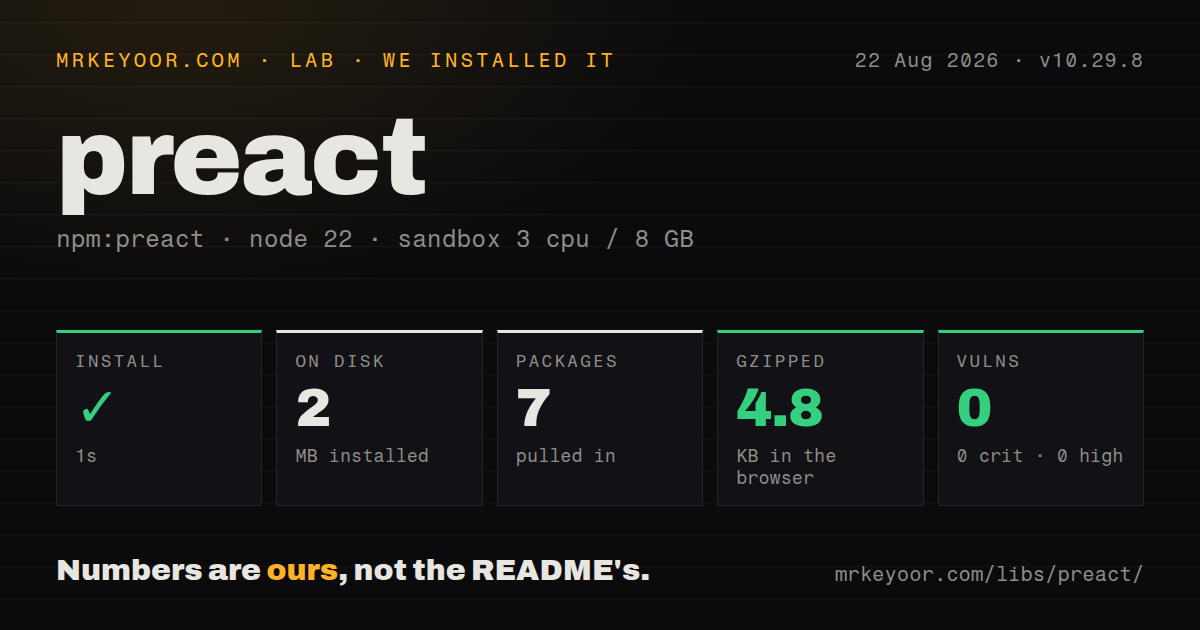
| Install | ✓ · 1s | 7 packages on disk · 2 MB |
| Import | ✓ | ESM import works · require() works · CommonJS package with exports map |
| Browser | 4.8 KB | gzipped (11.5 KB minified), bundled with esbuild |
| Types | ✓ | TypeScript types bundled |
| Known vulns | 0 | 0 critical · 0 high · 0 moderate · 0 low (npm audit) |
Answers from our run
Does preact install cleanly?
Yes. In a fresh container with an empty cache, npm install preact finished in 1 seconds, leaving 7 packages and 2 MB on disk. npm audit reported no known vulnerabilities.
How much does preact add to a browser bundle?
4.8 KB gzipped (11.5 KB minified) when the whole package is bundled for the browser with esbuild. Importing only part of it is usually smaller.
Does preact work with both ESM and CommonJS?
Yes. Both import 'preact' and require('preact') worked in Node 22 in our run. The package is published as CommonJS with an exports map.
Does preact include TypeScript types?
Yes, type declarations ship inside the package, so no @types install is needed.
preact or react: which should you use?
react: Use it for exact React semantics, Server Components, React Native, and the broadest component support. Our Preact 10.29.8 bundle was 4.8 KB gzipped, with a 1-second install and 0 audit findings, which makes it a strong fit for widgets and islands with a real byte ceiling.
When should you not use preact?
The application depends on React Server Components, React Native, Next.js App Router behavior, or ReactDOM internals; preact/compat does not provide those platforms
Discussed on
- hnPreact, a fast 3k React alternative224 points
- hnPreact Signals159 points
- hnPreact: Fast 3kb React Alternative with the Same API, Components and Virtual DOM117 points
- hnPreact: Countering the Perception That Open Source Must Be Free103 points
- hnPreact : a smaller, faster React alternative74 points
Use it if
- A widget, island, embed, or mobile page needs components and hooks inside a tightly measured JavaScript budget
- You control the component code and can import Preact APIs directly instead of depending on exact React behavior
- Your framework already treats Preact as a supported renderer, as Astro and other island-oriented stacks do
- You have a tested React application small enough to evaluate preact/compat aliases against every third-party component
- The application depends on React Server Components, React Native, Next.js App Router behavior, or ReactDOM internals; preact/compat does not provide those platforms
- Third-party packages assume React's scheduler, event details, Suspense edge cases, or test renderer; matching imports cannot promise matching runtime behavior
- Charts, editors, analytics, or a design system dominate the shipped JavaScript; changing the 4.8 KB gzipped root import may barely move the total
- Your form code relies on React's onChange convention; Preact core follows native events and uses onInput for each text edit
- You want version 11 features in production today; 11.0.0-rc.1 is a prerelease, and the README sends stable v10 fixes to the v10.x branch
Setup reality
We installed Preact 10.29.8 in a fresh Node 22 container in 1 second. The result was 7 packages and 2 MB on disk. npm audit reported 0 known vulnerabilities across critical, high, moderate, and low severities. The package declares 0 direct dependencies and 1 peer dependency, with 1,956 KB unpacked. Bundled TypeScript declarations are present. require() and ESM import both worked through the package's exports map.
JSX is the first configuration step. With the automatic transform, set jsxImportSource to preact in tsconfig and in the bundler when it has a separate setting. Hooks live at preact/hooks. React-oriented code needs aliases for react, react-dom, and their JSX runtime paths to preact/compat. A runtime alias does not remove conflicting @types/react declarations, so run the type checker on actual components before declaring a migration finished.
The single peer is preact-render-to-string version 5 or newer. Install it for server rendering, then call hydrate only when the browser's first tree matches the generated markup. Import preact/debug before application code to get development checks and keep that import out of production. Core event handlers receive native DOM events. For controlled text inputs, onInput sees each edit; onChange follows the browser's later change event.
Our esbuild case measured 11.5 KB minified and 4.8 KB gzipped for import * from preact. Router, compat, signals, SSR, and product code are separate costs. Updates may be queued, and 10.29.8 now batches updates inside flushSync while avoiding work in retained subtrees. Tests that inspect DOM immediately after state changes should use act() from preact/test-utils. Measure the production entry, since the root-package number does not predict a compat-heavy application.
Patterns
Render a component into the DOM render-first-component
import { render } from 'preact'

function Greeting({ name }) {
  return <h1>Hello {name}</h1>
}

render(<Greeting name="Mina" />, document.getElementById('app'))
A later render() call on the same container updates the existing Preact tree. It does not append a second application.
Point TypeScript JSX at Preact configure-typescript-jsx
{
  "compilerOptions": {
    "jsx": "react-jsx",
    "jsxImportSource": "preact"
  }
}
jsxImportSource selects preact/jsx-runtime for the automatic transform. Some bundlers need the same setting in their own configuration.
Update state from a button manage-local-state
import { useState } from 'preact/hooks'

export function Counter() {
  const [count, setCount] = useState(0)
  return <button onClick={() => setCount(value => value + 1)}>Count: {count}</button>
}
Hooks import from preact/hooks. Functional updates avoid closing over an older count when updates are batched.
Subscribe and clean up an effect run-effect-cleanup
import { useEffect } from 'preact/hooks'

function OnlineStatus() {
  useEffect(() => {
    const report = () => console.log(navigator.onLine)
    window.addEventListener('online', report)
    return () => window.removeEventListener('online', report)
  }, [])

  return null
}
The returned function runs during cleanup. The empty dependency list keeps this browser subscription tied to the component lifetime.
Track every text-field edit control-text-input
import { useState } from 'preact/hooks'

function SearchBox() {
  const [query, setQuery] = useState('')
  return (
    <input
      value={query}
      onInput={event => setQuery(event.currentTarget.value)}
    />
  )
}
Preact core uses native event behavior. onInput fires for each text edit, while native onChange waits for the browser's change event.
Pass a value without prop drilling share-context-value
import { createContext } from 'preact'
import { useContext } from 'preact/hooks'

const Theme = createContext('light')

function Label() {
  const theme = useContext(Theme)
  return <span class={`label label-${theme}`}>Status</span>
}

render(<Theme.Provider value="dark"><Label /></Theme.Provider>, root)
A consumer without a matching Provider receives the createContext() default, which is light in this example.
Reach a DOM node through a ref focus-with-ref
import { useRef } from 'preact/hooks'

function FocusButton() {
  const input = useRef(null)
  return (
    <>
      <input ref={input} />
      <button onClick={() => input.current?.focus()}>Focus</button>
    </>
  )
}
The DOM element appears in current after mount. Read it from an event or effect rather than during the initial render.
Avoid repeating an expensive calculation memoize-derived-value
import { useMemo } from 'preact/hooks'

function Results({ rows, query }) {
  const visible = useMemo(
    () => rows.filter(row => row.name.includes(query)),
    [rows, query],
  )
  return <ul>{visible.map(row => <li key={row.id}>{row.name}</li>)}</ul>
}
useMemo caches against dependency identity. A newly created rows array recomputes the filter even when its contents match.
Turn a component tree into HTML render-on-server
import renderToString from 'preact-render-to-string'
import { App } from './app.js'

const html = renderToString(<App url="/pricing" />)
Server rendering comes from the separate preact-render-to-string peer. The measured Preact package does not include that renderer.
Hydrate matching server HTML hydrate-server-markup
import { hydrate } from 'preact'
import { App } from './app.js'

hydrate(<App url={location.pathname} />, document.getElementById('app'))
The first client tree must match the server output. Browser-only branches should wait for an effect or use a stable server fallback.
Route React imports through compat in Vite alias-react-packages
import { defineConfig } from 'vite'
import preact from '@preact/preset-vite'

export default defineConfig({
  plugins: [preact()],
})
The preset supplies JSX handling and common React aliases. It cannot fix a dependency that imports React internals or requires a React-only platform.
Flush an update in a DOM test test-state-update
import { act } from 'preact/test-utils'
import { render } from 'preact'

act(() => {
  render(<Counter />, root)
})

act(() => {
  root.querySelector('button').click()
})
expect(root.textContent).toContain('Count: 1')
act() flushes queued rendering and effects before the assertion. This matters when 10.29.8 batches updates through flushSync paths.
Alternatives
| Package | Registry | Pick it when |
|---|---|---|
| react | npm | Use it for exact React semantics, Server Components, React Native, and the broadest component support. |
| solid-js | npm | Use it when fine-grained reactivity fits better than virtual-DOM updates and React compatibility is irrelevant. |
| lit | npm | Use it for custom elements intended to cross framework and plain-HTML boundaries. |
| svelte | npm | Use it when a compiler and Svelte's component syntax are acceptable tradeoffs for the application. |
More web frontend guides
postcss · react · react-dom · tailwindcss · clsx · htmlparser2 · the whole shelf →
How this guide is made: grounded in the library's documentation, release notes, changelog, and issue history, on a fixed rubric — not a hands-on install of every release. The 50 most-downloaded entries are additionally install-verified in clean containers. Corrections: contact the desk.