@react-three/fiber review
@react-three/fiber 9.7.0 is a React 19 renderer for Three.js scenes. JSX elements construct actual Three.js objects, `Canvas` owns renderer state and events, and hooks expose the frame loop, camera, viewport, loaders, raycaster, and scene. The release fixes keyed child reordering, pierced-prop resets, host-prop synchronization, and reconstruction of multiple instances; it also matches React DOM event priorities and enables reconciler microtasks. Our full-package browser build measured 887.8 KB minified and 238.4 KB gzipped, before application models, textures, or helper packages.
Our @react-three/fiber 9.7.0 full import measured 238.4 KB gzipped, and the install brought 8 peer contracts before any model or texture arrived. Pay that cost for a real React 19 Three.js application with shared components and scene tooling; use plain Three.js or a lighter visual when React reconciliation adds no product value.
We installed it
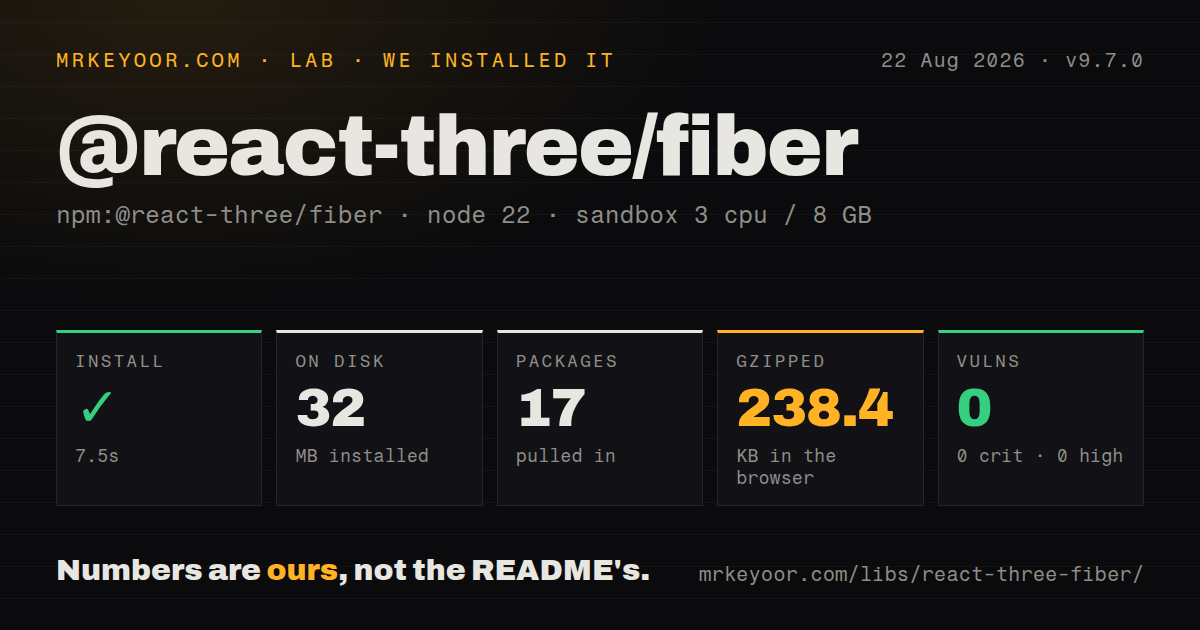

| Install | ✓ · 7.5s | 17 packages on disk · 32 MB |
| Import | ✓ | ESM import works · require() works · CommonJS package |
| Browser | 238.4 KB | gzipped (887.8 KB minified), bundled with esbuild |
| Types | ✓ | TypeScript types bundled |
| Known vulns | 0 | 0 critical · 0 high · 0 moderate · 0 low (npm audit) |
Answers from our run
Does @react-three/fiber install cleanly?
Yes. In a fresh container with an empty cache, npm install @react-three/fiber finished in 8 seconds, leaving 17 packages and 32 MB on disk. npm audit reported no known vulnerabilities.
How much does @react-three/fiber add to a browser bundle?
238.4 KB gzipped (887.8 KB minified) when the whole package is bundled for the browser with esbuild. Importing only part of it is usually smaller.
Does @react-three/fiber work with both ESM and CommonJS?
Yes. Both import '@react-three/fiber' and require('@react-three/fiber') worked in Node 22 in our run. The package is published as CommonJS.
Does @react-three/fiber include TypeScript types?
Yes, type declarations ship inside the package, so no @types install is needed.
@react-three/fiber or three: which should you use?
three: Choose it for direct scene ownership and an imperative loop without React reconciliation. Our @react-three/fiber 9.7.0 full import measured 238.4 KB gzipped, and the install brought 8 peer contracts before any model or texture arrived.
When should you not use @react-three/fiber?
The application remains on React 18. The project pairs Fiber 9 with React 19 and tells React 18 users to stay on Fiber 8.
Use it if
- A React 19 product needs an interactive Three.js scene whose objects map cleanly to reusable components and application state.
- The team knows Three.js and wants direct refs to its meshes, materials, cameras, loaders, and renderer while using JSX for composition.
- Suspense-based asset loading, pointer events, demand rendering, or the pmndrs helper ecosystem will replace substantial local glue.
- The same scene architecture must cover browser WebGL and a separately configured Expo React Native target.
- The application remains on React 18. The project pairs Fiber 9 with React 19 and tells React 18 users to stay on Fiber 8.
- The visual is a small decorative effect. Our import reached 238.4 KB gzipped before Three.js assets, so CSS, Canvas 2D, or a focused WebGL component may cost much less.
- Nobody on the team understands cameras, materials, coordinate systems, draw calls, or texture memory. The README says users should learn both React and Three.js.
- An imperative engine loop is the primary architecture. Plain Three.js avoids reconciling external mutations with React props, disposal, and Canvas context.
- Keyboard, screen-reader, reduced-motion, and non-WebGL fallbacks have no budget. Fiber handles 3D pointer events, while product accessibility still needs a DOM plan.
- React Native support must work without Expo-specific peers and Metro changes. The package declares Expo, GL, asset, filesystem, and React Native peer ranges for that entry point.
Setup reality
Our install of @react-three/fiber 9.7.0 completed in 7.5 seconds and left 17 packages using 32 MB. The package is 2276 KB unpacked, with 10 direct dependencies and 8 peer dependencies. npm audit reported zero known vulnerabilities. It ships CommonJS without an exports map; require() and ESM import worked in our Node 22 check. TypeScript declarations are included.
Peer alignment is the first blocker. Fiber 9.7.0 requires React and React DOM >=19 <19.3 plus Three.js >=0.156; Fiber 8 is the documented React 18 line. Browser scenes belong behind a client boundary in server-rendered frameworks. Canvas creates context for useFrame and useThree, so those hooks throw outside its tree. Model and texture URLs still need correct public paths, CORS, loading fallbacks, and error handling.
The default frame loop runs continuously. Use frameloop="demand" for mostly static scenes and call invalidate() after an imperative change. Inside useFrame, mutate Three.js refs and scale movement by the delta in seconds instead of setting React state every frame. useLoader caches by URL; mutating or disposing a cached scene can damage another component using the same object. Reuse geometry and materials, and instance repeated meshes when draw calls become the bottleneck.
Our esbuild test of a namespace import produced 887.8 KB minified and 238.4 KB gzipped. That number excludes GLB files, textures, Drei, physics, post-processing, and decoder binaries. React Native adds the /native entry plus compatible Expo packages, and Metro may need GLB, image, and CJS extensions. On the web, provide a useful DOM fallback for renderer creation, context loss, reduced motion, keyboard use, and devices that cannot sustain the scene's GPU load.
Patterns
Create a lit Three.js scene render-scene
import { Canvas } from '@react-three/fiber'

export function ProductScene() {
  return (
    <Canvas camera={{ position: [0, 0, 5], fov: 45 }}>
      <ambientLight intensity={0.6} />
      <directionalLight position={[4, 5, 3]} intensity={2} />
      <mesh>
        <boxGeometry args={[1, 1, 1]} />
        <meshStandardMaterial color="tomato" />
      </mesh>
    </Canvas>
  )
}
`Canvas` creates the renderer, scene, camera, resize observer, raycaster, and event context in a browser client component.
Advance rotation with frame delta animate-object
import { useRef } from 'react'
import { useFrame } from '@react-three/fiber'
import type { Mesh } from 'three'

function Rotor() {
  const mesh = useRef<Mesh>(null!)
  useFrame((_, delta) => {
    mesh.current.rotation.y += delta * 0.6
  })
  return <mesh ref={mesh}><boxGeometry /><meshNormalMaterial /></mesh>
}
In 9.7.0 the `delta` value is seconds; mutate the mesh ref instead of scheduling React state on every frame.
Subscribe to one renderer value select-canvas-state
import { useThree } from '@react-three/fiber'

function CameraBridge() {
  const camera = useThree((state) => state.camera)
  const invalidate = useThree((state) => state.invalidate)
  return null
}
`useThree` only works beneath `Canvas`; selectors react to store changes, not deep imperative mutations such as `camera.zoom` edits.
Suspend while a GLTF model loads load-gltf
import { Suspense } from 'react'
import { useLoader } from '@react-three/fiber'
import { GLTFLoader } from 'three/examples/jsm/loaders/GLTFLoader.js'

function Model() {
  const gltf = useLoader(GLTFLoader, '/models/chair.glb')
  return <primitive object={gltf.scene} />
}

<Canvas><Suspense fallback={null}><Model /></Suspense></Canvas>
`useLoader` caches the result by URL. Clone before scene-specific mutation and avoid disposing an object shared through that cache.
Start a GLTF request early preload-model
import { useLoader } from '@react-three/fiber'
import { GLTFLoader } from 'three/examples/jsm/loaders/GLTFLoader.js'

useLoader.preload(GLTFLoader, '/models/chair.glb')
Preloading only hits the same cache when the later loader class, URL, and extension setup match.
Stop a click at the nearest mesh handle-mesh-events
function Selectable() {
  return (
    <mesh onClick={(event) => {
      event.stopPropagation()
      choose(event.object.uuid)
    }}>
      <sphereGeometry />
      <meshStandardMaterial color="royalblue" />
    </mesh>
  )
}
R3F events can reach multiple ray intersections; `stopPropagation()` also blocks objects behind the selected mesh.
Wake a static scene after mutation render-on-demand
function Movable() {
  const mesh = useRef(null)
  const invalidate = useThree((state) => state.invalidate)
  return <mesh ref={mesh} onClick={() => {
    mesh.current.position.x += 1
    invalidate()
  }}><boxGeometry /><meshNormalMaterial /></mesh>
}

<Canvas frameloop="demand"><Movable /></Canvas>
`invalidate()` schedules a frame; imperative changes are otherwise invisible to a demand loop.
Reuse geometry and material objects share-gpu-resources
const shape = new THREE.SphereGeometry(1, 24, 24)
const finish = new THREE.MeshStandardMaterial({ color: 'navy' })

function Pair() {
  return <>
    <mesh geometry={shape} material={finish} position={[-2, 0, 0]} />
    <mesh geometry={shape} material={finish} position={[2, 0, 0]} />
  </>
}
Two meshes can share 1 geometry and 1 material, avoiding duplicate GPU compilation and memory.
Update transforms on an InstancedMesh instance-meshes
function Dots({ count = 500 }) {
  const mesh = useRef(null)
  useLayoutEffect(() => {
    const helper = new THREE.Object3D()
    for (let i = 0; i < count; i += 1) {
      helper.position.set(i % 25, Math.floor(i / 25), 0)
      helper.updateMatrix()
      mesh.current.setMatrixAt(i, helper.matrix)
    }
    mesh.current.instanceMatrix.needsUpdate = true
  }, [count])
  return <instancedMesh ref={mesh} args={[undefined, undefined, count]}>
    <circleGeometry args={[0.1, 8]} /><meshBasicMaterial />
  </instancedMesh>
}
Set `instanceMatrix.needsUpdate` after writing transforms; 500 instances then share geometry, material, and a draw call.
Inherit mesh props in TypeScript type-component-props
import type { ThreeElements } from '@react-three/fiber'

type TileProps = ThreeElements['mesh'] & { tone?: string }

function Tile({ tone = 'orange', ...props }: TileProps) {
  return <mesh {...props}><boxGeometry /><meshStandardMaterial color={tone} /></mesh>
}
`ThreeElements['mesh']` derives constructor props, object properties, refs, and R3F events from the installed Three.js types.
Expose a Three.js class as JSX register-three-class
import { extend, useThree } from '@react-three/fiber'
import { OrbitControls } from 'three/examples/jsm/controls/OrbitControls.js'

extend({ OrbitControls })

function Controls() {
  const { camera, gl } = useThree()
  return <orbitControls args={[camera, gl.domElement]} />
}
`extend()` registers runtime construction; TypeScript also needs intrinsic-element augmentation, while Drei's control component supplies that typing and cleanup.
Provide a non-WebGL product view show-webgl-fallback
<Canvas fallback={<img src="/chair.jpg" alt="Blue chair, front view" />}>
  <ChairScene />
</Canvas>
The fallback handles renderer creation failure. Asset errors and later context loss still belong in an error boundary with an equivalent DOM path.
Alternatives
| Package | Registry | Pick it when |
|---|---|---|
| three | npm | Choose it for direct scene ownership and an imperative loop without React reconciliation. |
| react-babylonjs | npm | Choose it when React composition should sit on Babylon.js rather than the Three.js engine and ecosystem. |
| @tresjs/core | npm | Choose it for a declarative Three.js renderer in a Vue application. |
| @react-three/drei | npm | Add it beside Fiber when controls, loaders, staging helpers, and common scene abstractions are the missing layer. |
More web frontend guides
postcss · react · react-dom · tailwindcss · clsx · htmlparser2 · the whole shelf →
How this guide is made: grounded in the library's documentation, release notes, changelog, and issue history, on a fixed rubric — not a hands-on install of every release. The 50 most-downloaded entries are additionally install-verified in clean containers. Corrections: contact the desk.