three review
three 0.185.1 is a browser rendering library with a scene graph, cameras, geometry, materials, textures, lights, animation, and WebGL or WebGPU backends. The main entry contains the scene and renderer foundations; controls, glTF loaders, post-processing, exporters, and alternate renderers use `three/addons`. r185 removes deprecated calls, expands WebGPU and WebXR behavior, adds `Material.fromJSON()`, and fixes geometry attributes, context restore, animation warping, and asset loading. Our broad import was 713.3 KB minified and 182.4 KB gzipped, and the installed package contained no TypeScript declarations.
three 0.185.1 installed as one 26 MB package in 1.1 seconds on our box, passed npm audit, and produced a 182.4 KB gzipped full import with no bundled TypeScript declarations. Choose it when a team wants browser 3D building blocks and owns the render loop; skip it for 2D interfaces or projects that need a full game engine.
We installed it
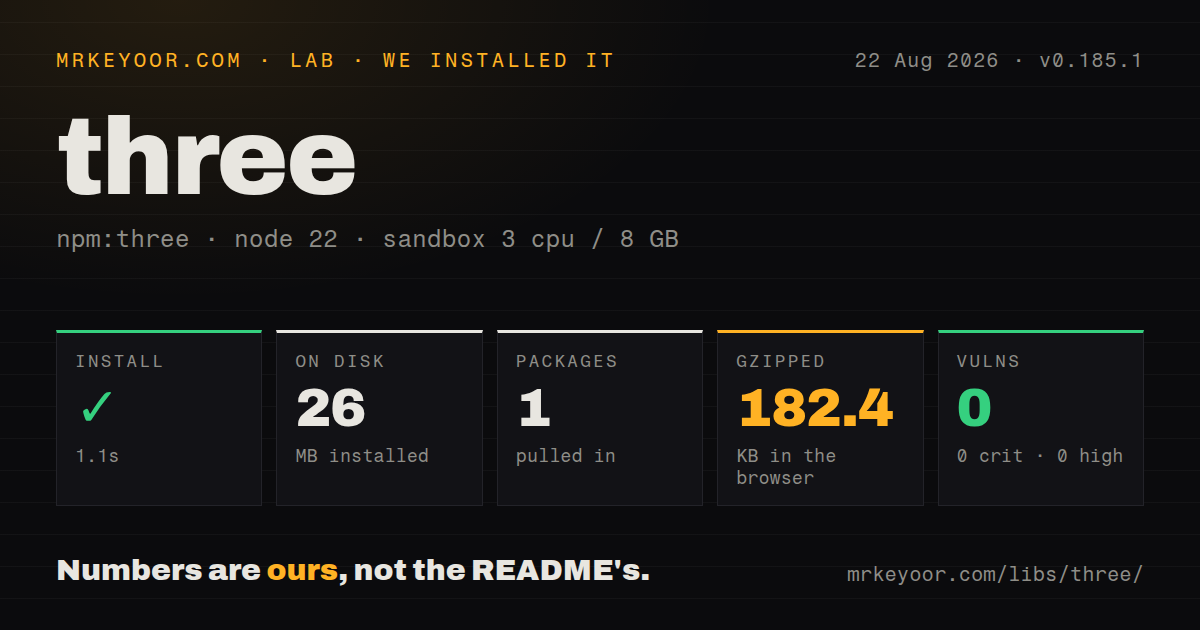
| Install | ✓ · 1.1s | 1 package on disk · 26 MB |
| Import | ✓ | ESM import works · require() works · ESM package with exports map |
| Browser | 182.4 KB | gzipped (713.3 KB minified), bundled with esbuild |
| Types | — | no TypeScript types found |
| Known vulns | 0 | 0 critical · 0 high · 0 moderate · 0 low (npm audit) |
Answers from our run
Does three install cleanly?
Yes. In a fresh container with an empty cache, npm install three finished in 1 seconds, leaving 1 package and 26 MB on disk. npm audit reported no known vulnerabilities.
How much does three add to a browser bundle?
182.4 KB gzipped (713.3 KB minified) when the whole package is bundled for the browser with esbuild. Importing only part of it is usually smaller.
Does three work with both ESM and CommonJS?
Yes. Both import 'three' and require('three') worked in Node 22 in our run. The package is published as ESM with an exports map.
Does three include TypeScript types?
No type declarations were found in our install, so TypeScript users need their own declarations.
three or babylonjs: which should you use?
babylonjs: Use it when an engine-style package with more built-in tooling fits better than a rendering library. three 0.185.1 installed as one 26 MB package in 1.1 seconds on our box, passed npm audit, and produced a 182.4 KB gzipped full import with no bundled TypeScript declarations.
When should you not use three?
The experience is 2D; our full-package import alone cost 182.4 KB gzipped before any model or texture
Use it if
- A browser feature needs an interactive 3D scene with cameras, models, lighting, picking, or animation
- glTF loaders, camera controls, exporters, helpers, and runnable examples should share one scene graph
- The same codebase must explore WebGPU while retaining a WebGL delivery path
- The team will own frame timing, model preparation, texture budgets, resource disposal, and 3D coordinate math
- The experience is 2D; our full-package import alone cost 182.4 KB gzipped before any model or texture
- A complete game engine must supply physics, networking, level editing, and an opinionated asset pipeline; three supplies rendering parts
- Frequent migration checks are unacceptable; this is a 0.x package and r185 explicitly deletes deprecated APIs
- Type declarations must be inside the npm package; our 0.185.1 inspection found none
- Long-lived views cannot dispose geometry, materials, textures, controls, and the renderer when ownership ends
- The team expects HTML layout rules; camera projection, world coordinates, lighting, clipping, and GPU state require different debugging
Setup reality
Our clean install of three 0.185.1 finished in 1.1 seconds under Node 22. One package occupied 26 MB, and npm audit found zero known vulnerabilities. The archive is 25,780 KB unpacked with zero direct and peer dependencies. It declares ESM and an exports map, while both require() and ESM import succeeded. No TypeScript declarations were present in the measured package. A full browser import reached 713.3 KB minified and 182.4 KB gzipped.
Import scene primitives from three. OrbitControls, GLTFLoader, post-processing passes, and many helpers live under three/addons/...js; WebGPU has a separate export path. Pin the r-number because deprecated code is later removed. r185 deletes deprecated APIs, removes or changes some addons, changes decoder configuration, and includes many renderer corrections. Read the 184 to 185 migration notes and run visual comparisons before updating an established scene.
A loader can only fetch models, textures, and decoder binaries that the browser may access. Remote assets need CORS, while Draco and KTX2 require their deployed worker or transcoder paths. Prefer glTF, compress geometry and textures deliberately, expose loader errors, and cap pixel ratio on dense screens. CSS dimensions alone do not update the canvas drawing buffer or camera projection; resize the renderer and update the camera aspect together. Color textures also need the sRGB color-space flag.
Removing a mesh from the scene leaves its GPU allocations alive. Dispose owned geometry, materials, texture maps, controls, render targets, and finally the renderer. Do not dispose a shared resource while another mesh uses it. JavaScript is only 182.4 KB gzipped in our broad-import measurement; models, textures, decoders, and shader compilation can dominate load and frame time. Split a 3D viewer from ordinary routes, stop setAnimationLoop() on teardown, and bound resumed-tab animation deltas.
Patterns
Render and animate a basic mesh basic-scene
import * as THREE from 'three';

const width = window.innerWidth, height = window.innerHeight;

const camera = new THREE.PerspectiveCamera(70, width / height, 0.01, 10);
camera.position.z = 1;

const scene = new THREE.Scene();
const mesh = new THREE.Mesh(
  new THREE.BoxGeometry(0.2, 0.2, 0.2),
  new THREE.MeshNormalMaterial()
);
scene.add(mesh);

const renderer = new THREE.WebGLRenderer({ antialias: true });
renderer.setSize(width, height);
renderer.setAnimationLoop(animate);
document.body.appendChild(renderer.domElement);

function animate(time) {
  mesh.rotation.x = time / 2000;
  mesh.rotation.y = time / 1000;
  renderer.render(scene, camera);
}
setAnimationLoop integrates with XR scheduling and keeps one renderer-owned loop. Stop it and dispose the renderer when the view unmounts.
Load a glTF scene through an addon load-gltf-model
import { GLTFLoader } from 'three/addons/loaders/GLTFLoader.js';

const loader = new GLTFLoader();
loader.load(
  'models/scene.glb',
  (gltf) => {
    scene.add(gltf.scene);
  },
  undefined,
  (error) => console.error(error)
);
GLTFLoader is outside the core entry. Handle the error callback and configure decoder paths before loading compressed assets.
Attach orbit controls to a camera orbit-controls
import { OrbitControls } from 'three/addons/controls/OrbitControls.js';

const controls = new OrbitControls(camera, renderer.domElement);
controls.enableDamping = true;

function animate() {
  controls.update(); // required when enableDamping is true
  renderer.render(scene, camera);
}
Damping needs controls.update() on every frame. Dispose the controls to remove their DOM event listeners during teardown.
Update camera and canvas on resize handle-resize
window.addEventListener('resize', () => {
  camera.aspect = window.innerWidth / window.innerHeight;
  camera.updateProjectionMatrix();
  renderer.setSize(window.innerWidth, window.innerHeight);
});
Changing canvas dimensions without updateProjectionMatrix() leaves the perspective projection stale and stretches the scene.
Raycast from a pointer into the scene raycast-picking
import * as THREE from 'three';

const raycaster = new THREE.Raycaster();
const pointer = new THREE.Vector2();

window.addEventListener('pointerdown', (event) => {
  pointer.x = (event.clientX / window.innerWidth) * 2 - 1;
  pointer.y = -(event.clientY / window.innerHeight) * 2 + 1;
  raycaster.setFromCamera(pointer, camera);
  const hits = raycaster.intersectObjects(scene.children, true);
  if (hits.length > 0) {
    console.log('clicked', hits[0].object.name);
  }
});
Normalize coordinates against the renderer element’s actual rectangle when the canvas does not fill the window. The sample assumes a full-window canvas.
Enable light and mesh shadows lights-and-shadows
import * as THREE from 'three';

renderer.shadowMap.enabled = true;

const sun = new THREE.DirectionalLight(0xffffff, 3);
sun.position.set(5, 10, 5);
sun.castShadow = true;
scene.add(sun, new THREE.AmbientLight(0xffffff, 0.3));

mesh.castShadow = true;
ground.receiveShadow = true;
Renderer shadow maps, a shadow-casting light, and mesh cast or receive flags are separate switches. Shadow-map size also affects GPU memory and sharpness.
Mark a color texture as sRGB load-texture
import * as THREE from 'three';

const texture = new THREE.TextureLoader().load('textures/wood.jpg');
texture.colorSpace = THREE.SRGBColorSpace;

const material = new THREE.MeshStandardMaterial({ map: texture });
Color textures need the sRGB color space, while normal, roughness, and other data textures should remain in their data color space.
Render repeated geometry with instancing instanced-mesh
import * as THREE from 'three';

const count = 10000;
const mesh = new THREE.InstancedMesh(geometry, material, count);
const dummy = new THREE.Object3D();

for (let i = 0; i < count; i++) {
  dummy.position.set(Math.random() * 40 - 20, 0, Math.random() * 40 - 20);
  dummy.updateMatrix();
  mesh.setMatrixAt(i, dummy.matrix);
}
mesh.instanceMatrix.needsUpdate = true;
scene.add(mesh);
Instancing reduces draw calls when geometry and material are shared. Update the instance matrix flag after changing transforms.
Advance a model’s animation mixer play-model-animation
import * as THREE from 'three';

let mixer;
loader.load('models/character.glb', (gltf) => {
  scene.add(gltf.scene);
  mixer = new THREE.AnimationMixer(gltf.scene);
  mixer.clipAction(gltf.animations[0]).play();
});

const clock = new THREE.Clock();
function animate() {
  if (mixer) mixer.update(clock.getDelta());
  renderer.render(scene, camera);
}
Mixer time is independent of renderer time. Feed it a bounded delta each frame, especially after a tab resumes from suspension.
Release scene resources explicitly dispose-resources
scene.remove(mesh);
mesh.geometry.dispose();
mesh.material.dispose();
if (mesh.material.map) mesh.material.map.dispose();

// when tearing down the whole app
renderer.dispose();
Scene removal only changes the graph. Dispose each resource the application owns, while avoiding disposal of textures or materials shared by remaining meshes.
Initialize the WebGPU renderer webgpu-renderer
import * as THREE from 'three/webgpu';

const renderer = new THREE.WebGPURenderer({ antialias: true });
await renderer.init();
renderer.setSize(window.innerWidth, window.innerHeight);
document.body.appendChild(renderer.domElement);
renderer.setAnimationLoop(() => renderer.render(scene, camera));
WebGPU initialization is asynchronous. Keep a WebGL path or a clear compatibility message for browsers and devices where the requested adapter is unavailable.
Track all model and texture requests loading-progress
const manager = new THREE.LoadingManager();
manager.onProgress = (url, loaded, total) => {
  progress.value = total ? loaded / total : 0;
};
manager.onError = (url) => console.error('asset failed', url);

const loader = new GLTFLoader(manager);
loader.load('/models/product.glb', (gltf) => scene.add(gltf.scene));
LoadingManager counts requested resources, not bytes. A model can report most files complete while one large texture still dominates the wait.
Alternatives
| Package | Registry | Pick it when |
|---|---|---|
| babylonjs | npm | Use it when an engine-style package with more built-in tooling fits better than a rendering library. |
| pixi.js | npm | Use it for hardware-accelerated 2D scenes without a 3D camera and lighting model. |
| ogl | npm | Use it for a smaller WebGL abstraction when you can build more of the surrounding systems yourself. |
More web frontend guides
postcss · react · react-dom · tailwindcss · clsx · htmlparser2 · the whole shelf →
How this guide is made: grounded in the library's documentation, release notes, changelog, and issue history, on a fixed rubric — not a hands-on install of every release. The 50 most-downloaded entries are additionally install-verified in clean containers. Corrections: contact the desk.