@react-three/drei review
The @react-three/drei 10.7.8 test install succeeded but failed all three entry checks: CommonJS require, ESM import, and a whole-package esbuild browser build. Drei supplies ready-made React components and hooks for work inside a React Three Fiber canvas, including camera controls, model and texture loading, HTML labels, text, environments, shadows, bounds, instances, and specialist materials. It expects React 19, Fiber 9, and Three.js rather than serving as a standalone renderer. The current 10.7.8 release changes backside rendering and performance in MeshTransmissionMaterial; its other release entries concern docs, CI, and npm publishing.
@react-three/drei 10.7.8 took 9.5 seconds, 72 packages, and 168 MB in our install, then failed require, ESM import, and a whole-package browser build on Node 22.23.2. Add it when a React 19 and Fiber 9 scene will use several helpers; for one control or loader, use three-stdlib or a local Fiber component.
We installed it
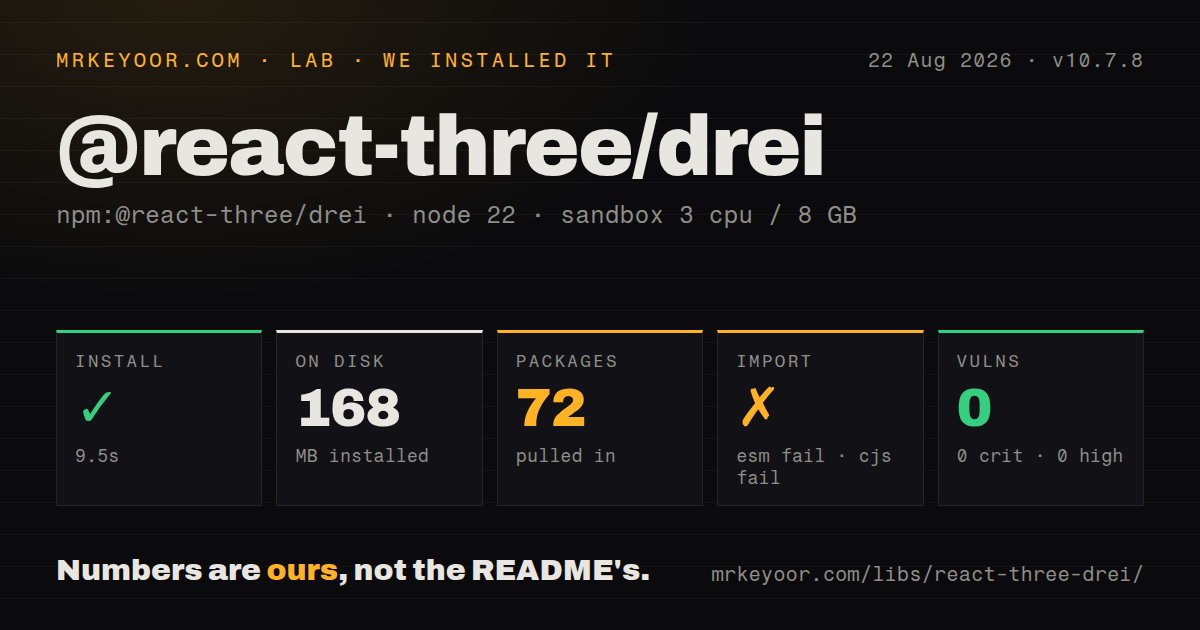
| Install | ✓ · 9.5s | 72 packages on disk · 168 MB |
| Import | ✗ | ESM import fails · require() fails · CommonJS package |
| Browser | n/a | could not be bundled for the browser (Node-only code, most likely) |
| Types | ✓ | TypeScript types bundled |
| Known vulns | 0 | 0 critical · 0 high · 0 moderate · 0 low (npm audit) |
Answers from our run
Does @react-three/drei install cleanly?
Yes. In a fresh container with an empty cache, npm install @react-three/drei finished in 10 seconds, leaving 72 packages and 168 MB on disk. npm audit reported no known vulnerabilities.
Can @react-three/drei run in a browser?
Not directly: esbuild could not bundle it for the browser in our run, which normally means it depends on Node built-ins. Use it on the server, or find a browser-targeted alternative.
Does @react-three/drei work with both ESM and CommonJS?
Neither plain import nor require succeeded in our sandbox, so it needs a bundler or extra setup.
Does @react-three/drei include TypeScript types?
Yes, type declarations ship inside the package, so no @types install is needed.
@react-three/drei or @react-three/fiber: which should you use?
@react-three/fiber: Choose Fiber alone when two or three local scene components cover the missing conveniences. @react-three/drei 10.7.8 took 9.5 seconds, 72 packages, and 168 MB in our install, then failed require, ESM import, and a whole-package browser build on Node 22.23.2.
When should you not use @react-three/drei?
The renderer is plain Three.js: Drei components read React Three Fiber context and follow React component lifecycles
Use it if
- A React 19 and Fiber 9 product needs several maintained scene helpers such as controls, GLTF loading, bounds, or environments
- Your scene uses Suspense for assets and can show a deliberate loading state while models, textures, fonts, or HDR files arrive
- Web and native code can use separate imports and tolerate the smaller export set under @react-three/drei/native
- The team will profile shadows, DOM overlays, instancing, and transmission materials on the actual mobile GPUs it supports
- The renderer is plain Three.js: Drei components read React Three Fiber context and follow React component lifecycles
- The application remains on React 18 or Fiber 8: version 10.7.8 declares React 19, React DOM 19, Fiber 9, and Three.js 0.159 or later as peers
- One small control or loader is all you need: our install put 72 packages and 168 MB on disk, while three-stdlib exposes many underlying utilities directly
- Your build gate requires the package root to load in Node or bundle wholesale: require, ESM import, and the browser build each failed on our Node 22.23.2 run
- Shared React Native code needs Html or Loader: the project README says the native entry exports neither component
Setup reality
In our test environment, we installed @react-three/drei 10.7.8 in a fresh Node 22 Bookworm container with 3 CPUs and 8 GB RAM. It succeeded in 9.5 seconds, leaving 72 packages and 168 MB on disk; npm audit found 0 known vulnerabilities at every severity. Drei declares 21 direct dependencies and 4 peers, bundles TypeScript types, uses MIT, and measured 3,052 KB unpacked. The peers require React 19, React DOM 19, Fiber 9, and Three.js 0.159 or later.
Package loading was the first surprise. The published package is CommonJS without an exports map, yet require and ESM import both failed under Node 22.23.2. The esbuild browser attempt also failed when it bundled the package root. Test the exact named imports through your real Vite or Next.js client build; a completed npm install did not prove that those entry points would load. Components that call Fiber hooks must render below Canvas.
Asset helpers add runtime setup even though no credentials are involved. useGLTF and useTexture suspend and cache by URL, so place their consumers under Suspense and provide a visible fallback. Draco models can trigger decoder downloads, environment presets reference remote assets, and Text fetches a font. Put decoders, HDR files, textures, and fonts on origins allowed by your CSP and CORS rules. A client boundary is required when Next.js renders a route on the server.
The cost depends on the chosen helper. ContactShadows renders an extra shadow scene, Html keeps DOM aligned with 3D coordinates, and Instances still creates React elements for each logical instance. Static contact shadows can stop after 1 frame, while a moving scene needs updates. The native entry omits Html and Loader. Since 10.7.8 modifies MeshTransmissionMaterial backside work, compare transparent meshes before and after the upgrade and capture GPU frame time on target devices.
Patterns
Register orbit controls for the scene add-orbit-controls
import { Canvas } from '@react-three/fiber'
import { OrbitControls } from '@react-three/drei'

export function Preview() {
  return (
    <Canvas camera={{ position: [0, 1.5, 4] }}>
      <mesh>
        <boxGeometry />
        <meshStandardMaterial color="tomato" />
      </mesh>
      <OrbitControls makeDefault enableDamping />
    </Canvas>
  )
}
OrbitControls reads Fiber state and must render below Canvas. makeDefault registers this instance so camera-aware helpers can find the active controls.
Load a GLTF scene under Suspense load-gltf-model
import { Suspense } from 'react'
import { useGLTF } from '@react-three/drei'

function Chair() {
  const model = useGLTF('/models/chair.glb')
  return <primitive object={model.scene} />
}

export function Product() {
  return (
    <Suspense fallback={null}>
      <Chair />
    </Suspense>
  )
}
useGLTF suspends and caches the result by URL. Two consumers of `/models/chair.glb` receive the cached object graph, so clone it before making independent mutations.
Self-host Draco and preload a model configure-draco
import { useGLTF } from '@react-three/drei'

useGLTF.setDecoderPath('/vendor/draco/')
useGLTF.preload('/models/compressed.glb', '/vendor/draco/')

function CompressedModel() {
  const { scene } = useGLTF(
    '/models/compressed.glb',
    '/vendor/draco/'
  )
  return <primitive object={scene} />
}
setDecoderPath changes where Draco binaries are fetched. Keep the decoder files at that path when CSP, offline use, or third-party availability rules out a remote host.
Map texture files to material props load-pbr-textures
import { SRGBColorSpace } from 'three'
import { useTexture } from '@react-three/drei'

function Finish() {
  const maps = useTexture({
    map: '/textures/paint-color.jpg',
    normalMap: '/textures/paint-normal.jpg',
    roughnessMap: '/textures/paint-roughness.jpg',
  })
  maps.map.colorSpace = SRGBColorSpace
  return <meshStandardMaterial {...maps} />
}
useTexture preserves the keys from its input object and suspends until the files load. Set the color texture's colorSpace explicitly; normal and roughness data maps should remain non-color data.
Use a local HDR environment set-local-environment
import { Environment } from '@react-three/drei'

<Environment
  files="/hdr/workshop.hdr"
  background={false}
  environmentIntensity={0.75}
/>
A files prop loads the HDR URL you supply, while preset names resolve to Drei's remote asset collection. Include the HDR transfer in the same Suspense loading plan as the model.
Attach a DOM button to an object attach-html-label
import { Html } from '@react-three/drei'

<mesh position={[0, 1, 0]}>
  <sphereGeometry args={[0.45, 24, 24]} />
  <meshStandardMaterial color="royalblue" />
  <Html center distanceFactor={7}>
    <button type="button">Open details</button>
  </Html>
</mesh>
Html creates a real DOM element and exists only in the web entry. Its position follows the 3D object, so test overlap, focus order, and pointer behavior over the canvas.
Render text with a local font render-sdf-text
import { Text } from '@react-three/drei'

<Text
  font="/fonts/Inter-Medium.woff"
  fontSize={0.32}
  anchorX="center"
  anchorY="middle"
  characters="SCORE 0123456789"
>
  SCORE 2400
</Text>
Text fetches the font and suspends while Troika prepares glyphs. The characters prop limits the glyph set, so include every character that dynamic labels may display.
Fit the camera around changing content fit-camera-to-model
import { Bounds, OrbitControls } from '@react-three/drei'

<>
  <Bounds fit clip observe margin={1.15}>
    <Chair />
  </Bounds>
  <OrbitControls makeDefault />
</>
Bounds computes a box around its descendants; observe repeats that work when the subtree changes. Registered default controls let the fit operation coordinate with the scene camera.
Reserve one instanced mesh for repeated objects instance-repeated-meshes
import { Instance, Instances } from '@react-three/drei'

<Instances limit={300} range={points.length}>
  <boxGeometry args={[0.08, 0.08, 0.08]} />
  <meshStandardMaterial />
  {points.map((point) => (
    <Instance
      key={point.id}
      position={point.position}
      color={point.color}
    />
  ))}
</Instances>
limit reserves capacity and must cover the largest range you render. The GPU draw count falls, but 300 Instance elements still pass through React and consume CPU work.
Render static contact shadows once freeze-contact-shadows
import { ContactShadows } from '@react-three/drei'

<ContactShadows
  frames={1}
  resolution={256}
  opacity={0.65}
  scale={8}
  blur={1.4}
/>
frames={1} stops the shadow render after its first update. Any object that moves later will keep the old shadow, so continuous scenes need more frames or a different shadow plan.
Read Three.js loading progress show-loading-progress
import { Html, useProgress } from '@react-three/drei'

function LoadingLabel() {
  const progress = useProgress((state) => state.progress)
  return (
    <Html center fullscreen>
      {Math.round(progress)}%
    </Html>
  )
}
useProgress observes Three.js DefaultLoadingManager. A fetch made outside that manager does not contribute to this percentage, so it may omit API requests or custom loaders.
Import the React Native entry use-native-entry
import {
  OrbitControls,
  PerspectiveCamera,
  Text,
} from '@react-three/drei/native'
The native route is a separate entry and does not export Html or Loader. Audit shared scene imports before moving a web component into React Native.
Alternatives
| Package | Registry | Pick it when |
|---|---|---|
| @react-three/fiber | npm | Choose Fiber alone when two or three local scene components cover the missing conveniences |
| three | npm | Choose Three.js when the render loop and object lifecycle should stay imperative |
| three-stdlib | npm | Choose its controls and loaders directly when you want the underlying utilities without Drei's React wrappers |
| @react-three/postprocessing | npm | Choose this narrower Fiber companion when postprocessing effects are the only missing layer |
More web frontend guides
postcss · react · react-dom · tailwindcss · clsx · htmlparser2 · the whole shelf →
How this guide is made: grounded in the library's documentation, release notes, changelog, and issue history, on a fixed rubric — not a hands-on install of every release. The 50 most-downloaded entries are additionally install-verified in clean containers. Corrections: contact the desk.