react-router review
Our clean install of React Router 8.3.0 was quick, but a full browser import was substantial at 197.1 KB minified and 63.8 KB gzipped. The package handles URL matching, nested layouts, navigation, route loaders, actions, pending states, and error boundaries for React applications. You can use those pieces inside your own build in Data or Declarative mode, or adopt Framework mode for route modules, server rendering, prerendering, and middleware. Version 8 requires Node 22.22.0 and React 19.2.7, removes the react-router-dom compatibility package, and makes the former v8 future-flag behavior standard. Release 8.3.0 changes generated path parameters to follow RFC 3986 path-segment encoding, fixes NavLink pending state for destinations with a trailing slash, and updates custom entry requirements for the still-unstable RSC mode.
React Router 8.3.0 is a good fit when route loaders, actions, nested errors, and server rendering earn their place in the app. For a small client-only router, the 63.8 KB gzipped full-import result and version 8 runtime minimums make Wouter or a narrower setup easier to justify.
We installed it
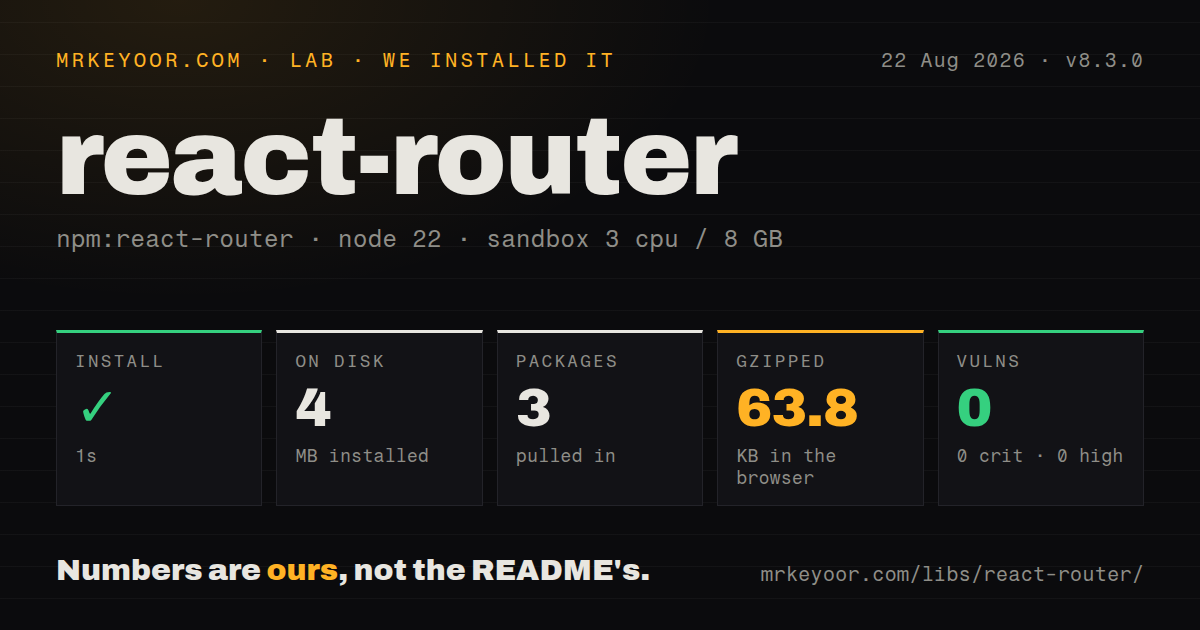
| Install | ✓ · 1s | 3 packages on disk · 4 MB |
| Import | ✓ | ESM import works · require() works · ESM package with exports map |
| Browser | 63.8 KB | gzipped (197.1 KB minified), bundled with esbuild |
| Types | — | no TypeScript types found |
| Known vulns | 0 | 0 critical · 0 high · 0 moderate · 0 low (npm audit) |
Answers from our run
Does react-router install cleanly?
Yes. In a fresh container with an empty cache, npm install react-router finished in 1 seconds, leaving 3 packages and 4 MB on disk. npm audit reported no known vulnerabilities.
How much does react-router add to a browser bundle?
63.8 KB gzipped (197.1 KB minified) when the whole package is bundled for the browser with esbuild. Importing only part of it is usually smaller.
Does react-router work with both ESM and CommonJS?
Yes. Both import 'react-router' and require('react-router') worked in Node 22 in our run. The package is published as ESM with an exports map.
Does react-router include TypeScript types?
No type declarations were found in our install, so TypeScript users need their own declarations.
react-router or @tanstack/react-router: which should you use?
@tanstack/react-router: Choose it when compile-time route, parameter, and search-schema checks are central to the application. React Router 8.3.0 is a good fit when route loaders, actions, nested errors, and server rendering earn their place in the app.
When should you not use react-router?
Your deployment is below Node 22.22.0 or your app is below React and React DOM 19.2.7; version 8 declares those minimums, and Framework mode also requires Vite 7
Discussed on
- hnReact Router v4 FAQ159 points
- hnReact Router v5156 points
- hnReact Router 2.0.0119 points
- hnMerging Remix and React Router107 points
- hnReact Router: Declarative Routing for React87 points
Use it if
- Your React app needs nested layouts, URL parameters, route-level errors, and pending navigation state under one routing model
- You want loaders and actions tied to route matches, with automatic loader revalidation after a Form or fetcher mutation
- You need the same route tree to support browser navigation and server rendering through an official framework or server adapter
- Your team is moving a v7 app that already adopted the v8 future flags and can meet the new Node and React minimums
- Your deployment is below Node 22.22.0 or your app is below React and React DOM 19.2.7; version 8 declares those minimums, and Framework mode also requires Vite 7
- You only need two or three client-side screens; our full-package browser import measured 197.1 KB minified and 63.8 KB gzipped, so Wouter leaves much less routing code in a small app
- Your application already belongs to Next.js or another React framework with its own route and data conventions; a second routing system creates overlapping navigation and server-rendering rules
- You want route parameters and search parameters checked from a route definition at compile time; TanStack Router is designed around that contract, while React Router's Data mode examples read runtime strings
- You plan to ship RSC mode without isolating experimental code; the 8.3.0 changelog still labels RSC APIs unstable and requires extra client-version, integrity, and nonce wiring for some custom entries
Setup reality
We installed react-router 8.3.0 in a fresh Node 22 container in 1 second. Three packages occupied 4 MB afterward, and npm audit reported 0 known vulnerabilities at every severity. The package has 1 direct dependency and 2 peer dependencies, with 3,648 KB unpacked. It declares ESM and has an exports map; both require() and ESM import worked in our check. We found no TypeScript type files. A full esbuild browser import measured 197.1 KB minified and 63.8 KB gzipped.
Library mode needs no credentials or config file. Install react-router beside React and React DOM 19.2.7 or newer, create the router once outside the React tree, then render RouterProvider from react-router/dom. Links, loaders, actions, and hooks come from react-router. Old react-router-dom imports fail on v8 because that compatibility package was removed. Choose a narrow import surface and let tree shaking work; our bundle figure imported the whole package namespace.
Framework mode changes the project shape. The official starter adds @react-router/dev, a Vite plugin, route modules, routes.ts, and react-router.config.ts. Vite 7 is the minimum. Loaders run before their matched route components render, while actions invoked by Form or fetcher cause loader data on the page to revalidate. That is convenient for server-backed screens, but it can repeat expensive reads unless your data layer caches or deduplicates them.
Middleware is always enabled in v8. A custom server's getLoadContext must return RouterContextProvider rather than the plain object accepted by older code. Raw request URLs can contain React Router's .data suffix and internal query details, so use the separate normalized url argument for routing decisions. RSC support remains unstable. Default RSC entries absorb the 8.3.0 changes, but custom entries may need client-version, subresource-integrity, and CSP nonce plumbing before they build and render correctly.
Patterns
Mount a data router create-browser-router
import { createBrowserRouter } from 'react-router';
import { RouterProvider } from 'react-router/dom';
import { createRoot } from 'react-dom/client';

const router = createBrowserRouter([
  { path: '/', Component: Home },
]);

createRoot(document.getElementById('root')).render(
  <RouterProvider router={router} />
);
Create the router outside the React tree. In v8, RouterProvider comes from react-router/dom rather than react-router-dom.
Render children through a layout render-nested-route
import { Outlet } from 'react-router';

function DashboardLayout() {
  return (
    <section>
      <DashboardNav />
      <Outlet />
    </section>
  );
}

const routes = [{
  path: '/dashboard',
  Component: DashboardLayout,
  children: [
    { index: true, Component: DashboardHome },
    { path: 'settings', Component: Settings },
  ],
}];
A matched child has nowhere to render if its parent omits Outlet. Index routes cannot have children.
Read a dynamic segment read-route-params
import { useParams } from 'react-router';

function Invoice() {
  const { invoiceId } = useParams();
  if (!invoiceId) return <p>Missing invoice id</p>;
  return <InvoiceDetails id={invoiceId} />;
}

const route = {
  path: '/invoices/:invoiceId',
  Component: Invoice,
};
URL parameters arrive as strings and may be absent. Parse and validate them before database or numeric use.
Show the active navigation item mark-active-link
import { NavLink } from 'react-router';

<NavLink
  to="/account"
  end
  className={({ isActive, isPending }) =>
    isPending ? 'pending' : isActive ? 'active' : undefined
  }
>
  Account
</NavLink>
The end prop prevents /account from staying active on every descendant. Version 8.3.0 fixes pending state when to ends in a slash.
Fetch data before rendering load-route-data
import { useLoaderData } from 'react-router';

const route = {
  path: '/teams/:teamId',
  loader: async ({ params }) => ({
    team: await getTeam(params.teamId),
  }),
  Component: Team,
};

function Team() {
  const { team } = useLoaderData();
  return <h1>{team.name}</h1>;
}
The loader runs before this matched component renders and runs again when the router revalidates the route.
Post a form to an action submit-route-action
import { Form, redirect } from 'react-router';

const route = {
  path: '/projects/new',
  action: async ({ request }) => {
    const values = await request.formData();
    const project = await createProject(values);
    return redirect(`/projects/${project.id}`);
  },
  Component: NewProject,
};

function NewProject() {
  return <Form method="post"><input name="title" /><button>Create</button></Form>;
}
A Form submission navigates and revalidates loader data after the action. Validate form values inside the action.
Save through a fetcher mutate-without-navigation
import { useFetcher } from 'react-router';

function RenameTask({ id, title }) {
  const fetcher = useFetcher();
  return (
    <fetcher.Form method="post" action={`/tasks/${id}`}>
      <input name="title" defaultValue={title} />
      <button disabled={fetcher.state !== 'idle'}>
        {fetcher.state === 'idle' ? 'Save' : 'Saving'}
      </button>
    </fetcher.Form>
  );
}
A fetcher calls the route action without adding a history entry. Its state is separate from global navigation state.
Render pending navigation UI show-navigation-progress
import { useNavigation } from 'react-router';

function GlobalProgress() {
  const navigation = useNavigation();
  if (navigation.state === 'idle') return null;
  return (
    <p role="status">
      {navigation.state === 'submitting' ? 'Submitting' : 'Loading'}
    </p>
  );
}
useNavigation tracks navigations and Form submissions. Fetcher work has its own state and does not appear here.
Keep a filter in the URL update-search-params
import { useSearchParams } from 'react-router';

function SearchFilter() {
  const [params, setParams] = useSearchParams();
  return (
    <input
      value={params.get('q') ?? ''}
      onChange={(event) => {
        const next = new URLSearchParams(params);
        next.set('q', event.target.value);
        setParams(next, { replace: true });
      }}
    />
  );
}
Replacing history prevents each keystroke from becoming a Back-button stop. URLSearchParams values still need parsing and validation.
Catch errors near the failing route handle-route-error
import { data, isRouteErrorResponse, useRouteError } from 'react-router';

async function loader({ params }) {
  const invoice = await getInvoice(params.invoiceId);
  if (!invoice) throw data('Invoice not found', { status: 404 });
  return invoice;
}

function InvoiceError() {
  const error = useRouteError();
  return isRouteErrorResponse(error)
    ? <h1>{error.status}: {error.data}</h1>
    : <h1>Invoice failed to load</h1>;
}
Assign InvoiceError as the route's ErrorBoundary. Errors bubble to the closest ancestor boundary when a route has none.
Redirect from route middleware protect-with-middleware
import { redirect } from 'react-router';

async function requireUser({ request }) {
  const user = await readUser(request);
  if (!user) throw redirect('/login');
}

const routes = [{
  path: '/dashboard',
  middleware: [requireUser],
  loader: loadDashboard,
  Component: Dashboard,
}];
Middleware is always enabled in v8. Framework server middleware and browser Data-mode middleware do not run in identical environments.
Load a route module on demand lazy-load-route
import { createBrowserRouter } from 'react-router';

const router = createBrowserRouter([{
  path: '/settings',
  lazy: async () => {
    const module = await import('./settings-route.js');
    return {
      Component: module.Settings,
      loader: module.loader,
      ErrorBoundary: module.SettingsError,
    };
  },
}]);
The lazy function can supply route implementation fields, but it cannot change matching fields such as path, index, or children.
Alternatives
| Package | Registry | Pick it when |
|---|---|---|
| @tanstack/react-router | npm | Choose it when compile-time route, parameter, and search-schema checks are central to the application |
| wouter | npm | Choose it for a small client-only React app that needs matching and links without route loaders or framework features |
| next | npm | Choose it when you want file routing, React Server Components, rendering, and deployment conventions supplied as one framework |
More web frontend guides
postcss · react · react-dom · tailwindcss · clsx · htmlparser2 · the whole shelf →
How this guide is made: grounded in the library's documentation, release notes, changelog, and issue history, on a fixed rubric — not a hands-on install of every release. The 50 most-downloaded entries are additionally install-verified in clean containers. Corrections: contact the desk.