next review
Next 16.3.3 is a React application framework with file-based routing, Server Components, client boundaries, request handlers, server actions, static generation, streaming, metadata, image processing, and a production build. The App Router assigns behavior through files such as `page`, `layout`, `loading`, `error`, and `route`. Version 16.3.3 is a security release: it patches critical unauthenticated remote-code-execution advisories involving Windows-hosted servers and the AVIF image optimizer, both of which affected 16.3.2. Our August 22 install measured 16.3.2 before those advisories were published, so its clean audit result is historical evidence rather than a reason to keep that version.
Next 16.3.2 took 11.4 seconds and 338 MB in our sandbox, then 16.3.3 superseded it with critical RCE fixes, so production users should upgrade before weighing any framework benefit. Choose Next for a React product that truly uses server rendering and server-owned data; a browser-only dashboard pays the operational cost without using the reason it exists.
We installed it
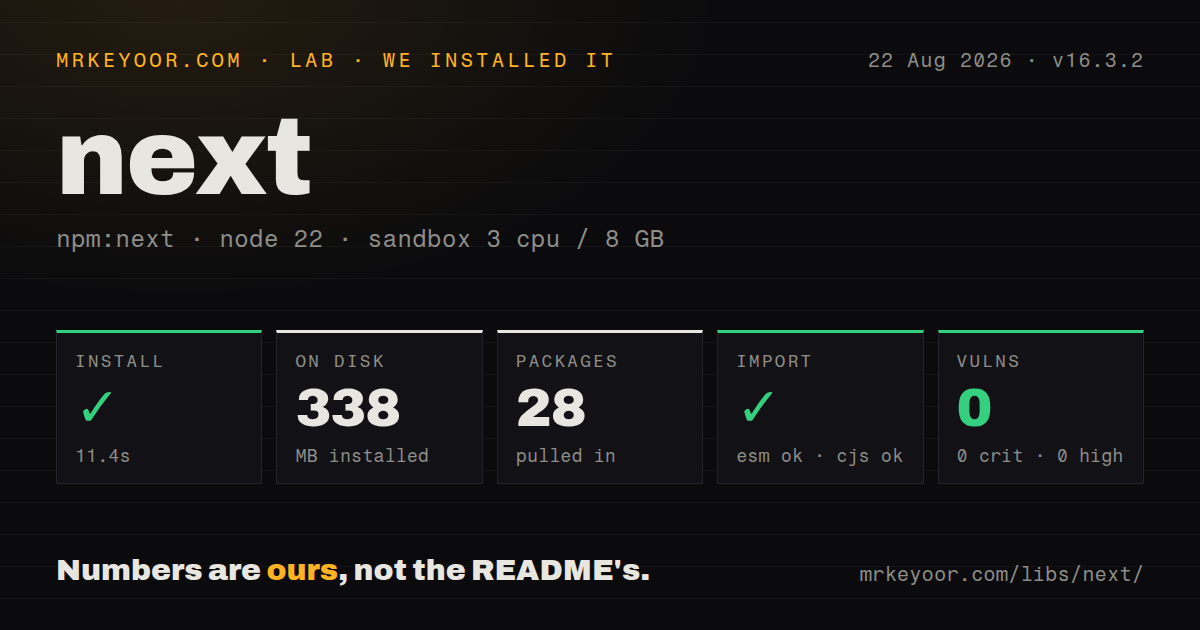

| Install | ✓ · 11.4s | 28 packages on disk · 338 MB |
| Import | ✓ | ESM import works · require() works · CommonJS package |
| Browser | n/a | could not be bundled for the browser (Node-only code, most likely) |
| Types | ✓ | TypeScript types bundled |
| Known vulns | 0 | 0 critical · 0 high · 0 moderate · 0 low (npm audit) |
Answers from our run
Does next install cleanly?
Yes. In a fresh container with an empty cache, npm install next finished in 11 seconds, leaving 28 packages and 338 MB on disk. npm audit reported no known vulnerabilities.
Can next run in a browser?
Not directly: esbuild could not bundle it for the browser in our run, which normally means it depends on Node built-ins. Use it on the server, or find a browser-targeted alternative.
Does next work with both ESM and CommonJS?
Yes. Both import 'next' and require('next') worked in Node 22 in our run. The package is published as CommonJS.
Does next include TypeScript types?
Yes, type declarations ship inside the package, so no @types install is needed.
next or react-router: which should you use?
react-router: Choose it for a browser application or framework mode when route and data behavior should remain more explicit. Next 16.3.2 took 11.4 seconds and 338 MB in our sandbox, then 16.3.3 superseded it with critical RCE fixes, so production users should upgrade before weighing any framework benefit.
When should you not use next?
The application is entirely behind a login and renders from browser APIs. Vite with React Router avoids Server Component rules, server builds, and cache semantics that add little to that shape.
Discussed on
Use it if
- A public React product needs static pages, request-time rendering, streamed Server Components, and browser interaction in the same route tree.
- The team wants data access to stay server-side by default, with client JavaScript introduced only below explicit `use client` boundaries.
- Routes, metadata, image handling, fonts, mutations, and cache invalidation should share one framework release and deployment contract.
- Your hosting setup can run the Next server or a supported adapter and can reproduce its image, cache, and routing behavior across instances.
- The application is entirely behind a login and renders from browser APIs. Vite with React Router avoids Server Component rules, server builds, and cache semantics that add little to that shape.
- Your release process cannot absorb major-version migrations. Next 16 made Turbopack the default, uses asynchronous request APIs, changes caching expectations, and replaces `middleware.ts` with `proxy.ts` for the main request interception convention.
- The server must own durable WebSockets, queue consumers, or jobs that outlive an HTTP request. Route handlers and server actions do not turn a frontend deployment into a general worker platform.
- A 338 MB clean framework install is outside the build budget. Our 16.3.2 sandbox reached that size across 28 packages before React, application code, or project tooling was added.
- You cannot patch framework releases promptly. Next 16.3.3 arrived four days after 16.3.2 and closed critical unauthenticated RCE paths that the earlier version's audit did not report in our August 22 run.
Setup reality
We installed Next 16.3.2 on August 22 in a fresh Node 22 Bookworm sandbox. npm finished in 11.4 seconds and left 28 packages consuming 338 MB. The package declared 6 direct and 6 peer dependencies, with 205956 KB unpacked, and required Node 20.9.0 or newer. npm audit then returned 0 known vulnerabilities. CommonJS require() and ESM import both worked, TypeScript declarations were bundled, and the package had no exports map.
Do not deploy that measured version now. Next 16.3.3 was released on August 25 to fix critical unauthenticated RCE advisories affecting 16.3.2 in Windows hosting and AVIF image optimization. The clean August 22 audit shows what the scanner knew that day, not the package's later security status. A real app also needs compatible React and React DOM peers. Keep secrets server-side; any variable prefixed NEXT_PUBLIC_ is compiled for browser use. Allow remote image hosts with images.remotePatterns.
Current server fetch calls require an explicit cache choice when reuse is intended. Set cache or next.revalidate, attach tags to related reads, and invalidate those tags after writes. Reading cookies, headers, search parameters, or uncached data can change when a route renders. A server action is still an HTTP mutation endpoint, even though a form imports it like a function. Authenticate inside the action and validate every submitted value there.
Turbopack is the version 16 default, so test webpack loaders and older plugins instead of assuming identical output. The package is server and build infrastructure: our browser-targeted esbuild probe failed on Node-only code. With output: 'standalone', deployment copies a smaller runtime set, but you still operate the reverse proxy, shared cache, image behavior, and multi-instance invalidation. Long-running jobs and socket services belong in a separate process whose lifecycle you control.
Patterns
Fetch data in a Server Component render-server-list
// app/posts/page.tsx
export default async function PostsPage() {
  const response = await fetch('https://api.example.com/posts', {
    cache: 'no-store',
  });
  const posts = await response.json();
  return <ul>{posts.map((post) => <li key={post.id}>{post.title}</li>)}</ul>;
}
Next 16 does not cache this server fetch unless you opt in. `cache: 'no-store'` makes the request-time choice visible in the code.
Read an asynchronous route parameter await-route-params
// app/posts/[slug]/page.tsx
type Props = { params: Promise<{ slug: string }> };

export default async function PostPage({ params }: Props) {
  const { slug } = await params;
  return <h1>{slug}</h1>;
}
Version 16 request APIs expose `params` as a promise. Synchronous parameter examples from older Next releases require migration.
Implement an App Router endpoint return-route-json
// app/api/items/route.ts
import { NextResponse } from 'next/server';

export async function GET() {
  return NextResponse.json({ items: [] });
}

export async function POST(request: Request) {
  const input = await request.json();
  return NextResponse.json(input, { status: 201 });
}
A `route.ts` file and `page.tsx` cannot occupy the same final route. Handlers use Web `Request` and `Response` conventions.
Write through a server action mutate-with-action
// app/todos/actions.ts
'use server';
import { revalidatePath } from 'next/cache';

export async function addTodo(formData: FormData) {
  const user = await requireUser();
  const title = String(formData.get('title') ?? '').trim();
  if (!title) throw new Error('title required');
  await saveTodo(user.id, title);
  revalidatePath('/todos');
}
A server action is reachable through an HTTP POST. Version 16 does not remove the need for authorization and input checks inside the function.
Keep state in a client leaf add-client-boundary
'use client';
import { useState } from 'react';

export function Counter() {
  const [count, setCount] = useState(0);
  return <button onClick={() => setCount((n) => n + 1)}>{count}</button>;
}
Imports below `use client` can enter the browser graph. Keep database clients, private environment reads, and Node-only modules above that boundary.
Generate a fixed slug set prebuild-dynamic-routes
// app/posts/[slug]/page.tsx
export async function generateStaticParams() {
  const posts = await listPublishedPosts();
  return posts.map(({ slug }) => ({ slug }));
}

export const dynamicParams = false;
`dynamicParams = false` returns 404 for slugs absent from the generated list. Leave it enabled when new records must render before the next build.
Tag a cached request cache-tagged-data
const response = await fetch('https://api.example.com/prices', {
  next: { revalidate: 60, tags: ['prices'] },
});

// after the corresponding write
import { revalidateTag } from 'next/cache';
revalidateTag('prices', 'max');
The 60-second policy and `prices` tag apply only to reads using this configuration. Invalidate every tag whose cached result the write changed.
Derive metadata from a slug generate-page-metadata
type Props = { params: Promise<{ slug: string }> };

export async function generateMetadata({ params }: Props) {
  const { slug } = await params;
  const post = await getPost(slug);
  return { title: post.title, description: post.summary };
}
Metadata functions run on the server. A client page can receive metadata from its server layout or a server wrapper.
Configure a remote image host allow-remote-image
// next.config.ts
import type { NextConfig } from 'next';

const config: NextConfig = {
  images: {
    remotePatterns: [new URL('https://cdn.example.com/products/**')],
  },
};
export default config;
`next/image` rejects unmatched remote sources. Limit `remotePatterns` to the host and path that actually store application images.
Redirect at the version 16 proxy boundary redirect-in-proxy
// proxy.ts
import { NextResponse, type NextRequest } from 'next/server';

export function proxy(request: NextRequest) {
  if (!request.cookies.has('session')) {
    return NextResponse.redirect(new URL('/login', request.url));
  }
  return NextResponse.next();
}

export const config = { matcher: ['/account/:path*'] };
Version 16 uses `proxy.ts` for this convention. Cookie presence is only an early redirect; protected data still needs authoritative authorization.
Add a route loading fallback stream-loading-state
// app/reports/loading.tsx
export default function LoadingReports() {
  return <p aria-live="polite">Loading reports...</p>;
}
`loading.tsx` wraps the route segment in a Suspense boundary. It can appear during navigation while the segment's server work completes.
Offer an error-boundary retry recover-route-error
// app/account/error.tsx
'use client';

export default function AccountError({ reset }: { reset: () => void }) {
  return (
    <section>
      <p>Account data could not be loaded.</p>
      <button onClick={() => reset()}>Try again</button>
    </section>
  );
}
`error.tsx` must be a Client Component. Keep stack traces and private failure details in server logs rather than rendering them.
Alternatives
| Package | Registry | Pick it when |
|---|---|---|
| react-router | npm | Choose it for a browser application or framework mode when route and data behavior should remain more explicit. |
| astro | npm | Choose it for a content-heavy site that can send mostly HTML and hydrate only selected interactive islands. |
| nuxt | npm | Choose it when the team prefers Vue but still wants server rendering, filesystem routing, and a full application framework. |
More web frontend guides
postcss · react · react-dom · tailwindcss · clsx · htmlparser2 · the whole shelf →
How this guide is made: grounded in the library's documentation, release notes, changelog, and issue history, on a fixed rubric — not a hands-on install of every release. The 50 most-downloaded entries are additionally install-verified in clean containers. Corrections: contact the desk.