react-router-dom review
react-router-dom 7 is the compatibility entry point for React Router's browser APIs. It re-exports routing components, hooks, data routers, forms, loaders, actions, fetchers, and DOM-specific RouterProvider behavior while depending on react-router. Version 7.18.2 hardens React Server Components CSRF code paths. This package has reached a boundary: React Router 8 removed react-router-dom after moving most imports to react-router and DOM provider imports to react-router/dom. It remains relevant for v6 and v7 applications, but a new application should start on the current react-router package.
Keep react-router-dom 7.18.2 for a maintained v6 or v7 application and take the CSRF hardening patch. Do not add it to a new app: React Router 8 has already removed the package, so start with react-router.
We installed it
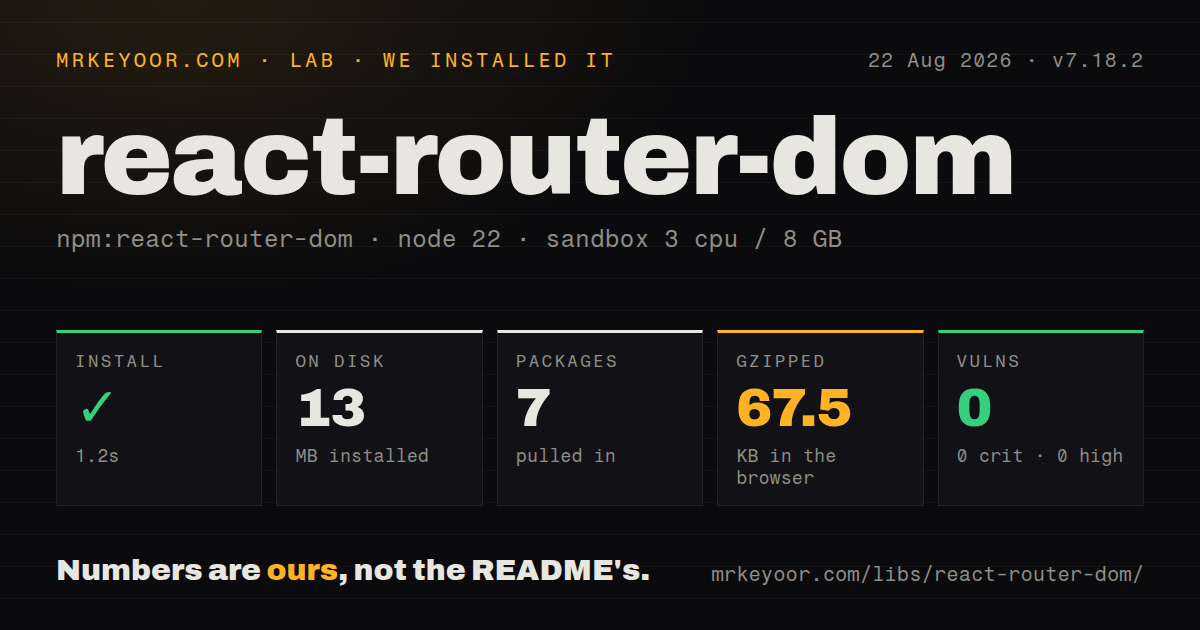
| Install | ✓ · 1.2s | 7 packages on disk · 13 MB |
| Import | ✓ | ESM import works · require() works · CommonJS package with exports map |
| Browser | 67.5 KB | gzipped (207.6 KB minified), bundled with esbuild |
| Types | ✓ | TypeScript types bundled |
| Known vulns | 0 | 0 critical · 0 high · 0 moderate · 0 low (npm audit) |
Answers from our run
Does react-router-dom install cleanly?
Yes. In a fresh container with an empty cache, npm install react-router-dom finished in 1 seconds, leaving 7 packages and 13 MB on disk. npm audit reported no known vulnerabilities.
How much does react-router-dom add to a browser bundle?
67.5 KB gzipped (207.6 KB minified) when the whole package is bundled for the browser with esbuild. Importing only part of it is usually smaller.
Does react-router-dom work with both ESM and CommonJS?
Yes. Both import 'react-router-dom' and require('react-router-dom') worked in Node 22 in our run. The package is published as CommonJS with an exports map.
Does react-router-dom include TypeScript types?
Yes, type declarations ship inside the package, so no @types install is needed.
react-router-dom or react-router: which should you use?
react-router: Choose it for new React Router work and the v8 path that replaces react-router-dom imports. Keep react-router-dom 7.18.2 for a maintained v6 or v7 application and take the CSRF hardening patch.
When should you not use react-router-dom?
You are choosing a router for a new application. React Router 8 removed this package; install react-router and use react-router/dom for DOM provider exports.
Use it if
- You maintain a React Router 6 or 7 application whose imports already come from react-router-dom.
- Your v7 app needs nested routes, loaders, actions, error boundaries, forms, or fetchers through the browser data router.
- You are preparing a staged v8 migration and want v7 behavior while changing imports and enabling future flags.
- Your runtime supports Node 20 or newer and the application already uses React and React DOM 18 or newer.
- You are choosing a router for a new application. React Router 8 removed this package; install react-router and use react-router/dom for DOM provider exports.
- You want route parameters and search state to be inferred from a typed route tree. TanStack Router makes type-safe route definitions a central feature.
- Your app only needs a few client-side paths and links. wouter has a much smaller API and avoids the data-router model.
- You cannot meet Node 20 or React 18 minimums for version 7.18.2. Keeping an old router release also means missing later fixes.
- You assume navigation alone guarantees access control or CSRF protection. Loaders and actions still need server-side authorization, and the 7.18.2 security change specifically concerns RSC CSRF paths.
Setup reality
Our clean Node 22 install of react-router-dom 7.18.2 finished in 1.2 seconds. Seven packages occupied 13 MB afterward. The package is 36 KB unpacked, declares one direct dependency and two peer dependencies, and has an MIT license. npm audit reported zero known vulnerabilities at every severity.
React and React DOM 18 or newer must be supplied by the application. The package itself requires Node 20 or newer. It publishes CommonJS and ESM targets through an exports map; both require() and import worked in our container. TypeScript declarations are bundled. A full namespace browser import measured 207.6 KB minified and 67.5 KB gzipped in our esbuild check, so route-level lazy loading and real application bundle analysis matter.
Data routers change setup beyond matching URLs. createBrowserRouter owns route loaders, actions, pending navigation, revalidation, error elements, and abort signals. A loader can run again after an action or search-parameter change, so it must tolerate repeated calls. Browser loaders also expose requests to users; secrets and privileged database access belong behind authenticated server endpoints.
The current migration trap is package identity. Version 7 keeps react-router-dom so old imports continue to work, while version 8 removes it. Move ordinary imports to react-router and RouterProvider or HydratedRouter to react-router/dom before upgrading. Use the versioned 7.18.2 docs while this dependency remains. Tests need a memory router or createMemoryRouter rather than BrowserRouter when no real browser history exists.
Patterns
Create a v7 browser data router create-browser-router
import { createBrowserRouter, RouterProvider } from 'react-router-dom'

const router = createBrowserRouter([
  { path: '/', element: <Home /> },
  { path: '/about', element: <About /> },
])

root.render(<RouterProvider router={router} />)
These imports work in v7. For v8, createBrowserRouter comes from react-router and RouterProvider comes from react-router/dom.
Render child routes through an outlet define-nested-routes
import { Outlet } from 'react-router-dom'

const routes = [{
  path: '/account',
  element: <AccountLayout />,
  children: [
    { index: true, element: <Profile /> },
    { path: 'security', element: <Security /> },
  ],
}]

function AccountLayout() {
  return <main><AccountNav /><Outlet /></main>
}
Child paths without a leading slash are relative to the parent route.
Load data before rendering a route load-route-data
import { useLoaderData } from 'react-router-dom'

async function projectLoader({ params, request }) {
  const response = await fetch('/api/projects/' + params.projectId, {
    signal: request.signal,
  })
  if (!response.ok) throw new Response('Project not found', { status: 404 })
  return response.json()
}

function Project() {
  const project = useLoaderData()
  return <h1>{project.name}</h1>
}
Forward request.signal so an abandoned navigation can cancel the fetch. The API must still enforce authorization.
Handle a mutation with Form and an action submit-route-action
import { Form, redirect } from 'react-router-dom'

async function renameAction({ request, params }) {
  const form = await request.formData()
  await api.renameProject(params.projectId, String(form.get('name')))
  return redirect('/projects/' + params.projectId)
}

function RenameForm() {
  return <Form method="post"><input name="name" /><button>Save</button></Form>
}
An action normally triggers loader revalidation. Validate input and authorization on the server reached by the action.
Show pending navigation feedback show-navigation-state
import { useNavigation } from 'react-router-dom'

function SaveStatus() {
  const navigation = useNavigation()
  return navigation.state === 'idle'
    ? null
    : <p aria-live="polite">Working...</p>
}
The state can be loading or submitting. Keep existing content visible unless the new route truly requires a full replacement.
Submit without changing the current route fetch-without-navigation
import { useFetcher } from 'react-router-dom'

function FavoriteButton({ projectId, active }) {
  const fetcher = useFetcher()
  return (
    <fetcher.Form method="post" action={'/projects/' + projectId + '/favorite'}>
      <button name="active" value={active ? '0' : '1'} disabled={fetcher.state !== 'idle'}>
        {active ? 'Unfavorite' : 'Favorite'}
      </button>
    </fetcher.Form>
  )
}
A fetcher runs route data logic without navigation and has its own state. Concurrent fetchers can finish out of order.
Link within a nested route link-relative-route
import { Link, NavLink } from 'react-router-dom'

<Link to="security">Security</Link>
<NavLink to="." end className={({ isActive }) => isActive ? 'active' : undefined}>
  Overview
</NavLink>
Relative links resolve against the route hierarchy. end prevents the parent link from staying active on every child path.
Read a dynamic path segment read-route-params
import { useParams } from 'react-router-dom'

function ProjectPage() {
  const { projectId } = useParams()
  return <Project id={projectId} />
}
Path parameters are strings or undefined. Parse and validate them before using them as numeric IDs or trusted input.
Store a filter in the URL update-search-params
import { useSearchParams } from 'react-router-dom'

function SearchBox() {
  const [params, setParams] = useSearchParams()
  const query = params.get('q') || ''
  return <input value={query} onChange={(event) => {
    setParams((current) => {
      current.set('q', event.target.value)
      return current
    }, { replace: true })
  }} />
}
Changing search parameters is navigation and can re-run loaders. replace avoids adding one history entry per keystroke.
Navigate after application logic navigate-programmatically
import { useNavigate } from 'react-router-dom'

function DoneButton() {
  const navigate = useNavigate()
  return <button onClick={() => navigate('/dashboard', { replace: true })}>Done</button>
}
Prefer Link for ordinary navigation so browser link behavior remains available. useNavigate fits event-driven redirects.
Give a route its own error UI render-route-error
import { isRouteErrorResponse, useRouteError } from 'react-router-dom'

function RouteError() {
  const error = useRouteError()
  if (isRouteErrorResponse(error)) {
    return <h1>{error.status}: {error.statusText}</h1>
  }
  return <h1>Unexpected route error</h1>
}

const route = { path: '/reports', loader: reportsLoader, element: <Reports />, errorElement: <RouteError /> }
The nearest route errorElement handles thrown responses and rendering errors below that route.
Test a route without browser history test-with-memory-router
import { createMemoryRouter, RouterProvider } from 'react-router-dom'

const router = createMemoryRouter(routes, {
  initialEntries: ['/projects/42'],
})
render(<RouterProvider router={router} />)
A memory router keeps history in process and can start at the exact URL needed by the test.
Alternatives
| Package | Registry | Pick it when |
|---|---|---|
| react-router | npm | Choose it for new React Router work and the v8 path that replaces react-router-dom imports. |
| @tanstack/react-router | npm | Choose it when route-tree type inference, typed search parameters, and compile-time navigation checks are priorities. |
| wouter | npm | Choose it for a small client-side React router with hooks and minimal data-loading opinions. |
| universal-router | npm | Choose it for framework-neutral route matching when React-specific components and data APIs are unnecessary. |
More web frontend guides
postcss · react · react-dom · tailwindcss · clsx · htmlparser2 · the whole shelf →
How this guide is made: grounded in the library's documentation, release notes, changelog, and issue history, on a fixed rubric — not a hands-on install of every release. The 50 most-downloaded entries are additionally install-verified in clean containers. Corrections: contact the desk.