react-redux review
React-Redux 9.3.0 is the official bridge between a Redux 5 store and React 18 or 19. `Provider` puts the store in context, `useSelector` subscribes to selected state, `useDispatch` sends actions, and `useStore` exposes imperative store access. It uses React's external-store subscription mechanism for current rendering behavior. Store creation, reducers, and action logic still belong to Redux, normally Redux Toolkit. Version 9.3.0 adds a TypeScript deprecation marker to `connect()` and exports `legacy_connect` without that marker; the implementation still works and is not scheduled for removal.
React-Redux 9.3.0 installed in 1 second, used 2 MB, and bundled to 6.9 KB gzipped in our sandbox with 0 audit findings. Use it when Redux already owns client state; starting with Redux solely to share a few values usually costs more structure than a smaller store or server-data cache.
We installed it
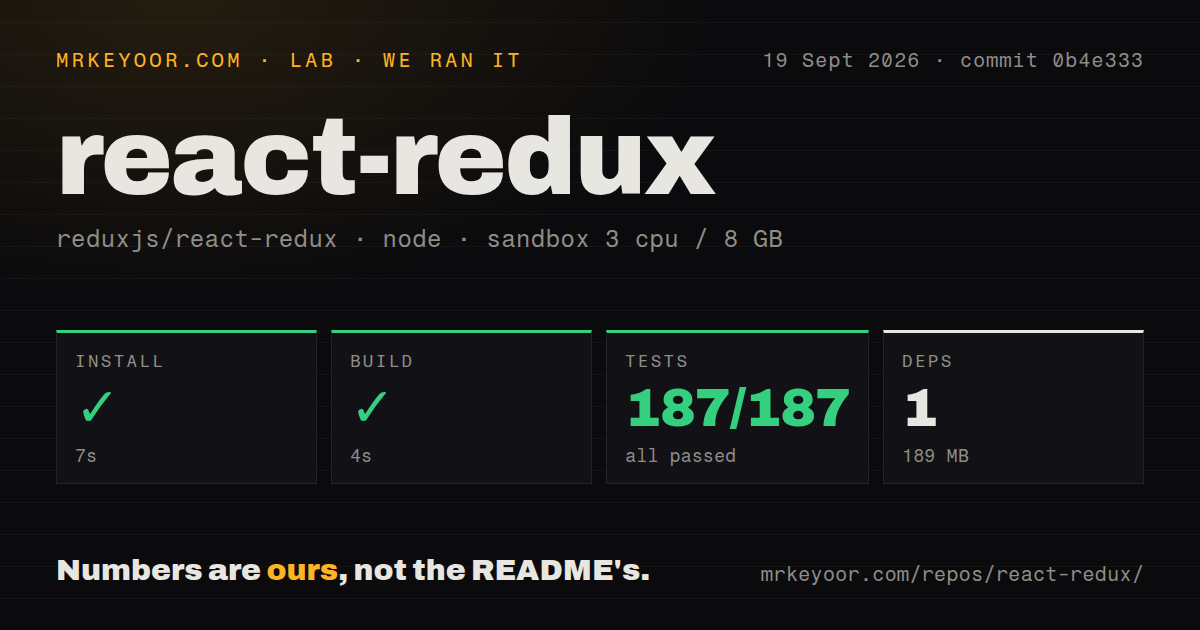
| Install | ✓ · 1s | 4 packages on disk · 2 MB |
| Import | ✓ | ESM import works · require() works · CommonJS package with exports map |
| Browser | 6.9 KB | gzipped (18.7 KB minified), bundled with esbuild |
| Types | ✓ | TypeScript types bundled |
| Known vulns | 0 | 0 critical · 0 high · 0 moderate · 0 low (npm audit) |
Answers from our run
Does react-redux install cleanly?
Yes. In a fresh container with an empty cache, npm install react-redux finished in 1 seconds, leaving 4 packages and 2 MB on disk. npm audit reported no known vulnerabilities.
How much does react-redux add to a browser bundle?
6.9 KB gzipped (18.7 KB minified) when the whole package is bundled for the browser with esbuild. Importing only part of it is usually smaller.
Does react-redux work with both ESM and CommonJS?
Yes. Both import 'react-redux' and require('react-redux') worked in Node 22 in our run. The package is published as CommonJS with an exports map.
Does react-redux include TypeScript types?
Yes, type declarations ship inside the package, so no @types install is needed.
react-redux or zustand: which should you use?
zustand: Use it for a compact hook-based client store without reducers or action dispatch. React-Redux 9.3.0 installed in 1 second, used 2 MB, and bundled to 6.9 KB gzipped in our sandbox with 0 audit findings.
When should you not use react-redux?
There is no Redux store and the app only shares a few local client values. Zustand or Jotai avoids reducers, dispatch, and a required top-level Provider.
Discussed on
- hnWhy React/Redux is inferior as a paradigm198 points
- hnDjango React/Redux Base Project175 points
- hnStep by Step Guide to Building React Redux Apps133 points
- hnReact/Redux Links: a curated list of tutorials for React, Redux, ES6, and more125 points
- hnReact Redux 6.0 released84 points
Use it if
- A React application already owns state in Redux or Redux Toolkit and needs the maintained context and subscription binding.
- Many components consume separate slices of one action-driven state tree and Redux DevTools history is useful during diagnosis.
- Application hooks should carry `RootState`, `AppDispatch`, and `AppStore` types through one `withTypes()` setup.
- A `connect()` codebase needs to migrate component by component while existing connected views continue to run.
- There is no Redux store and the app only shares a few local client values. Zustand or Jotai avoids reducers, dispatch, and a required top-level Provider.
- Most shared state is remote data with refetching, freshness, invalidation, and retries. TanStack Query or RTK Query models that lifecycle directly.
- Consumers must remain React Server Components. The package's `react-server` export rejects hooks, so `Provider` and store-reading components require a client boundary.
- Selectors return a fresh object, array, filtered list, or mapped list on every action and the team will not memoize them. Default equality is a reference check.
- The project is pinned to React 17 or Redux 4. Version 9.3.0 declares React 18 or 19 and Redux 5 as peers.
- One small feature is the only state consumer. Adding the full Redux store model and 3 peer dependencies is hard to justify for isolated state.
Setup reality
Our react-redux 9.3.0 install finished in 1 second under Node 22. It left 4 packages and 2 MB on disk. The package reports 948 KB unpacked, 2 direct dependencies, 3 peer dependencies, bundled TypeScript declarations, and an MIT license. npm audit found 0 issues across all severities. A full esbuild browser import measured 18.7 KB minified and 6.9 KB gzipped.
The package publishes CommonJS through an exports map, and both require() and ESM import worked in our checks. React and Redux are peers supplied by the application. Create the Redux 5 store separately, normally with Redux Toolkit, and render Provider above every hook consumer. TypeScript projects should create typed selector, dispatch, and store hooks with withTypes() so thunk dispatch and state types stay accurate.
useSelector reruns after store changes and compares the selected result by reference. Scalars behave well. A new array, object, filter result, or map result causes a render even when its contents are equal. Put reusable createSelector instances outside components, or create one selector per mounted component when props participate in memoization. Use shallowEqual only for a small flat object whose fields retain stable references.
Next.js App Router needs a client-side Provider component and an isolated store per request; a singleton created in a server module can leak data between requests. Preloaded state must match the server-rendered output for hydration. Version 9.3.0 changes editor guidance rather than runtime behavior: connect() gains @deprecated, legacy_connect exposes the same implementation without that marker, and the release notes say removal is not planned.
Patterns
Place the Redux store above components provide-store
import { Provider } from 'react-redux'
import { createRoot } from 'react-dom/client'
import { store } from './store'

createRoot(document.getElementById('root')).render(
  <Provider store={store}>
    <App />
  </Provider>
)
Every component calling a React-Redux hook must render below the `Provider` that owns the intended store context.
Define application-typed hooks once create-typed-hooks
import { useDispatch, useSelector, useStore } from 'react-redux'
import type { AppDispatch, AppStore, RootState } from './store'

export const useAppDispatch = useDispatch.withTypes<AppDispatch>()
export const useAppSelector = useSelector.withTypes<RootState>()
export const useAppStore = useStore.withTypes<AppStore>()
Typed wrappers preserve application state, thunk dispatch, and store types without importing a concrete store into every component.
Subscribe to one scalar select-scalar
function CartCount() {
  const count = useAppSelector(
    (state) => state.cart.items.length
  )
  return <output>{count}</output>
}
A number is compared by value. This component rerenders only when the selected count changes.
Dispatch from a user event dispatch-action
function AddButton({ product }) {
  const dispatch = useAppDispatch()
  return (
    <button onClick={() => dispatch(itemAdded(product))}>
      Add to cart
    </button>
  )
}
The dispatch function reference stays stable while the same store remains attached to the Provider.
Compare a flat selected object shallow-compare-object
import { shallowEqual } from 'react-redux'

const summary = useAppSelector(
  (state) => ({
    id: state.user.id,
    name: state.user.name,
  }),
  shallowEqual,
)
`shallowEqual` compares top-level fields. It does not make freshly created nested objects or arrays stable.
Retain a filtered list reference memoize-derived-list
import { createSelector } from '@reduxjs/toolkit'

const selectCompleted = createSelector(
  [(state) => state.todos.items],
  (items) => items.filter((item) => item.completed),
)

function CompletedList() {
  const items = useAppSelector(selectCompleted)
  return items.map((item) => (
    <Todo key={item.id} item={item} />
  ))
}
A module-level selector keeps its cache across renders and recalculates when the input array reference changes.
Give each mounted row its own selector memoize-by-prop
const makeSelectTodo = () => createSelector(
  [
    (state) => state.todos.byId,
    (_state, id) => id,
  ],
  (byId, id) => byId[id],
)

function TodoRow({ id }) {
  const selectTodo = useMemo(makeSelectTodo, [])
  const todo = useAppSelector((state) => selectTodo(state, id))
  return <span>{todo.text}</span>
}
One selector instance per mounted row prevents different prop values from evicting a shared single-entry cache.
Create a client store for a Next.js request provide-next-store
'use client'
import { useRef } from 'react'
import { Provider } from 'react-redux'

export function StoreProvider({ children, initialState }) {
  const storeRef = useRef()
  if (!storeRef.current) {
    storeRef.current = makeStore(initialState)
  }
  return (
    <Provider store={storeRef.current}>
      {children}
    </Provider>
  )
}
Do not create a mutable store singleton in a server module. Each request needs isolated initial state before hydration.
Read current state without subscribing read-store-on-event
function SaveButton() {
  const store = useAppStore()
  const dispatch = useAppDispatch()

  function save() {
    const draft = store.getState().editor.draft
    dispatch(saveDraft(draft))
  }

  return <button onClick={save}>Save</button>
}
`useStore()` does not subscribe the component. Read `getState()` inside the event rather than using it to derive rendered output.
Isolate a second Redux store use-custom-context
const WidgetContext = createContext(null)

export const useWidgetSelector = createSelectorHook(WidgetContext)
export const useWidgetDispatch = createDispatchHook(WidgetContext)

<Provider context={WidgetContext} store={widgetStore}>
  <Widget />
</Provider>
The custom hooks and Provider must receive the same context. Default hooks continue reading the default Redux context.
Give each component test a fresh store test-with-store
function renderWithStore(ui, preloadedState) {
  const store = makeStore(preloadedState)
  return {
    store,
    ...render(
      <Provider store={store}>{ui}</Provider>
    ),
  }
}

const view = renderWithStore(
  <CartCount />,
  { cart: { items: [] } },
)
A new store per test prevents state leakage and exercises real reducers plus selectors without mocking React-Redux hooks.
Use connect without an editor warning keep-connected-component
import { legacy_connect } from 'react-redux'

const ConnectedHeader = legacy_connect(
  (state) => ({ user: state.auth.user }),
  { logout },
)(Header)
`legacy_connect` is the same 9.3.0 runtime implementation without the deprecated TypeScript marker. Hooks remain the recommended API for new components.
Alternatives
| Package | Registry | Pick it when |
|---|---|---|
| zustand | npm | Use it for a compact hook-based client store without reducers or action dispatch. |
| jotai | npm | Use it when state naturally separates into independent atoms. |
| mobx-react-lite | npm | Use it when an existing MobX model should drive React observers. |
| @tanstack/react-query | npm | Use it when cache freshness and server-data invalidation are the actual problem. |
More web frontend guides
postcss · react · react-dom · tailwindcss · clsx · htmlparser2 · the whole shelf →
How this guide is made: grounded in the library's documentation, release notes, changelog, and issue history, on a fixed rubric — not a hands-on install of every release. The 50 most-downloaded entries are additionally install-verified in clean containers. Corrections: contact the desk.