pyathena review
PyAthena 3.35.4 is a Python DB API 2.0 client and SQLAlchemy dialect for Amazon Athena. It submits SQL to the remote AWS service, polls execution, and turns results into Python rows or optional Pandas, Arrow, and Polars objects. The project also has futures-based and native asyncio cursors, workgroup settings, result reuse, and AWS credential-chain support. Version 3.35.4 fixes escaper selection for DELETE and CTAS queries to prevent SQL injection under CVE-2026-65321. Our Python 3.12 install imported in 0.12 seconds with typed metadata and no audit findings, but the base environment occupied 33 MB.
PyAthena 3.35.4 installed in 0.5 seconds as 10 packages using 33 MB, imported in 0.12 seconds, and had 0 audit findings in our sandbox. Use it when DB API, SQLAlchemy, dataframe, or async conveniences justify the client; boto3 is clearer for a couple of tightly scoped Athena calls.
We installed it
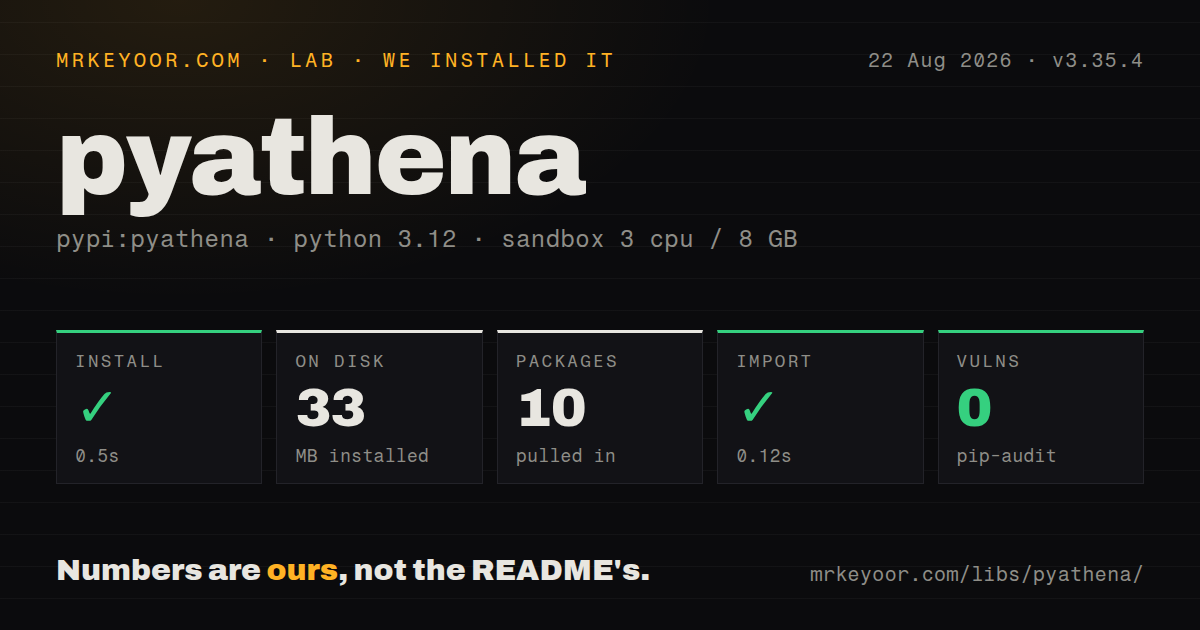
| Install | ✓ · 0.5s | 10 packages on disk · 33 MB |
| Import | ✓ | import pyathena in 0.12s · pure Python · py.typed · requires Python >=3.10 |
| Known vulns | 0 | (pip-audit) |
Answers from our run
Does pyathena install cleanly?
Yes. In a fresh container with an empty cache, pip install pyathena finished in 0.5s, leaving 10 packages and 33 MB on disk. pip-audit reported no known vulnerabilities.
What does pyathena need to run?
Python >=3.10, and nothing compiled: it is pure Python. In our run import pyathena succeeded in 0.12s, and the package ships py.typed for type checkers.
pyathena or boto3: which should you use?
boto3: Choose it for a few Athena operations where the AWS API and polling state should remain explicit. PyAthena 3.35.4 installed in 0.5 seconds as 10 packages using 33 MB, imported in 0.12 seconds, and had 0 audit findings in our sandbox.
When should you not use pyathena?
The workload needs low-latency transactions. Every execute call remains a remote Athena job with queueing, scanning, billing, result storage, and polling.
Use it if
- Athena queries should fit existing Python DB API cursor code instead of a custom boto3 polling loop.
- An application needs an Athena SQLAlchemy dialect with AWS credential-chain authentication.
- Query results regularly move into Pandas, Arrow, or Polars and the matching optional extra is acceptable.
- Native asyncio, future cursors, workgroup controls, cancellation, or Athena result reuse will replace substantial in-house code.
- The workload needs low-latency transactions. Every execute call remains a remote Athena job with queueing, scanning, billing, result storage, and polling.
- AWS identity cannot receive both Athena execution and result-location permissions. A successful Python connection object does not prove the first query can run.
- The service is pinned below Python 3.10. PyAthena 3.35.4 requires Python 3.10 or newer.
- Large results will be fetched without bounds. fetchall and an unchunked Pandas cursor can materialize the complete result in local memory.
- You want a small base client for 1 or 2 queries. Our install used 33 MB across 10 packages, while boto3 exposes the underlying Athena API directly.
Setup reality
We installed PyAthena 3.35.4 in a fresh Python 3.12 Bookworm sandbox. The install completed in 0.5 seconds, left 10 packages, and used 33 MB. The pure-Python distribution reports 12 direct dependencies, requires Python 3.10 or newer, ships py.typed, and imported in 0.12 seconds. pip-audit found 0 known vulnerabilities. PyPI publishes MIT-style license text, and GitHub labels the repository MIT.
Use the normal AWS credential provider chain rather than passing keys in source. The principal needs Athena query permissions, catalog access, and permission to read or write the result location. A standard workgroup needs s3_staging_dir or AWS_ATHENA_S3_STAGING_DIR, with a bucket and region that match policy. A workgroup using Athena-managed query results can omit external S3 output; pass an explicit empty staging string if an inherited environment variable would otherwise override it.
Connection creation is lazy enough that configuration errors often appear on execute. Set region, workgroup, catalog, and schema explicitly, then run a cheap query during startup or deployment checks. The default pyformat parameter style performs client-side formatting; use paramstyle qmark for Athena execution parameters. Version 3.35.4 specifically fixes SQL escaping for DELETE and CTAS, so do not remain on 3.35.3 when those statements can include parameters.
The plain cursor blocks while Athena runs. AsyncCursor returns concurrent futures and does not follow DB API 2.0; aio_connect is the native asyncio interface. Install the pandas, arrow, polars, sqlalchemy, or aiosqlalchemy extra before importing those paths. Chunking controls local dataframe memory but does not reduce bytes scanned. Result reuse can return an earlier equivalent result inside its age window, so disable it for freshness-sensitive reads and use partitions, workgroup limits, timeouts, and cancellation to control cost.
Patterns
Execute a DB API query run-query
from pyathena import connect

with connect(
    s3_staging_dir='s3://analytics-results/pyathena/',
    region_name='us-east-1',
    work_group='analysts',
) as conn:
    with conn.cursor() as cur:
        cur.execute('SELECT current_date')
        print(cur.fetchone())
The first execute is where IAM, region, workgroup, and staging-location errors usually surface.
Select workgroup-managed result storage use-managed-results
conn = connect(
    work_group='managed-results-group',
    s3_staging_dir='',
    region_name='us-east-1',
)
An explicit empty string prevents AWS_ATHENA_S3_STAGING_DIR from forcing an external bucket onto a managed-results workgroup.
Use Athena execution parameters parameterize-query
cur = connect(
    s3_staging_dir=staging,
    region_name='us-east-1',
    paramstyle='qmark',
).cursor()
cur.execute(
    'SELECT * FROM events WHERE event_date = ? AND account_id = ?',
    ['2026-08-01', 'acct-42'],
)
qmark uses Athena execution parameters; default pyformat performs client-side formatting and follows different escaping rules.
Process rows without fetchall iterate-rows
cur.execute('SELECT id, total FROM orders')
for order_id, total in cur:
    process(order_id, total)
Iteration avoids a second full Python list, although Athena has already written the remote query result.
Address row values by column name fetch-dictionaries
from pyathena.cursor import DictCursor

cur = connect(s3_staging_dir=staging, region_name='us-east-1').cursor(DictCursor)
cur.execute('SELECT order_id, status FROM orders LIMIT 100')
for row in cur:
    print(row['order_id'], row['status'])
Alias duplicate column names explicitly because a dictionary row cannot preserve two values under the same key.
Read a bounded result into Pandas load-pandas
from pyathena.pandas.cursor import PandasCursor

cur = connect(s3_staging_dir=staging, region_name='us-east-1').cursor(PandasCursor)
df = cur.execute(
    "SELECT * FROM daily_summary WHERE day >= DATE '2026-08-01'"
).as_pandas()
Install PyAthena[pandas]. An unchunked PandasCursor can hold the entire result in memory.
Bound local dataframe memory read-pandas-chunks
cur.execute('SELECT * FROM large_events', chunksize=50_000)
for frame in cur.iter_chunks():
    write_partition(frame)
A 50,000-row chunk limits local dataframe size but does not change Athena bytes scanned or query charges.
Await a query with aio_connect run-native-async
from pyathena import aio_connect

async with await aio_connect(
    s3_staging_dir=staging,
    region_name='us-east-1',
) as conn:
    cur = conn.cursor()
    await cur.execute('SELECT 1')
    row = await cur.fetchone()
aio_connect is the native asyncio API; AsyncCursor is a separate futures-based cursor that is not DB API 2.0.
Allow a recent equivalent result reuse-result
cur.execute(
    "SELECT count(*) FROM events WHERE day = DATE '2026-08-01'",
    result_reuse_enable=True,
    result_reuse_minutes=15,
)
The 15-minute reuse window can return older data, so leave it disabled when the latest table state is required.
Build an Athena SQLAlchemy engine create-sqlalchemy-engine
from sqlalchemy import create_engine, text

engine = create_engine(
    'awsathena+rest://:@athena.us-east-1.amazonaws.com:443/default',
    connect_args={'s3_staging_dir': staging, 'work_group': 'analysts'},
)
with engine.connect() as conn:
    rows = conn.execute(text('SELECT 1')).all()
Install PyAthena[sqlalchemy] and let boto3 discover credentials instead of embedding AWS keys in the URL.
Alternatives
| Package | Registry | Pick it when |
|---|---|---|
| boto3 | PyPI | Choose it for a few Athena operations where the AWS API and polling state should remain explicit. |
| awswrangler | PyPI | Choose it for dataframe-first workflows spanning Athena, Glue, S3, and other AWS analytics services. |
| pyhive | PyPI | Choose it for a DB API or SQLAlchemy layer aimed at Hive or Presto rather than Athena-specific controls. |
More data guides
numpy · pandas · fsspec · lxml · pyarrow · sqlalchemy · the whole shelf →
How this guide is made: grounded in the library's documentation, release notes, changelog, and issue history, on a fixed rubric — not a hands-on install of every release. The 50 most-downloaded entries are additionally install-verified in clean containers. Corrections: contact the desk.