pdf2image review
pdf2image 1.17.0 turns PDF pages into Pillow images by launching Poppler's `pdfinfo`, `pdftoppm`, or `pdftocairo` programs. It accepts a file path or bytes and can restrict page ranges, DPI, pixel size, image format, passwords, crop boxes, timeouts, and worker count. It can return opened images or disk paths. The Python package does not contain a PDF renderer, so `pip install` alone is not a working conversion setup. Version 1.17.0 added first-page and last-page bounds to the pdfinfo helpers, fixed `single_file` with more than 1 thread, and improved Pyright compatibility. Our import succeeded in 0.31 seconds and the package ships a `py.typed` marker.
pdf2image 1.17.0 installed in 0.5 seconds and imported in 0.31 seconds in our sandbox, but actual conversion still requires separately installed Poppler executables. Use it when Poppler is already part of the runtime and the output is page images; choose PyMuPDF or pypdfium2 for a more self-contained or broader PDF stack.
We installed it
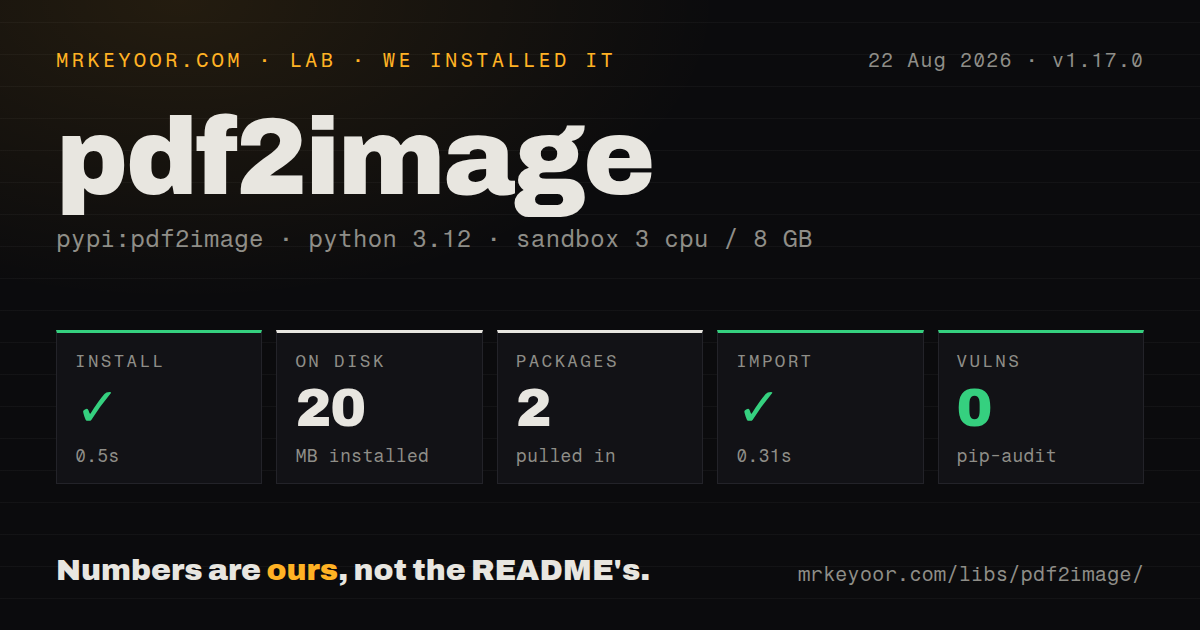
| Install | ✓ · 0.5s | 2 packages on disk · 20 MB |
| Import | ✓ | import pdf2image in 0.31s · pure Python · py.typed |
| Known vulns | 0 | (pip-audit) |
Answers from our run
Does pdf2image install cleanly?
Yes. In a fresh container with an empty cache, pip install pdf2image finished in 0.5s, leaving 2 packages and 20 MB on disk. pip-audit reported no known vulnerabilities.
What does pdf2image need to run?
Python 3.x, and nothing compiled: it is pure Python. In our run import pdf2image succeeded in 0.31s, and the package ships py.typed for type checkers.
pdf2image or pymupdf: which should you use?
pymupdf: Choose it for rendering plus text, annotations, editing, and a broader document model. pdf2image 1.17.0 installed in 0.5 seconds and imported in 0.31 seconds in our sandbox, but actual conversion still requires separately installed Poppler executables.
When should you not use pdf2image?
You cannot install operating-system binaries; pip supplies Pillow but not the required Poppler executables
Use it if
- Poppler is already approved in the runtime and Python code needs pages as Pillow images
- A thumbnail, preview, or OCR stage needs raster pages rather than extracted PDF text
- Conversion jobs need explicit page bounds, DPI or pixel size, output format, and a hard timeout
- Large documents should write page images to disk and return paths instead of retaining every decoded image
- You cannot install operating-system binaries; pip supplies Pillow but not the required Poppler executables
- Deployment must be one self-contained Python wheel; Poppler and its shared libraries remain a separate platform concern
- The service needs PDF editing, annotations, or text extraction; this wrapper's purpose is raster page output
- Untrusted documents cannot run inside a process with memory, time, and file-size limits; rendering can consume substantial resources
- You need recent wrapper releases for new Python or Poppler behavior; 1.17.0 shipped in January 2024 and the repository last moved in July 2024
Setup reality
We installed pdf2image 1.17.0 in a fresh Python 3.12 Bookworm sandbox. The install succeeded in 0.5 seconds, left 2 packages using 20 MB, and pip-audit found 0 known vulnerabilities. pdf2image declares 1 direct dependency, is pure Python, carries the MIT license, and includes py.typed. Its package metadata does not state a Python requirement. import pdf2image worked in 0.31 seconds. None of those checks proves a PDF can render because the wrapper calls external Poppler programs.
Install Poppler separately and make pdfinfo plus pdftoppm or pdftocairo visible on PATH. The README uses the system package on Linux and macOS and a downloaded or built distribution on Windows. poppler_path can point at the executable directory when PATH cannot. No credentials or project config file are needed. Container images and serverless layers must carry Poppler and any required shared libraries themselves.
The defaults render at 200 DPI, use 1 thread, return a Pillow image per page, and can consume too much memory on a large document. For bounded work, set first_page, last_page, size, and timeout. Write into output_folder and add paths_only=True to avoid reopening every result. Returned paths live only as long as their directory, so consume or copy them before a temporary directory closes.
The README recommends no more than 4 threads because storage becomes the bottleneck and notes that PNG compression is slow. use_pdftocairo=True can help some workloads, but backend features differ. Passwords pass to child processes, so keep them out of logs and consider host process visibility. A timeout kills slow Poppler work, yet hostile uploads also need outer memory, page-count, input-size, and disk quotas.
Patterns
Render every page from a path render-file
from pdf2image import convert_from_path

pages = convert_from_path('report.pdf', dpi=150)
for number, image in enumerate(pages, 1):
    image.save(f'page-{number}.png')
Every rendered page stays as a Pillow image in memory; this 150 DPI example is for a bounded document.
Render the first uploaded pages render-bytes
from pdf2image import convert_from_bytes

pages = convert_from_bytes(upload, dpi=144, first_page=1, last_page=3, timeout=30)
The upload bytes and up to 3 decoded pages coexist in memory, so enforce an input-size limit before this call.
Keep a large conversion on disk return-disk-paths
from pdf2image import convert_from_path
paths = convert_from_path('large.pdf', output_folder='/var/tmp/pages', paths_only=True, fmt='jpeg', dpi=120)
`paths_only=True` needs an output folder; clean the generated files after their consumers finish.
Bound output lifetime use-temporary-directory
from tempfile import TemporaryDirectory
from pdf2image import convert_from_path

with TemporaryDirectory() as directory:
    paths = convert_from_path('report.pdf', output_folder=directory, paths_only=True)
    consume(paths)
All returned paths disappear when the `with` block ends, so `consume` must finish or copy them first.
Convert an inclusive page range render-page-range
pages = convert_from_path('appendix.pdf', first_page=10, last_page=15, dpi=200)PDF page numbers are 1-based here, and both boundaries are included.
Fit one page into a thumbnail create-thumbnail
thumb = convert_from_path('brochure.pdf', first_page=1, last_page=1, size=400, fmt='jpeg', jpegopt={'quality': 82})[0]An integer `size` fits within a 400 by 400 box while preserving the page's aspect ratio.
Use Cairo for transparent PNG render-transparent-image
pages = convert_from_path('overlay.pdf', fmt='png', transparent=True, use_pdftocairo=True)PNG compression is slower according to the README, and pdftocairo does not support every pdftoppm option.
Supply a PDF password open-protected-pdf
pages = convert_from_path('protected.pdf', userpw=user_password, first_page=1, last_page=1)The password reaches a Poppler child process; do not print command arguments or retain the secret in logs.
Stop a slow renderer enforce-timeout
from pdf2image.exceptions import PDFPopplerTimeoutError
try:
    pages = convert_from_path('input.pdf', timeout=20)
except PDFPopplerTimeoutError:
    quarantine('input.pdf')
The 20-second timeout stops Poppler work; apply separate memory and disk limits around untrusted input.
Treat syntax warnings as errors reject-syntax-warning
from pdf2image.exceptions import PDFSyntaxError
try:
    pages = convert_from_path('input.pdf', strict=True)
except PDFSyntaxError as error:
    report(error)
`strict` defaults to false, so enabling it may reject a PDF that Poppler would otherwise render.
Check page count before rendering inspect-page-count
from pdf2image import pdfinfo_from_path
info = pdfinfo_from_path('report.pdf', timeout=10)
if info['Pages'] > 200:
    raise ValueError('document too long')
This 200-page policy still launches `pdfinfo`, so the metadata call also receives a timeout.
Point Windows at Poppler set-poppler-path
pages = convert_from_path(r'C:\docs\report.pdf', poppler_path=r'C:\tools\poppler\Library\bin', first_page=1, last_page=1)The directory must contain `pdfinfo` and a renderer; pip installs neither executable.
Alternatives
| Package | Registry | Pick it when |
|---|---|---|
| pymupdf | PyPI | Choose it for rendering plus text, annotations, editing, and a broader document model. |
| pypdfium2 | PyPI | Choose it for PDFium rendering distributed through platform wheels. |
| pillow | PyPI | Choose it only after PDF pages are already rasterized and the remaining work is image processing. |
More utils guides
lru-cache · type-fest · ajv · zod · p-limit · find-up · the whole shelf →
How this guide is made: grounded in the library's documentation, release notes, changelog, and issue history, on a fixed rubric — not a hands-on install of every release. The 50 most-downloaded entries are additionally install-verified in clean containers. Corrections: contact the desk.