patsy review
Patsy 1.0.2 turns R-style statistical formulas into numeric design matrices for Python models. `y ~ x + C(group)` creates a response, intercept, numeric column, categorical contrasts, and meaningful column names. Its `DesignInfo` retains training categories, spline knots, and centering values so later rows receive the same encoding. Version 1.0.2 only fixes pandas 3 `StringDtype` compatibility. Our pure-Python install occupied 59 MB once NumPy was included. The maintainers state that Patsy receives compatibility maintenance, not new features, and recommend Formulaic for migrations.
patsy 1.0.2 installed in 0.6 seconds but occupied 59 MB across 2 packages in our sandbox, and its maintainers plan no new features. Keep it for statsmodels compatibility and existing `DesignInfo` workflows; start new formula infrastructure with Formulaic unless exact Patsy semantics are required.
We installed it
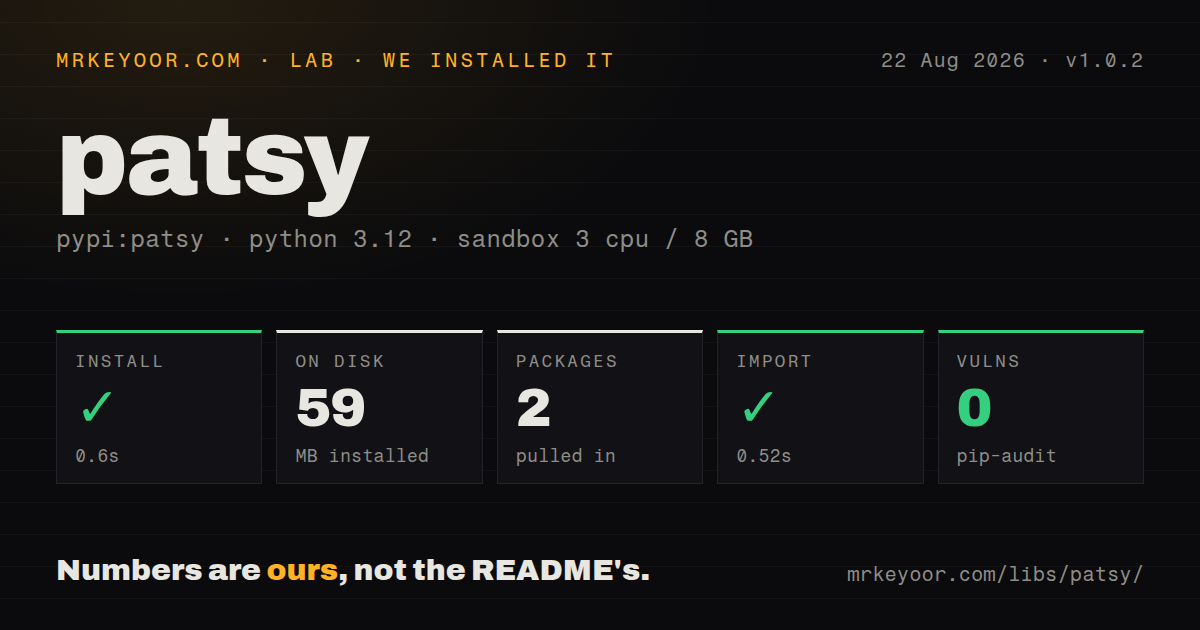
| Install | ✓ · 0.6s | 2 packages on disk · 59 MB |
| Import | ✓ | import patsy in 0.52s · pure Python · requires Python >=3.6 |
| Known vulns | 0 | (pip-audit) |
Answers from our run
Does patsy install cleanly?
Yes. In a fresh container with an empty cache, pip install patsy finished in 0.6s, leaving 2 packages and 59 MB on disk. pip-audit reported no known vulnerabilities.
What does patsy need to run?
Python >=3.6, and nothing compiled: it is pure Python. In our run import patsy succeeded in 0.52s.
patsy or formulaic: which should you use?
formulaic: Use it for new formula systems; Patsy's maintainers identify it as the successor and publish migration guidance. patsy 1.0.2 installed in 0.6 seconds but occupied 59 MB across 2 packages in our sandbox, and its maintainers plan no new features.
When should you not use patsy?
You are designing new formula infrastructure. Patsy's own README says feature development has stopped and names Formulaic as its successor.
Use it if
- A statsmodels formula workflow needs inspectable design columns and consistent prediction matrices.
- Training and scoring rows must share category levels, contrast rules, centering values, or spline knots through stored `DesignInfo`.
- Analysts already use Wilkinson formulas for main effects, interactions, and categorical terms.
- Coefficient output needs named matrix columns that map back to formula terms.
- You are designing new formula infrastructure. Patsy's own README says feature development has stopped and names Formulaic as its successor.
- Sparse matrices or multiple DataFrame backends are requirements; Patsy's normal outputs are dense NumPy arrays or pandas DataFrames.
- Feature construction must live inside a scikit-learn Pipeline with its fit and transform contracts; `ColumnTransformer` is a better native fit.
- Formula text comes from an untrusted user. Factor expressions evaluate Python names, so the formula language is executable input.
- Only simple dummy encoding is needed. `pandas.get_dummies` or an encoder avoids implicit intercepts and a separate formula grammar.
Setup reality
Our install of patsy 1.0.2 finished in 0.6 seconds in a clean Python 3.12 container. Two packages used 59 MB on disk, and import patsy took 0.52 seconds. PyPI lists 4 direct requirements when test extras are counted. Patsy is pure Python, requires Python 3.6 or newer, carries the 2-clause BSD license, and has no py.typed marker. pip-audit reported 0 known vulnerabilities.
NumPy accounts for much of the measured environment because design matrices are numeric arrays. The spline helpers bs, cr, cc, and te also require SciPy, which the README lists as optional rather than a base dependency. Install SciPy before accepting formulas with spline terms. Otherwise an expression can look valid in configuration review and fail only when the formula is evaluated.
Formula evaluation reads Python names from an EvalEnvironment. Importing NumPy as np permits np.log(x); I(x + 1) protects arithmetic from formula operators, and Q('odd name') quotes a column. Treat every formula as code-bearing configuration. Keep it in reviewed source or trusted model metadata, never in an unrestricted request field. Missing values are dropped by default, so use NAAction(on_NA='raise') when silent row loss is unacceptable.
Retain the training DesignInfo. Calling dmatrix() again on prediction rows can infer different category levels and recompute stateful transforms. build_design_matrices() replays the stored design and raises on an unseen category instead of silently moving coefficients. Version 1.0.2 makes pandas 3 string columns work, but it does not change this lifecycle. Patsy is in maintenance mode, so new work should verify Formulaic unless exact statsmodels or Patsy behavior is required.
Patterns
Build response and predictor matrices build-design-matrices
from patsy import dmatrices

y, X = dmatrices('y ~ x + group', data, return_type='dataframe')
print(X.columns.tolist())
`dmatrices()` returns both formula sides. DataFrame output preserves the original index after Patsy 1.0.2 applies its missing-row policy.
Encode prediction rows with the training design reuse-design-info
from patsy import build_design_matrices, dmatrices

y, X = dmatrices('y ~ x + group', train, return_type='dataframe')
(X_new,) = build_design_matrices([X.design_info], new_rows, return_type='dataframe')
A fresh `dmatrix()` can infer different category columns. `build_design_matrices()` reuses the stored training levels and stateful transform values.
Choose a categorical reference level set-category-contrast
from patsy import C, Treatment, dmatrix

X = dmatrix("C(group, Treatment(reference='b'))", data)
`C()` also forces numeric codes to be categorical. With an intercept, treatment coding omits the chosen reference column.
Compare full and interaction-only formulas expand-interaction
full = dmatrix('x * group', data)
interaction_only = dmatrix('x:group', data)
`x * group` expands to 3 terms: `x`, `group`, and `x:group`. A colon requests only the interaction.
Remove the implicit intercept remove-formula-intercept
X1 = dmatrix('x - 1', data)
X2 = dmatrix('0 + group', data)
Patsy adds an intercept unless the formula removes it. Without that intercept, a categorical term normally expands to full dummy columns.
Use functions and quoted column names evaluate-python-transform
import numpy as np
logged = dmatrix('np.log(x)', data)
arithmetic = dmatrix('I(x + 1)', data)
quoted = dmatrix("Q('total sales')", data)
Names resolve through the evaluation environment. `I()` hides arithmetic from formula parsing, while `Q()` addresses a column that is not a valid Python identifier.
Replay training centering on new rows reuse-stateful-transform
train_X = dmatrix('center(x) + standardize(x)', train)
(scored_X,) = build_design_matrices([train_X.design_info], new_rows)
Centering and standardization values live in `DesignInfo`. Rebuilding the formula on a scoring batch would calculate different statistics.
Expand a nonlinear spline term create-spline-basis
from patsy import bs, cr, dmatrix

b_spline = dmatrix('bs(x, df=4)', data)
natural_cubic = dmatrix('cr(x, df=4)', data)
Spline helpers need the optional SciPy dependency. Their learned knots are stateful and must be replayed through the training design.
Reject missing values instead of dropping rows raise-on-missing
from patsy import NAAction, dmatrices

y, X = dmatrices('y ~ x', data, NA_action=NAAction(on_NA='raise'))
The default removes rows with missing factor values from both sides. `on_NA='raise'` makes that data loss visible.
Find every matrix column owned by a term inspect-term-columns
design = dmatrix('x + group', data).design_info
print(design.term_names)
print(design.column_names)
print(design.slice('group'))
One categorical term can occupy several columns. Use `DesignInfo.slice()` rather than assuming a coefficient position.
Let statsmodels retain the formula design fit-statsmodels-formula
import statsmodels.formula.api as smf

result = smf.ols('y ~ x + C(group)', data=data).fit()
prediction = result.predict(new_rows)
The fitted statsmodels result keeps design metadata and reuses it during prediction, avoiding an independently inferred scoring matrix.
Carry a model specification into Formulaic migrate-to-formulaic
from formulaic import model_matrix

y, X = model_matrix('y ~ x + group', data)
X_new = X.model_spec.get_model_matrix(new_rows)
Formulaic's `ModelSpec` fills the persistence role. Compare column names, order, and categorical contrasts before reusing fitted coefficients by position.
Alternatives
| Package | Registry | Pick it when |
|---|---|---|
| formulaic | PyPI | Use it for new formula systems; Patsy's maintainers identify it as the successor and publish migration guidance. |
| statsmodels | PyPI | Use its formula interface when the goal is fitting statistical models rather than manipulating matrices directly. |
| scikit-learn | PyPI | Use `ColumnTransformer` and encoders when preprocessing must participate in sklearn pipelines and cross-validation. |
More data guides
numpy · pandas · fsspec · pyarrow · lxml · sqlalchemy · the whole shelf →
How this guide is made: grounded in the library's documentation, release notes, changelog, and issue history, on a fixed rubric — not a hands-on install of every release. The 50 most-downloaded entries are additionally install-verified in clean containers. Corrections: contact the desk.