parse-imports-exports review
parse-imports-exports 0.2.4 scans a JavaScript or TypeScript source string and reports module-boundary syntax without building a full AST. It separates static imports, literal dynamic imports, `require()` calls, reexports, local exports, TypeScript type forms, interfaces, namespaces, and CommonJS assignments. Each hit includes source offsets, with optional line and column strings. The result is syntax metadata, not resolved files: package exports, aliases, `tsconfig` paths, extensions, filesystem lookup, scopes, and runtime evaluation remain outside this package. The current 0.2.4 release adds no published changelog, so its README and declaration file are the contract to pin.
parse-imports-exports 0.2.4 installed in 1 second, occupied 1 MB, loaded through both module systems, and bundled to 6.5 KB gzipped in our sandbox. Use it for fast inventories of valid formatted modules; use a full parser plus resolver when broken syntax, transformations, computed paths, or actual target files matter.
We installed it
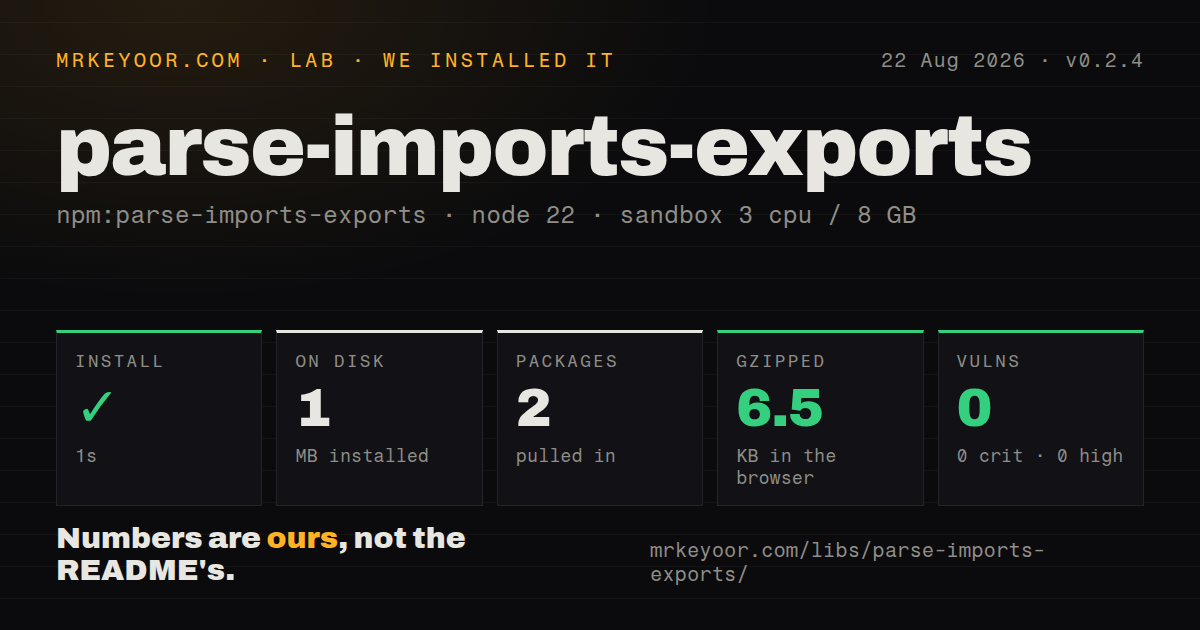
| Install | ✓ · 1s | 2 packages on disk · 1 MB |
| Import | ✓ | ESM import works · require() works · ESM package with exports map |
| Browser | 6.5 KB | gzipped (21 KB minified), bundled with esbuild |
| Types | ✓ | TypeScript types bundled |
| Known vulns | 0 | 0 critical · 0 high · 0 moderate · 0 low (npm audit) |
Answers from our run
Does parse-imports-exports install cleanly?
Yes. In a fresh container with an empty cache, npm install parse-imports-exports finished in 1 seconds, leaving 2 packages and 1 MB on disk. npm audit reported no known vulnerabilities.
How much does parse-imports-exports add to a browser bundle?
6.5 KB gzipped (21 KB minified) when the whole package is bundled for the browser with esbuild. Importing only part of it is usually smaller.
Does parse-imports-exports work with both ESM and CommonJS?
Yes. Both import 'parse-imports-exports' and require('parse-imports-exports') worked in Node 22 in our run. The package is published as ESM with an exports map.
Does parse-imports-exports include TypeScript types?
Yes, type declarations ship inside the package, so no @types install is needed.
parse-imports-exports or es-module-lexer: which should you use?
es-module-lexer: Use it for a widely used low-level ESM lexer when compact import slices are enough. parse-imports-exports 0.2.4 installed in 1 second, occupied 1 MB, loaded through both module systems, and bundled to 6.5 KB gzipped in our sandbox.
When should you not use parse-imports-exports?
Input can be half-typed or syntactically broken. The README limits support to syntactically correct, well-formatted code such as Prettier output.
Use it if
- A dependency-analysis tool receives valid, formatted source and needs categorized imports or exports without a complete syntax tree.
- The report must keep ESM values, TypeScript type-only forms, CommonJS calls, and reexports in separate groups.
- Source ranges are needed for highlighting or extraction, while expression semantics and scope traversal are unnecessary.
- The same small scanner must run through ESM, CommonJS, or a browser bundle with included TypeScript declarations.
- Input can be half-typed or syntactically broken. The README limits support to syntactically correct, well-formatted code such as Prettier output.
- You need transformations, scopes, comments outside module statements, or arbitrary expression analysis. The return value is not an AST.
- The output must identify real files. Raw strings such as `@scope/pkg` and `./local` are not resolved through Node conditions, aliases, or `tsconfig`.
- A stable 1.0 contract is required. Version 0.2.4 exposes more than 20 optional result groups and can still change those shapes before 1.0.
- Computed dynamic imports must be followed. The scanner can key `import('./fixed.js')` by path but cannot turn `import(prefix + name)` into one module specifier.
Setup reality
We installed parse-imports-exports 0.2.4 in a fresh Node 22 Bookworm sandbox in 1 second. It left 2 packages and 1 MB on disk. npm audit found 0 known vulnerabilities. The ESM package has 1 direct dependency, no peers, an exports map, bundled TypeScript declarations, and 208 KB unpacked. Both require() and ESM import worked on Node 22.23.2. Our browser build measured 21 KB minified and 6.5 KB gzipped.
There are no credentials, native builds, service processes, or configuration files. Installation gives one runtime function, parseImportsExports, plus its types. The returned object is not a flat dependency list. Static, dynamic, type-only, reexport, local export, and CommonJS forms live under separate optional properties. Missing categories are undefined, and one module path maps to an array because the same specifier may occur more than once. Wrap that shape in your own adapter if 0.2.x upgrades must not reach every caller.
The README requires syntactically correct, well-formatted input and ES2018 RegExp named capture groups. Treat parser errors as a policy decision: strict analysis should reject the file instead of trusting a partial inventory. includeLineColumn adds strings such as 3:12; numeric start and end offsets remain the safer source-slicing primitive. Aliased named imports are keyed by the local binding, while the by property records the imported name. Type-only groups must be included deliberately when building dependency lists.
Options can skip CommonJS exports, dynamic imports, require() calls, RegExp literals, or string literal shielding. The first 3 intentionally remove categories. The literal options are riskier because import-looking text inside an ignored string or regular expression can become a false match. Keep the original source beside the result, and send each raw specifier to a separate resolver when the job needs export conditions, package locations, extension rules, or tsconfig path mapping.
Patterns
Read one module boundary parse-module
import { parseImportsExports } from 'parse-imports-exports';

const parsed = parseImportsExports(`
  import { readFile as read } from 'node:fs/promises';
  export const load = (path) => read(path, 'utf8');
`);
console.log(parsed.namedImports, parsed.declarationExports);
Every syntax group is optional in 0.2.4. Decide whether any entry in `errors` invalidates the whole analysis.
Collect static dependency strings list-static-specifiers
const parsed = parseImportsExports(source);
const paths = new Set([
  ...Object.keys(parsed.namedImports ?? {}),
  ...Object.keys(parsed.namespaceImports ?? {}),
  ...Object.keys(parsed.typeNamedImports ?? {}),
  ...Object.keys(parsed.typeNamespaceImports ?? {}),
]);
This combines 4 static groups and includes type-only dependencies. The strings are specifiers, not resolved filesystem paths.
Map local names to imported names read-import-aliases
const parsed = parseImportsExports(
  "import { readFile as read, writeFile } from 'node:fs/promises'",
);
const item = parsed.namedImports?.['node:fs/promises']?.[0];
for (const [local, info] of Object.entries(item?.names ?? {})) {
  console.log(local, info.by ?? local);
}
The `names` object uses the local binding as its key. `by` appears when the imported name differs.
Separate import and require calls find-runtime-loads
const parsed = parseImportsExports(source);
const dynamicEsm = Object.keys(parsed.dynamicImports ?? {});
const commonJs = Object.keys(parsed.requires ?? {});
console.log({ dynamicEsm, commonJs });
Only literal targets become concrete keys. A computed expression such as `import(prefix + name)` has no single path to report.
List public reexport sources collect-reexports
const parsed = parseImportsExports(source);
const groups = [
  parsed.namedReexports, parsed.namespaceReexports, parsed.starReexports,
  parsed.typeNamedReexports, parsed.typeNamespaceReexports, parsed.typeStarReexports,
];
const sources = new Set(groups.flatMap((group) => Object.keys(group ?? {})));
The API has 6 reexport groups. Keep them separate from ordinary imports when mapping a package's public surface.
Inspect exported declarations list-declarations
const parsed = parseImportsExports(`
  export const port = 3000;
  export async function start() {}
  export class Server {}
`);
for (const [name, item] of Object.entries(parsed.declarationExports ?? {})) {
  console.log(name, item.kind);
}
`kind` records supported declaration syntax. The scanner does not parse the declaration body or infer its runtime value.
Report TypeScript-only declarations separate-type-exports
const parsed = parseImportsExports(`
  export type ID = string;
  export interface User { id: ID }
  export namespace Models {}
`);
console.log(Object.keys(parsed.typeExports ?? {}));
console.log(Object.keys(parsed.interfaceExports ?? {}));
console.log(Object.keys(parsed.namespaceExports ?? {}));
These 3 groups identify declarations but do not expose interface members or resolve relationships between types.
Detect CommonJS assignments read-commonjs-exports
const parsed = parseImportsExports(`
  module.exports = createApp();
  module.exports.version = '1.0.0';
`);
console.log(parsed.commonJsNamespaceExport);
console.log(parsed.commonJsExports?.version);
Namespace replacement and property assignment use 2 different fields. Detection is syntactic and does not execute the module.
Request line and column labels include-line-columns
const parsed = parseImportsExports(source, { includeLineColumn: true });
const first = parsed.namedImports?.react?.[0];
console.log(first?.startLineColumn, first?.endLineColumn);
Line and column strings are optional. Numeric offsets remain available for exact slicing in version 0.2.4.
Recover original source text slice-statement
const parsed = parseImportsExports(source);
const item = parsed.namedImports?.react?.[0];
if (item) console.log(source.slice(item.start, item.end));
Keep the source string beside the metadata. The result stores 2 offsets instead of copying each full statement.
Fail closed on parse errors reject-partial-result
const parsed = parseImportsExports(source);
if (parsed.errors && Object.keys(parsed.errors).length > 0) {
  throw new Error('module boundary could not be parsed completely');
}
The README requires valid formatted input. A strict dependency graph should reject errors rather than publish a partial edge list.
Disable unwanted syntax passes skip-unused-scans
const parsed = parseImportsExports(source, {
  ignoreCommonJsExports: true,
  ignoreDynamicImports: true,
  ignoreRequires: true,
});
These 3 flags intentionally remove categories. Avoid ignoring string or RegExp shielding unless false matches inside literals are acceptable.
Alternatives
| Package | Registry | Pick it when |
|---|---|---|
| es-module-lexer | npm | Use it for a widely used low-level ESM lexer when compact import slices are enough. |
| @babel/parser | npm | Use it for a full JavaScript or TypeScript AST, proposal syntax, recovery, and transformations. |
| acorn | npm | Use it for a standards-focused JavaScript parser with ESTree output and plugins. |
| cjs-module-lexer | npm | Use it when fast CommonJS export and reexport detection is the main job. |
More cli & tooling guides
commander · chalk · typescript · esbuild · yargs · click · the whole shelf →
How this guide is made: grounded in the library's documentation, release notes, changelog, and issue history, on a fixed rubric — not a hands-on install of every release. The 50 most-downloaded entries are additionally install-verified in clean containers. Corrections: contact the desk.