onnxruntime review
onnxruntime 1.29.0 executes trained models represented as ONNX graphs. Python code opens an InferenceSession, sends NumPy arrays under the graph's declared input names, and reads named outputs without loading the framework that trained the model. Execution providers map supported operators to CPU, CUDA, TensorRT, OpenVINO, DirectML, and other hardware paths. This release adds environment variables for default thread counts and many validation fixes for paths, shapes, ranks, bounds, buffers, and operator attributes. Our CPU-wheel install occupied 121 MB and imported in 0.44 seconds.
onnxruntime 1.29.0 installed in 0.9 seconds but used 121 MB in our sandbox, and its compiled CPU wheel imported in 0.44 seconds with no audit findings. Pay that cost when a parity-tested ONNX graph removes a training framework or reaches a required provider; otherwise keep the existing runtime and avoid a second model contract.
We installed it
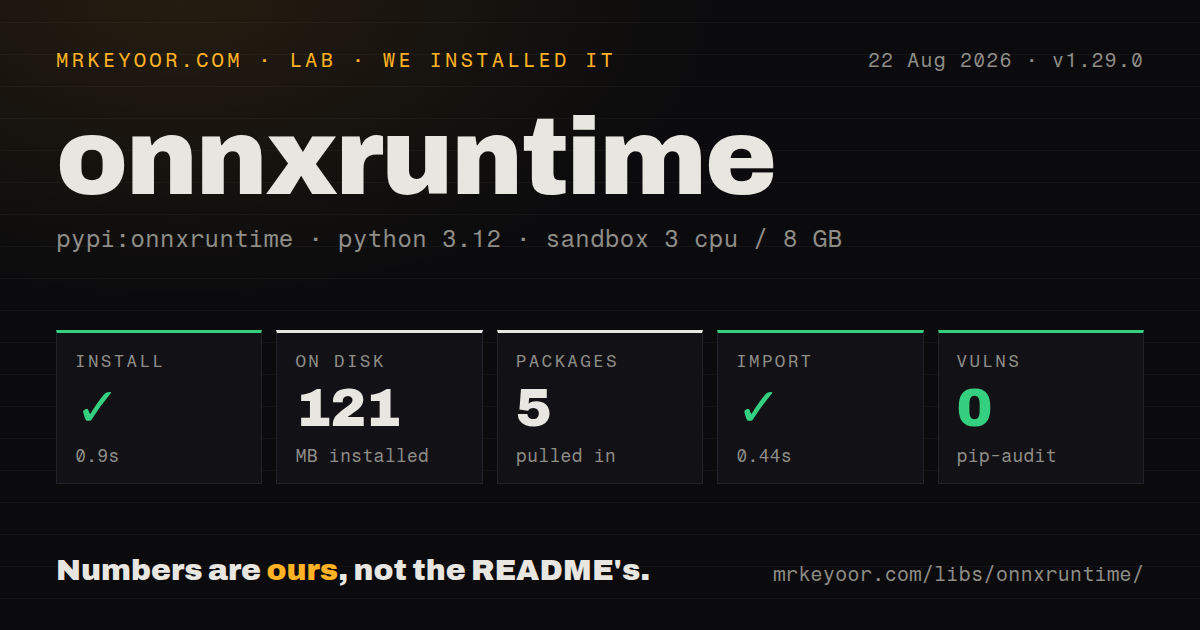
| Install | ✓ · 0.9s | 5 packages on disk · 121 MB |
| Import | ✓ | import onnxruntime in 0.44s · compiled extensions · requires Python >=3.11 |
| Known vulns | 0 | (pip-audit) |
Answers from our run
Does onnxruntime install cleanly?
Yes. In a fresh container with an empty cache, pip install onnxruntime finished in 0.9s, leaving 5 packages and 121 MB on disk. pip-audit reported no known vulnerabilities.
What does onnxruntime need to run?
Python >=3.11, and a platform wheel with compiled extensions. In our run import onnxruntime succeeded in 0.44s.
onnxruntime or openvino: which should you use?
openvino: Choose it when Intel CPUs, integrated GPUs, or NPUs are the fixed target and Intel-specific optimization is the main goal. onnxruntime 1.29.0 installed in 0.9 seconds but used 121 MB in our sandbox, and its compiled CPU wheel imported in 0.44 seconds with no audit findings.
When should you not use onnxruntime?
Export requires unsupported custom operators or produces unacceptable output drift. The runtime cannot correct a graph that already changed the model's semantics.
Use it if
- The exported ONNX graph matches its source model numerically and deployment should omit the training framework.
- One model artifact needs tested execution on CPU plus a specific supported accelerator provider.
- A CPU inference service needs graph optimization, quantization tools, explicit thread limits, and a stable session call.
- Startup code can inspect names, element types, and dynamic dimensions and reject a model that violates the service contract.
- Export requires unsupported custom operators or produces unacceptable output drift. The runtime cannot correct a graph that already changed the model's semantics.
- You need language-model request batching, scheduling, and KV-cache ownership. A serving system such as vLLM is designed around those concerns.
- PyTorch must stay in the image and already meets the target. Adding ONNX creates a second artifact plus conversion and parity tests without removing the original runtime.
- The GPU image cannot pin a documented combination of ONNX Runtime, CUDA, cuDNN, and provider libraries. Failed provider loading may leave inference on CPU.
- py.typed is a release requirement. Our 1.29.0 wheel did not include that marker, despite the public Python annotations visible in parts of the API.
- You intend to install onnxruntime and onnxruntime-gpu together. Both own the onnxruntime import, so an image should choose one distribution deliberately.
Setup reality
We installed onnxruntime 1.29.0 in a fresh, unprivileged Python 3.12 Bookworm container. pip completed in 0.9 seconds, left 5 packages, and consumed 121 MB. The package declares 6 direct dependencies, requires Python 3.11 or later, includes compiled .so files, and does not ship py.typed. import onnxruntime succeeded in 0.44 seconds. pip-audit found zero known vulnerabilities, and the installed metadata names the MIT License.
The CPU wheel needs no account or background service. It does require an ONNX artifact whose operator versions, names, shapes, and element types match the caller. Read get_inputs() and get_outputs() at startup instead of copying identifiers from training code. Export dynamic axes intentionally and compare representative outputs against the source framework. A converter returning successfully says nothing about acceptable numerical drift.
Accelerator providers add the difficult packaging layer. Install the distribution for the chosen provider, supply providers in priority order, and inspect get_providers() after creating the session. A CPU fallback can return correct results slowly enough to break a service objective. CUDA and cuDNN versions, provider options, optimized graph files, and target hardware belong in one tested image contract. Do not reuse a provider-specific optimized model without retesting it.
Thread pools can oversubscribe a shared worker. Version 1.29.0 adds ORT_INTRA_OP_NUM_THREADS and ORT_INTER_OP_NUM_THREADS; explicit SessionOptions values win over those defaults. Load-test thread limits under real request concurrency. Builds with telemetry enabled can send usage data, and ORT_DISABLE_TELEMETRY=1 must be set before initialization to disable POSIX telemetry. Treat models and external tensor data as untrusted files because this release fixes multiple validation and path-handling bugs.
Patterns
Execute every output on CPU run-cpu-model
import numpy as np
import onnxruntime as ort

session = ort.InferenceSession(
    'model.onnx',
    providers=['CPUExecutionProvider'],
)
feed = {'input': np.zeros((1, 3, 224, 224), dtype=np.float32)}
outputs = session.run(None, feed)
The input key, dimensions, and dtype must match the graph. Passing None as the output list requests every output in graph order.
Print the graph's public contract inspect-model-interface
for value in session.get_inputs():
    print('input', value.name, value.shape, value.type)

for value in session.get_outputs():
    print('output', value.name, value.shape, value.type)
A dynamic dimension may be a symbolic string instead of an integer. Validate permitted ranges separately before accepting a request.
Fail startup when CUDA is unavailable require-cuda-provider
session = ort.InferenceSession(
    'model.onnx',
    providers=['CUDAExecutionProvider', 'CPUExecutionProvider'],
)

active = session.get_providers()
if active[0] != 'CUDAExecutionProvider':
    raise RuntimeError(f'CUDA provider inactive: {active}')
Install onnxruntime-gpu and its documented CUDA libraries. This check prevents an accidental CPU fallback from passing health checks with poor latency.
Set session-owned thread counts limit-cpu-threads
options = ort.SessionOptions()
options.intra_op_num_threads = 4
options.inter_op_num_threads = 1
options.graph_optimization_level = ort.GraphOptimizationLevel.ORT_ENABLE_ALL

session = ort.InferenceSession(
    'model.onnx',
    options,
    providers=['CPUExecutionProvider'],
)
SessionOptions overrides the 1.29.0 ORT_INTRA_OP_NUM_THREADS and ORT_INTER_OP_NUM_THREADS defaults. Tune against concurrent traffic, not one request.
Check numerical parity after conversion compare-export-output
expected = model(example).detach().cpu().numpy()
input_name = session.get_inputs()[0].name
actual = session.run(None, {
    input_name: example.detach().cpu().numpy(),
})[0]

np.testing.assert_allclose(expected, actual, rtol=1e-3, atol=1e-5)
Choose tolerances for the model and dtype. Include every production shape boundary, especially axes exported as dynamic.
Fetch one output by name request-named-output
output_name = session.get_outputs()[0].name
result, = session.run([output_name], feed)
Naming outputs avoids relying on graph order and can skip materializing outputs the request does not use.
Write a dynamic int8 variant quantize-model-weights
from onnxruntime.quantization import QuantType, quantize_dynamic

quantize_dynamic(
    'model.onnx',
    'model.int8.onnx',
    weight_type=QuantType.QInt8,
)
Quantization can change accuracy and may not improve latency on every provider. Benchmark this derived file on the actual device.
Persist the graph optimized for CPU save-optimized-model
options = ort.SessionOptions()
options.optimized_model_filepath = 'model.cpu.ort.onnx'

ort.InferenceSession(
    'model.onnx',
    options,
    providers=['CPUExecutionProvider'],
)
The output can depend on runtime and provider choices. Version it as a derived artifact and regenerate it after those inputs change.
Write an operator timing trace profile-one-session
options = ort.SessionOptions()
options.enable_profiling = True
session = ort.InferenceSession('model.onnx', options)

session.run(None, feed)
trace_file = session.end_profiling()
print(trace_file)
Warm the session before the run you analyze. end_profiling closes the trace, which can be opened in Perfetto or Chromium tracing tools.
Keep input and output on the GPU bind-cuda-buffer
binding = session.io_binding()
device_input = ort.OrtValue.ortvalue_from_numpy(array, 'cuda', 0)
binding.bind_ortvalue_input('input', device_input)
binding.bind_output('output', 'cuda')

session.run_with_iobinding(binding)
device_outputs = binding.get_outputs()
IO binding avoids automatic host copies only when provider placement and buffer devices match. Measure transfers as part of end-to-end latency.
Opt out before runtime initialization disable-runtime-telemetry
import os

os.environ['ORT_DISABLE_TELEMETRY'] = '1'
import onnxruntime as ort
Set this before the first onnxruntime import. Version 1.29.0 adds the POSIX opt-out for builds compiled with telemetry; WebAssembly remains telemetry-free.
Reduce runtime log noise configure-log-severity
options = ort.SessionOptions()
options.log_severity_level = 3  # errors only
options.logid = 'fraud-model'

session = ort.InferenceSession('model.onnx', options)
Severity values run from 0 for verbose through 4 for fatal. Keep warnings visible while validating a new provider image.
Alternatives
| Package | Registry | Pick it when |
|---|---|---|
| openvino | PyPI | Choose it when Intel CPUs, integrated GPUs, or NPUs are the fixed target and Intel-specific optimization is the main goal. |
| torch | PyPI | Choose it when PyTorch already belongs in the production image and an ONNX conversion would add more testing than it removes. |
| tflite-runtime | PyPI | Choose it for a supported TensorFlow Lite artifact on a constrained edge target where that format is already established. |
| vllm | PyPI | Choose it for GPU language-model serving that needs continuous batching and KV-cache-aware scheduling. |
More ai / ml guides
@modelcontextprotocol/sdk · openai · mcp · huggingface-hub · @anthropic-ai/sdk · openai · the whole shelf →
How this guide is made: grounded in the library's documentation, release notes, changelog, and issue history, on a fixed rubric — not a hands-on install of every release. The 50 most-downloaded entries are additionally install-verified in clean containers. Corrections: contact the desk.