oas-linter review
oas-linter 3.2.2 is an internal rule engine for OAS-Kit, not the command-line program its package name suggests. oas-validator calls it while traversing an already parsed OpenAPI document. Rules can inspect object types such as operations, parameters, responses, and security schemes for required values, patterns, ordering, mutually exclusive fields, length limits, and schema fragments. Direct callers must provide that traversal context themselves. Our package check found no executable entry and no TypeScript declarations, which makes it a poor standalone choice for a new API-lint job.
oas-linter 3.2.2 installed in 2.4 seconds with 0 audit findings, but our browser build failed and the package exposes no CLI or bundled types. Keep it behind an existing oas-validator setup; start new OpenAPI linting with Spectral or Redocly CLI.
We installed it
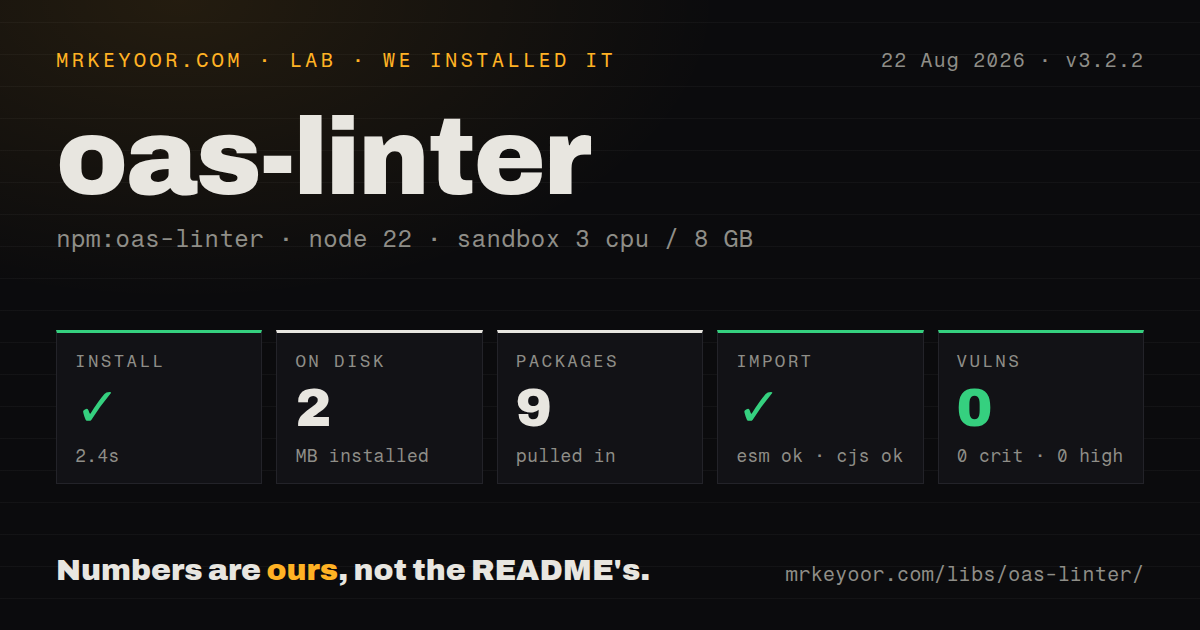
| Install | ✓ · 2.4s | 9 packages on disk · 2 MB |
| Import | ✓ | ESM import works · require() works · CommonJS package |
| Browser | n/a | could not be bundled for the browser (Node-only code, most likely) |
| Types | — | no TypeScript types found |
| Known vulns | 0 | 0 critical · 0 high · 0 moderate · 0 low (npm audit) |
Answers from our run
Does oas-linter install cleanly?
Yes. In a fresh container with an empty cache, npm install oas-linter finished in 2 seconds, leaving 9 packages and 2 MB on disk. npm audit reported no known vulnerabilities.
Can oas-linter run in a browser?
Not directly: esbuild could not bundle it for the browser in our run, which normally means it depends on Node built-ins. Use it on the server, or find a browser-targeted alternative.
Does oas-linter work with both ESM and CommonJS?
Yes. Both import 'oas-linter' and require('oas-linter') worked in Node 22 in our run. The package is published as CommonJS.
Does oas-linter include TypeScript types?
No type declarations were found in our install, so TypeScript users need their own declarations.
oas-linter or @stoplight/spectral-cli: which should you use?
@stoplight/spectral-cli: Use it for a real CLI, JSONPath-based checks, shareable rulesets, and OpenAPI or AsyncAPI validation in CI. oas-linter 3.2.2 installed in 2.4 seconds with 0 audit findings, but our browser build failed and the package exposes no CLI or bundled types.
When should you not use oas-linter?
Your CI command should accept an OpenAPI filename. Version 3.2.2 has no bin entry and therefore provides no oas-linter shell command.
Use it if
- An existing oas-validator pipeline needs its default lints or a compatible rules file.
- Checks map naturally to the OAS-Kit traversal names, including operation, parameter, reference, and securityScheme.
- Legacy integration code already calls loadRules(), lint(), and getResults() with validator-shaped options.
- A local YAML rule file must extend a base file and override entries by rule name.
- Your CI command should accept an OpenAPI filename. Version 3.2.2 has no bin entry and therefore provides no oas-linter shell command.
- The team wants an actively released governance tool. npm dates this version to May 2021, and the monorepo's last push was October 2023.
- Rules need JSONPath selectors or custom JavaScript functions. This DSL works with fixed OAS-Kit object names and its built-in operators.
- Several rule sets must run concurrently in one process. Module-level rules and results are reset during loading and application, so jobs can overwrite shared state.
- One package should parse, resolve, lint, and format API files. oas-linter handles only the rule step and expects oas-validator to supply traversal metadata.
Setup reality
We installed oas-linter 3.2.2 in 2.4 seconds in a clean Node 22 Bookworm container. Nine packages used 2 MB on disk, and npm audit returned 0 known vulnerabilities. The package has 3 direct dependencies, no peers, 32 KB unpacked, and a BSD-3-Clause license. It is CommonJS without an exports map; require() and ESM import both succeeded. No TypeScript declarations were found. Our esbuild browser build failed, matching code that reads rule files from Node.
Installation does not create a command. The package publishes no bin field. Normal OAS-Kit use installs oas-validator and enables { lint: true }; the validator parses and walks the document, invokes this module for each object, then copies getResults() into warnings. Direct calls require loadDefaultRules() or loadRules(path), followed by lint() calls with the same object names, keys, metadata counters, context, lintSkip, and numeric verbose option that oas-validator supplies.
Custom YAML or JSON rules are read synchronously from disk. A top-level require can load a base rules file, relative paths resolve beside the parent, and an extensionless child inherits the parent's extension. Matching rule names merge, disabled entries disappear, and applyRules() clears earlier results. These details make process startup the right time to load a ruleset.
Rules and findings live in module-level mutable arrays. Two validations using different rules in the same process can reset each other's state, so isolate concurrent jobs or serialize them. CI also needs its own exit policy because the module collects warnings instead of acting as an executable. Pin the OAS-Kit packages together, since direct API assumptions are shaped by oas-validator rather than a standalone contract.
Patterns
Enable the shipped rules in oas-validator validate-with-defaults
const validator = require('oas-validator')

const options = { lint: true }
try {
  await validator.validate(openapiDocument, options)
} catch (error) {
  console.error(error.message)
  console.error(options.warnings || [])
}
oas-validator supplies the missing document traversal, loads the default rules, and places collected findings in options.warnings.
Write two YAML lint rules write-rules-file
# api-rules.yaml
url: https://docs.example.com/api-rules
rules:
  - name: operation-id-required
    object: operation
    description: operations need an operationId
    truthy: operationId
  - name: operation-id-style
    object: operation
    pattern:
      property: operationId
      value: '^[a-z][A-Za-z0-9]+$'
The object value must match a traversal name produced by oas-validator. This engine does not locate targets with JSONPath.
Replace the active ruleset load-custom-rules
const linter = require('oas-linter')

linter.loadRules(require.resolve('./api-rules.yaml'))
console.log(linter.getRules().rules.map((rule) => rule.name))
loadRules() performs a synchronous disk read and replaces process-wide state. Load during startup and avoid switching rules while requests overlap.
Give oas-validator a configured linter inject-custom-linter
const validator = require('oas-validator')
const linter = require('oas-linter')

linter.loadRules(require.resolve('./api-rules.yaml'))
const options = {
  lint: true,
  linter: linter.lint,
  linterResults: linter.getResults,
}
await validator.validate(openapiDocument, options)
Once linter is supplied, oas-validator skips its default-rule load. linterResults is also needed so the host can retrieve warnings.
Inherit another YAML rules file chain-rule-files
# team-rules.yaml
require: ./base-rules
rules:
  - name: operation-tags
    description: every operation needs at least one tag
    object: operation
    truthy: tags
A child without an extension inherits the parent's `.yaml`. Relative locations start beside the parent file, not at process.cwd().
Turn off one inherited rule disable-default-rule
require: ./base-rules.yaml
rules:
  - name: info-contact
    disabled: true
Entries merge on name before disabled rules are removed. The former enabled property is deprecated and no longer controls activation.
Accept either of two fields require-one-property
rules:
  - name: operation-summary-or-description
    object: operation
    description: add summary or description
    or:
      - summary
      - description
or tests property presence, so an empty string still satisfies it. Add a truthy rule when the chosen value cannot be empty.
Allow only one competing field require-exclusive-property
rules:
  - name: example-source-exclusive
    object: example
    description: choose inline or external example data
    xor:
      - value
      - externalValue
xor warns when both properties are absent or both are present. Like or, it checks definedness rather than content.
Cap a property length enforce-max-length
rules:
  - name: operation-summary-length
    object: operation
    maxLength:
      property: summary
      value: 80
maxLength ignores absent and non-string values. Pair it with truthy when the property is required as well as length limited.
Attach a JSON Schema check embed-json-schema
rules:
  - name: contact-shape
    object: contact
    schema:
      type: object
      required: [email]
      properties:
        email:
          type: string
          pattern: '^[^@]+@[^@]+$'
@exodus/schemasafe compiles this schema on first use and caches it as $schema on the rule object. Stay within the dependency version's supported dialect.
Suppress named checks for one run skip-named-rules
const options = {
  lint: true,
  lintSkip: ['info-contact', 'license-url'],
}
await validator.validate(openapiDocument, options)
lintSkip uses exact rule names. Treat the list as expiring configuration, since a forgotten entry keeps bypassing that policy.
Collect the current warning array inspect-results
for (const warning of options.warnings || []) {
  console.error({
    rule: warning.ruleName,
    pointer: warning.pointer,
    message: warning.message,
    docs: warning.rule && warning.rule.url,
  })
}
Results are shared module state. Read them directly after one validation and separate parallel jobs when their active rules can differ.
Alternatives
| Package | Registry | Pick it when |
|---|---|---|
| @stoplight/spectral-cli | npm | Use it for a real CLI, JSONPath-based checks, shareable rulesets, and OpenAPI or AsyncAPI validation in CI. |
| @redocly/cli | npm | Use it when linting, bundling, preview, and organization-level OpenAPI rules should share one toolchain. |
| ibm-openapi-validator | npm | Use it when you want a direct OpenAPI validator command and configurable rules without recreating OAS-Kit's traversal calls. |
More cli & tooling guides
commander · chalk · typescript · esbuild · yargs · click · the whole shelf →
How this guide is made: grounded in the library's documentation, release notes, changelog, and issue history, on a fixed rubric — not a hands-on install of every release. The 50 most-downloaded entries are additionally install-verified in clean containers. Corrections: contact the desk.