node-pty review
node-pty 1.1.0 starts a process inside an operating-system pseudoterminal, giving shells, REPLs, and full-screen terminal programs the TTY behavior they do not get from ordinary pipes. The returned object emits terminal bytes and accepts input, resize, pause, resume, clear, and kill calls on Linux, macOS, and Windows ConPTY. Version 1.1.0 restores `clear()` for the ConPTY DLL path, adds Buffer input, handles partial nonblocking writes, reduces excess listeners, grows Windows named-pipe buffers, and ships selected prebuilt native files. It supplies the process endpoint; a browser terminal still needs a renderer and a secured transport.
node-pty 1.1.0 took 13.4 seconds to compile and occupied 63 MB across 2 packages in our sandbox, while a browser build failed, so install it only when a real pseudoterminal changes program behavior. Routine subprocess calls should stay on `child_process` or Execa, and any network-facing shell needs isolation from the host.
We installed it
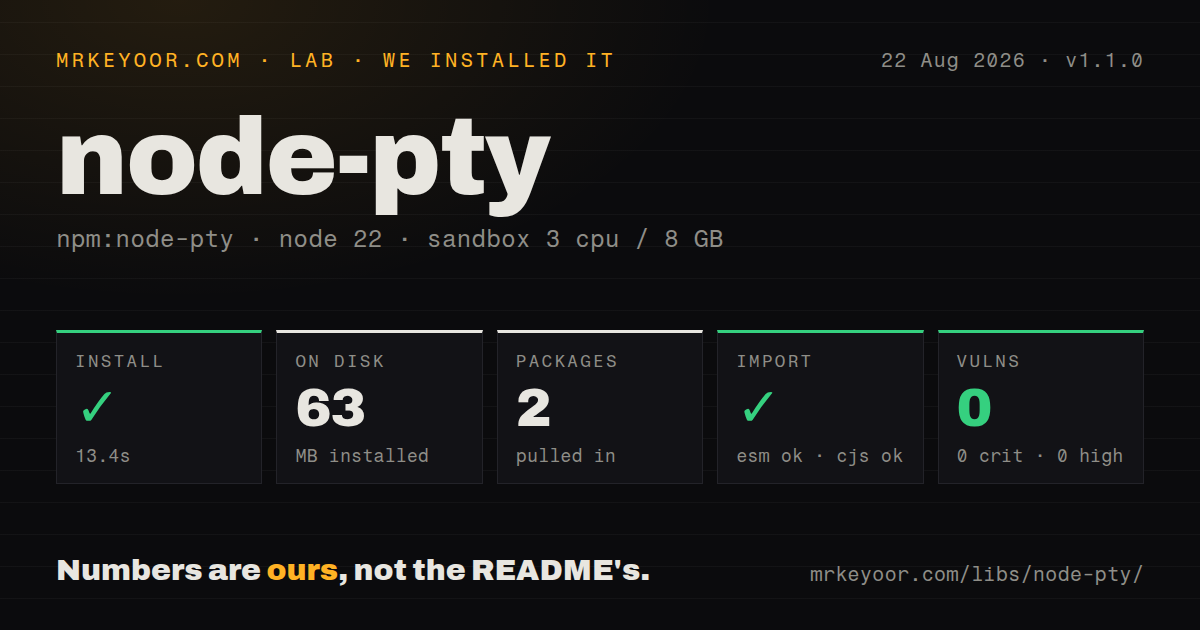
| Install | ✓ · 13.4s | 2 packages on disk · 63 MB · native build step |
| Import | ✓ | ESM import works · require() works · CommonJS package |
| Browser | n/a | could not be bundled for the browser (Node-only code, most likely) |
| Types | ✓ | TypeScript types bundled |
| Known vulns | 0 | 0 critical · 0 high · 0 moderate · 0 low (npm audit) |
Answers from our run
Does node-pty install cleanly?
Yes. In a fresh container with an empty cache, npm install node-pty finished in 13 seconds, leaving 2 packages and 63 MB on disk, after a native build step. npm audit reported no known vulnerabilities.
Can node-pty run in a browser?
Not directly: esbuild could not bundle it for the browser in our run, which normally means it depends on Node built-ins. Use it on the server, or find a browser-targeted alternative.
Does node-pty work with both ESM and CommonJS?
Yes. Both import 'node-pty' and require('node-pty') worked in Node 22 in our run. The package is published as CommonJS.
Does node-pty include TypeScript types?
Yes, type declarations ship inside the package, so no @types install is needed.
node-pty or execa: which should you use?
execa: Use Execa for subprocesses that need structured output, cancellation, and errors without terminal semantics. node-pty 1.1.0 took 13.4 seconds to compile and occupied 63 MB across 2 packages in our sandbox, while a browser build failed, so install it only when a real pseudoterminal changes program behavior.
When should you not use node-pty?
You only need an exit code and captured stdout or stderr. node:child_process or Execa avoids terminal escape sequences and a native add-on.
Use it if
- An IDE, desktop terminal, browser shell, or test system must run software that checks whether it has a real TTY.
- The child needs color, prompts, cursor movement, alternate-screen mode, or terminal resize signals.
- One code path must cover Unix pseudoterminals and supported Windows ConPTY systems.
- You can isolate the spawned process and own session cleanup, input validation, output flow control, and terminal rendering.
- You only need an exit code and captured stdout or stderr. `node:child_process` or Execa avoids terminal escape sequences and a native add-on.
- Your build image cannot compile C++ on every unsupported target. Our Linux install ran a native compile step and occupied 63 MB.
- The PTY object must move across Node worker threads. The README says node-pty is not thread safe.
- Windows machines predate Windows 10 version 1809 build 18309. Winpty support has been removed, leaving ConPTY as the supported Windows route.
- An internet user would receive a shell with the Node service account's host permissions. The project warns that children inherit parent privileges and recommends container isolation.
Setup reality
We installed node-pty 1.1.0 in a fresh Node 22 Bookworm sandbox. npm took 13.4 seconds, ran a native compile step, and left 2 packages occupying 63 MB. The package has 1 direct dependency, 0 peers, bundled TypeScript declarations, and a 63,772 KB unpacked size. npm audit found 0 known vulnerabilities. It is CommonJS without an exports map; both require() and ESM import worked. Our esbuild browser bundle failed because this is Node-only native code.
Prebuild availability depends on platform and architecture. Version 1.1.0 publishes macOS and Windows binaries, while our Linux path compiled locally. Linux images need Python, make, and a C++ toolchain. macOS source builds need Xcode. Windows builds may require Python, Visual C++, the desktop Windows SDK, and Spectre-mitigated libraries matching the toolchain.
Choose the executable and environment yourself. Preserve SystemRoot on Windows or PowerShell may fail with error 8009001d. Windows requires ConPTY on Windows 10 version 1809 build 18309 or newer. The README lists Node 16 or Electron 19 as a floor and says ongoing runtime support follows the Node version used by VS Code, so test the exact Electron or Node release you ship.
onData delivers arbitrary terminal chunks with ANSI control sequences, not complete text lines. Connect viewport changes to resize(), dispose listeners, kill abandoned sessions, and connect pause() and resume() to real transport backpressure. A network terminal also needs authentication, session quotas, idle expiry, bounded messages, and OS-level isolation because the child runs with the Node parent's permissions.
Patterns
Open the platform shell spawn-shell
import os from 'node:os'
import * as pty from 'node-pty'

const shell = os.platform() === 'win32'
  ? (process.env.COMSPEC ?? 'powershell.exe')
  : (process.env.SHELL ?? 'bash')
const term = pty.spawn(shell, [], {
  name: 'xterm-256color', cols: 80, rows: 24,
  cwd: process.cwd(), env: process.env,
})
Keep `SystemRoot` in the Windows environment so PowerShell can initialize. Columns and rows are terminal cells, not pixels.
Forward terminal bytes read-output
const output = term.onData(data => {
  process.stdout.write(data)
})
term.onExit(() => output.dispose())
Each `onData` value may contain partial text or several ANSI sequences. Event boundaries do not represent lines.
Send raw keyboard input forward-input
process.stdin.setRawMode?.(true)
process.stdin.resume()
const onInput = chunk => term.write(chunk)
process.stdin.on('data', onInput)
Raw mode forwards control keys immediately. Remove the listener and restore stdin state when the session ends.
Start the Node REPL in a PTY run-interactive-node
const repl = pty.spawn(process.execPath, ['--interactive'], {
  name: 'xterm-256color', cols: 100, rows: 30,
  cwd: process.cwd(), env: process.env,
})
repl.onData(data => process.stdout.write(data))
Arguments normally use an array. A pre-escaped command-line string is accepted on Windows, leaving quoting to the caller.
Apply a validated terminal size resize-session
function resize(cols, rows) {
  if (!Number.isInteger(cols) || !Number.isInteger(rows)) return
  if (cols < 1 || cols > 500 || rows < 1 || rows > 200) return
  term.resize(cols, rows)
}
Validate client-provided sizes before calling `resize()`. Large unbounded dimensions can increase terminal and application work.
Release listeners after process exit handle-exit
const dataSub = term.onData(sendToClient)
const exitSub = term.onExit(({ exitCode, signal }) => {
  dataSub.dispose()
  exitSub.dispose()
  closeClient({ exitCode, signal })
})
`onExit` reports an exit code and optional signal. Version 1.1.0 also reduces excess internal listener retention.
Terminate an abandoned terminal kill-idle-session
const timer = setTimeout(() => {
  if (process.platform === 'win32') term.kill()
  else term.kill('SIGHUP')
}, 15 * 60 * 1000)
term.onExit(() => clearTimeout(timer))
Windows does not support passing a signal to `kill()`. Call it without an argument on that platform.
Use automatic XON and XOFF handling enable-flow-control
const term = pty.spawn(shell, [], {
  env: process.env,
  handleFlowControl: true,
})
term.write('\x13')
term.write('\x11')
With flow control enabled, complete XOFF and XON messages pause and resume the PTY instead of reaching the child.
Avoid XON and XOFF collisions custom-flow-messages
const term = pty.spawn(shell, [], {
  env: process.env,
  handleFlowControl: true,
  flowControlPause: '\x1b[PTY-PAUSE',
  flowControlResume: '\x1b[PTY-RESUME',
})
Custom pause and resume strings help when ordinary terminal traffic can contain XON or XOFF bytes. Matching expects a complete message.
Pause when a stream buffer fills apply-backpressure
term.onData(data => {
  if (!socket.write(data)) term.pause()
})
socket.on('drain', () => term.resume())
Tie `pause()` and `resume()` to the transport's actual backpressure events. Unbounded buffering can exhaust process memory.
Connect an authorized WebSocket bridge-websocket
const output = term.onData(data => socket.send(JSON.stringify({ type: 'data', data })))
socket.on('message', raw => {
  const msg = JSON.parse(String(raw))
  if (msg.type === 'input') term.write(String(msg.data).slice(0, 4096))
  if (msg.type === 'resize') resize(msg.cols, msg.rows)
})
socket.on('close', () => {
  output.dispose()
  term.kill()
})
Authenticate before spawning, cap every message, and isolate the child. node-pty grants the child the Node process's OS permissions.
Clear renderer and ConPTY state clear-windows-buffer
function clearTerminal() {
  renderer.clear()
  term.clear()
}
Version 1.1.0 restores `clear()` for the ConPTY DLL path. The call affects node-pty's Windows buffer and is a no-op elsewhere.
Alternatives
| Package | Registry | Pick it when |
|---|---|---|
| execa | npm | Use Execa for subprocesses that need structured output, cancellation, and errors without terminal semantics. |
| cross-spawn | npm | Use cross-spawn when portable command launching and Windows resolution are enough. |
| ssh2 | npm | Use ssh2 when the pseudoterminal belongs on a remote SSH host and authentication is part of the session. |
More cli & tooling guides
commander · chalk · typescript · esbuild · yargs · click · the whole shelf →
How this guide is made: grounded in the library's documentation, release notes, changelog, and issue history, on a fixed rubric — not a hands-on install of every release. The 50 most-downloaded entries are additionally install-verified in clean containers. Corrections: contact the desk.