nltk review
NLTK 3.10.3 is a Python collection of tokenizers, stemmers, taggers, parsers, corpus readers, WordNet access, distance functions, and teaching material for classical natural-language processing. Installing the wheel supplies code, while many familiar functions still need separately downloaded nltk_data resources. The current release concentrates on containment: it limits expensive parser and distance work, validates corpus paths and Java options, restricts Stanford and Malt JAR execution, and addresses two named MaltParser CVEs. It is useful for inspectable linguistic pieces, not a current neural model pipeline.
NLTK 3.10.3 installed in 0.4 seconds and used 13 MB in our sandbox, yet a usable deployment still has to package each named nltk_data resource. Install it for corpora, WordNet, teaching, and classical baselines; choose a trained pipeline library for modern production parsing or entity extraction.
We installed it
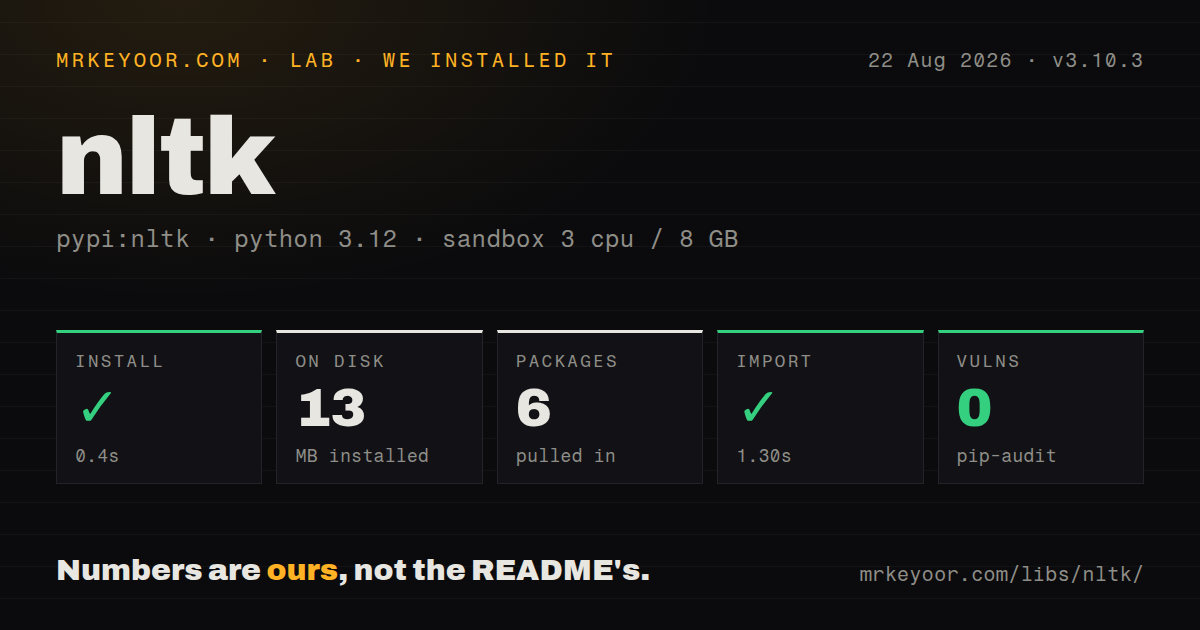
| Install | ✓ · 0.4s | 6 packages on disk · 13 MB |
| Import | ✓ | import nltk in 1.30s · pure Python · requires Python >=3.10 |
| Known vulns | 0 | (pip-audit) |
Answers from our run
Does nltk install cleanly?
Yes. In a fresh container with an empty cache, pip install nltk finished in 0.4s, leaving 6 packages and 13 MB on disk. pip-audit reported no known vulnerabilities.
What does nltk need to run?
Python >=3.10, and nothing compiled: it is pure Python. In our run import nltk succeeded in 1.30s.
nltk or spacy: which should you use?
spacy: Choose it for production tokenization, tagging, dependency parsing, and named-entity pipelines. NLTK 3.10.3 installed in 0.4 seconds and used 13 MB in our sandbox, yet a usable deployment still has to package each named nltk_data resource.
When should you not use nltk?
Production entity recognition or dependency parsing is the goal; spaCy or Stanza ships trained pipelines for that work
Use it if
- A course, experiment, or baseline needs WordNet, treebanks, tokenizers, stemmers, or grammar tools in one package
- The team wants rule-based and statistical components whose intermediate results are easy to inspect
- Existing code reads an NLTK corpus format or follows exercises from the NLTK book
- Frequency distributions, n-grams, concordance, and edit distance matter more than model inference
- Production entity recognition or dependency parsing is the goal; spaCy or Stanza ships trained pipelines for that work
- The deployment cannot package nltk_data, because installing nltk alone leaves common tokenizer and corpus calls unresolved
- Every public dependency must advertise typing through py.typed; our 3.10.3 install had no marker
- Users can submit arbitrarily large grammars, XML, or string-distance inputs; the 3.10.3 bounds do not replace service-level limits
- The product needs embeddings, transformer inference, semantic search, or generation rather than classical NLP utilities
Setup reality
Our Python 3.12 sandbox installed NLTK 3.10.3 in 0.4 seconds. Six packages occupied 13 MB, and pip-audit reported 0 known vulnerabilities. The distribution lists 21 direct dependencies, requires Python 3.10 or newer, and is pure Python under Apache License, Version 2.0. It did not ship py.typed. import nltk worked in 1.30 seconds. Corpus files have their own terms separate from the code license.
The first runtime call often needs data that pip did not install. Tokenizers, taggers, WordNet, stopwords, VADER, and corpora each reference named downloads. New code commonly needs punkt_tab and averaged_perceptron_tagger_eng where older tutorials show different names. Download a fixed resource list while building the image, set NLTK_DATA to that read-only directory, and make a missing resource fail the build instead of reaching production.
Avoid nltk.download(all) in a service image. It pulls unused corpora with separate licenses and writes to user or system locations that may not exist in an unprivileged container. First-run downloads can also fail behind a proxy or in offline CI. Keep notices for the exact corpora shipped. Load frequently used taggers and lexicons once per worker; repeated construction costs time, while multiple processes can duplicate their in-memory data.
Version 3.10.3 confines Stanford and Malt Java execution to nltk_data roots, checks Java options, tightens temporary-file handling, and bounds several parser, grammar, XML, distance, and network paths. Java integrations still require an external runtime and JAR files. These fixes narrow known attack paths, yet untrusted input still needs size and time limits at the API boundary. Review downloader sources and parser configuration as executable deployment inputs.
Patterns
Bake a fixed resource list into the image install-data-resources
import nltk

for resource in ["punkt_tab", "stopwords", "wordnet", "averaged_perceptron_tagger_eng"]:
    nltk.download(resource, download_dir="/opt/app/nltk_data", raise_on_error=True)
Set NLTK_DATA to the same directory at runtime. Current code uses punkt_tab and averaged_perceptron_tagger_eng, unlike many older examples.
Split a passage into sentences and tokens tokenize-sentences-words
from nltk.tokenize import sent_tokenize, word_tokenize

text = "Dr. Rao arrived. She couldn't stay."
for sentence in sent_tokenize(text):
    print(word_tokenize(sentence))
These calls require punkt_tab. A contraction may become multiple tokens, so this is not a human word counter.
Build one stopword set for repeated filtering remove-stopwords
from nltk.corpus import stopwords

blocked = set(stopwords.words("english"))
kept = [word for word in tokens if word.casefold() not in blocked]
Construct the set outside request loops. Removing stopwords can erase negation and damage short queries.
Pass part of speech to the WordNet lemmatizer lemmatize-with-pos
from nltk.stem import WordNetLemmatizer

lemmatizer = WordNetLemmatizer()
print(lemmatizer.lemmatize("running", pos="v"))
print(lemmatizer.lemmatize("geese", pos="n"))
The WordNet download is required. Its default is a noun, which means many verb forms remain unchanged unless pos is supplied.
Predict Penn Treebank part-of-speech tags tag-parts-of-speech
from nltk import pos_tag
from nltk.tokenize import word_tokenize

tags = pos_tag(word_tokenize("The small model runs locally"))
print(tags)
The English tagger data must be installed. Domain-specific terms can receive convincing but incorrect labels.
Count common and single-use tokens count-token-frequency
from nltk import FreqDist

freq = FreqDist(token.casefold() for token in tokens)
print(freq.most_common(10))
print(freq.hapaxes())
FreqDist builds on Counter. Decide how punctuation and case are normalized before interpreting the counts.
List WordNet senses for one word query-wordnet
from nltk.corpus import wordnet as wn

for sense in wn.synsets("bank", pos=wn.NOUN):
    print(sense.name(), sense.definition(), sense.lemma_names())
WordNet separates financial and geographic senses of `bank`. Choose a sense before treating lemmas as synonyms.
Score short English text with VADER score-vader-sentiment
from nltk.sentiment import SentimentIntensityAnalyzer

scorer = SentimentIntensityAnalyzer()
print(scorer.polarity_scores("The update is fast, but setup still hurts."))
This requires vader_lexicon. Its lexicon rules target short informal English, so application thresholds need labeled examples.
Create rough matching stems stem-search-terms
from nltk.stem import PorterStemmer

stemmer = PorterStemmer()
stems = [stemmer.stem(token) for token in ["connect", "connected", "connecting"]]
print(stems)
Porter output is a search key and may not be a real word. Keep it out of reader-facing text.
Iterate over token bigrams generate-token-ngrams
from nltk import ngrams

for bigram in ngrams(tokens, 2):
    print(bigram)
Tokenization and optional boundary padding determine the feature values. Record both choices with any trained model.
Compute edit distance for bounded strings compare-edit-distance
from nltk.metrics.distance import edit_distance

cost = edit_distance("colour", "color", substitution_cost=1)
print(cost)
Distance cost grows with input length. Version 3.10.3 adds bounds in this area, and an API should still cap user input.
Read a category from the Brown corpus read-packaged-corpus
from nltk.corpus import brown

news_sentences = brown.sents(categories="news")
print(news_sentences[0])
The Brown files must be downloaded separately and carry their own notice. Corpus readers may touch disk when iterated.
Alternatives
| Package | Registry | Pick it when |
|---|---|---|
| spacy | PyPI | Choose it for production tokenization, tagging, dependency parsing, and named-entity pipelines. |
| stanza | PyPI | Choose it for neural linguistic analysis across a broad set of languages. |
| textblob | PyPI | Choose it for a smaller beginner-facing API over common tagging, sentiment, and text operations. |
More ai / ml guides
@modelcontextprotocol/sdk · openai · mcp · huggingface-hub · @anthropic-ai/sdk · openai · the whole shelf →
How this guide is made: grounded in the library's documentation, release notes, changelog, and issue history, on a fixed rubric — not a hands-on install of every release. The 50 most-downloaded entries are additionally install-verified in clean containers. Corrections: contact the desk.