mongoose review
Mongoose 9.9.4 is an object document mapper for MongoDB applications running on Node.js. A schema can cast values, apply defaults and validators, declare indexes, run middleware, expose methods, and describe references for `populate`. Queries return hydrated model instances unless `.lean()` requests plain objects. Mongoose sits above the official MongoDB driver and adds application-side rules; it does not change MongoDB's server validation or turn document references into SQL joins. Version 9 requires Node 20.19 or newer and uses MongoDB driver 7.x.
Mongoose 9.9.3 installed in 3.7 seconds and used 12 MB with 0 audit findings in our sandbox; npm has since moved to 9.9.4. Install it when MongoDB-specific schemas and document middleware are worth the hydration and hidden-behavior costs, and use the raw driver for thinner read-heavy services.
We installed it
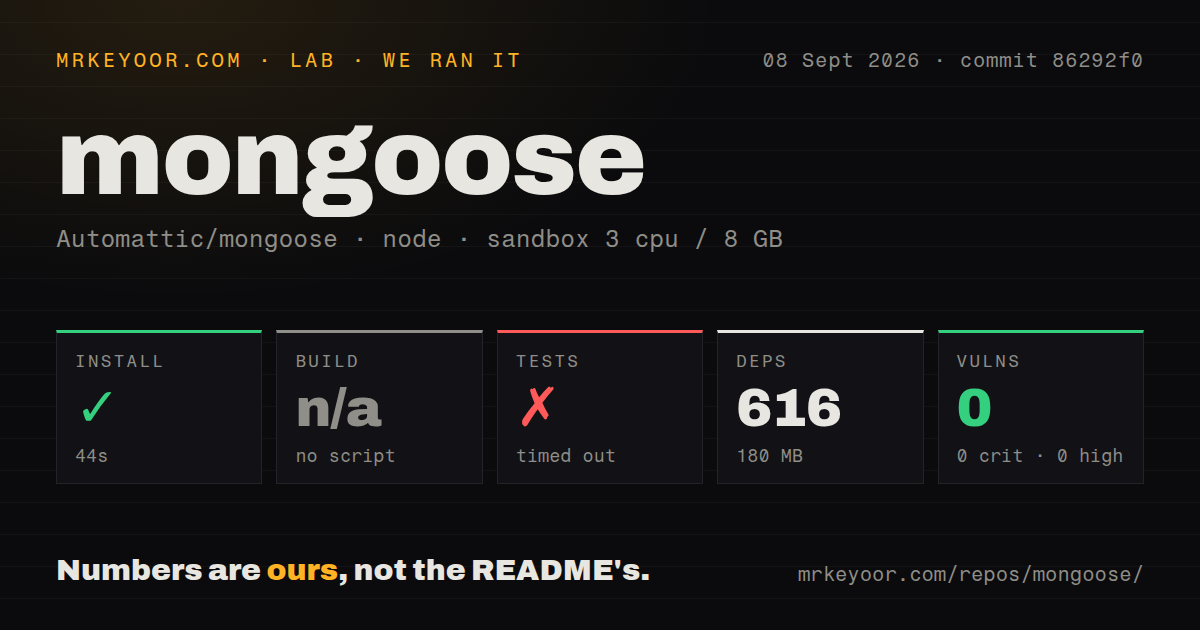
| Install | ✓ · 3.7s | 19 packages on disk · 12 MB |
| Import | ✓ | ESM import works · require() works · CommonJS package |
| Browser | n/a | could not be bundled for the browser (Node-only code, most likely) |
| Types | ✓ | TypeScript types bundled |
| Known vulns | 0 | 0 critical · 0 high · 0 moderate · 0 low (npm audit) |
Answers from our run
Does mongoose install cleanly?
Yes. In a fresh container with an empty cache, npm install mongoose finished in 4 seconds, leaving 19 packages and 12 MB on disk. npm audit reported no known vulnerabilities.
Can mongoose run in a browser?
Not directly: esbuild could not bundle it for the browser in our run, which normally means it depends on Node built-ins. Use it on the server, or find a browser-targeted alternative.
Does mongoose work with both ESM and CommonJS?
Yes. Both import 'mongoose' and require('mongoose') worked in Node 22 in our run. The package is published as CommonJS.
Does mongoose include TypeScript types?
Yes, type declarations ship inside the package, so no @types install is needed.
mongoose or mongodb: which should you use?
mongodb: Choose the official driver for direct MongoDB operations, fewer model abstractions, and plain result objects. Mongoose 9.9.3 installed in 3.7 seconds and used 12 MB with 0 audit findings in our sandbox; npm has since moved to 9.9.4.
When should you not use mongoose?
TypeScript models must have one source of truth. Mongoose infers many types, but complex schemas can still drift from explicit interfaces or require another layer such as Typegoose.
Use it if
- A Node service wants schemas, casting, defaults, validation, and change tracking around MongoDB documents.
- Model hooks, virtual properties, instance methods, and `populate` are deliberate parts of the application's data layer.
- The team accepts Mongoose query semantics and wants its mature plugin and support ecosystem.
- Collection rules should live beside indexes and model behavior, with database validation handled separately where needed.
- TypeScript models must have one source of truth. Mongoose infers many types, but complex schemas can still drift from explicit interfaces or require another layer such as Typegoose.
- The service may move away from MongoDB. Mongoose models, queries, middleware, and populate behavior are database-specific.
- Read paths need driver-level overhead. Hydrated documents carry change tracking, getters, methods, and save behavior; `.lean()` is often a better fit for read-only results.
- Hidden work is unacceptable. Connection buffering delays failures, model names pluralize into collection names, and hooks can perform writes away from the calling line.
- The runtime is older than Node 20.19. Mongoose 9.9.4 declares that minimum.
- Joins and reporting queries dominate the workload. `populate` issues MongoDB queries around references and does not provide relational query planning.
Setup reality
We installed Mongoose 9.9.3 in a clean Node 22 Bookworm sandbox before npm published the current 9.9.4 patch. That run took 3.7 seconds, left 19 packages using 12 MB, and found 0 vulnerabilities at every npm audit severity. The measured package had 7 direct dependencies, no peers, and 3024 KB unpacked. Bundled TypeScript declarations were present.
Mongoose 9 is CommonJS without an exports map. Both require() and ESM import worked in our Node 22.23.2 check. It requires Node 20.19 or newer. Our browser build failed in esbuild, which matches a server-side ODM that opens database connections and depends on the MongoDB driver.
A wrong URI may not stop startup because Mongoose buffers model operations until a connection opens. Disable buffering or set a short selection timeout when fail-fast startup matters. Models created with mongoose.model() belong to the default connection. A model for createConnection() must be registered through that connection, or operations wait on the wrong one.
Mongoose pluralizes a model name when choosing the default collection. Supply an explicit collection name when that convention is wrong. Update validators are opt-in for several update methods, and query middleware receives a query as this, unlike document middleware. Transactions require a replica set or mongos, so a standalone local mongod cannot reproduce that path.
Patterns
Open the default connection connect-database
const mongoose = require("mongoose");

await mongoose.connect("mongodb://127.0.0.1:27017/my_database");
Buffered commands can hide a bad URI until an operation times out. Use `127.0.0.1` if local hostname resolution points somewhere unexpected.
Create a model with explicit rules define-schema-model
const { Schema, model } = require("mongoose");

const postSchema = new Schema({
  title: { type: String, required: true },
  author: { type: Schema.Types.ObjectId, ref: "User" },
  views: { type: Number, default: 0, min: 0 },
  createdAt: { type: Date, default: Date.now },
});

const BlogPost = model("BlogPost", postSchema);
`model('BlogPost', ...)` targets a pluralized collection by default. Pass a collection name when the database uses another convention.
Persist a validated document create-document
const post = await BlogPost.create({ title: "Hello" });

// or the two-step form
const draft = new BlogPost({ title: "Draft" });
draft.views = 1;
await draft.save();
`create()` and `save()` run document validation by default and reject with path-specific `ValidationError` details.
Build a bounded query query-documents
const recent = await BlogPost.find({ views: { $gte: 10 } })
  .sort({ createdAt: -1 })
  .limit(20)
  .select("title views");

const one = await BlogPost.findById(id);
Mongoose queries are thenables rather than reusable promises. Executing the same query object twice sends it twice.
Return plain objects for reads lean-reads
const rows = await BlogPost.find({ published: true }).lean();`lean()` skips document hydration, including methods, change tracking, getters, virtuals, and `save()`.
Validate an atomic update update-document
const updated = await BlogPost.findOneAndUpdate(
  { _id: id },
  { $inc: { views: 1 } },
  { new: true, runValidators: true }
);
`new: true` returns the updated document. Update validators run only when `runValidators` is enabled for this operation.
Resolve a referenced author populate-references
const post = await BlogPost.findById(id)
  .populate("author", "name email");

console.log(post.author.name);
`populate` performs additional MongoDB work around references. Review query counts before applying it through loops or deep graphs.
Run model middleware middleware-hooks
postSchema.pre("save", function (next) {
  this.slug = slugify(this.title);
  next();
});

postSchema.pre("deleteOne", { document: true }, async function () {
  await Comment.deleteMany({ post: this._id });
});
Document hooks bind `this` to a document. Query hooks bind it to the query, so their available data and update behavior differ.
Modify an embedded document embedded-subdocuments
const post = await BlogPost.findById(myId);
post.comments.push({ title: "My comment" });
await post.save();

// remove one
post.comments[0].deleteOne();
await post.save();
Subdocuments use their own defaults, validation, and hooks, but changes reach MongoDB only when the parent is saved.
Move money in one transaction transactions
const session = await mongoose.startSession();
await session.withTransaction(async () => {
  await Account.updateOne({ _id: from }, { $inc: { balance: -100 } }, { session });
  await Account.updateOne({ _id: to }, { $inc: { balance: 100 } }, { session });
});
await session.endSession();
MongoDB transactions need a replica set or mongos. A standalone development server rejects this code path.
Declare a nested field named type nested-type-field
new Schema({
  asset: {
    name: String,
    type: { type: String }, // works
  },
});
Inside a schema definition, bare `type` has special meaning. Wrap a literal field named `type` in its own schema-type object.
Bind a model to another database multiple-connections
const conn = mongoose.createConnection(process.env.ANALYTICS_URI);
const Event = conn.model("Event", eventSchema);
await new Event({ name: "pageview" }).save();
Register with `conn.model()`. Calling `mongoose.model()` attaches the model to the default connection instead.
Alternatives
| Package | Registry | Pick it when |
|---|---|---|
| mongodb | npm | Choose the official driver for direct MongoDB operations, fewer model abstractions, and plain result objects. |
| prisma | npm | Choose it for generated client types and a schema workflow that also supports SQL databases. |
| @typegoose/typegoose | npm | Choose it on top of Mongoose when TypeScript classes should drive schema declarations. |
More data guides
numpy · pandas · fsspec · pyarrow · lxml · sqlalchemy · the whole shelf →
How this guide is made: grounded in the library's documentation, release notes, changelog, and issue history, on a fixed rubric — not a hands-on install of every release. The 50 most-downloaded entries are additionally install-verified in clean containers. Corrections: contact the desk.