mongodb review
mongodb 7.6.0 is MongoDB's official Node.js driver. It handles topology discovery, pooled connections, BSON conversion, authentication, CRUD operations, aggregation cursors, sessions, transactions, and change streams. TypeScript collection generics describe documents during compilation but do not validate stored data. Version 7.6.0 drops MongoDB 4.2 server support, adds an HTTP proxy callback for encryption KMS traffic, fixes MongoClient construction in bundled ESM server output, and serializes bulk-write documents once instead of twice. Our 7.5.0 browser-target build failed, which is consistent with a Node driver that should stay outside client bundles.
mongodb 7.5.0 installed in 3.4 seconds and left 12 packages using 8 MB in our sandbox, while its browser bundle failed; the current 7.6.0 release belongs in Node services only. Use it when the team wants MongoDB primitives and owns validation, or add an ODM when model behavior is the requirement.
We installed it
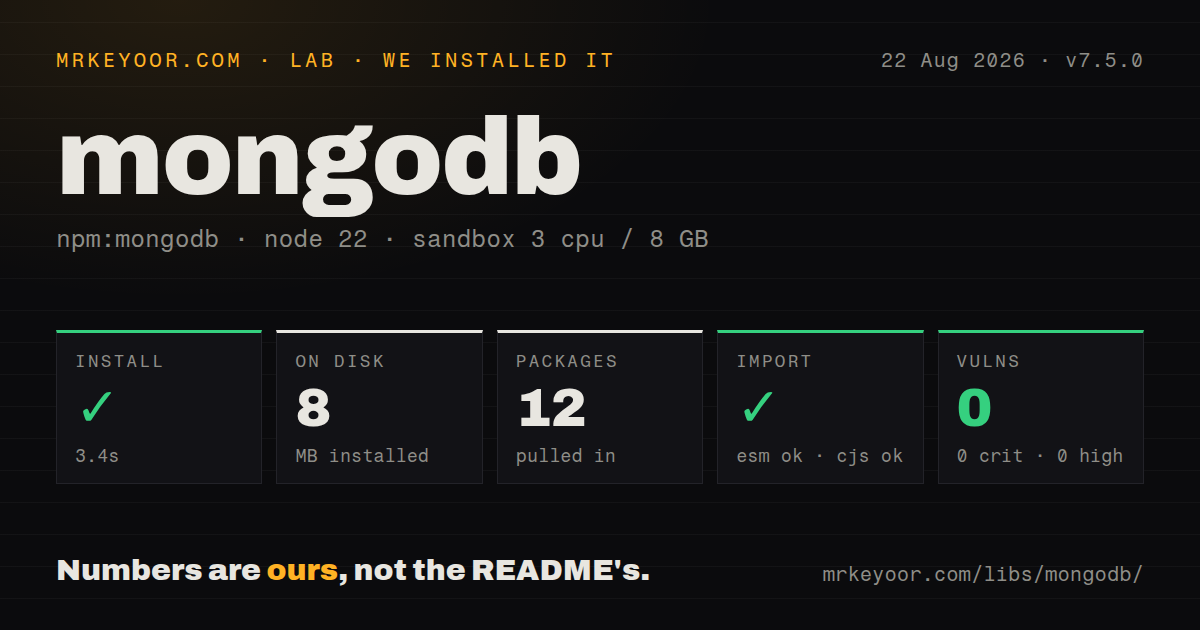
| Install | ✓ · 3.4s | 12 packages on disk · 8 MB |
| Import | ✓ | ESM import works · require() works · CommonJS package |
| Browser | n/a | could not be bundled for the browser (Node-only code, most likely) |
| Types | ✓ | TypeScript types bundled |
| Known vulns | 0 | 0 critical · 0 high · 0 moderate · 0 low (npm audit) |
Answers from our run
Does mongodb install cleanly?
Yes. In a fresh container with an empty cache, npm install mongodb finished in 3 seconds, leaving 12 packages and 8 MB on disk. npm audit reported no known vulnerabilities.
Can mongodb run in a browser?
Not directly: esbuild could not bundle it for the browser in our run, which normally means it depends on Node built-ins. Use it on the server, or find a browser-targeted alternative.
Does mongodb work with both ESM and CommonJS?
Yes. Both import 'mongodb' and require('mongodb') worked in Node 22 in our run. The package is published as CommonJS.
Does mongodb include TypeScript types?
Yes, type declarations ship inside the package, so no @types install is needed.
mongodb or mongoose: which should you use?
mongoose: Use it when schemas, validation middleware, virtuals, and reference population justify an ODM layer. mongodb 7.5.0 installed in 3.4 seconds and left 12 packages using 8 MB in our sandbox, while its browser bundle failed; the current 7.6.0 release belongs in Node services only.
When should you not use mongodb?
Your team expects schema validation, middleware, virtual properties, and populated references; those are ODM features supplied by packages such as Mongoose.
Use it if
- A Node service needs direct control of MongoDB queries, aggregation, indexes, sessions, and driver options.
- Runtime validation already exists and an ODM model layer would repeat schemas or hide useful database primitives.
- Change streams, transactions, authentication extensions, or client-side encryption must be configured at driver level.
- The application owns connection-pool limits, timeouts, read preference, and write concern rather than accepting framework defaults.
- Your team expects schema validation, middleware, virtual properties, and populated references; those are ODM features supplied by packages such as Mongoose.
- The runtime is older than Node 20.19.0, which the 7.6.0 package declares as its minimum.
- The driver must execute in browser code. Our esbuild browser target for 7.5.0 failed, and the README says non-Node runtime work is still in progress.
- TypeScript types are expected to reject malformed documents at runtime. Collection generics vanish after compilation and do not inspect database contents.
- The deployment still runs MongoDB 4.2. Driver 7.6.0 now throws when connecting to server 4.2 or earlier.
- Your data depends on relational constraints and multi-table joins as its default model. Document references and aggregation do not automatically reproduce a relational database.
Setup reality
We installed mongodb 7.5.0, the measured version, in a clean Node 22 container in 3.4 seconds. It left 12 packages and 8 MB on disk. That package had 3 direct dependencies, 7 peer dependencies, and 4420 KB unpacked, with bundled TypeScript declarations and a Node 20.19.0 minimum. npm audit reported 0 known vulnerabilities. CommonJS require and ESM import both worked even though the package had no exports map. The browser-target esbuild bundle failed, pointing to Node-only code.
A working client needs a MongoDB URI and may need TLS certificates or authentication credentials. Build one MongoClient per process and share its pool rather than reconnecting per request. Set serverSelectionTimeoutMS to an application-owned failure window. The 7 optional peers cover Kerberos, compression, SOCKS, cloud credentials, and field-level encryption; some contain native extensions. Install only what the chosen deployment uses and match the driver's compatibility table.
Collection generics do not enforce data shape. Add server-side JSON Schema or application validation where malformed documents matter. A cursor stays lazy until next(), iteration, or toArray() requests results; never call toArray() on an unbounded query. Transactions require a replica set or sharded cluster, and each operation inside withTransaction() must receive the same session. Change streams have the same deployment requirement and need persisted resume tokens for durable consumers.
Version 7.6.0 refuses MongoDB 4.2 and older, fixes require is not defined when a server build bundles the driver as ESM, and reduces BSON work for bulk writes. Those changes landed after our 7.5.0 sandbox measurement, so we do not claim a measured 7.6.0 size or timing. Shutdown should stop incoming work, finish requests, then close the shared client. Keep the URI and every database call on the server side.
Patterns
Open one MongoClient for the process connect-shared-client
import { MongoClient } from 'mongodb'

const client = new MongoClient(process.env.MONGODB_URI, {
  serverSelectionTimeoutMS: 5000,
})
await client.connect()
const db = client.db('shop')
`MongoClient` owns a connection pool. Recreating it for each request adds handshakes and can exhaust the server's connection limit.
Describe collection documents to TypeScript type-collection
import { ObjectId } from 'mongodb'

interface User {
  _id?: ObjectId
  email: string
  createdAt: Date
}
const users = db.collection<User>('users')
The generic checks TypeScript calls only. Driver 7.6.0 does not validate existing documents or stop another client from inserting a different shape.
Insert one document and an unordered batch insert-documents
const one = await users.insertOne({ email: 'a@b.com', createdAt: new Date() })
await users.insertMany([
  { email: 'c@d.com', createdAt: new Date() },
  { email: 'e@f.com', createdAt: new Date() },
], { ordered: false })
`ordered: false` lets independent inserts continue after an error. Inspect the bulk error because the 2 input documents can produce a mix of success and failure.
Limit and materialize a find cursor query-with-cursor
const recent = await users
  .find({ createdAt: { $gte: new Date('2026-01-01') } })
  .project({ email: 1 })
  .sort({ createdAt: -1 })
  .limit(20)
  .toArray()
`find()` is lazy and `toArray()` loads every result left after the 20-document limit. Use `for await` when the result cannot be tightly bounded.
Convert a string before matching ObjectId query-object-id
import { ObjectId } from 'mongodb'

if (!ObjectId.isValid(idString)) throw new Error('bad id')
const user = await users.findOne({ _id: new ObjectId(idString) })
An ObjectId and its hexadecimal string are different BSON values. Validate first so malformed input becomes a controlled client error rather than a constructor failure.
Upsert with update operators upsert-document
await users.updateOne(
  { email: 'a@b.com' },
  { $set: { plan: 'pro' }, $setOnInsert: { createdAt: new Date() } },
  { upsert: true },
)
`updateOne()` expects update operators for partial changes. Use `replaceOne()` when the intended 7.6.0 operation replaces the whole document body.
Return the document after an atomic update update-and-return
const updated = await users.findOneAndUpdate(
  { _id: userId },
  { $inc: { credits: -1 } },
  { returnDocument: 'after' },
)
`returnDocument: 'after'` requests the post-update value. The result can still be null when no document matches or another writer removes it first.
Group paid orders by user run-aggregation
const totals = await orders.aggregate([
  { $match: { status: 'paid' } },
  { $group: { _id: '$userId', total: { $sum: '$amount' } } },
  { $sort: { total: -1 } },
  { $limit: 10 },
]).toArray()
An early indexed `$match` reduces later work. Large grouping and sorting stages can need `allowDiskUse`, suitable indexes, and a deliberate result limit.
Create required indexes by definition create-indexes
await users.createIndex({ email: 1 }, { unique: true })
await orders.createIndex({ userId: 1, createdAt: -1 })
Reapplying an identical definition is safe. Changing options under an existing index name needs an explicit migration, especially when adding uniqueness to populated data.
Pass one session through a transaction run-transaction
const session = client.startSession()
try {
  await session.withTransaction(async () => {
    await accounts.updateOne({ _id: from }, { $inc: { balance: -100 } }, { session })
    await accounts.updateOne({ _id: to }, { $inc: { balance: 100 } }, { session })
  })
} finally { await session.endSession() }
Every operation in the callback needs the same session. Transactions work on replica sets and sharded clusters, not a standalone `mongod`.
Watch inserts and retain resume tokens consume-change-stream
const stream = orders.watch([{ $match: { operationType: 'insert' } }])
for await (const change of stream) {
  await handle(change.fullDocument)
  await saveResumeToken(change._id)
}
Change streams require a replica set or sharded cluster. Persist the token after successful handling so a restart can resume without intentionally replaying all history.
Combine independent writes in one request send-bulk-write
await users.bulkWrite([
  { insertOne: { document: { email: 'x@y.com', createdAt: new Date() } } },
  { updateOne: { filter: { email: 'a@b.com' }, update: { $set: { plan: 'free' } } } },
  { deleteOne: { filter: { email: 'old@z.com' } } },
], { ordered: false })
Version 7.6.0 serializes each bulk document once, reducing BSON CPU for large batches. A bulk request reduces round trips but does not make unrelated writes transactional.
Alternatives
| Package | Registry | Pick it when |
|---|---|---|
| mongoose | npm | Use it when schemas, validation middleware, virtuals, and reference population justify an ODM layer. |
| nedb-promises | npm | Use it for a small embedded document store when running a MongoDB deployment is unnecessary. |
| mongoist | npm | Use it only when maintaining an existing MongoDB codebase built around its promise-oriented wrapper API. |
More data guides
numpy · pandas · fsspec · pyarrow · lxml · sqlalchemy · the whole shelf →
How this guide is made: grounded in the library's documentation, release notes, changelog, and issue history, on a fixed rubric — not a hands-on install of every release. The 50 most-downloaded entries are additionally install-verified in clean containers. Corrections: contact the desk.