prisma review
The `prisma` package is the command-line side of Prisma ORM 7. It reads `schema.prisma`, generates a typed database client into an explicit output directory, creates and applies SQL migrations, introspects existing databases, and starts Prisma Studio. Application code imports the generated client and supplies a database driver adapter. Version 7 removed the old Rust query-engine binary from the runtime path and changed project setup around `prisma.config.ts`, generated output, environment loading, and adapters. Version 7.9.1 is a patch for a transitive security advisory in the CLI dependency tree. Our npm audit still found three high-severity issues in the clean environment, so the installed graph needs inspection rather than assumptions based on the release note.
Prisma ORM 7 suits TypeScript teams that value generated query types and one schema-led workflow enough to accept a large CLI install and required code generation. SQL-heavy services should compare Drizzle or Kysely, and every 7.9.1 deployment should review the three high audit findings we measured.
We installed it
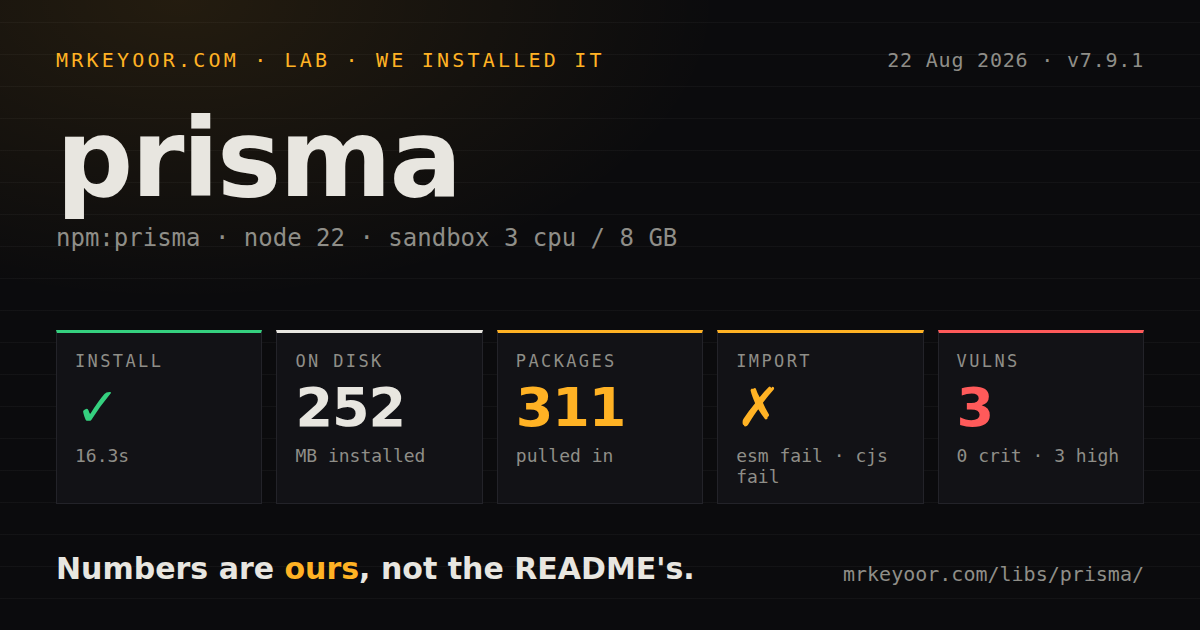
| Install | ✓ · 16.3s | 311 packages on disk · 252 MB |
| Import | ✗ | ESM import fails · require() fails · CommonJS package with exports map |
| Browser | n/a | could not be bundled for the browser (Node-only code, most likely) |
| Types | ✓ | TypeScript types bundled |
| Known vulns | 3 | 0 critical · 3 high · 0 moderate · 0 low (npm audit) |
Answers from our run
Does prisma install cleanly?
Yes. In a fresh container with an empty cache, npm install prisma finished in 16 seconds, leaving 311 packages and 252 MB on disk. npm audit reported 3 known vulnerabilities.
Can prisma run in a browser?
Not directly: esbuild could not bundle it for the browser in our run, which normally means it depends on Node built-ins. Use it on the server, or find a browser-targeted alternative.
Does prisma work with both ESM and CommonJS?
Neither plain import nor require succeeded in our sandbox, so it needs a bundler or extra setup.
Does prisma include TypeScript types?
Yes, type declarations ship inside the package, so no @types install is needed.
prisma or drizzle-orm: which should you use?
drizzle-orm: Use it for typed SQL-shaped queries and schema tooling with less generated-client machinery. Prisma ORM 7 suits TypeScript teams that value generated query types and one schema-led workflow enough to accept a large CLI install and required code generation.
When should you not use prisma?
Your queries center on CTEs, window functions, database-specific operators, or reporting SQL. Frequent $queryRaw calls weaken the reason to adopt the object query API.
Use it if
- Your TypeScript application benefits from a generated query client whose return types follow each select and include shape.
- One schema file should drive client generation, database introspection, migrations, and a local data browser.
- The team works mainly with PostgreSQL, MySQL, SQLite, SQL Server, CockroachDB, or another ORM 7 supported database.
- Developers prefer relation traversal and nested writes through typed objects while retaining tagged raw SQL for exceptions.
- Your queries center on CTEs, window functions, database-specific operators, or reporting SQL. Frequent `$queryRaw` calls weaken the reason to adopt the object query API.
- A small service cannot justify a 252 MB tool installation, 311 installed packages, code generation, a config file, and a separate driver adapter.
- The build must import the `prisma` CLI package directly. In our Node 22.23.2 lab, both CommonJS require and ESM import failed; normal applications should invoke the CLI and import generated client code instead.
- Browser execution is required. Our esbuild browser bundle failed, which matches a Node-oriented CLI and database workflow rather than client-side code.
- You want the repository's main branch to match the production package line. ORM 7 is maintained on the v7 branch while main contains the early-access Prisma Next rewrite.
Setup reality
We installed prisma 7.9.1 in a fresh Node 22 Bookworm container. npm completed in 16.3 seconds, left 311 packages, and used 252 MB. The package declares 6 direct dependencies and 2 peer dependencies, with 42916 KB unpacked. npm audit reported 3 known vulnerabilities, all high severity. The package includes TypeScript declarations, uses CommonJS with an exports map, and requires Node ^20.19 || ^22.12 || >=24.0. Under Node 22.23.2, both require('prisma') and ESM import('prisma') failed in our checks.
That load failure does not block the intended CLI workflow, but it is a warning against treating prisma as an application runtime import. Install a matching client package and database adapter, define a prisma-client generator with an explicit output path, then import PrismaClient from generated code. Put the datasource URL in prisma.config.ts. Version 7 does not automatically load .env for that config, so import dotenv/config or provide variables through the process environment. Run prisma generate after schema changes and in deployment builds that do not preserve generated output.
Use prisma migrate dev only for development migration creation; production and CI should apply checked-in migrations with prisma migrate deploy. A driver adapter owns the database connection behavior, so pooling and serverless limits depend on that adapter and hosting platform.
The CLI is Node-only in practice: our attempt to create a browser bundle with esbuild failed. Keep it out of frontend bundles. Version 7.9.1 addresses a transitive advisory that maintainers say did not affect the CLI, yet our resolved install still reported three high findings, so review npm audit details and lockfile resolution before release.
Patterns
Describe two related models define-schema
generator client {
  provider = "prisma-client"
  output   = "../src/generated/prisma"
}

datasource db {
  provider = "postgresql"
}

model User {
  id    Int    @id @default(autoincrement())
  email String @unique
  posts Post[]
}

model Post {
  id       Int    @id @default(autoincrement())
  title    String
  author   User   @relation(fields: [authorId], references: [id])
  authorId Int
}
ORM 7's prisma-client generator requires an output directory. Generated source belongs at that path rather than behind an implicit node_modules location.
Configure schema and migrations configure-cli
import 'dotenv/config'
import { defineConfig, env } from 'prisma/config'

export default defineConfig({
  schema: 'prisma/schema.prisma',
  migrations: { path: 'prisma/migrations' },
  datasource: { url: env('DATABASE_URL') },
})
The config file does not load .env by itself. Import dotenv before calling env(), or inject DATABASE_URL through the process environment.
Construct a PostgreSQL client instantiate-client
import { PrismaClient } from './generated/prisma/client'
import { PrismaPg } from '@prisma/adapter-pg'

const adapter = new PrismaPg({ connectionString: process.env.DATABASE_URL })
export const prisma = new PrismaClient({ adapter })
Install the adapter that matches the database. Import PrismaClient from the generated output declared in schema.prisma.
Separate development and deployment migrations migrate
npx prisma migrate dev --name add_posts   # dev: diff, apply, regenerate
npx prisma migrate deploy                  # prod: apply pending migrations
npx prisma generate                        # regenerate client after schema edits
migrate dev creates and tests migrations against a development database. Apply reviewed migration files in deployed environments with migrate deploy.
Create a relation and select fields crud-create-read
const user = await prisma.user.create({
  data: {
    email: 'alice@example.com',
    posts: { create: { title: 'hello' } },
  },
})

const users = await prisma.user.findMany({
  where: { email: { endsWith: '@example.com' } },
  select: { id: true, email: true },
})
Nested writes keep related creation in one Prisma operation. A select clause narrows both the database result and its inferred TypeScript type.
Filter and limit an included relation relations-include
const usersWithPosts = await prisma.user.findMany({
  include: {
    posts: {
      where: { title: { contains: 'prisma' } },
      orderBy: { id: 'desc' },
      take: 3,
    },
  },
})
At one query level, choose include for related records or select for an exact field shape. Nest selection inside a relation when both controls are needed.
Handle present and absent records update-upsert
await prisma.post.update({
  where: { id: 42 },
  data: { title: 'updated' },
})

await prisma.user.upsert({
  where: { email: 'alice@example.com' },
  update: { email: 'alice@example.com' },
  create: { email: 'alice@example.com' },
})
update expects the unique target to exist. Use upsert when creation is the intended response to a missing row.
Use an interactive transaction transactions
await prisma.$transaction(async (tx) => {
  const from = await tx.account.update({
    where: { id: 1 },
    data: { balance: { decrement: 100 } },
  })
  if (from.balance < 0) throw new Error('insufficient funds')
  await tx.account.update({
    where: { id: 2 },
    data: { balance: { increment: 100 } },
  })
})
An exception rejects the callback and rolls back its writes. Every database call inside the unit must use tx or it executes outside that transaction.
Page after a stable cursor pagination
const page = await prisma.post.findMany({
  take: 20,
  skip: cursor ? 1 : 0,
  cursor: cursor ? { id: cursor } : undefined,
  orderBy: { id: 'asc' },
})
const nextCursor = page.at(-1)?.id
skip one removes the cursor record from the next page. Order by the same stable unique field used by the cursor to avoid duplicates or gaps.
Run a parameterized raw query raw-sql
const rows = await prisma.$queryRaw`
  SELECT author_id, COUNT(*)::int AS posts
  FROM "Post"
  GROUP BY author_id
  HAVING COUNT(*) > ${min}
`
The tagged template binds interpolated values. Avoid building user-controlled SQL strings for `$queryRawUnsafe`.
Match a unique-constraint error error-handling
import { Prisma } from './generated/prisma/client'

try {
  await prisma.user.create({ data: { email } })
} catch (e) {
  if (e instanceof Prisma.PrismaClientKnownRequestError && e.code === 'P2002') {
    return { error: 'email already taken' }
  }
  throw e
}
P2002 identifies a unique-constraint violation. Check the documented code and error class while rethrowing all unrelated failures.
Close a one-off script cleanly disconnect-script
async function main() {
  const count = await prisma.user.count()
  console.log({ count })
}

main()
  .catch((error) => {
    console.error(error)
    process.exitCode = 1
  })
  .finally(async () => {
    await prisma.$disconnect()
  })
Disconnect at the end of scripts and jobs. Long-running servers should reuse a client instead of connecting and disconnecting for every request.
Alternatives
| Package | Registry | Pick it when |
|---|---|---|
| drizzle-orm | npm | Use it for typed SQL-shaped queries and schema tooling with less generated-client machinery. |
| kysely | npm | Use it when a small typed query builder is enough and migrations can remain a separate concern. |
| sequelize | npm | Use it in projects that prefer model classes, runtime associations, and a long-established Node ORM API. |
More data guides
numpy · pandas · fsspec · pyarrow · lxml · sqlalchemy · the whole shelf →
How this guide is made: grounded in the library's documentation, release notes, changelog, and issue history, on a fixed rubric — not a hands-on install of every release. The 50 most-downloaded entries are additionally install-verified in clean containers. Corrections: contact the desk.