modal review
modal 1.5.4 is the Python SDK and command line client for deploying code to Modal's hosted containers. Python decorators turn functions or classes into remote CPU and GPU workloads, scheduled jobs, parallel maps, or web endpoints. Image recipes, secrets, shared volumes, queues, and scaling limits also live in Python code. This release adds APIs for App and Image logs, workspace billing-rate lookup, fractional target concurrency, and an early Sandbox backend enabled by `MODAL_SANDBOX_V2=1`. The package is a service client; installing its 30 MB environment does not create a local compute runtime.
modal 1.5.4 installed 29 packages using 30 MB in 0.5 seconds, but every useful execution still requires a Modal account, token, network, and hosted control plane. It fits bursty GPU or parallel jobs when the vendor and metered scaling are deliberate architecture choices, not as a local utility dependency.
We installed it
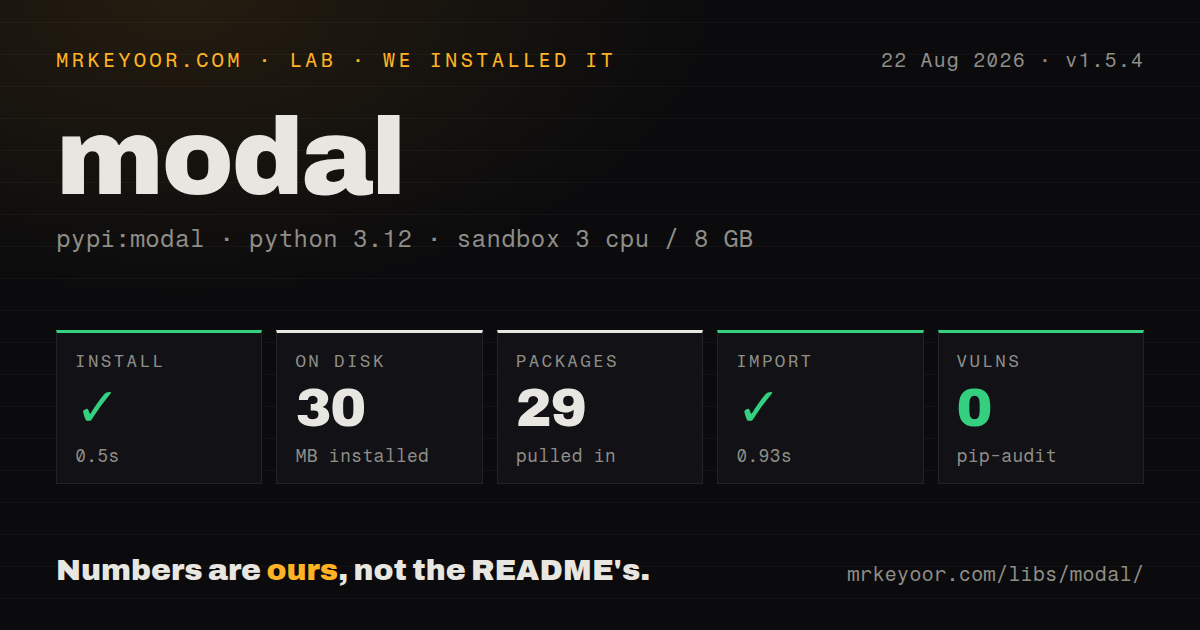
| Install | ✓ · 0.5s | 29 packages on disk · 30 MB |
| Import | ✓ | import modal in 0.93s · pure Python · py.typed · requires Python <3.15,>=3.10 |
| Known vulns | 0 | (pip-audit) |
Answers from our run
Does modal install cleanly?
Yes. In a fresh container with an empty cache, pip install modal finished in 0.5s, leaving 29 packages and 30 MB on disk. pip-audit reported no known vulnerabilities.
What does modal need to run?
Python <3.15,>=3.10, and nothing compiled: it is pure Python. In our run import modal succeeded in 0.93s, and the package ships py.typed for type checkers.
modal or runpod: which should you use?
runpod: Choose it for containerized GPU endpoints and jobs built around Runpod's handler model. modal 1.5.4 installed 29 packages using 30 MB in 0.5 seconds, but every useful execution still requires a Modal account, token, network, and hosted control plane.
When should you not use modal?
Workloads must run self-hosted or move between clouds. Modal decorators and named resources address one vendor service.
Use it if
- GPU or CPU demand arrives in bursts that do not justify idle worker machines.
- Independent batch inputs can fan out to many disposable containers under an explicit maximum.
- The team wants image dependencies and files defined through `modal.Image` beside Python code.
- One model function needs remote Python calls plus a hosted HTTP endpoint from the same deployment.
- Workloads must run self-hosted or move between clouds. Modal decorators and named resources address one vendor service.
- A fixed monthly infrastructure ceiling is more useful than metered fan-out, warm capacity, and per-resource billing.
- Jobs must execute offline. Image builds, secrets, deployment, and remote calls all need an account and network.
- Python 3.9 remains in production. Release 1.5.4 accepts Python >=3.10 and <3.15 only.
- Sandbox code depends on deprecated FileIO methods. The opt-in V2 backend drops them before becoming the 1.6.0 default.
Setup reality
We installed modal 1.5.4 in a clean Python 3.12 Bookworm sandbox. It completed in 0.5 seconds and left 29 packages occupying 30 MB. The pure-Python client declares 16 direct dependencies, supports Python >=3.10 and <3.15, and includes py.typed. import modal took 0.93 seconds. pip-audit found 0 known vulnerabilities, while the package metadata we inspected did not state a license.
An account and token are required for useful work. modal setup performs interactive login; CI can provide MODAL_TOKEN_ID with MODAL_TOKEN_SECRET. modal run executes a local entry point against remote resources, modal serve creates a temporary development endpoint, and modal deploy publishes a durable app. Platform secrets are named resources injected into chosen containers, not values that should be committed beside the code.
Modal builds images remotely, so a local module or data file is absent until the Image recipe adds it. Put heavyweight imports inside remote code or an image import block. Volume writes are not instantly coherent across containers; commit and reload at the points your workflow requires. min_containers buys lower cold-start latency by reserving billable capacity, while a broad .map() plus a high maximum can multiply cost.
Sandbox V2 is opt-in in 1.5.4 through MODAL_SANDBOX_V2=1 and is announced as the 1.6.0 default. It omits the deprecated FileIO interface. App logs may be fetched, tailed, or streamed; Image build logs may be fetched or tailed. Pin the client used by deployments because SDK behavior and the hosted control plane change together.
Patterns
Invoke a function on Modal run-remote-function
import modal

app = modal.App('math-jobs')

@app.function()
def square(value: int) -> int:
    return value * value

@app.local_entrypoint()
def main():
    print(square.remote(12))

# modal run app.py
`.remote()` crosses into hosted compute. Calling `.local()` executes the same body in the caller process instead.
Build an image from Python build-image
image = (
    modal.Image.debian_slim(python_version='3.12')
    .apt_install('ffmpeg')
    .pip_install('torch==2.8.0')
    .add_local_python_source('my_project')
)

@app.function(image=image)
def version():
    import torch
    return torch.__version__
The remote filesystem does not inherit the project; `add_local_python_source` copies the named module into this image.
Allocate L4 workers with a cap request-gpu
@app.function(
    image=image,
    gpu='L4',
    timeout=30 * 60,
    max_containers=20,
)
def infer(prompt: str):
    import torch
    assert torch.cuda.is_available()
    return model(prompt)
`max_containers=20` bounds simultaneous allocation. Without a suitable cap, `.map()` can expand billable GPU use quickly.
Fan out one thousand inputs fan-out-inputs
@app.local_entrypoint()
def main():
    for result in square.map(range(1000)):
        store(result)
Results arrive through lazy iteration. If the caller never consumes it, remote errors and completion may stay unseen.
Load model state once per worker load-model-once
@app.cls(image=image, gpu='L4', scaledown_window=300)
class Embedder:
    @modal.enter()
    def load(self):
        from sentence_transformers import SentenceTransformer
        self.model = SentenceTransformer('all-MiniLM-L6-v2')

    @modal.method()
    def embed(self, texts: list[str]):
        return self.model.encode(texts).tolist()
The enter hook initializes each container, then the method reuses that in-memory model for individual calls.
Publish a POST endpoint expose-endpoint
web_image = modal.Image.debian_slim().pip_install('fastapi[standard]')

@app.function(image=web_image)
@modal.fastapi_endpoint(method='POST')
def predict(body: dict):
    return {'result': run_model(body['text'])}

# modal deploy app.py
Decorator order matters here, and the remote image must install FastAPI because local dependencies are irrelevant.
Inject one required credential inject-secret
@app.function(secrets=[
    modal.Secret.from_name('api-credentials', required_keys=['API_TOKEN'])
])
def fetch_data():
    import os
    return call_service(os.environ['API_TOKEN'])
Naming `API_TOKEN` in `required_keys` makes deployment fail early when the stored secret lacks it.
Commit a shared model file persist-files
volume = modal.Volume.from_name('model-cache', create_if_missing=True)

@app.function(volumes={'/cache': volume})
def write_model(data: bytes):
    with open('/cache/model.bin', 'wb') as file:
        file.write(data)
    volume.commit()
`commit()` persists this writer's changes. Already running readers must call `reload()` to refresh their view.
Run a daily Kolkata job schedule-job
@app.function(schedule=modal.Cron('0 9 * * *', timezone='Asia/Kolkata'))
def daily_report():
    create_report()

# modal deploy app.py
Cron activation begins after `modal deploy`; scheduled entry functions must be callable without parameters.
Opt into Sandbox V2 enable-sandbox-v2
MODAL_SANDBOX_V2=1 modal run sandbox_job.pyThis flag selects V2 in 1.5.4. Any deprecated FileIO calls must be removed because that backend does not implement them.
Follow deployed App output read-app-logs
deployed = modal.App.lookup('math-jobs')
for entry in deployed.logs.stream():
    print(entry.message, end='')
App logs support streaming in 1.5.4. Image build logs expose fetch and tail operations only.
Read authenticated billing rates inspect-billing-rates
workspace = modal.Workspace.from_context()
rates = workspace.billing.rates()
print(rates)

# modal billing rates
The response describes current workspace rates. It neither estimates this workload nor enforces a budget.
Alternatives
| Package | Registry | Pick it when |
|---|---|---|
| runpod | PyPI | Choose it for containerized GPU endpoints and jobs built around Runpod's handler model. |
| ray | PyPI | Choose it for distributed Python scheduled across clusters that your team owns or selects. |
| bentoml | PyPI | Choose it to package model APIs while retaining several deployment targets. |
More infra guides
semver · boto3 · opentelemetry-api · @opentelemetry/api · psutil · distro · the whole shelf →
How this guide is made: grounded in the library's documentation, release notes, changelog, and issue history, on a fixed rubric — not a hands-on install of every release. The 50 most-downloaded entries are additionally install-verified in clean containers. Corrections: contact the desk.