@microsoft/api-extractor review
@microsoft/api-extractor 7.59.0 checks the exported TypeScript contract of a library after `tsc` has emitted declarations. It can write a Git-reviewed `.api.md` snapshot, catch missing exports and release-tag mistakes, combine a declaration tree into publishable `.d.ts` files, and produce an `.api.json` model for documentation tooling. It does not compile application JavaScript or render a finished docs site. The 7.59.0 release adds `ae-unresolved-import-path`, so a relative inline `import()` that cannot be resolved now produces a named diagnostic instead of leaving a broken path in the declaration rollup.
@microsoft/api-extractor 7.59.0 installed in 6.8 seconds with 46 packages, 49 MB on disk, and 0 audit findings in our sandbox, a reasonable development cost for libraries that enforce public API review. Skip it when you only need a declaration bundle or have no exported compatibility promise to police.
We installed it
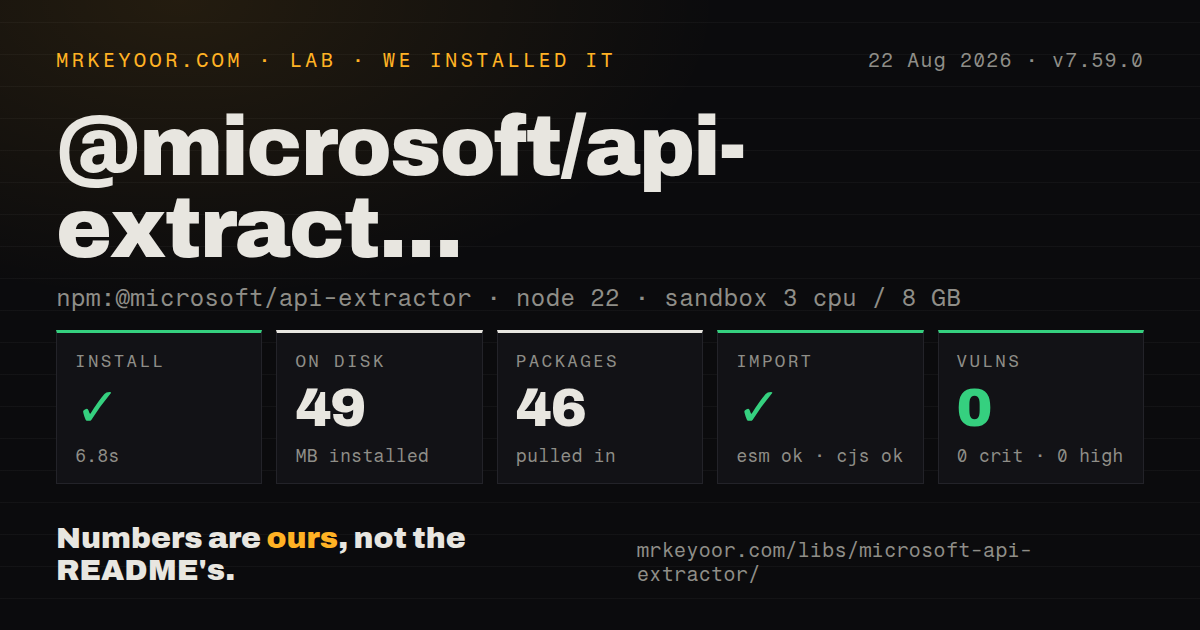
| Install | ✓ · 6.8s | 46 packages on disk · 49 MB |
| Import | ✓ | ESM import works · require() works · CommonJS package with exports map |
| Browser | n/a | could not be bundled for the browser (Node-only code, most likely) |
| Types | ✓ | TypeScript types bundled |
| Known vulns | 0 | 0 critical · 0 high · 0 moderate · 0 low (npm audit) |
Answers from our run
Does @microsoft/api-extractor install cleanly?
Yes. In a fresh container with an empty cache, npm install @microsoft/api-extractor finished in 7 seconds, leaving 46 packages and 49 MB on disk. npm audit reported no known vulnerabilities.
Can @microsoft/api-extractor run in a browser?
Not directly: esbuild could not bundle it for the browser in our run, which normally means it depends on Node built-ins. Use it on the server, or find a browser-targeted alternative.
Does @microsoft/api-extractor work with both ESM and CommonJS?
Yes. Both import '@microsoft/api-extractor' and require('@microsoft/api-extractor') worked in Node 22 in our run. The package is published as CommonJS with an exports map.
Does @microsoft/api-extractor include TypeScript types?
Yes, type declarations ship inside the package, so no @types install is needed.
@microsoft/api-extractor or rollup-plugin-dts: which should you use?
rollup-plugin-dts: Use it when an existing Rollup build only needs declaration bundling. @microsoft/api-extractor 7.59.0 installed in 6.8 seconds with 46 packages, 49 MB on disk, and 0 audit findings in our sandbox, a reasonable development cost for libraries that enforce public API review.
When should you not use @microsoft/api-extractor?
Leave it out of private applications because the tool evaluates a library's exported declaration entry point and adds no runtime behavior
Use it if
- A published TypeScript library needs an API contract diff that reviewers can approve in pull requests
- You want one declaration rollup or separate public, beta, and alpha type files from emitted declarations
- TSDoc release tags define which exports may refer to public, beta, alpha, or internal types
- A docs pipeline needs the structured `.api.json` model consumed by API Documenter or custom rendering code
- Leave it out of private applications because the tool evaluates a library's exported declaration entry point and adds no runtime behavior
- Use rollup-plugin-dts or dts-bundle-generator when declaration concatenation is the whole job; API Extractor also imposes reports, diagnostics, release tags, and config policy
- Plan another structure for packages with several unrelated entry points; one run begins at one `mainEntryPointFilePath`, so each public surface needs a facade or its own extraction strategy
- Delay adoption when your declarations cannot be analyzed by its bundled TypeScript 5.9.3 engine; `skipLibCheck` and a custom compiler folder exist, but the config warns that skipped checks may yield incomplete declarations
- Avoid it when a 49 MB development install and generated review files outweigh the value of an explicit API contract for a small internal package
Setup reality
Our install of @microsoft/api-extractor 7.59.0 took 6.8 seconds and left 46 packages using 49 MB on disk. npm audit found 0 known vulnerabilities. The package has 13 direct dependencies, 0 peer dependencies, 4216 KB unpacked, bundled TypeScript declarations, and an MIT license. It requires Node 20.9.0 or newer. Both require() and ESM import worked through its exports map, while our esbuild browser bundle failed because this is Node build tooling.
Run api-extractor init to create api-extractor.json, then point mainEntryPointFilePath at a declaration file emitted by TypeScript. API Extractor does not start from .ts source. Build order matters: tsc must finish first, and stale declarations can make the report describe yesterday's API. The generated config uses JSON with comments and has separate enabled switches for API reports, doc models, declaration rollups, and TSDoc metadata.
The review loop has 2 modes. api-extractor run --local copies a changed temporary report into the approved report folder; the developer reviews and commits that .api.md. A CI run without --local compares the new report with the approved file and fails when they differ. Production mode also treats warning-level messages as a failed result by default. Configure newlineKind if CRLF output would create noisy diffs on a Unix repository.
Declaration rollups, API reports, and .api.json models are separate outputs. Point package.json types and exports at the rollup you intend consumers to receive; generating it does not change package resolution. API Documenter can render the model, while API Extractor itself emits no finished website. Version 7.59.0 bundles TypeScript 5.9.3 and reports unresolved relative inline imports as ae-unresolved-import-path; compiler-version mismatches may require fixing declarations or selecting --typescript-compiler-folder.
Patterns
Generate the starter configuration initialize-config
npm install --save-dev @microsoft/api-extractor
npx api-extractor init
API Extractor 7.59.0 writes `api-extractor.json` as JSON with comments; keep the comments until each output path and default has been reviewed.
Emit declarations before extraction emit-declarations
{
  "compilerOptions": {
    "declaration": true,
    "declarationMap": true,
    "emitDeclarationOnly": true,
    "outDir": "dist/types"
  },
  "include": ["src"]
}
`mainEntryPointFilePath` must resolve to an emitted `.d.ts` file; API Extractor does not analyze the `.ts` entry directly.
Enable an API report and rollup configure-analysis
{
  "$schema": "https://developer.microsoft.com/json-schemas/api-extractor/v7/api-extractor.schema.json",
  "mainEntryPointFilePath": "<projectFolder>/dist/types/index.d.ts",
  "newlineKind": "lf",
  "apiReport": { "enabled": true },
  "docModel": { "enabled": false },
  "dtsRollup": {
    "enabled": true,
    "untrimmedFilePath": "<projectFolder>/dist/index.d.ts"
  }
}
The v7 schema requires `mainEntryPointFilePath`; each of the 3 main output sections also needs an explicit `enabled` value.
Refresh the approved report locally approve-api-report
npm run build:types
npx api-extractor run --local --verbose
Local mode copies a changed temporary `.api.md` into the approved report folder, so review its Git diff before committing.
Reject an unapproved API change check-api-in-ci
npm run build:types
npx api-extractor run
A production run fails when the generated report differs from the committed `.api.md`; warning-level messages also fail the result by default.
Declare public and beta surfaces mark-release-tags
/** @public */
export interface ClientOptions {
  endpoint: string
}

/** @beta */
export function createPreviewClient(options: ClientOptions): Client
API Extractor reports a compatibility error when an `@public` declaration exposes an `@beta` or `@internal` type.
Mark the package documentation entry document-package
/**
 * Client primitives for the Example service.
 *
 * @packageDocumentation
 */

export { Client } from './Client.js'
`@packageDocumentation` belongs in the declaration entry module; TSDoc parser problems are routed through `tsdocMessageReporting`.
Review public and beta contracts separately split-report-variants
{
  "apiReport": {
    "enabled": true,
    "reportVariants": ["public", "beta"]
  }
}
The public variant contains `@public` items, while the beta variant contains both `@public` and `@beta` items.
Write public and beta declaration files emit-trimmed-types
{
  "dtsRollup": {
    "enabled": true,
    "untrimmedFilePath": "",
    "publicTrimmedFilePath": "<projectFolder>/dist/index.d.ts",
    "betaTrimmedFilePath": "<projectFolder>/dist/index-beta.d.ts",
    "omitTrimmingComments": true
  }
}
Generating 2 rollups does not publish either one; `package.json` types and exports must select the consumer-facing file.
Produce the documentation model generate-doc-model
{
  "docModel": {
    "enabled": true,
    "apiJsonFilePath": "<projectFolder>/temp/<unscopedPackageName>.api.json",
    "projectFolderUrl": "https://github.com/acme/widgets/tree/main"
  }
}
The `.api.json` file is an intermediate model; API Documenter or custom code must turn it into reader-facing pages.
Fail on forgotten exports promote-message
{
  "messages": {
    "extractorMessageReporting": {
      "ae-forgotten-export": {
        "logLevel": "error",
        "addToApiReportFile": true
      }
    }
  }
}
`ae-forgotten-export` means a reachable API type lacks a named export; setting `logLevel` to error gives that condition a nonzero build result.
Invoke extraction from a build script run-programmatically
const path = require('node:path')
const { Extractor, ExtractorConfig } = require('@microsoft/api-extractor')

const config = ExtractorConfig.loadFileAndPrepare(
  path.resolve('api-extractor.json')
)
const result = Extractor.invoke(config, {
  localBuild: false,
  showVerboseMessages: true,
})
if (!result.succeeded) process.exitCode = 1
`Extractor.invoke()` returns counts and `succeeded`; setting `localBuild` to false applies the production report and warning checks.
Alternatives
| Package | Registry | Pick it when |
|---|---|---|
| rollup-plugin-dts | npm | Use it when an existing Rollup build only needs declaration bundling. |
| dts-bundle-generator | npm | Use its focused CLI when one bundled declaration file is enough and no API approval report is wanted. |
| typedoc | npm | Use it when browsable TypeScript reference pages are the primary output rather than contract review. |
More cli & tooling guides
commander · chalk · typescript · esbuild · yargs · click · the whole shelf →
How this guide is made: grounded in the library's documentation, release notes, changelog, and issue history, on a fixed rubric — not a hands-on install of every release. The 50 most-downloaded entries are additionally install-verified in clean containers. Corrections: contact the desk.