markdown-it-py review
Our Python 3.12 sandbox installed markdown-it-py 4.2.0 in 0.2 seconds, left two packages using 1 MB, and imported `markdown_it` in 0.24 seconds. It is a pure-Python CommonMark parser that renders HTML or exposes its block and inline tokens for inspection and rewriting. A preset chooses the syntax at construction; code can then switch named parser rules or replace renderer callbacks. Version 4.2.0 adds `make_fence_rule()`, a factory for plugin authors who need fence markers or closing rules beyond CommonMark's backticks and tildes.
markdown-it-py 4.2.0 installed in 0.2 seconds, occupied 1 MB across two packages, imported in 0.24 seconds, and produced 0 audit findings in our sandbox. Install it for CommonMark token work or `mdit-py-plugins`, but choose another parser if exact GitHub output, Python 3.9 support, or a configurable CLI is mandatory.
We installed it
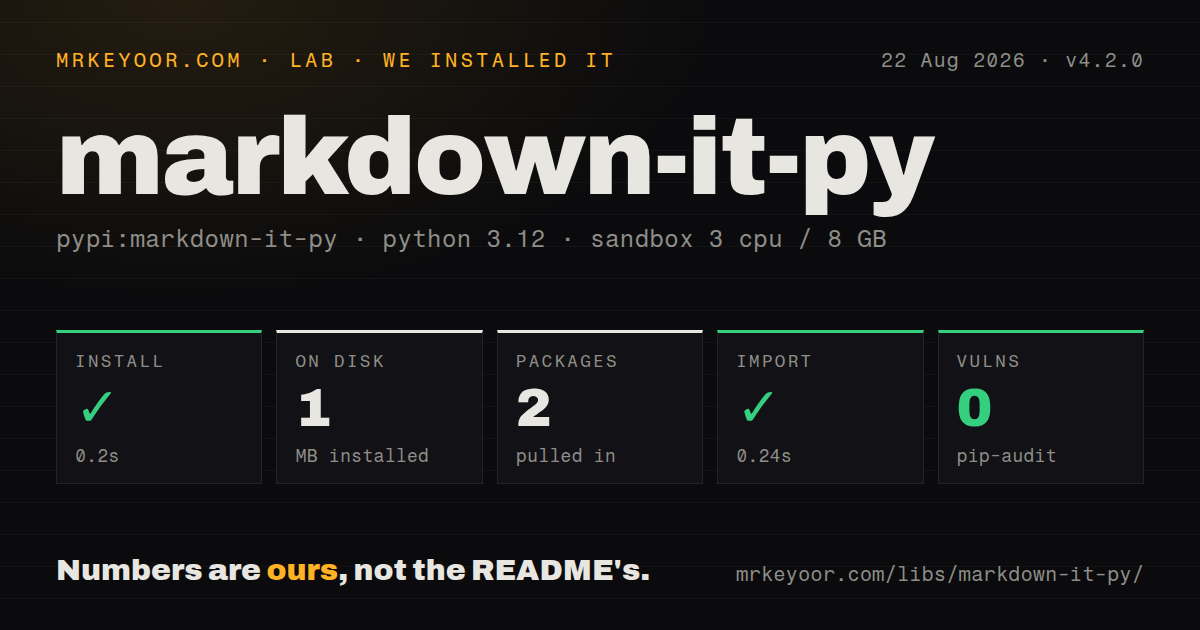
| Install | ✓ · 0.2s | 2 packages on disk · 1 MB |
| Import | ✓ | import markdown_it in 0.24s · pure Python · py.typed · requires Python >=3.10 |
| Known vulns | 0 | (pip-audit) |
Answers from our run
Does markdown-it-py install cleanly?
Yes. In a fresh container with an empty cache, pip install markdown-it-py finished in 0.2s, leaving 2 packages and 1 MB on disk. pip-audit reported no known vulnerabilities.
What does markdown-it-py need to run?
Python >=3.10, and nothing compiled: it is pure Python. In our run import markdown_it succeeded in 0.24s, and the package ships py.typed for type checkers.
markdown-it-py or mistune: which should you use?
mistune: Choose it when rendering speed and its own plugin API matter more than CommonMark conformance or markdown-it token compatibility. markdown-it-py 4.2.0 installed in 0.2 seconds, occupied 1 MB across two packages, imported in 0.24 seconds, and produced 0 audit findings in our sandbox.
When should you not use markdown-it-py?
Security policy requires the default constructor to reject raw HTML. MarkdownIt() selects CommonMark, which accepts HTML; the project's security page recommends js-default for user submissions.
Use it if
- You need CommonMark parsing plus access to source maps, nesting levels, attributes, and inline child tokens.
- A documentation tool must add syntax through named block, inline, or renderer rules without forking a parser.
- Your output policy needs separate parser presets for trusted documents and user-submitted Markdown.
- You want the `mdit-py-plugins` syntax family or compatibility with tools built around markdown-it token names.
- Security policy requires the default constructor to reject raw HTML. `MarkdownIt()` selects CommonMark, which accepts HTML; the project's security page recommends `js-default` for user submissions.
- Production still runs Python 3.9 or older. The 4.x package metadata requires Python 3.10 or newer.
- Your output must match GitHub's renderer exactly. The supplied presets call themselves `gfm-like` and `gfm-like2`, and the docs describe the match as approximate.
- Markdown throughput dominates the job. This package is pure Python, and its own README points speed-sensitive users to the experimental Rust `markdown-it-pyrs` binding.
- A command-line converter must select plugins and parser options itself. The bundled `markdown-it` command accepts files or standard input, but exposes no plugin or preset flag.
Setup reality
Our measurement setup was a fresh, unprivileged Python 3.12 Bookworm container with 3 CPUs and 8 GB of RAM. We installed markdown-it-py 4.2.0 in 0.2 seconds and found two packages occupying 1 MB. import markdown_it worked in 0.24 seconds, and pip-audit reported 0 known vulnerabilities. The distribution is pure Python, includes py.typed, carries the MIT License, and declares 28 direct dependency entries, most of them attached to optional extras.
No account, token, native compiler, or project config file is needed. Version 4.2.0 requires Python 3.10 or later. The base installation brings the parser and its small file-to-HTML command. Install [linkify] for bare-URL detection and [plugins] for mdit-py-plugins. Both gfm-like presets turn on linkification, so they need linkify-it-py even when the document has no bare URL. Parser policy lives in Python code rather than a shared configuration file.
MarkdownIt() uses the CommonMark preset, and that preset permits raw HTML. The maintainers call this unsafe for web applications that accept user text and recommend js-default, which disables HTML parsing. Link validation blocks schemes such as javascript:, vbscript:, and file:, but plugin-generated id or name attributes can still cause DOM clobbering. Review each plugin and sanitize rendered HTML when your chosen rules can emit markup you do not control.
Parsing and rendering are synchronous. parse() returns a flat block-token list, while inline markup sits in each inline token's children; code expecting a conventional AST must use SyntaxTreeNode or build another shape. Plugins may read and mutate the env mapping passed to a parse, so create one per document. Configure parser instances once and keep separate instances for different policies. The source warns that changing options on an existing instance hurts performance. In 4.2.0, custom fence behavior also requires registering the rule returned by make_fence_rule().
Patterns
Render user text with raw HTML disabled render-user-markdown
from markdown_it import MarkdownIt

md = MarkdownIt("js-default")
html = md.render(user_text)
`js-default` disables raw HTML while enabling tables and strikethrough, which is the project's recommended starting point for user submissions.
Render strict CommonMark render-commonmark
from markdown_it import MarkdownIt

md = MarkdownIt("commonmark")
html = md.render("# Build notes\n\nUse **Python 3.12**.")
The CommonMark preset is also the constructor default, and it permits raw HTML from the source document.
Turn on the extended GFM-like preset enable-gfm-features
# pip install "markdown-it-py[linkify]"
from markdown_it import MarkdownIt

md = MarkdownIt("gfm-like2")
html = md.render("- [x] shipped\n\n> [!NOTE]\n> Read the log.")
`gfm-like2` adds task lists, GitHub-style alerts, and single-tilde strikethrough, but it still claims only approximate GFM behavior and requires `linkify-it-py`.
Enable only the syntax your product accepts select-syntax-rules
from markdown_it import MarkdownIt

md = (
    MarkdownIt("commonmark", {"breaks": True, "html": False})
    .enable(["table", "strikethrough"])
    .disable("image")
)
html = md.render(source)
Unknown rule names raise `ValueError` unless `ignoreInvalid=True`, which catches misspelled policy rules during startup.
Collect destinations from parsed links inspect-link-tokens
from markdown_it import MarkdownIt

md = MarkdownIt("commonmark")
tokens = md.parse("See [the runbook](https://example.com/runbook).")
links = [
    child.attrGet("href")
    for block in tokens if block.type == "inline"
    for child in (block.children or []) if child.type == "link_open"
]
Links live in an inline token's `children`; scanning only the top-level block list will miss them.
Render text without a paragraph wrapper render-inline-fragment
from markdown_it import MarkdownIt

md = MarkdownIt("js-default")
label_html = md.renderInline("**Status:** ready")
`renderInline()` skips block rules and returns the fragment without surrounding `<p>` tags.
Add attributes to rendered links customize-link-output
from markdown_it import MarkdownIt

def open_link(self, tokens, idx, options, env):
    tokens[idx].attrSet("rel", "nofollow noopener")
    return self.renderToken(tokens, idx, options, env)

md = MarkdownIt("js-default")
md.add_render_rule("link_open", open_link)
html = md.render(source)
A render rule replaces output handling for that token type and may mutate the token before delegating to `renderToken()`.
Add front matter and footnotes load-syntax-plugins
from markdown_it import MarkdownIt
from mdit_py_plugins.front_matter import front_matter_plugin
from mdit_py_plugins.footnote import footnote_plugin

md = (
    MarkdownIt("js-default")
    .use(front_matter_plugin)
    .use(footnote_plugin)
)
tokens = md.parse(source)
Install the `[plugins]` extra first; the front-matter rule emits the header as token text and does not parse YAML.
Convert bare URLs into links linkify-bare-urls
# pip install "markdown-it-py[linkify]"
from markdown_it import MarkdownIt

md = MarkdownIt("commonmark", {"linkify": True}).enable("linkify")
html = md.render("Status: https://status.example.com")
Bare-URL detection needs the `linkify-it-py` extra, the `linkify` option, and the matching parser rule.
Apply an HTML allowlist after rendering sanitize-rendered-html
import nh3
from markdown_it import MarkdownIt

md = MarkdownIt("commonmark")
rendered = md.render(user_text)
safe_html = nh3.clean(rendered)
The CommonMark preset passes raw HTML through, so an external sanitizer must inspect the combined output when that preset handles untrusted text.
Accept colon-delimited fences define-custom-fences
from markdown_it import MarkdownIt
from markdown_it.rules_block.fence import make_fence_rule

md = MarkdownIt("commonmark")
md.block.ruler.at(
    "fence",
    make_fence_rule(markers=("~", "`", ":")),
)
html = md.render("::: note\nCheck the backup.\n:::")
Version 4.2.0 added this factory; its default closing rule accepts a fence at least as long as the opener unless `exact_match=True`.
Convert Markdown files from the shell convert-files-from-cli
markdown-it README.md CHANGELOG.md > combined.html
printf '# report\n' | markdown-it --stdin
The bundled command writes HTML to standard output and has no flag for loading plugins or choosing a preset.
Alternatives
| Package | Registry | Pick it when |
|---|---|---|
| mistune | PyPI | Choose it when rendering speed and its own plugin API matter more than CommonMark conformance or markdown-it token compatibility. |
| Markdown | PyPI | Choose Python-Markdown when an existing MkDocs site or Python-Markdown extension fixes the parser choice. |
| marko | PyPI | Choose it when your transforms fit an element tree and renderer model better than markdown-it's flat block-token stream. |
More utils guides
lru-cache · type-fest · ajv · zod · p-limit · find-up · the whole shelf →
How this guide is made: grounded in the library's documentation, release notes, changelog, and issue history, on a fixed rubric — not a hands-on install of every release. The 50 most-downloaded entries are additionally install-verified in clean containers. Corrections: contact the desk.