loglevel review
Our full browser import of loglevel 1.9.2 was 3.7 KB minified and 1.6 KB gzipped. The package is a small console wrapper for browsers and Node that adds trace, debug, info, warn, error, and silent thresholds. It can persist a chosen browser level, create independently filtered named loggers, and replace output methods through methodFactory. It does not format structured records, ship logs, rotate files, or attach request context. Version 1.9.2 is a maintenance patch after 1.9.1 fixed setLevel in some ESM-oriented runtimes.
loglevel is a sensible browser console switch when 1.6 KB gzipped buys exactly the filtering and named loggers you need. Install something else for production telemetry, durable delivery, structured records, or server request context.
We installed it
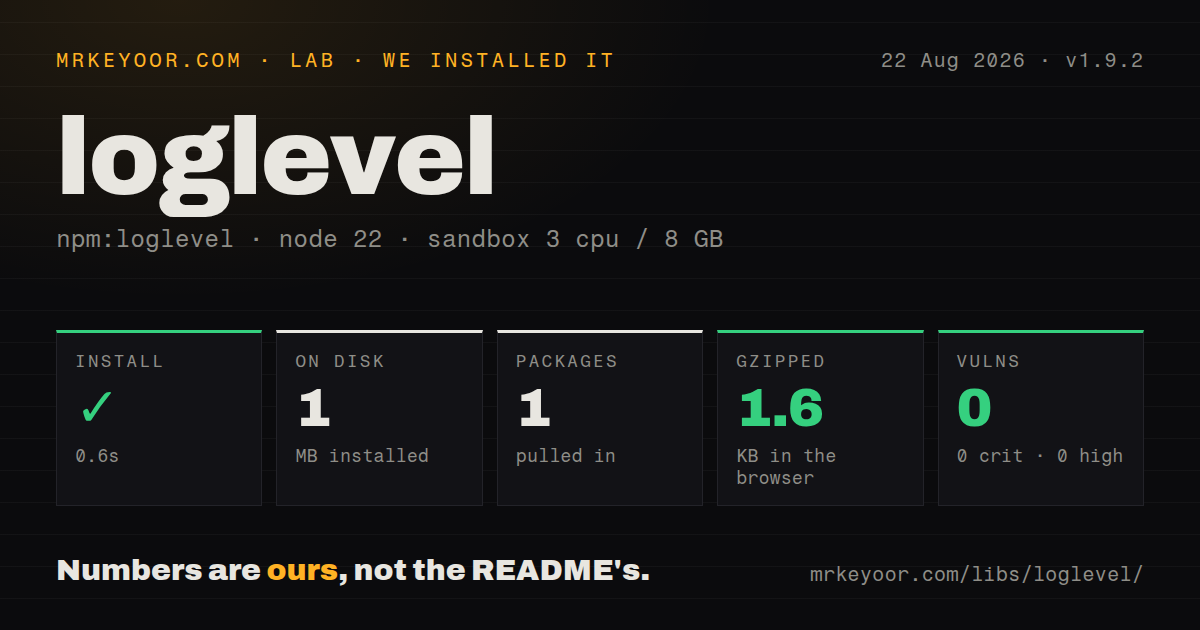
| Install | ✓ · 0.6s | 1 package on disk · 1 MB |
| Import | ✓ | ESM import works · require() works · CommonJS package |
| Browser | 1.6 KB | gzipped (3.7 KB minified), bundled with esbuild |
| Types | ✓ | TypeScript types bundled |
| Known vulns | 0 | 0 critical · 0 high · 0 moderate · 0 low (npm audit) |
Answers from our run
Does loglevel install cleanly?
Yes. In a fresh container with an empty cache, npm install loglevel finished in 0.6s, leaving 1 package and 1 MB on disk. npm audit reported no known vulnerabilities.
How much does loglevel add to a browser bundle?
1.6 KB gzipped (3.7 KB minified) when the whole package is bundled for the browser with esbuild. Importing only part of it is usually smaller.
Does loglevel work with both ESM and CommonJS?
Yes. Both import 'loglevel' and require('loglevel') worked in Node 22 in our run. The package is published as CommonJS.
Does loglevel include TypeScript types?
Yes, type declarations ship inside the package, so no @types install is needed.
loglevel or debug: which should you use?
debug: Use namespace patterns and the DEBUG setting for opt-in diagnostics across Node and browsers. loglevel is a sensible browser console switch when 1.6 KB gzipped buys exactly the filtering and named loggers you need.
When should you not use loglevel?
You need JSON logs, child bindings, redaction, or transport pipelines on a Node server; pino covers that job
Use it if
- A browser application needs runtime-selectable console levels with almost no bundle cost
- Developers must enable debug output for one module without turning on every logger
- You want console calls to retain useful source line information when no plugin wraps them
- A shared package needs a logger that stays quiet by default and works in CommonJS or ESM consumers
- You need JSON logs, child bindings, redaction, or transport pipelines on a Node server; pino covers that job
- Logs must reach a remote collector reliably; loglevel only writes through console unless you add and operate a plugin
- Persisting a debug level in localStorage or cookies would surprise users or expose sensitive diagnostic output
- You need identical trace formatting across runtimes; the README says output depends on the available console implementation
- You plan to add prefixes and formatters while preserving original call-site lines; methodFactory indirection can move stack locations into the wrapper
Setup reality
Our fresh Node 22 install of loglevel 1.9.2 took 0.6 seconds. One package used 1 MB on disk, and npm audit reported zero known vulnerabilities. The package has no direct or peer dependencies and is 136 KB unpacked. It is CommonJS without an exports map; require() and ESM import both worked. TypeScript declarations ship in the package. An esbuild import of the full browser entry measured 3.7 KB minified and 1.6 KB gzipped.
There are no credentials or config files. The first surprise is the default threshold: WARN. Calls to trace, debug, and info stay silent until the level changes. In a browser, setLevel persists through localStorage and falls back to cookies when possible. Pass false as the second argument when a temporary support session must not survive refresh. setDefaultLevel respects a previously stored choice; resetLevel clears it.
Named loggers returned by getLogger(name) have their own threshold. Repeating the same name returns the same object, which is useful for modules and awkward in tests that expect a fresh instance. Changing the root level does not override a child that already received an explicit level. Calling rebuild reapplies inherited settings and is also required after replacing methodFactory.
loglevel passes arguments to the closest console method it can find. It does not serialize errors or promise rejections, buffer output, apply backpressure, or guarantee delivery before navigation. A remote plugin moves data over the network but also creates privacy, retry, and recursion questions. Treat logged objects as public diagnostics: remove tokens and personal data before the call, not in an afterthought transport.
Patterns
Choose a temporary threshold set-level
import log from 'loglevel';

log.setLevel('info', false);
log.debug('hidden');
log.info('visible');
Passing false prevents browser persistence. The default threshold is WARN.
Respect a saved support setting set-default-level
log.setDefaultLevel(process.env.NODE_ENV === 'production' ? 'warn' : 'debug');A level previously stored by setLevel wins over this default.
Clear a persisted override reset-level
log.resetLevel();
console.log('active level', log.getLevel());
The logger returns to its explicit default, the root level, or WARN.
Filter one module separately named-logger
const cacheLog = log.getLogger('cache');
cacheLog.setLevel('debug');
cacheLog.debug('miss', { key });
Calling getLogger('cache') again returns the same logger object.
Silence every method disable-logging
log.disableAll();
log.error('this is suppressed');

log.enableAll();
disableAll includes error. It is equivalent to the silent level.
Pass values as separate arguments avoid-eager-formatting
log.debug('cache result', key, result);Separate arguments avoid building a debug string when that level is disabled.
Add a prefix through methodFactory wrap-methods
const originalFactory = log.methodFactory;
log.methodFactory = (method, level, name) => {
  const raw = originalFactory(method, level, name);
  return (...args) => raw(`[${name || 'app'}]`, ...args);
};
log.rebuild();
Wrapping console methods can move the displayed source line into this factory.
List created named loggers inspect-loggers
for (const [name, logger] of Object.entries(log.getLoggers())) {
  console.log(name, logger.getLevel());
}
The root logger is not included in the returned named-logger dictionary.
Load from CommonJS commonjs-import
const log = require('loglevel');
log.warn('configuration is missing');
The package has no exports map, but our require() check succeeded on Node 22.
Alternatives
| Package | Registry | Pick it when |
|---|---|---|
| debug | npm | Use namespace patterns and the DEBUG setting for opt-in diagnostics across Node and browsers |
| pino | npm | Use structured JSON, child context, redaction, and production transports in Node services |
| consola | npm | Use richer reporters and log types for CLIs or universal JavaScript applications |
More web frontend guides
postcss · react · react-dom · tailwindcss · clsx · htmlparser2 · the whole shelf →
How this guide is made: grounded in the library's documentation, release notes, changelog, and issue history, on a fixed rubric — not a hands-on install of every release. The 50 most-downloaded entries are additionally install-verified in clean containers. Corrections: contact the desk.