langgraph review
LangGraph is a Python runtime for workflows expressed as nodes, edges, shared state, and explicit routing. It targets agent loops that must pause, resume, checkpoint state, stream progress, ask a person for approval, or fan work out and merge it later. The core does not choose an LLM provider or write your tool functions. Version 1.2.11 added trace_policy to add_node and updated its checkpoint packages. Our sandbox imported langgraph in 0.02 seconds and found bundled typing metadata. Use it when an agent's control flow has become stateful enough that a while loop and a pile of callbacks are hard to recover after failure.
LangGraph 1.2.11 installed in 0.9 seconds, used 51 MB across 35 packages, and imported in 0.02 seconds with no audit findings in our sandbox. Install it for agents that need checkpoints, pauses, cycles, and explicit state; a single tool-calling chat path does not repay the graph machinery.
We installed it
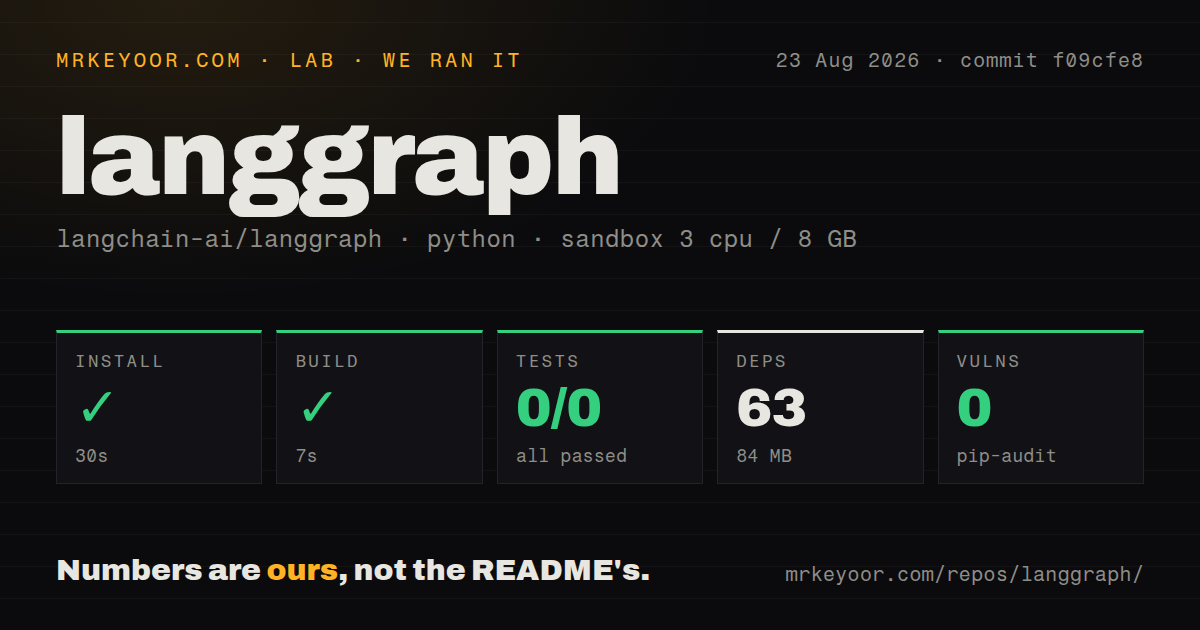
| Install | ✓ · 0.9s | 35 packages on disk · 51 MB |
| Import | ✓ | import langgraph in 0.02s · pure Python · py.typed · requires Python >=3.10 |
| Known vulns | 0 | (pip-audit) |
Answers from our run
Does langgraph install cleanly?
Yes. In a fresh container with an empty cache, pip install langgraph finished in 0.9s, leaving 35 packages and 51 MB on disk. pip-audit reported no known vulnerabilities.
What does langgraph need to run?
Python >=3.10, and nothing compiled: it is pure Python. In our run import langgraph succeeded in 0.02s, and the package ships py.typed for type checkers.
langgraph or pydantic-ai: which should you use?
pydantic-ai: Use it for typed model interactions and agent dependencies with less graph machinery. LangGraph 1.2.11 installed in 0.9 seconds, used 51 MB across 35 packages, and imported in 0.02 seconds with no audit findings in our sandbox.
When should you not use langgraph?
The workflow is a short request, one model call, and one response; a graph adds state schemas, compilation, and routing code with little return
Use it if
- An agent must stop for approval and resume later with the same state instead of keeping one request open
- You need conditional branches, retries, cycles, subgraphs, or parallel fan-out that should be visible as one execution graph
- A thread's checkpoints and state history must be inspectable for recovery, replay, or debugging
- Your team wants to bring its own model clients and tools while keeping orchestration separate from provider code
- The workflow is a short request, one model call, and one response; a graph adds state schemas, compilation, and routing code with little return
- You want a ready-made autonomous assistant with planning and file tools. LangGraph's own README points beginners toward the higher-level Deep Agents package
- Durable execution must include arbitrary external side effects exactly once. Checkpoint replay can rerun a node, so database writes and paid API calls still need idempotency
- You do not want LangChain packages in the environment; langchain-core and several LangGraph companion distributions are direct requirements
- A general business workflow engine is the requirement, without LLM-specific message and tool patterns; Temporal or a job system may fit operational guarantees better
Setup reality
Our clean Python 3.12 install of LangGraph 1.2.11 succeeded in 0.9 seconds. It left 35 packages using 51 MB, and pip-audit reported no known vulnerabilities. The distribution declares six direct dependencies, requires Python 3.10 or newer, is pure Python, and ships py.typed. import langgraph worked in 0.02 seconds. The installed package metadata did not state a license, even though the repository API identifies the repo as MIT.
The core install supplies graph machinery, checkpoint interfaces, prebuilt helpers, and an SDK. It does not install every model provider or production checkpoint backend. Add the package for your provider and pass a configured model or callable. Local graphs need no credentials; LangSmith tracing and hosted deployment use separate services and keys. Keep those optional paths out of the core module if local tests must run without network access.
Define a typed state, add nodes and edges to StateGraph, then compile it before invoke(), stream(), or ainvoke(). Nodes return partial updates. A field that receives values from parallel branches needs a reducer, otherwise later updates overwrite earlier ones or trigger conflicts. Checkpointed calls also need a stable thread_id. InMemorySaver loses everything on process exit, so use a supported persistent saver for real resumability.
Interrupts replay the node from its beginning when execution resumes. Put non-idempotent work after the interrupt, or protect it with your own operation key. Async nodes should await async clients; sync blocking work inside them can stall the event loop. Set recursion limits for cyclic graphs, cap fan-out derived from model output, and validate Command destinations. Version 1.2.11 can set trace_policy per node, but tracing is observability, not a substitute for state and side-effect tests.
Patterns
Compile and invoke a two-node graph compile-basic-graph
from typing import TypedDict
from langgraph.graph import StateGraph, START, END

class State(TypedDict):
    text: str
    length: int

def count(state: State):
    return {"length": len(state["text"])}

builder = StateGraph(State)
builder.add_node("count", count)
builder.add_edge(START, "count")
builder.add_edge("count", END)
graph = builder.compile()
print(graph.invoke({"text": "hello"}))
Nodes return state updates. StateGraph is only a builder; invoke() belongs to the compiled graph.
Route from state to a named node route-conditionally
def choose(state: State):
    return "retry" if state["length"] == 0 else "finish"

builder.add_conditional_edges(
    "count",
    choose,
    {"retry": "rewrite", "finish": END},
)
The route function returns a mapping key. Keep all possible destinations in the mapping so graph rendering and review match runtime behavior.
Checkpoint a conversation thread persist-thread-state
from langgraph.checkpoint.memory import InMemorySaver

graph = builder.compile(checkpointer=InMemorySaver())
config = {"configurable": {"thread_id": "case-1042"}}
graph.invoke({"text": "first pass"}, config)
A checkpointer requires thread_id on each call. InMemorySaver is disposable and should not be presented as process-safe production storage.
Interrupt for approval and resume pause-for-approval
from langgraph.types import interrupt, Command

def approve(state: State):
    accepted = interrupt({"summary": state["text"]})
    return {"approved": bool(accepted)}

paused = graph.invoke(inputs, config)
resumed = graph.invoke(Command(resume=True), config)
The interrupted node starts again on resume. Do not charge a card or send a message before interrupt() unless that action is idempotent.
Stream each node's state delta stream-node-updates
for update in graph.stream(inputs, config, stream_mode="updates"):
    print(update)
updates yields deltas, while values yields the full state after each step. Token streaming uses another mode and requires a compatible model integration.
Create dynamic parallel branches fan-out-with-send
from langgraph.types import Send

def dispatch(state):
    return [Send("summarize", {"document": doc}) for doc in state["documents"]]

builder.add_conditional_edges("plan", dispatch, ["summarize"])
Parallel results need a reducer on the collecting state field. Cap the item count before creating branches when documents come from users or models.
Update state and choose the next node update-and-jump
from typing import Literal
from langgraph.types import Command

def decide(state) -> Command[Literal["finish", "retry"]]:
    if state["score"] >= 0.8:
        return Command(update={"status": "done"}, goto="finish")
    return Command(update={"attempts": state["attempts"] + 1}, goto="retry")
The Literal return annotation tells graph inspection which destinations exist. A cyclic retry path still needs an explicit attempt limit.
Inspect current and previous checkpoints inspect-saved-history
current = graph.get_state(config)
print(current.values, current.next)

for snapshot in graph.get_state_history(config):
    print(snapshot.config["configurable"]["checkpoint_id"])
History is available only through a checkpointer. Treat checkpoint data as application data because it may include prompts, tool results, and user content.
Merge chat messages with a reducer accumulate-chat-messages
from typing import Annotated
from typing_extensions import TypedDict
from langgraph.graph.message import add_messages

class ChatState(TypedDict):
    messages: Annotated[list, add_messages]
Without add_messages, a node update replaces the existing list. MessagesState is a built-in shortcut when messages are the only special field.
Run asynchronous nodes without blocking invoke-graph-async
async def fetch_context(state):
    rows = await database.fetch(state['query'])
    return {'rows': rows}

builder.add_node('fetch_context', fetch_context)
result = await graph.ainvoke(inputs, config)
Use ainvoke or astream when nodes await async clients. Calling blocking SDKs inside an async node still stalls the event loop.
Use a compiled graph as a node compose-subgraph
child = child_builder.compile()
parent_builder.add_node('research_flow', child)
parent_builder.add_edge(START, 'research_flow')
parent = parent_builder.compile()
Direct composition works when parent and child share compatible state keys. Wrap the child in a translating function when their schemas differ.
Trim a node payload from traces set-node-trace-policy
from langgraph.types import TracePolicy, omit_payload

builder.add_node(
    'large_context_step',
    large_context_step,
    trace_policy=TracePolicy(process_inputs=omit_payload),
)
trace_policy is exposed by add_node in 1.2.11 and changes recorded payloads without changing node input. The type documentation says it is not a secrets-redaction boundary.
Alternatives
| Package | Registry | Pick it when |
|---|---|---|
| pydantic-ai | PyPI | Use it for typed model interactions and agent dependencies with less graph machinery |
| crewai | PyPI | Use it when role-based multi-agent crews and task delegation are the primary abstraction |
| haystack-ai | PyPI | Use it for component pipelines centered on retrieval, indexing, and question answering |
| temporalio | PyPI | Use it when durable business workflows and activity retry guarantees matter more than agent-specific state |
More ai / ml guides
@modelcontextprotocol/sdk · openai · mcp · huggingface-hub · @anthropic-ai/sdk · openai · the whole shelf →
How this guide is made: grounded in the library's documentation, release notes, changelog, and issue history, on a fixed rubric — not a hands-on install of every release. The 50 most-downloaded entries are additionally install-verified in clean containers. Corrections: contact the desk.