mrkeyoor.com_
Thu 06 Aug 15:40 UTC
PyPIDataupdated 06 Aug 2026

imageio

imageio gives you one function to read any image into a NumPy array and one to write an array back out, regardless of what the format underneath is. iio.imread works the same whether the target is a PNG on disk, a JPEG at a URL, a multi-page TIFF, a DICOM series, a FITS file from a telescope, an animated GIF, or an MP4. It does almost none of this itself: it is a plugin manager that inspects the resource, picks a backend (Pillow for common formats, tifffile for TIFF, ffmpeg or PyAV for video, ITK and astropy for scientific data), applies sensible defaults, and hands back a plain ndarray. The v3 API is six functions: imread, imwrite, imiter, improps, immeta, and imopen. The core install depends only on NumPy and Pillow; every backend beyond that is an optional extra you install separately.

Verdict

The right choice when the format is not known ahead of time or the format is scientific, and the two-dependency core makes it cheap to add. If your inputs are only PNG and JPEG, or your workload is really video, the specific library underneath it is the better tool.

API stability4/5The v3 API (imread, imwrite, imiter, improps, immeta, imopen) has been settled for years and the 2.x line has not broken it. The deduction is for carrying two APIs at once: imageio.imread is v2, warns that its behavior will change, and has different defaults from imageio.v3.imread, so half the tutorials online teach something the library is trying to retire. format_hint is also deprecated in favour of extension
Docs4/5readthedocs has a page per format and per plugin, a full API reference with the index and Ellipsis semantics spelled out, a getting-started section covering URIs, bytes, and file-like resources, and runnable examples. What is thinner is guidance on which backend to pick when two can open the same file, and per-backend keyword arguments often send you to that backend's own docs
Maintenance4/5Pushed 2026-08-05, 2.37.4 released 2026-07-20, classified Production/Stable, and commercially supported through Tidelift. 113 open issues out of 127 open issues and PRs. Releases are patch-level and mostly track upstream backend changes, which is what a mature format-adapter library should look like, but the team is small and a bug in a niche plugin can sit for a while
Ecosystem4/5Around 10.2M downloads a week, most arriving as a transitive dependency of scikit-image and similar packages, with more than 295 documented formats and first-class backends for Pillow, tifffile, ffmpeg, PyAV, ITK, astropy, and rawpy. It is the standard glue layer in the scientific Python image stack. The limit is that it is glue: the community around any specific format lives in that format's library, not here

Use it if

  • Your code has to accept whatever file a user hands it and you do not want a chain of if-extension branches picking between Pillow, tifffile, and a video decoder
  • You work with scientific or volumetric data (DICOM, NIfTI, FITS, OME-TIFF, multi-page TIFF) and want the same call signature you use for PNGs, with the frames stacked into one array
  • You need to write an animated GIF or a short MP4 out of an array of frames and do not want to learn a codec API to do it
  • Your input is not always a path: imread takes bytes, a file-like object, an http URL, or a pathlib.Path, and imwrite can return encoded bytes with the '<bytes>' target instead of touching the disk
  • You are in a NumPy pipeline already (scikit-image, SciPy, PyTorch) so an ndarray is the shape you want anyway, not a library-specific image object
Skip it if

Setup reality

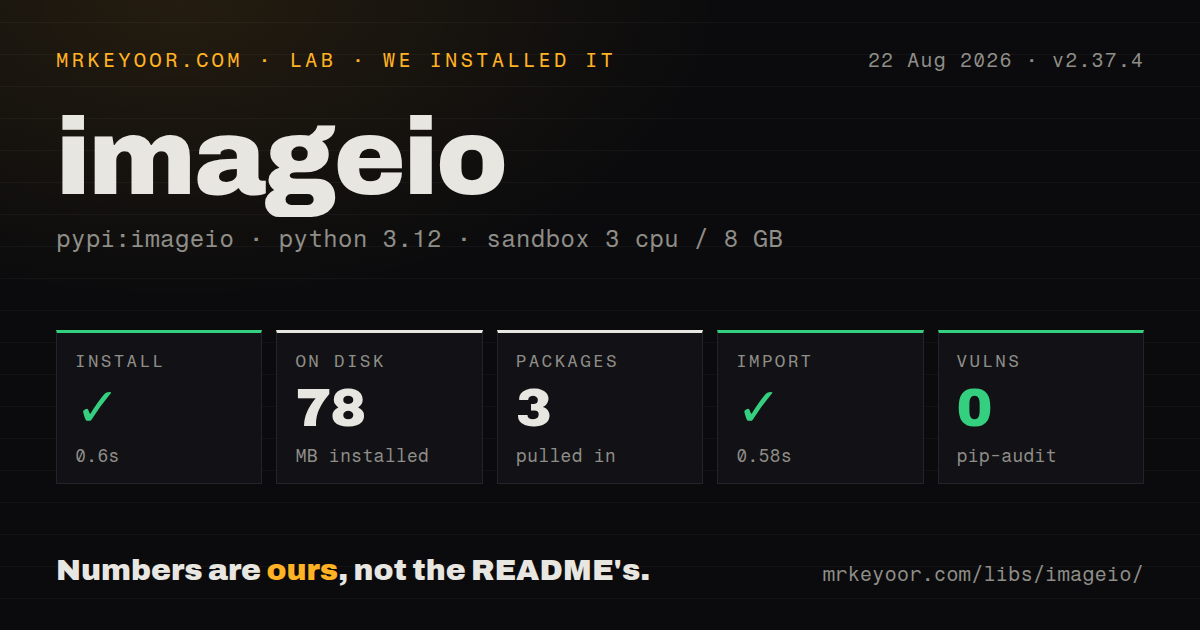
pip install imageio pulls only NumPy and Pillow and needs Python 3.10 or newer, which is genuinely light for what it covers. The extras are where the real decision is. Video needs pip install 'imageio[ffmpeg]' (which brings imageio-ffmpeg, a wheel with a bundled ffmpeg binary of roughly 20 to 30 MB depending on platform, plus psutil) or pip install 'imageio[pyav]' for the PyAV backend. TIFF beyond what Pillow handles needs tifffile, HEIC needs pillow-heif, camera raw needs rawpy, FITS needs astropy, and medical volumes need itk or SimpleITK. There is an 'imageio[all-plugins]' target and a 'full' extra if you would rather not think about it, at the cost of a heavy environment. Two things bite people after install. First, missing backends fail at call time, not import time, with an OSError that at least names the pip command you need. Second, imwrite validates nothing about your dtype: hand it a float64 array and Pillow raises 'Cannot handle this data type', so convert to uint8 yourself. Start every new file with import imageio.v3 as iio, because the bare imageio namespace is the v2 API and will warn at you. The imageio: URI prefix loads bundled sample images such as imageio:chelsea.png, which is handy for testing and fetches over the network the first time.

Patterns

Read anything into an array, write it back outread-and-write

import imageio.v3 as iio

im = iio.imread("photo.jpg")        # ndarray, shape (H, W, 3), dtype uint8
im.shape, im.dtype

iio.imwrite("photo.png", im)         # format comes from the extension
iio.imwrite("small.jpg", im, quality=50)   # kwargs go to the backend (Pillow here)

# force grayscale on read
gray = iio.imread("photo.jpg", mode="L")   # shape (H, W)

# bundled sample images, useful in tests
chelsea = iio.imread("imageio:chelsea.png")

Always import imageio.v3 as iio. The bare imageio.imread is the v2 API and raises a DeprecationWarning saying the behavior will switch. imwrite does not convert dtypes for you: passing a float array to a PNG gives 'TypeError: Cannot handle this data type', so do (arr * 255).astype('uint8') yourself. Extra keyword arguments are forwarded to whichever plugin answered, so quality works for JPEG and means nothing for PNG.

The index argument, and why a GIF is a 4D arraymulti-frame-index

import imageio.v3 as iio

frames = iio.imread("anim.gif")            # (N, H, W, 3)  plugin decided: all frames
first  = iio.imread("anim.gif", index=0)   # (H, W, 3)     one frame
stack  = iio.imread("anim.gif", index=...) # (N, H, W, 3)  explicitly all frames

page3 = iio.imread("scan.tif", index=3)    # page 3 of a multi-page TIFF

index=None (the default) means 'let the plugin decide', and the Pillow plugin decides to stack every frame of a GIF, so code written for still images gets a 4D array and breaks somewhere downstream. Be explicit: index=0 for one frame, index=... for the batch. The same argument controls improps and immeta. With v2's imageio.imread the same GIF returns only the first frame, which is exactly the inconsistency the deprecation warning is about.

Iterate frames instead of loading everythingstream-large-files

import imageio.v3 as iio
import numpy as np

total = None
count = 0
for frame in iio.imiter("long_video.mp4", plugin="pyav"):
    total = frame.astype(np.float64) if total is None else total + frame
    count += 1

mean_frame = (total / count).astype(np.uint8)

imread with index=... reads every frame into one array, which for a few minutes of 1080p video is tens of gigabytes. imiter yields them one at a time and is the only sane option above a few hundred frames. The yielded array is converted with np.asarray each iteration, and some backends reuse their internal buffer, so copy the frame if you intend to keep it past the next loop step.

Write a GIF or an MP4 from a stack of frameswrite-animation

import imageio.v3 as iio
import numpy as np

frames = np.stack([make_frame(t) for t in range(60)])   # (60, H, W, 3) uint8

# GIF: duration is per frame in milliseconds, loop=0 means forever
iio.imwrite("out.gif", frames, duration=100, loop=0)

# MP4: needs pip install 'imageio[ffmpeg]' or 'imageio[pyav]'
iio.imwrite("out.mp4", frames, fps=30)

# incremental writing, so you never hold every frame in memory
with iio.imopen("out.mp4", "w", plugin="pyav") as f:
    f.init_video_stream("libx264", fps=30)
    for t in range(6000):
        f.write_frame(make_frame(t))

GIF duration is milliseconds per frame in current versions; older tutorials pass seconds and produce an animation 1000 times too slow. H.264 encoders generally require both dimensions to be even, so an odd-height array fails inside ffmpeg with a message that does not mention your array. Without the ffmpeg or pyav extra the MP4 write raises OSError listing the exact pip command, which is the most helpful part of the whole error surface.

Sources other than a file pathbytes-and-urls

import imageio.v3 as iio
import requests

# http(s) URL
im = iio.imread("https://example.com/cat.png")

# raw bytes, e.g. from a request or a database blob
blob = requests.get("https://example.com/cat.png").content
im = iio.imread(blob)

# encode to bytes without writing a file (extension picks the format)
png_bytes = iio.imwrite("<bytes>", im, extension=".png")

# any file-like object
with open("cat.png", "rb") as fh:
    im = iio.imread(fh)

The literal string '<bytes>' as the target is what makes imwrite return the encoded image instead of None, and you must pass extension so it knows which encoder to use. When reading raw bytes there is no filename to sniff, so pass extension='.tif' if detection picks the wrong backend. URL reads are not cached and have no timeout you control from here, so fetch with requests yourself for anything that runs in production.

improps for standardized fields, immeta for everything elsemetadata

import imageio.v3 as iio

props = iio.improps("scan.tif")
props.shape, props.dtype, props.n_images, props.is_batch, props.spacing

meta = iio.immeta("photo.jpg")
meta.get("EXIF_MAIN", {}).get("Orientation")

# per-frame metadata in a multi-image file
iio.immeta("anim.gif", index=2)

improps is deliberately format-independent and tries to avoid decoding pixels, so it is the cheap way to get the shape of a large file. immeta returns whatever the backend exposes, so the keys differ between a JPEG, a TIFF, and a DICOM and you cannot write code against them without checking the plugin's docs. Neither call applies EXIF rotation for you: imread returns the pixels as stored, so a phone photo may come back sideways with Orientation sitting in the metadata.

Pin the backend when the automatic choice is wrongchoose-a-plugin

import imageio.v3 as iio

iio.imread("scan.tif", plugin="tifffile")   # not Pillow's limited TIFF support
iio.imread("clip.mp4", plugin="pyav")        # not the ffmpeg subprocess backend
iio.imread("clip.mp4", plugin="FFMPEG")

# a file with a wrong or missing extension
iio.imread(unnamed_bytes, extension=".png")

# keep one handle open across many calls
with iio.imopen("scan.tif", "r", plugin="tifffile") as f:
    n = f.properties(index=...).n_images
    pages = [f.read(index=i) for i in range(n)]

plugin takes priority over extension, and extension only reorders the candidate list rather than forcing a decoder. If nothing can open the file you get OSError: 'Could not find a backend to open ... Based on the extension, the following plugins might add capable backends', followed by the pip commands, which is usually the real answer. imopen avoids reopening and reparsing the header for every page, which matters for large multi-page TIFFs.

Pull specific frames out of a videovideo-frames

import imageio.v3 as iio

props = iio.improps("clip.mp4", plugin="pyav")
props.shape        # (n_frames, H, W, 3) when the container reports a count

frame_100 = iio.imread("clip.mp4", index=100, plugin="pyav")

meta = iio.immeta("clip.mp4", plugin="pyav")
meta.get("fps"), meta.get("duration")

# every 30th frame without decoding into memory twice
keep = [f for i, f in enumerate(iio.imiter("clip.mp4", plugin="pyav")) if i % 30 == 0]

Frame indexing into video is approximate by nature: with the FFMPEG backend index=100 means decoding the first hundred frames and throwing them away, and with pyav it becomes a container seek to the nearest keyframe followed by decoding forward, so a variable-frame-rate file can hand you a neighbouring frame. If exact frame identity matters, use PyAV directly and work with presentation timestamps. Frame counts reported by containers are often estimates too.

Keep 16-bit data 16-bitdtype-and-bit-depth

import imageio.v3 as iio
import numpy as np

depth = iio.imread("depth16.png")
depth.dtype        # uint16, preserved

# writing 16-bit: PNG and TIFF keep it, JPEG cannot
iio.imwrite("out.png", depth)
iio.imwrite("out.tif", depth, plugin="tifffile")

# float data needs an explicit conversion before a uint8 format
float_img = np.clip(some_float_array, 0, 1)
iio.imwrite("out.png", (float_img * 255).astype(np.uint8))

# scientific float TIFF, no scaling
iio.imwrite("raw.tif", some_float_array.astype(np.float32), plugin="tifffile")

imageio never rescales silently, which is the behavior you want and also the source of most write failures: a float64 array handed to Pillow raises 'Cannot handle this data type: (1, 1, 3), <f8'. JPEG is 8-bit only, so a uint16 array written to .jpg either errors or is truncated depending on the backend. tifffile is the plugin to use for float or multi-channel scientific data, and it is a separate install.

Translating the v2 calls you found on Stack Overflowmigrate-from-v2

# v2 (deprecated)                     ->  v3
# imageio.imread(f)                    ->  iio.imread(f, index=0)
# imageio.mimread(f)                   ->  iio.imread(f, index=...)
# imageio.volread(f)                   ->  iio.imread(f, index=...)
# imageio.imwrite(f, im)               ->  iio.imwrite(f, im)
# imageio.mimwrite(f, frames)          ->  iio.imwrite(f, frames)
# imageio.get_reader(f)                ->  iio.imiter(f)  /  iio.imopen(f, 'r')
# imageio.get_writer(f)                ->  iio.imopen(f, 'w')

import imageio.v2 as iio2   # explicit v2 import: no deprecation warning
import imageio.v3 as iio    # what new code should use

If you need to keep v2 behavior for now, import imageio.v2 as iio2 rather than plain imageio; the explicit import is supported and silences the warning, so you can migrate file by file. The trap while migrating is imread: v2 returns the first frame of a multi-frame file, v3 lets the plugin decide and usually returns all of them. v2 also returns an Array subclass of ndarray carrying a .meta attribute, which v3 dropped in favour of immeta.

Batch convert a folder, handling the failuresconvert-directory

from pathlib import Path
import imageio.v3 as iio

src, dst = Path("raw"), Path("web")
dst.mkdir(exist_ok=True)

for p in sorted(src.iterdir()):
    try:
        im = iio.imread(p)
    except OSError as e:            # no backend for this format
        print(f"skip {p.name}: {e}")
        continue
    except Exception as e:          # truncated or corrupt file
        print(f"bad  {p.name}: {type(e).__name__}")
        continue
    if im.ndim == 4:                # a GIF or multi-page file slipped in
        im = im[0]
    iio.imwrite(dst / f"{p.stem}.webp", im, quality=80)

Two guards earn their keep in any batch job. The ndim == 4 check catches multi-frame files that imread stacked, which is otherwise a confusing error inside the writer. And catch OSError separately from everything else: a missing backend is a fixable environment problem that should be reported loudly, while a corrupt input is just a bad file. Pillow may also raise on truncated JPEGs unless you set ImageFile.LOAD_TRUNCATED_IMAGES.

Alternatives

PackageRegistryPick it when
pillowPyPIYou handle common web formats and need to resize, crop, convert, or draw, since imageio depends on Pillow anyway and gives you no processing of its own
opencv-pythonPyPIYou are already doing computer vision and want fast decoding plus processing plus video capture in one dependency, and you can live with BGR channel order
avPyPIVideo is the actual workload and you need seeking, timestamps, audio streams, or codec options rather than a pipe of raw frames