@huggingface/transformers review
@huggingface/transformers 4.2.0 runs pretrained ONNX models through a JavaScript pipeline API in browsers and server runtimes. It covers text classification, generation, embeddings, speech recognition, vision, and other tasks without requiring a Python inference service. Version 4 moved WebGPU work to a rewritten runtime, added ModelRegistry methods for inspecting and clearing model assets, and improved pipeline result types. The 4.2 release adds tool definitions to text generation and support for an OpenAI privacy-filter model. Our browser bundle measured 545 KB minified and 157.5 KB gzipped before any model weights were downloaded, so the library code is only the first part of the client cost.
@huggingface/transformers 4.2.0 installed in 11.4 seconds but occupied 686 MB and produced 4 high audit findings in our sandbox; its browser code alone measured 157.5 KB gzipped before model downloads. Use it for supported local inference when privacy or offline execution earns that cost, and keep it out of ordinary pages that can call an existing model service.
We installed it
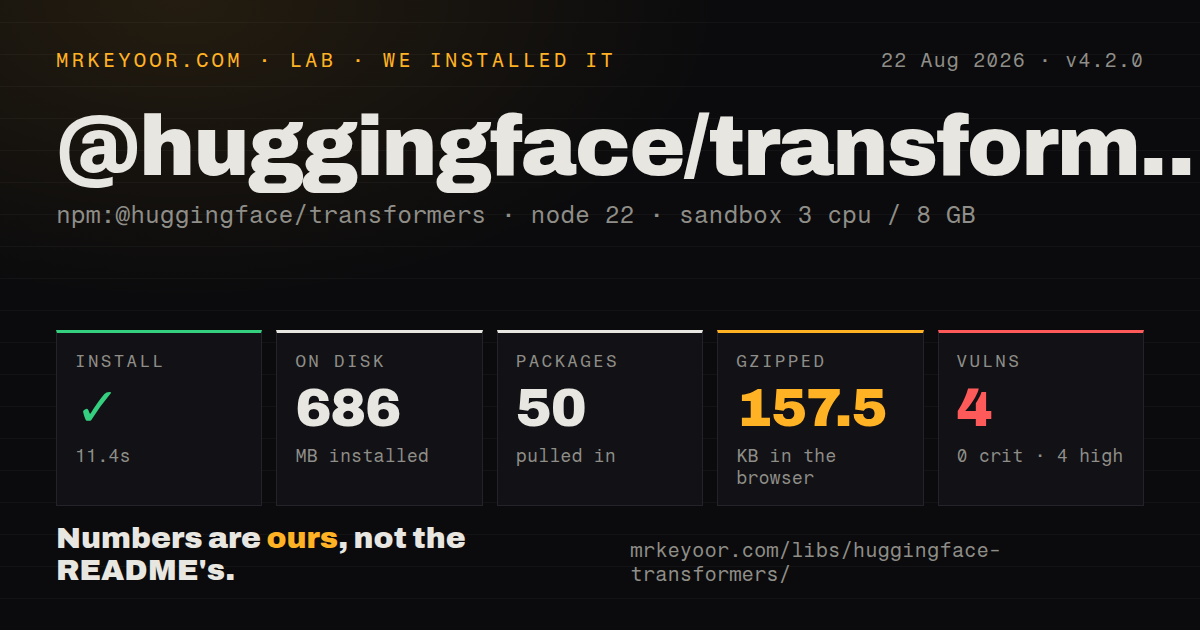
| Install | ✓ · 11.4s | 50 packages on disk · 686 MB · 1 deprecation warning |
| Import | ✓ | ESM import works · require() works · ESM package with exports map |
| Browser | 157.5 KB | gzipped (545 KB minified), bundled with esbuild |
| Types | ✓ | TypeScript types bundled |
| Known vulns | 4 | 0 critical · 4 high · 0 moderate · 0 low (npm audit) |
Answers from our run
Does @huggingface/transformers install cleanly?
Yes. In a fresh container with an empty cache, npm install @huggingface/transformers finished in 11 seconds, leaving 50 packages and 686 MB on disk. npm audit reported 4 known vulnerabilities. The install printed 1 deprecation warning.
How much does @huggingface/transformers add to a browser bundle?
157.5 KB gzipped (545 KB minified) when the whole package is bundled for the browser with esbuild. Importing only part of it is usually smaller.
Does @huggingface/transformers work with both ESM and CommonJS?
Yes. Both import '@huggingface/transformers' and require('@huggingface/transformers') worked in Node 22 in our run. The package is published as ESM with an exports map.
Does @huggingface/transformers include TypeScript types?
Yes, type declarations ship inside the package, so no @types install is needed.
@huggingface/transformers or onnxruntime-web: which should you use?
onnxruntime-web: Choose it when you already own the ONNX preprocessing and output logic and want direct session control without Hub or pipeline abstractions. @huggingface/transformers 4.2.0 installed in 11.4 seconds but occupied 686 MB and produced 4 high audit findings in our sandbox; its browser code alone measured 157.5 KB gzipped before model downloads.
When should you not use @huggingface/transformers?
A 157.5 KB gzipped library bundle is already too much for the page. That measured figure excludes model weights and the runtime files fetched when a pipeline loads.
Use it if
- A browser, Electron app, Node service, Bun process, or Deno program needs to run a supported Hugging Face model locally through one JavaScript API.
- You need embeddings, classification, transcription, or another bounded inference task and can choose an ONNX model tagged for Transformers.js.
- Keeping input on the user's device matters enough to justify downloading model files and running WASM or WebGPU locally.
- Your product needs to inspect model files, available dtypes, cache status, and total loading progress before creating a pipeline.
- A 157.5 KB gzipped library bundle is already too much for the page. That measured figure excludes model weights and the runtime files fetched when a pipeline loads.
- You require uniform GPU behavior across browsers. The project documentation still labels WebGPU experimental in many browsers, while the default browser path runs on CPU through WASM.
- You need to train or fine-tune a model in this package. The documented API loads pretrained ONNX assets for inference; training belongs in another toolchain.
- The model repository only contains PyTorch, TensorFlow, or JAX weights. Transformers.js needs a supported architecture and ONNX files, usually produced with Optimum, before it can load that model.
- Shipping remote model requests or CDN-hosted WASM violates your deployment policy. Remote models are allowed by default, and the README says precompiled WASM files use a CDN unless you change the environment paths.
- Four high-severity npm audit findings are unacceptable under your release policy. That is what npm audit reported for our clean 4.2.0 install, even though none was marked critical.
Setup reality
We installed @huggingface/transformers 4.2.0 in a fresh Node 22 Bookworm container. npm finished in 11.4 seconds, printed one deprecation warning, and left 50 packages using 686 MB. The package itself has 5 direct dependencies, no peer dependencies, 15400 KB unpacked, bundled TypeScript declarations, and an Apache-2.0 license. npm audit found 4 known vulnerabilities, all high severity. Both ESM import and CommonJS require worked in our checks.
A successful npm install does not put a usable model on disk. The first pipeline creation resolves configuration, tokenizer or processor files, ONNX weights, and runtime assets. Browsers allow remote Hub models by default, and the README says WASM binaries default to a CDN. Set env.allowRemoteModels = false, env.localModelPath, and env.backends.onnx.wasm.wasmPaths when those files must come from your own origin. Private Hub assets need a custom env.fetch that adds authorization.
Model caching needs an explicit product policy. Version 4 added ModelRegistry calls that list required files, report available dtypes, check whether a pipeline is cached, and clear its cached assets. Browser model caching uses the Cache API when available; filesystem runtimes use ./.cache by default. A progress_callback can now receive progress_total, so show the full first-load transfer instead of leaving the interface apparently stuck.
Our esbuild browser check produced 545 KB minified and 157.5 KB gzipped from import *, before model data. WASM work runs on the calling thread, so browser applications should create and reuse a pipeline inside a module worker. Select webgpu only after checking support and keep a WASM path. Quantized dtypes reduce transfer and memory, but each model publishes its own available set; ask ModelRegistry instead of assuming q4 exists.
Patterns
Classify text with a reusable pipeline classify-sentiment
import { pipeline } from '@huggingface/transformers';

const classify = await pipeline('sentiment-analysis');
const result = await classify('The upgrade finished without errors.');
console.log(result);
Pipeline creation downloads and initializes the default model on first use. Keep the returned pipeline alive instead of rebuilding it for every input.
Load a named compatible model select-hub-model
import { pipeline } from '@huggingface/transformers';

const classify = await pipeline(
  'sentiment-analysis',
  'Xenova/bert-base-multilingual-uncased-sentiment',
);
The model must expose ONNX assets for a supported Transformers.js architecture. A repository containing only framework checkpoints will not load.
Use WebGPU with a WASM fallback choose-browser-backend
import { pipeline } from '@huggingface/transformers';

const device = navigator.gpu ? 'webgpu' : 'wasm';
const classify = await pipeline(
  'sentiment-analysis',
  'Xenova/distilbert-base-uncased-finetuned-sst-2-english',
  { device },
);
The project still calls WebGPU experimental in many browsers. Feature detection selects a backend, but the exact model must also support the chosen device.
Check available dtypes before loading pick-quantization
import { ModelRegistry, pipeline } from '@huggingface/transformers';

const model = 'onnx-community/all-MiniLM-L6-v2-ONNX';
const dtypes = await ModelRegistry.get_available_dtypes(model);
const dtype = dtypes.includes('q4') ? 'q4' : dtypes[0];
const embed = await pipeline('feature-extraction', model, { dtype });
Version 4 exposes available dtypes through ModelRegistry. Quantization files vary by model, so hard-coding q4 can request an asset that was never published.
Create normalized sentence vectors create-embeddings
import { pipeline } from '@huggingface/transformers';

const embed = await pipeline(
  'feature-extraction',
  'Xenova/all-MiniLM-L6-v2',
);
const tensor = await embed(['first document', 'second document'], {
  pooling: 'mean',
  normalize: true,
});
const vectors = tensor.tolist();
Mean pooling and normalization produce one comparable vector per input. Without them, feature extraction returns token-level tensor data.
Transcribe audio with Whisper transcribe-audio
import { pipeline } from '@huggingface/transformers';

const transcribe = await pipeline(
  'automatic-speech-recognition',
  'Xenova/whisper-tiny.en',
);
const result = await transcribe('/audio/interview.wav');
console.log(result.text);
The automatic-speech-recognition pipeline accepts an audio URL or decoded samples. Browser decoding and resampling still need testing against the chosen model's input requirements.
Generate from chat messages generate-chat-response
import { pipeline } from '@huggingface/transformers';

const generate = await pipeline(
  'text-generation',
  'HuggingFaceTB/SmolLM2-135M-Instruct',
  { dtype: 'q4' },
);
const messages = [{ role: 'user', content: 'Explain CORS in one sentence.' }];
const output = await generate(messages, { max_new_tokens: 80 });
console.log(output[0].generated_text.at(-1).content);
A messages array uses the model's chat template. The model card determines the expected roles, available dtype files, and practical memory cost.
Disable remote model and runtime fetches self-host-assets
import { env } from '@huggingface/transformers';

env.allowRemoteModels = false;
env.localModelPath = '/models/';
env.backends.onnx.wasm.wasmPaths = '/wasm/';
Remote Hub models are allowed by default, and the README says WASM files default to a CDN. Host both paths yourself for a closed-network deployment.
Report full pipeline loading progress show-total-download-progress
import { pipeline } from '@huggingface/transformers';

const embed = await pipeline('feature-extraction', modelId, {
  progress_callback(event) {
    if (event.status === 'progress_total') {
      updateProgress(Math.round(event.progress));
    }
  },
});
Version 4 adds the progress_total event after inspecting all required pipeline files. Per-file progress events may still arrive, so filter on status before reading aggregate progress.
Check and clear a cached pipeline inspect-model-cache
import { ModelRegistry } from '@huggingface/transformers';

const task = 'feature-extraction';
const model = 'onnx-community/all-MiniLM-L6-v2-ONNX';
const options = { dtype: 'q4' };

if (await ModelRegistry.is_pipeline_cached(task, model, options)) {
  await ModelRegistry.clear_pipeline_cache(task, model, options);
}
Cache identity includes the task, model, and loading options. Clearing it forces those assets to be fetched again on the next pipeline creation.
Keep browser inference off the main thread run-in-worker
// inference.worker.js
import { pipeline } from '@huggingface/transformers';
const classifier = pipeline('sentiment-analysis');
self.onmessage = async ({ data }) => {
  const run = await classifier;
  self.postMessage(await run(data));
};

// app.js
const worker = new Worker(
  new URL('./inference.worker.js', import.meta.url),
  { type: 'module' },
);
worker.postMessage('Runs away from the UI thread');
WASM inference uses the thread that calls it. A module worker prevents that work from blocking page input and rendering.
Group tokens into named entities extract-named-entities
import { pipeline } from '@huggingface/transformers';

const recognize = await pipeline(
  'token-classification',
  'Xenova/bert-base-NER',
);
const entities = await recognize('Alice moved to Berlin.', {
  aggregation_strategy: 'simple',
});
The simple aggregation strategy joins subword predictions into entity spans. Labels and accuracy come from the selected model, not from the pipeline name.
Alternatives
| Package | Registry | Pick it when |
|---|---|---|
| onnxruntime-web | npm | Choose it when you already own the ONNX preprocessing and output logic and want direct session control without Hub or pipeline abstractions. |
| @tensorflow/tfjs | npm | Choose it for TensorFlow.js models or browser-side training, which @huggingface/transformers does not provide. |
| @mlc-ai/web-llm | npm | Choose it when the application is specifically an in-browser chat LLM and WebGPU is a firm platform requirement. |
More ai / ml guides
@modelcontextprotocol/sdk · openai · mcp · huggingface-hub · @anthropic-ai/sdk · openai · the whole shelf →
How this guide is made: grounded in the library's documentation, release notes, changelog, and issue history, on a fixed rubric — not a hands-on install of every release. The 50 most-downloaded entries are additionally install-verified in clean containers. Corrections: contact the desk.