html-react-parser review
html-react-parser 6.1.7 converts an HTML string into React elements on Node or in a browser. A replace callback can swap parsed tags for application components, domToReact converts their children, and transform runs after conversion. Version 6 targets modern React-era builds and the current package works through CommonJS and ESM. Our install found no TypeScript declarations. Most important, the README says it is neither an XSS sanitizer nor a repair tool for invalid markup.
html-react-parser 6.1.7 added 13 packages and a 13.9 KB gzipped browser bundle in our sandbox, with 0 audit findings but no bundled types found. Use it to map already-sanitized CMS HTML into components, never as the sanitizer itself.
We installed it
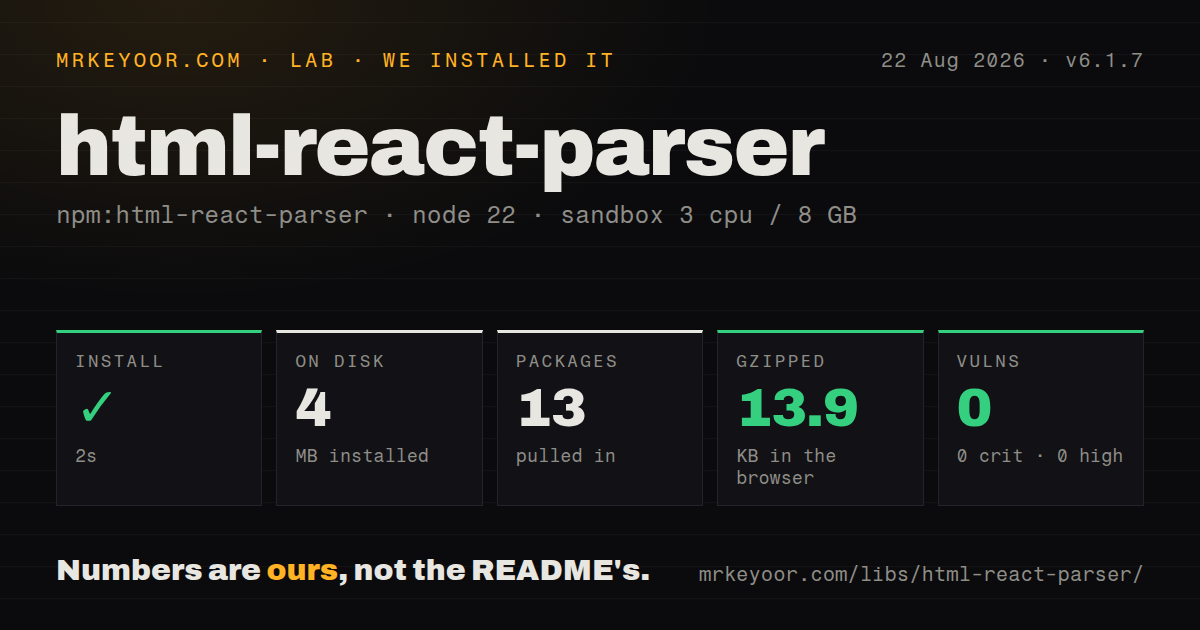
| Install | ✓ · 2s | 13 packages on disk · 4 MB |
| Import | ✓ | ESM import works · require() works · CommonJS package with exports map |
| Browser | 13.9 KB | gzipped (40.2 KB minified), bundled with esbuild |
| Types | — | no TypeScript types found |
| Known vulns | 0 | 0 critical · 0 high · 0 moderate · 0 low (npm audit) |
Answers from our run
Does html-react-parser install cleanly?
Yes. In a fresh container with an empty cache, npm install html-react-parser finished in 2 seconds, leaving 13 packages and 4 MB on disk. npm audit reported no known vulnerabilities.
How much does html-react-parser add to a browser bundle?
13.9 KB gzipped (40.2 KB minified) when the whole package is bundled for the browser with esbuild. Importing only part of it is usually smaller.
Does html-react-parser work with both ESM and CommonJS?
Yes. Both import 'html-react-parser' and require('html-react-parser') worked in Node 22 in our run. The package is published as CommonJS with an exports map.
Does html-react-parser include TypeScript types?
No type declarations were found in our install, so TypeScript users need their own declarations.
html-react-parser or rehype-react: which should you use?
rehype-react: Use it when content already passes through unified and rehype AST plugins. html-react-parser 6.1.7 added 13 packages and a 13.9 KB gzipped browser bundle in our sandbox, with 0 audit findings but no bundled types found.
When should you not use html-react-parser?
Input is untrusted and no sanitizer runs first; the project explicitly says parsing is not XSS-safe
Use it if
- A CMS provides trusted or separately sanitized HTML and selected tags must become React components
- The same stored markup must render during Node SSR and in the browser through one conversion API
- You need access to domhandler nodes before conversion and React elements after conversion
- Whitespace trimming, attribute conversion, or a Preact-compatible element library must be configured per parse
- Input is untrusted and no sanitizer runs first; the project explicitly says parsing is not XSS-safe
- You expect onclick strings to become React handlers; the FAQ says inline handlers remain strings
- Server and browser output must use custom htmlparser2 behavior identically; those options apply only on Node
- Content contains JSX-style self-closing non-void tags; HTML parsing can nest the following nodes unexpectedly
- A strict TypeScript build cannot accept local declarations or inferred imports; our 6.1.7 package inspection found no bundled types
Setup reality
Our fresh Node 22 install of html-react-parser 6.1.7 took 2 seconds. It left 13 packages and 4 MB on disk; the package is 608 KB unpacked with 4 direct dependencies and 2 peers. npm audit reported 0 known vulnerabilities. The package is CommonJS with an exports map, and require() plus ESM import succeeded. We found no bundled TypeScript declarations. An esbuild import measured 40.2 KB minified and 13.9 KB gzipped, which is material for occasional rich text.
Install compatible React peers and treat sanitization as a separate boundary. The parser will create nodes for script markup on the server, and a Trusted Types policy only helps if its createHTML function applies a real sanitizer such as DOMPurify. replace() receives a DOMNode union, so code must verify that a node is an Element before reading name, attribs, or children. Returning a valid React element replaces the node; domToReact() preserves selected children.
htmlparser2 options work on Node but not in the browser, which can produce different trees during hydration. trim removes whitespace globally, including intentional spaces in some elements. HTML rules also treat
differently from JSX because div is not a void element. Parsing fixed markup on every render wastes the 13.9 KB bundle and repeated conversion work; keep static content as JSX, and sanitize plus parse stored content when its source changes.Patterns
Convert one HTML fragment parse-basic-html
import parse from 'html-react-parser';

export function ArticleIntro({ html }: { html: string }) {
  return <section>{parse(html)}</section>;
}
parse() returns one React element or an array according to the input shape.
Replace a matching element render-multiple-roots
import parse from 'html-react-parser';

const items = '<li>First</li><li>Second</li>';

export function List() {
  return <ul>{parse(items)}</ul>;
}
replace() acts only when the callback returns a valid React element; other nodes continue through normal conversion.
Keep children inside a replacement replace-tag-with-component
import parse, { Element, type HTMLReactParserOptions } from 'html-react-parser';
import { ProductCard } from './ProductCard';

const options: HTMLReactParserOptions = {
  replace(node) {
    if (node instanceof Element && node.name === 'product-card') {
      return <ProductCard id={node.attribs['data-id']} />;
    }
  },
};

const content = parse(html, options);
domToReact() converts the original child nodes with the same options, preserving nested replacement rules.
Remove a parsed node preserve-replaced-children
import parse, { domToReact, Element, type DOMNode, type HTMLReactParserOptions } from 'html-react-parser';

const options: HTMLReactParserOptions = {
  replace(node) {
    if (node instanceof Element && node.name === 'callout') {
      return <aside className="callout">{domToReact(node.children as DOMNode[], options)}</aside>;
    }
  },
};

parse('<callout><strong>Heads up</strong></callout>', options);
Returning an empty fragment removes output for that node without changing the source HTML.
Convert attributes to React props convert-html-attributes
import parse, { attributesToProps, Element } from 'html-react-parser';

parse('<main class="article" style="text-align:center"></main>', {
  replace(node) {
    if (node instanceof Element && node.name === 'main') {
      return <section {...attributesToProps(node.attribs)} />;
    }
  },
});
attributesToProps() maps HTML spellings such as class into React prop names; it does not sanitize values.
Transform every React element remove-selected-elements
import { Fragment } from 'react';
import parse, { Element } from 'html-react-parser';

const rendered = parse(html, {
  replace(node) {
    if (node instanceof Element && ['script', 'iframe'].includes(node.name)) {
      return <Fragment />;
    }
  },
});
transform() receives the converted React node after replace() and can wrap or clone it.
Narrow a DOM node before reading fields transform-react-elements
import { isValidElement } from 'react';
import parse from 'html-react-parser';

const rendered = parse(html, {
  transform(reactNode, domNode, index) {
    return isValidElement(reactNode) && reactNode.type === 'img'
      ? <figure key={index}>{reactNode}</figure>
      : reactNode;
  },
});
A DOMNode is not always an Element, so check instanceof Element before accessing attribs or children.
Trim parser whitespace sanitize-before-parsing
import DOMPurify from 'dompurify';
import parse from 'html-react-parser';

export function SafeRichText({ html }: { html: string }) {
  const clean = DOMPurify.sanitize(html, {
    USE_PROFILES: { html: true },
  });
  return <div>{parse(clean)}</div>;
}
trim: true removes whitespace-only text nodes globally and can erase spaces that content intended to display.
Configure the Node parser use-trusted-types-policy
import DOMPurify from 'dompurify';
import parse from 'html-react-parser';

const policy = window.trustedTypes?.createPolicy('rich-text', {
  createHTML(input) {
    return DOMPurify.sanitize(input, { RETURN_TRUSTED_TYPE: false });
  },
});

const rendered = parse(html, { trustedTypePolicy: policy });
htmlparser2 settings run only during Node parsing and can make SSR differ from the browser tree.
Use another element library trim-formatting-whitespace
import parse from 'html-react-parser';

const compact = parse('<p>One</p>
<p>Two</p>', { trim: true });
The library option needs createElement, cloneElement, and isValidElement behavior compatible with the expected output.
Sanitize before conversion parse-xml-on-server
import parse from 'html-react-parser';

const nodes = parse('<entry/><entry/>', {
  htmlparser2: { xmlMode: true },
});
The README states this parser is not XSS-safe; clean untrusted markup with a policy before parse().
Memoize stored rich text render-with-preact
import * as preact from 'preact';
import parse from 'html-react-parser';

const vnode = parse('<strong>Small app</strong>', {
  library: preact,
});
A 13.9 KB gzipped full import plus parsing work is easier to justify when the result changes only with its HTML source.
Alternatives
| Package | Registry | Pick it when |
|---|---|---|
| rehype-react | npm | Use it when content already passes through unified and rehype AST plugins. |
| dompurify | npm | Use it when browser-side XSS sanitization is the actual missing step. |
| sanitize-html | npm | Use it for server-side allowlist cleaning before any React conversion. |
More web frontend guides
postcss · react · react-dom · tailwindcss · clsx · htmlparser2 · the whole shelf →
How this guide is made: grounded in the library's documentation, release notes, changelog, and issue history, on a fixed rubric — not a hands-on install of every release. The 50 most-downloaded entries are additionally install-verified in clean containers. Corrections: contact the desk.