sanitize-html review
sanitize-html 2.17.7 accepts an HTML fragment, parses it with htmlparser2, and writes a new fragment that follows your allowlist for elements, attributes, URL schemes, classes, inline styles, and embeds. Rejected tags usually lose their wrappers while safe text remains, and output text and attribute values are escaped. This makes it a Node-side boundary for rich-text editor or pasted HTML, not a general browser security layer. Version 2.17.7 fixes a URL-scheme bypass that required opting into SVG animation elements plus `attributeName` and animation value attributes; its maintained defaults did not expose that route. Our browser build measured 164.1 KB minified and 63 KB gzipped, and the npm package has no TypeScript declarations.
sanitize-html 2.17.7 installed in 1.1 seconds with 20 packages and 5 MB in our sandbox, and npm audit found 0 known vulnerabilities. Use it for a tested server-side rich-text allowlist; choose DOMPurify for browser-first parsing and avoid enabling SVG or raw-text states without dedicated mutation-XSS tests.
We installed it
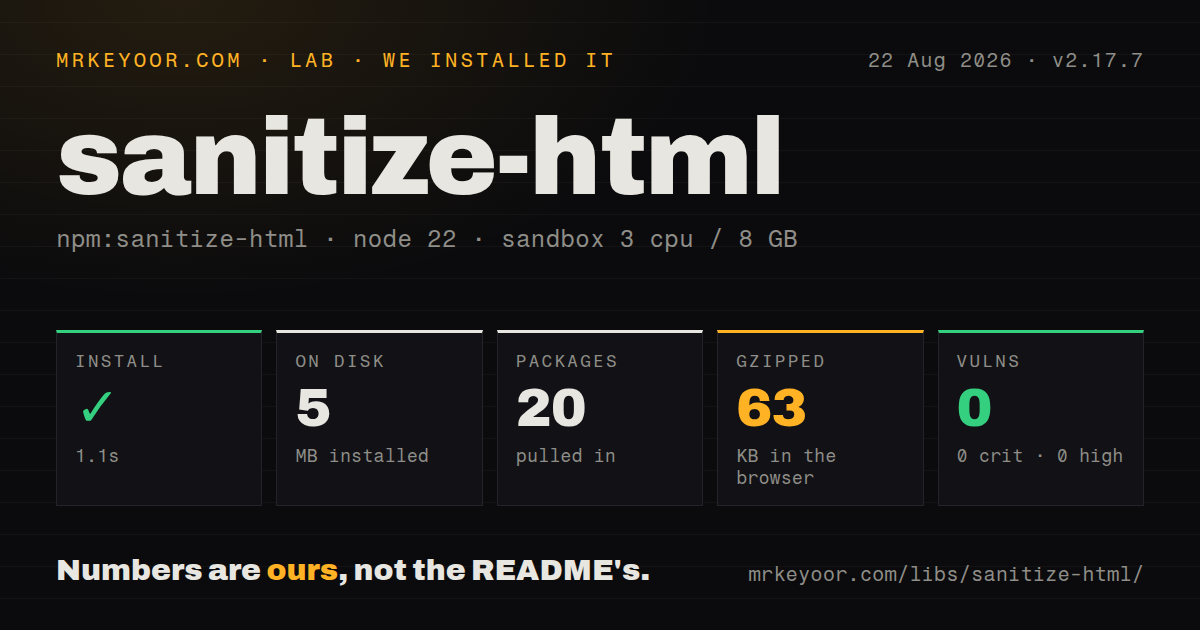
| Install | ✓ · 1.1s | 20 packages on disk · 5 MB |
| Import | ✓ | ESM import works · require() works · CommonJS package |
| Browser | 63 KB | gzipped (164.1 KB minified), bundled with esbuild |
| Types | — | no TypeScript types found |
| Known vulns | 0 | 0 critical · 0 high · 0 moderate · 0 low (npm audit) |
Answers from our run
Does sanitize-html install cleanly?
Yes. In a fresh container with an empty cache, npm install sanitize-html finished in 1 seconds, leaving 20 packages and 5 MB on disk. npm audit reported no known vulnerabilities.
How much does sanitize-html add to a browser bundle?
63 KB gzipped (164.1 KB minified) when the whole package is bundled for the browser with esbuild. Importing only part of it is usually smaller.
Does sanitize-html work with both ESM and CommonJS?
Yes. Both import 'sanitize-html' and require('sanitize-html') worked in Node 22 in our run. The package is published as CommonJS.
Does sanitize-html include TypeScript types?
No type declarations were found in our install, so TypeScript users need their own declarations.
sanitize-html or dompurify: which should you use?
dompurify: Use it for browser DOM sanitization, or on a server where jsdom is already an accepted dependency. sanitize-html 2.17.7 installed in 1.1 seconds with 20 packages and 5 MB in our sandbox, and npm audit found 0 known vulnerabilities.
When should you not use sanitize-html?
The only execution point is an untrusted browser. Server code cannot rely on client-side cleaning, and DOMPurify matches browser DOM parsing more closely for previews.
Use it if
- A Node service accepts rich-text HTML and must enforce the same narrow policy before storing or rendering it.
- Links, iframes, classes, and inline styles need separate allowlists rather than one blanket list of attributes.
- Pasted editor markup should lose unwanted wrappers and CSS while keeping readable text and selected formatting.
- The sanitizer must rewrite tags or links and remove empty elements during the same parsing pass.
- The only execution point is an untrusted browser. Server code cannot rely on client-side cleaning, and DOMPurify matches browser DOM parsing more closely for previews.
- Your policy must accept SVG animation, MathML, `textarea`, `xmp`, or `option`. Several 2.17.x security fixes concern browser and htmlparser2 differences in those explicitly enabled states.
- A client-only preview cannot afford the 164.1 KB minified and 63 KB gzipped import we measured.
- First-party TypeScript declarations are mandatory. Version 2.17.7 ships none; the documented types are maintained separately in `@types/sanitize-html`.
- Production still runs below Node 22.12.0. The current package requires that version because its CommonJS code loads an ESM-only htmlparser2 release.
Setup reality
We installed sanitize-html 2.17.7 in a clean Node 22 Bookworm sandbox. npm completed in 1.1 seconds, left 20 packages, and used 5 MB. The package itself is 84 KB unpacked, with 7 direct dependencies and 0 peers. npm audit found 0 vulnerabilities at all severities. It is CommonJS without an exports map; both require() and ESM import worked. No TypeScript types were present. Our esbuild browser import was 164.1 KB minified and 63 KB gzipped.
No credential or remote service is involved. Your allowlist is the configuration that matters. Omitting allowedTags keeps the maintained defaults, while providing an array replaces them. Inline style rules only run when style is also an allowed attribute. Anchor CSS regular expressions at both ends, since URLs inside inline styles receive no separate filtering beyond those expressions. Iframe host rules can restrict src to named hosts or domains.
Sanitize again on the trusted server before persistence or rendering, regardless of any browser preview. Keep scripts, styles, and other raw-content elements in nonTextTags. transformTags runs inside the parser but its returned attributes still face the attribute policy. An exclusiveFilter can discard an element and its content, or return excludeTag to keep the content and remove only the wrapper. Set nestingLimit when hostile input can be deeply nested.
Version 2.17.7 protects custom policies that allow SVG animation tags; default tags excluded the vulnerable combination. The two previous releases repaired raw-text handling around SVG, MathML, textarea, and xmp, and the parser upgrade raised the runtime floor to Node 22.12.0. Custom parser settings receive less security coverage than defaults. Avoid decodeEntities: false, keep the opt-in tag set small, and run known browser-mutation payloads through the exact production policy after each update.
Patterns
Clean a fragment with maintained defaults apply-default-policy
const sanitizeHtml = require('sanitize-html')

const clean = sanitizeHtml(untrustedHtml)
Defaults retain common text, list, table, and link markup. Images, iframes, scripts, and inline styles are excluded.
Allow five rich-text tags and safe links replace-with-small-policy
const clean = sanitizeHtml(untrustedHtml, {
  allowedTags: ['p', 'br', 'strong', 'em', 'a'],
  allowedAttributes: { a: ['href', 'title'] },
  allowedSchemes: ['http', 'https', 'mailto'],
})
Providing `allowedTags` replaces the built-in tag list. Omit the option only when the full maintained default is intended.
Add images without copying the whole default extend-default-tags
const clean = sanitizeHtml(untrustedHtml, {
  allowedTags: [...sanitizeHtml.defaults.allowedTags, 'img'],
  allowedAttributes: {
    ...sanitizeHtml.defaults.allowedAttributes,
    img: ['src', 'alt', 'width', 'height', 'loading'],
  },
})
Extend both defaults. Replacing `allowedAttributes` with only the image entry would remove the default attributes for links.
Keep escaped text and discard every wrapper remove-all-markup
const text = sanitizeHtml(untrustedHtml, {
  allowedTags: [],
  allowedAttributes: {},
  disallowedTagsMode: 'discard',
})
`discard` removes tag syntax but keeps child text. It does not add spaces where block elements used to separate content.
Remove rejected elements and their children discard-dangerous-content
const clean = sanitizeHtml(untrustedHtml, {
  allowedTags: ['p', 'strong', 'em'],
  disallowedTagsMode: 'completelyDiscard',
})
`completelyDiscard` removes the content under every rejected wrapper. Use it only when losing nested safe text is acceptable.
Permit two inline CSS properties allow-bounded-styles
const clean = sanitizeHtml(untrustedHtml, {
  allowedTags: ['p', 'span'],
  allowedAttributes: { p: ['style'], span: ['style'] },
  allowedStyles: {
    '*': {
      color: [/^#[0-9a-f]{6}$/i],
      'text-align': [/^(left|center|right)$/],
    },
  },
})
Style rules do nothing until `style` is allowed. URLs inside CSS receive only these regex checks, so anchor every accepted value.
Keep named and prefixed classes restrict-css-classes
const clean = sanitizeHtml(untrustedHtml, {
  allowedTags: ['p', 'code'],
  allowedClasses: {
    p: ['notice', 'warning'],
    code: ['language-*'],
  },
})
A wildcard suffix accepts every class with that prefix. Use an anchored regular expression when the allowed shape is more specific.
Accept embeds from two exact hosts limit-iframe-hosts
const clean = sanitizeHtml(untrustedHtml, {
  allowedTags: ['p', 'iframe'],
  allowedAttributes: { iframe: ['src', 'allowfullscreen'] },
  allowedIframeHostnames: ['www.youtube.com', 'player.vimeo.com'],
  allowIframeRelativeUrls: false,
})
Hostnames match exact hosts. If `src` is rejected, the allowed iframe wrapper can remain and may need an empty-element filter.
Add target and rel during sanitization rewrite-external-links
const clean = sanitizeHtml(untrustedHtml, {
  allowedTags: ['a'],
  allowedAttributes: { a: ['href', 'target', 'rel'] },
  transformTags: {
    a: (tagName, attribs) => ({
      tagName,
      attribs: { ...attribs, target: '_blank', rel: 'noopener noreferrer' },
    }),
  },
})
Attributes produced by a transform still pass through `allowedAttributes`. List `target` and `rel` or they will be removed.
Remove empty links and unwrap rejected URLs drop-empty-links
const clean = sanitizeHtml(untrustedHtml, {
  allowedTags: ['p', 'a'],
  allowedAttributes: { a: ['href'] },
  exclusiveFilter(frame) {
    if (frame.tag !== 'a') return false
    if (!frame.attribs.href) return 'excludeTag'
    return !frame.text.trim()
  },
})
Returning `true` removes the tag and content. Returning `excludeTag` keeps its text after URL filtering has removed an unsafe `href`.
Bound work from deeply nested input cap-nesting-depth
const clean = sanitizeHtml(untrustedHtml, {
  allowedTags: ['div', 'p', 'strong', 'em'],
  nestingLimit: 20,
})
A nesting limit bounds pathological depth. Test the value against legitimate editor output before rejecting deeper structure.
Import the separate TypeScript declarations add-community-types
// npm install sanitize-html
// npm install --save-dev @types/sanitize-html
import sanitizeHtml from 'sanitize-html'

const clean: string = sanitizeHtml(input, {
  allowedTags: ['p', 'strong'],
})
Version 2.17.7 bundles no declarations. The default import needs `esModuleInterop`; otherwise use `import * as sanitizeHtml`.
Alternatives
| Package | Registry | Pick it when |
|---|---|---|
| dompurify | npm | Use it for browser DOM sanitization, or on a server where jsdom is already an accepted dependency. |
| xss | npm | Use it for a smaller Node allowlist filter when sanitize-html's style and transform controls are unnecessary. |
| hast-util-sanitize | npm | Use it when content already moves through unified or rehype as a HAST tree. |
More security guides
cryptography · jose · pyjwt · dompurify · jsonwebtoken · requests-oauthlib · the whole shelf →
How this guide is made: grounded in the library's documentation, release notes, changelog, and issue history, on a fixed rubric — not a hands-on install of every release. The 50 most-downloaded entries are additionally install-verified in clean containers. Corrections: contact the desk.