dompurify review
DOMPurify 3.4.14 cleans untrusted HTML by parsing it through a real DOM and removing unsafe elements, attributes, and URL values before the result reaches an HTML sink. Its default policy accepts safe HTML, SVG, and MathML, while profiles and allow-lists can narrow that set. Release 3.4.14 fixes possible bypasses when applications allow risky tags, handles more mixed-document context cases, and permits two SVG presentation attributes. Our browser build was 28.1 KB minified and 10.9 KB gzipped, with TypeScript declarations included.
DOMPurify 3.4.14 added 10.9 KB gzipped in our browser build and its install reported zero audit findings, making it a sensible cost when untrusted HTML truly has to reach the DOM. Keep it and jsdom current, narrow the allowed namespaces, and do not alter the returned markup afterward.
We installed it
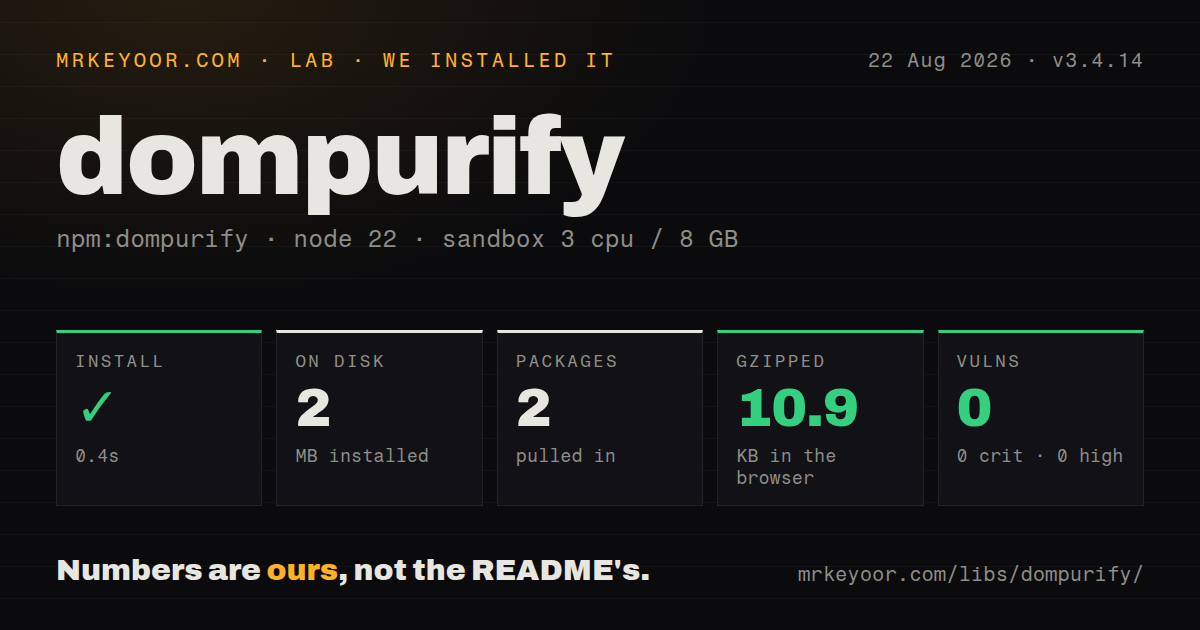
| Install | ✓ · 0.4s | 2 packages on disk · 2 MB |
| Import | ✓ | ESM import works · require() works · CommonJS package with exports map |
| Browser | 10.9 KB | gzipped (28.1 KB minified), bundled with esbuild |
| Types | ✓ | TypeScript types bundled |
| Known vulns | 0 | 0 critical · 0 high · 0 moderate · 0 low (npm audit) |
Answers from our run
Does dompurify install cleanly?
Yes. In a fresh container with an empty cache, npm install dompurify finished in 0.4s, leaving 2 packages and 2 MB on disk. npm audit reported no known vulnerabilities.
How much does dompurify add to a browser bundle?
10.9 KB gzipped (28.1 KB minified) when the whole package is bundled for the browser with esbuild. Importing only part of it is usually smaller.
Does dompurify work with both ESM and CommonJS?
Yes. Both import 'dompurify' and require('dompurify') worked in Node 22 in our run. The package is published as CommonJS with an exports map.
Does dompurify include TypeScript types?
Yes, type declarations ship inside the package, so no @types install is needed.
dompurify or sanitize-html: which should you use?
sanitize-html: Choose it for a Node-focused allow-list sanitizer that does not require you to create a browser-like window. DOMPurify 3.4.14 added 10.9 KB gzipped in our browser build and its install reported zero audit findings, making it a sensible cost when untrusted HTML truly has to reach the DOM.
When should you not use dompurify?
You can escape the input and render it as text, or disable raw HTML in a structured markup parser; either choice removes the dangerous HTML interpretation step
Discussed on
- hnDOMPurify bypass: XSS via HTML namespace confusion161 points
- hnDOMPurify, Security in the DOM, and Why We Really Need Both [pdf]72 points
- hnDOM Purify – untrusted Node bypass18 points
- hnBypassing DOMPurify with good old XML4 points
- hnShow HN: A 70x faster and 5x smaller XSS sanitizer than DOMPurify3 points
Use it if
- Comments, CMS fields, email bodies, or editor output must be rendered as HTML instead of escaped text
- Malformed markup and browser parser behavior make a regular-expression or string replacement filter unsafe
- The page uses Trusted Types and needs sanitized strings or TrustedHTML at a controlled sink
- One reviewed policy must handle HTML and, when explicitly wanted, SVG or MathML
- You can escape the input and render it as text, or disable raw HTML in a structured markup parser; either choice removes the dangerous HTML interpretation step
- Your release process cannot patch a sanitizer quickly; version 3.4.14 itself fixes bypass conditions involving risky allow-listed tags
- Server code is tied to an old jsdom or to happy-dom; the maintainers treat the DOM implementation as security-sensitive and advise against happy-dom
- A formatter, template engine, or plugin rewrites the cleaned markup afterward; DOMPurify warns that post-processing can undo sanitization
- Internet Explorer must receive sanitized output from the current 3.x line; unsupported legacy browsers get the original string back, and 2.5.9 is the last IE-compatible release
Setup reality
We installed DOMPurify 3.4.14 in a fresh Node 22 sandbox in 0.4 seconds. Two packages occupied 2 MB, even though DOMPurify declares zero direct and zero peer dependencies. npm audit found zero known vulnerabilities. The package was 1,828 KB unpacked and offered either MPL-2.0 or Apache-2.0 licensing. Bundled TypeScript declarations were present. CommonJS require() and ESM import both worked through its exports map. Our complete browser import built to 28.1 KB minified and 10.9 KB gzipped.
A browser needs no credentials or config file. sanitize(dirty) returns a string by default, and the cleaned value should go straight to its intended sink. Defaults cover HTML, SVG, and MathML. Use the HTML profile when rich text does not need the other namespaces. USE_PROFILES overrides ALLOWED_TAGS, so mixing those controls does not create the intersection a reader might expect. Version 3.4.14 also shows why widening risky tag lists needs review: that release fixes a possible bypass in this area.
Node does not supply the DOM that DOMPurify needs. Server-side use requires a maintained jsdom window or an isomorphic wrapper that brings one. Keep that parser updated, because the README names old jsdom bugs that allowed XSS even when the sanitizer ran correctly. Build one purifier instance and reuse it; constructing a 2 MB dependency setup for every request adds needless work. The project currently says happy-dom is unsafe for this job.
Hooks stay attached to their purifier instance until removed, and sanitize() is not re-entrant. Tests that share one instance must clear hooks or they can inherit policy changes. With Trusted Types, RETURN_TRUSTED_TYPE can produce TrustedHTML. A custom policy's createHTML callback needs a plain string, so it must call sanitize with RETURN_TRUSTED_TYPE false or with the internal policy disabled. DOMPurify.removed is diagnostic data, never an authorization result.
Patterns
Clean a string before insertion sanitize-html-string
import DOMPurify from 'dompurify'

const clean = DOMPurify.sanitize(dirty)
container.innerHTML = clean
Insert the returned value without another markup transform; later edits were never checked by the sanitizer.
Exclude SVG and MathML limit-to-html
const clean = DOMPurify.sanitize(dirty, {
  USE_PROFILES: { html: true },
})
The HTML profile narrows the default three-namespace policy. USE_PROFILES takes priority over ALLOWED_TAGS.
Define a small rich-text policy allow-basic-formatting
const clean = DOMPurify.sanitize(dirty, {
  ALLOWED_TAGS: ['p', 'strong', 'em', 'a', 'code'],
  ALLOWED_ATTR: ['href', 'title'],
})
KEEP_CONTENT defaults to true, so text may survive when its disallowed wrapper is removed.
Remove style elements and attributes forbid-inline-style
const clean = DOMPurify.sanitize(dirty, {
  FORBID_TAGS: ['style'],
  FORBID_ATTR: ['style'],
})
FORBID settings subtract from the active policy and are useful when user-controlled CSS is outside the product's needs.
Clean a React HTML prop render-in-react
function RichText({ html }) {
  const clean = DOMPurify.sanitize(html, { USE_PROFILES: { html: true } })
  return <div dangerouslySetInnerHTML={{ __html: clean }} />
}
This direct import works in the browser. Server rendering still needs a DOM implementation.
Create a server-side purifier sanitize-with-jsdom
import { JSDOM } from 'jsdom'
import createDOMPurify from 'dompurify'

const window = new JSDOM('').window
const purify = createDOMPurify(window)
const clean = purify.sanitize(dirty)
Reuse the initialized instance and update jsdom with the same urgency as DOMPurify; both sit inside the security boundary.
Keep the cleaned DOM tree return-document-fragment
const fragment = DOMPurify.sanitize(dirty, {
  RETURN_DOM_FRAGMENT: true,
})
container.replaceChildren(fragment)
RETURN_DOM_FRAGMENT avoids serializing the clean tree to a string before adding it to the document.
Request a TrustedHTML result create-trusted-html
const trusted = DOMPurify.sanitize(dirty, {
  RETURN_TRUSTED_TYPE: true,
})
element.innerHTML = trusted
The return value is TrustedHTML only where the browser implements Trusted Types; otherwise normal compatibility rules apply.
Sanitize inside an application policy wrap-trusted-types-policy
window.trustedTypes.createPolicy('app-html', {
  createHTML: (input) => DOMPurify.sanitize(input, {
    TRUSTED_TYPES_POLICY: null,
    RETURN_TRUSTED_TYPE: false,
  }),
})
createHTML expects a string. Disabling DOMPurify's internal policy also avoids a circular policy call.
Harden allowed links with a hook set-link-attributes
const hook = (node) => {
  if (node.tagName === 'A' && node.hasAttribute('href')) {
    node.setAttribute('rel', 'noopener noreferrer')
  }
}
DOMPurify.addHook('afterSanitizeAttributes', hook)
const clean = DOMPurify.sanitize(dirty)
DOMPurify.removeHook('afterSanitizeAttributes', hook)
Hooks persist on the instance; remove temporary hooks so later sanitizer calls do not inherit them.
Set and clear shared configuration persist-one-policy
DOMPurify.setConfig({
  USE_PROFILES: { html: true },
  ALLOWED_ATTR: ['href', 'title'],
})
const clean = DOMPurify.sanitize(dirty)
DOMPurify.clearConfig()
Per-call options are ignored while a persistent configuration is active.
Log removed nodes during debugging inspect-sanitizer-removals
const clean = DOMPurify.sanitize(dirty)
console.log(DOMPurify.removed)
The removed list can explain one run, but the project forbids using it for security decisions.
Alternatives
| Package | Registry | Pick it when |
|---|---|---|
| sanitize-html | npm | Choose it for a Node-focused allow-list sanitizer that does not require you to create a browser-like window |
| xss | npm | Choose it for server-side filtering with a compact whitelist API when exact browser DOM parsing is not required |
| isomorphic-dompurify | npm | Choose it when shared browser and SSR code needs DOMPurify with jsdom wiring already handled |
More security guides
cryptography · jose · pyjwt · jsonwebtoken · requests-oauthlib · oauthlib · the whole shelf →
How this guide is made: grounded in the library's documentation, release notes, changelog, and issue history, on a fixed rubric — not a hands-on install of every release. The 50 most-downloaded entries are additionally install-verified in clean containers. Corrections: contact the desk.