@hey-api/openapi-ts review
@hey-api/openapi-ts 0.99.0 is a Node code generator that turns an OpenAPI file, URL, registry identifier, or in-memory document into TypeScript. Plugins can emit request and response types, callable SDK functions, Fetch or Axios clients, runtime schemas, query helpers, mocks, and server adapters. The 0.99.0 release adds presets and merges repeated plugin configurations, while changing custom-plugin imports and several internal field names. It generates source files during development or CI; it is not the HTTP client that runs by itself in a browser.
We measured an 8.3-second install for @hey-api/openapi-ts 0.99.0, followed by 42 MB on disk, 4 high audit findings, and two failed module-loading probes on Node 22.23.2. Use the pinned CLI when its SDK and schema plugins replace real hand-written code; wait or choose a narrower generator if stable programmatic loading and a clean audit are release requirements.
We installed it
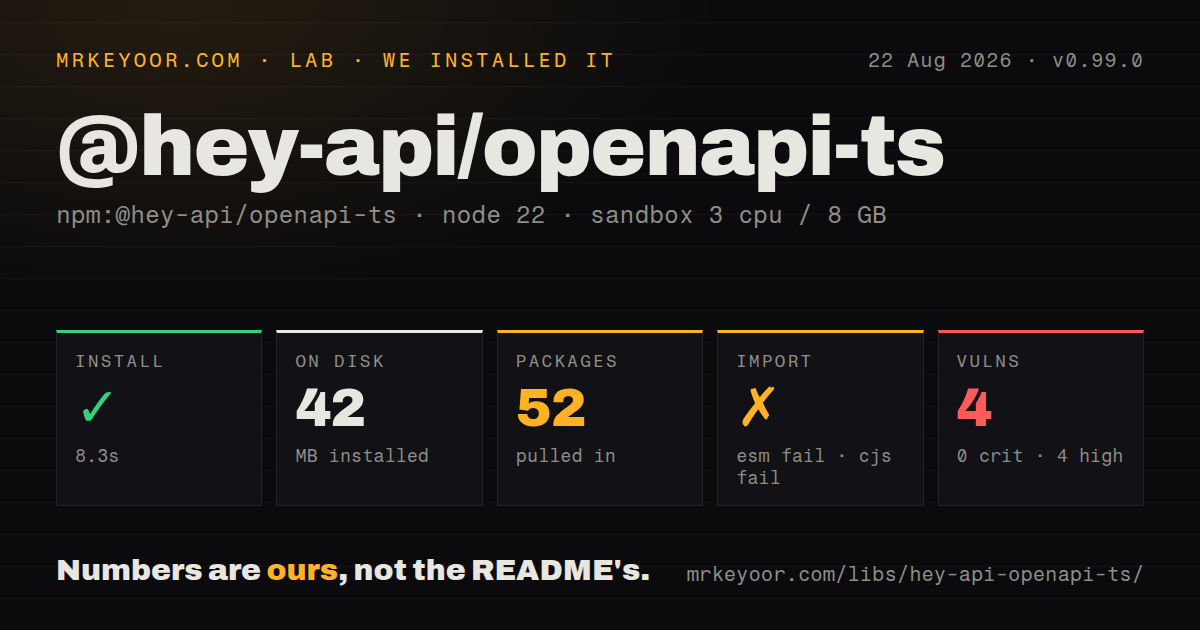
| Install | ✓ · 8.3s | 52 packages on disk · 42 MB |
| Import | ✗ | ESM import fails · require() fails · ESM package with exports map |
| Browser | n/a | could not be bundled for the browser (Node-only code, most likely) |
| Types | ✓ | TypeScript types bundled |
| Known vulns | 4 | 0 critical · 4 high · 0 moderate · 0 low (npm audit) |
Answers from our run
Does @hey-api/openapi-ts install cleanly?
Yes. In a fresh container with an empty cache, npm install @hey-api/openapi-ts finished in 8 seconds, leaving 52 packages and 42 MB on disk. npm audit reported 4 known vulnerabilities.
Can @hey-api/openapi-ts run in a browser?
Not directly: esbuild could not bundle it for the browser in our run, which normally means it depends on Node built-ins. Use it on the server, or find a browser-targeted alternative.
Does @hey-api/openapi-ts work with both ESM and CommonJS?
Neither plain import nor require succeeded in our sandbox, so it needs a bundler or extra setup.
Does @hey-api/openapi-ts include TypeScript types?
Yes, type declarations ship inside the package, so no @types install is needed.
@hey-api/openapi-ts or openapi-typescript: which should you use?
openapi-typescript: Choose it when the target is TypeScript types and you do not want generated request code. We measured an 8.3-second install for @hey-api/openapi-ts 0.99.0, followed by 42 MB on disk, 4 high audit findings, and two failed module-loading probes on Node 22.23.2.
When should you not use @hey-api/openapi-ts?
You require a stable 1.x generator contract: 0.99.0 is still initial-development software and its release contains four breaking changes
Use it if
- Your OpenAPI contract is authoritative and the team wants generated request functions beside generated TypeScript types
- One generation job needs Zod or Valibot schemas plus framework-specific TanStack Query helpers
- The project can pin 0.99.0 exactly, inspect generated diffs, and run on Node 22.18 or newer
- You need a selectable transport such as Fetch, Axios, Angular, Next.js, Nuxt, Ky, or ofetch
- You require a stable 1.x generator contract: 0.99.0 is still initial-development software and its release contains four breaking changes
- Your automation runs on Node 20: the published engine floor is Node 22.18.0
- You need programmatic generation without a compatibility investigation: both `require()` and ESM `import` failed in our Node 22.23.2 smoke tests
- Only TypeScript declarations are needed: `openapi-typescript` produces a narrower output without choosing an SDK client and plugin set
- Developers intend to edit generated files: the manual says regeneration may erase the output directory, and operation or schema renames will churn exported names
Setup reality
In our sandbox, @hey-api/openapi-ts 0.99.0 installed in 8.3 seconds and left 52 packages using 42 MB. The package itself has 10 direct dependencies, one peer dependency, bundled TypeScript declarations, and a 3,048 KB unpacked size. npm audit found 4 high vulnerabilities and none at the other severities. It declares ESM and Node >=22.18.0, yet require() and ESM import both failed in our Node.js 22.23.2 probes.
Use an exact dev-dependency pin and run the openapi-ts executable from a package script. A normal config names the input, output directory, client, and plugin list. Inputs may be local JSON or YAML, remote URLs, or Hey API Registry identifiers. Private URL inputs need the server's authentication. The docs mention disabling TLS verification for a self-signed development endpoint; do not carry that process setting into CI or production.
Generation owns its output folder and can erase hand edits. Commit the result if reviewed generated code is part of your release process, or regenerate in CI and fail when the diff changes. Operation IDs, component names, required fields, and nullability in the OpenAPI document determine exported names and signatures. A generator upgrade is only half the review; a contract edit can break callers while 0.99.0 stays pinned.
Plugins can add runtime obligations to the consuming app. Axios output needs Axios, and each TanStack plugin needs its matching framework package. The package has one TypeScript peer dependency. Our browser bundle could not be built by esbuild, which fits a Node-only code generator. Version 0.99.0 also merges duplicate plugin entries, adds presets, renames custom-plugin .symbols to .imports, and removes .external(), so custom plugins need the release notes before upgrading.
Patterns
Generate from a local contract run-cli-once
npx @hey-api/openapi-ts@0.99.0 -i ./openapi.yaml -o ./src/generated/apiThe README asks users to pin an exact version because 0.99.0 is still in initial development.
Create a typed config file define-generator-config
import { defineConfig } from '@hey-api/openapi-ts'

export default defineConfig({
  input: './openapi.yaml',
  output: './src/generated/api',
  plugins: ['@hey-api/client-fetch', '@hey-api/sdk', '@hey-api/typescript'],
})
An explicit plugin array records the transport and artifacts in source control instead of relying on defaults.
Expose the pinned CLI through npm add-generate-script
{
  "scripts": {
    "generate:api": "openapi-ts"
  },
  "devDependencies": {
    "@hey-api/openapi-ts": "0.99.0"
  }
}
Run `npm run generate:api` from the project root so the loader can find `openapi-ts.config.ts`.
Call the generator from an ESM script generate-programmatically
import { createClient } from '@hey-api/openapi-ts'

await createClient({
  input: './openapi.yaml',
  output: './src/generated/api',
})
The package exports an ESM entry only, and both ESM `import` and `require()` failed in our Node 22.23.2 smoke tests. Verify this path in your exact runner before adopting it.
Emit Fetch calls and TypeScript types generate-fetch-client
export default defineConfig({
  input: './openapi.json',
  output: './src/generated/api',
  plugins: [
    '@hey-api/client-fetch',
    '@hey-api/sdk',
    '@hey-api/typescript',
  ],
})
The generated Fetch client handles requests; `@hey-api/openapi-ts` itself remains a Node generation tool.
Add Zod output beside the SDK generate-zod-schemas
export default defineConfig({
  input: './openapi.yaml',
  output: './src/generated/api',
  plugins: [
    '@hey-api/client-fetch',
    '@hey-api/sdk',
    '@hey-api/typescript',
    'zod',
  ],
})
Install the Zod runtime version required by the generated output; the generator package does not supply it for the application.
Produce React Query options generate-react-query
export default defineConfig({
  input: './openapi.yaml',
  output: './src/generated/api',
  plugins: [
    '@hey-api/client-fetch',
    '@hey-api/sdk',
    '@hey-api/typescript',
    '@tanstack/react-query',
  ],
})
Use the plugin matching the framework and install its TanStack runtime package in the consuming app.
Generate against Axios target-axios
export default defineConfig({
  input: './openapi.yaml',
  output: './src/generated/api',
  plugins: ['@hey-api/client-axios', '@hey-api/sdk', '@hey-api/typescript'],
})
Axios is a runtime dependency of the generated client and must be installed separately.
Run a formatter after generation format-output
export default defineConfig({
  input: './openapi.yaml',
  output: {
    path: './src/generated/api',
    postProcess: ['oxfmt'],
  },
})
The post-process command must exist on every developer and CI machine; pin it to prevent formatter-only diffs.
Set generated client defaults configure-runtime-client
import { client } from './generated/api/client.gen'

client.setConfig({
  baseUrl: 'https://api.example.com',
  headers: { Authorization: `Bearer ${token}` },
})
A shared mutable client can mix tenant credentials in a server process. Use an isolated client for request-scoped authentication.
Build a request-scoped client create-isolated-client
import { createClient } from './generated/api/client'

const apiClient = createClient({
  baseUrl: 'https://api.example.com',
  headers: { Authorization: `Bearer ${token}` },
})
Pass the returned instance to generated SDK calls when headers differ by user or tenant.
Invoke one generated SDK function call-generated-operation
import { getPetById } from './generated/api/sdk.gen'

const result = await getPetById({ path: { petId: 42 } })
if (result.error) throw new Error('pet request failed')
console.log(result.data)
The function name and `path` shape come from your OpenAPI operation, so inspect the generated file after every contract change.
Alternatives
| Package | Registry | Pick it when |
|---|---|---|
| openapi-typescript | npm | Choose it when the target is TypeScript types and you do not want generated request code. |
| orval | npm | Choose it when React Query clients and mock generation fit its established output model. |
| swagger-typescript-api | npm | Choose it when editable templates are more important than a large plugin catalogue. |
| @openapitools/openapi-generator-cli | npm | Choose it for generators outside TypeScript and accept the larger OpenAPI Generator toolchain. |
More cli & tooling guides
commander · chalk · typescript · esbuild · yargs · click · the whole shelf →
How this guide is made: grounded in the library's documentation, release notes, changelog, and issue history, on a fixed rubric — not a hands-on install of every release. The 50 most-downloaded entries are additionally install-verified in clean containers. Corrections: contact the desk.