gspread review
gspread 6.2.1 is a synchronous Python wrapper around the Google Sheets API v4. It gives scripts worksheet-shaped calls for ranges, records, appends, formatting, validation, sharing, and grouped requests, while Google still handles storage and permissions. The current patch fixes the public API authentication example and names duplicate headers in the get_all_records error. Our Python 3.12 sandbox imported the typed, pure-Python package successfully.
gspread 6.2.1 installed in 0.4 seconds, used 22 MB across 15 packages, imported in 0.65 seconds, and had zero known vulnerabilities in our sandbox, but its README says the project currently lacks maintainers. Existing small automations can justify a pinned version; new critical services need an owned fallback or the official Google client.
We installed it
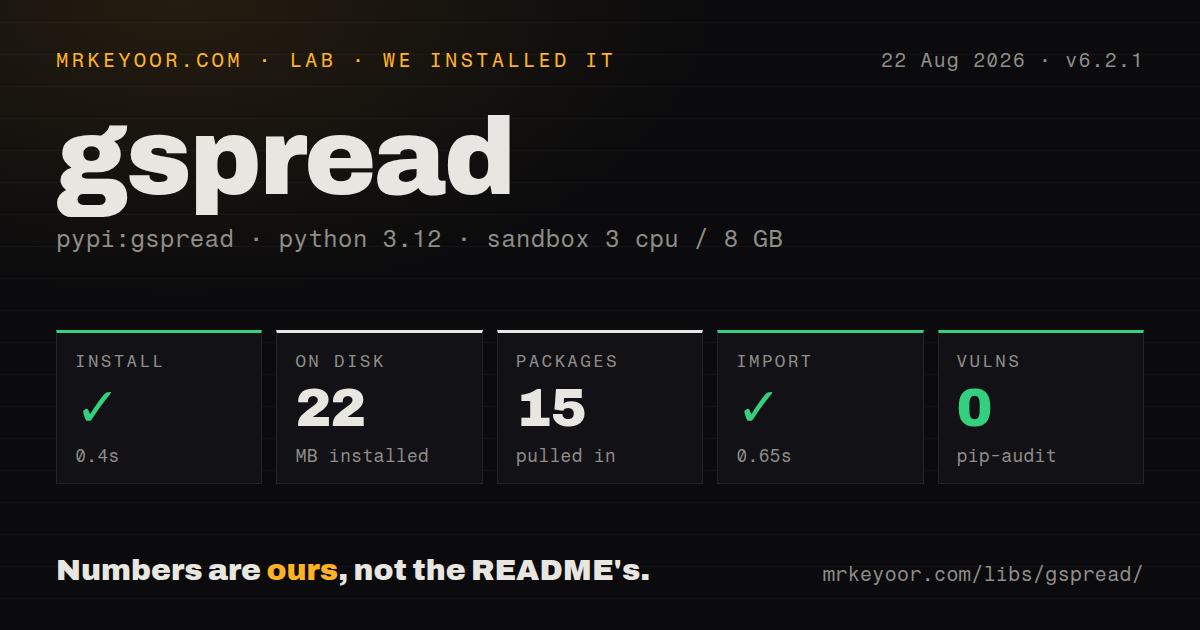
| Install | ✓ · 0.4s | 15 packages on disk · 22 MB |
| Import | ✓ | import gspread in 0.65s · pure Python · py.typed · requires Python >=3.8 |
| Known vulns | 0 | (pip-audit) |
Answers from our run
Does gspread install cleanly?
Yes. In a fresh container with an empty cache, pip install gspread finished in 0.4s, leaving 15 packages and 22 MB on disk. pip-audit reported no known vulnerabilities.
What does gspread need to run?
Python >=3.8, and nothing compiled: it is pure Python. In our run import gspread succeeded in 0.65s, and the package ships py.typed for type checkers.
gspread or pygsheets: which should you use?
pygsheets: Choose it when its worksheet, cell, and DataFrame interfaces fit existing Python code better. gspread 6.2.1 installed in 0.4 seconds, used 22 MB across 15 packages, imported in 0.65 seconds, and had zero known vulnerabilities in our sandbox, but its README says the project currently lacks maintainers.
When should you not use gspread?
You need an actively staffed dependency; the repository README says the current team is unable to maintain gspread and is looking for new maintainers
Use it if
- A Python reporting job needs to place results in a sheet that coworkers already edit and review
- A service account can be granted access to specific spreadsheets, and stable spreadsheet IDs are available in configuration
- Range reads, row appends, formatting, validation, and worksheet management cover the Google Sheets work you need
- The workload can group reads and writes so Google API quotas do not become the application's main control flow
- You need an actively staffed dependency; the repository README says the current team is unable to maintain gspread and is looking for new maintainers
- Your service needs transactions, uniqueness constraints, row locks, or predictable concurrent writes; Google Sheets does not provide database semantics
- The event loop must remain asynchronous under many simultaneous sheet operations; gspread's main client and worksheet methods are synchronous
- The job must administer Drive resources or call Sheets endpoints that gspread does not expose; google-api-python-client gives direct access to both APIs
- Security policy forbids storing a service-account private key or an OAuth refresh token, which blocks the normal private-sheet authentication paths
Setup reality
Our install of gspread 6.2.1 finished in 0.4 seconds inside a fresh Python 3.12 Bookworm container. The environment ended with 15 packages using 22 MB, and pip-audit reported zero known vulnerabilities. gspread declares 2 direct dependencies, requires Python 3.8 or newer, ships as pure Python with py.typed, and imported in 0.65 seconds. We did not connect a Google account during that run.
Private files add the work the package cannot do for you. A service account needs a JSON key and its client_email must be granted access to the sheet. User OAuth needs a client file plus a refreshable authorized-user file. Both files contain secrets and belong outside the repository. API-key authorization is limited to public resources allowed by Google. Use open_by_key with a configured spreadsheet ID because titles can collide or change.
gspread 6 changed Worksheet.update so values precede range_name; keyword arguments keep the call readable when old examples surface. Worksheet positions passed to get_worksheet start at 0, while cell row and column coordinates start at 1. Normal reads return displayed values, so a currency, date, or formula may arrive differently from the underlying value. Set value_render_option deliberately when code depends on numbers or formulas.
One innocent-looking cell loop can spend 100 HTTP requests. Use get, batch_get, update, or batch_update for ranges, and account for Google's request quotas. A read followed by a write has no transaction around it, so another editor can change the same cells between those calls. BackOffHTTPClient retries selected failures, but an append retried after an uncertain response can duplicate a row. Add an application identifier or deduplication check when duplicate writes matter.
Patterns
Open a sheet with a service account authorize-service-account
import gspread

client = gspread.service_account(filename='service-account.json')
book = client.open_by_key('SPREADSHEET_ID')
orders = book.worksheet('Orders')
The spreadsheet must be shared with the client_email inside service-account.json before this account can open it.
Run the installed-user OAuth flow authorize-user-oauth
import gspread

client = gspread.oauth(
    credentials_filename='oauth-client.json',
    authorized_user_filename='oauth-token.json',
)
book = client.open_by_key('SPREADSHEET_ID')
oauth-token.json contains refreshable user credentials. Exclude it from source control and restrict who can read it.
Read raw values from a rectangular range read-value-range
from gspread.utils import ValueRenderOption

rows = orders.get(
    'A2:D200',
    value_render_option=ValueRenderOption.unformatted,
)
for order_id, sku, quantity, total in rows:
    process(order_id, sku, quantity, total)
Unformatted mode returns underlying values instead of display strings. Empty or short rows still need validation before unpacking.
Map rows to named columns read-row-records
records = orders.get_all_records(
    expected_headers=['order_id', 'sku', 'quantity', 'status'],
    default_blank=None,
)
for record in records:
    print(record['order_id'], record['status'])
Column labels must be unique. Version 6.2.1 includes the duplicate names in the resulting error.
Write several cells in one request write-cell-block
orders.update(
    values=[
        ['order_id', 'status'],
        ['A-301', 'packed'],
        ['A-302', 'waiting'],
    ],
    range_name='A1:B3',
)
gspread 6 expects values before the range. Named arguments avoid copying the pre-6 positional order.
Append a group of rows append-order-rows
from gspread.utils import ValueInputOption

orders.append_rows(
    [['A-303', 'new'], ['A-304', 'new']],
    value_input_option=ValueInputOption.raw,
)
An append may reach Google even if the client loses the response. Retrying blindly can add the same rows twice.
Fetch separate ranges together batch-read-ranges
header_result, body_result = orders.batch_get(['A1:D1', 'A2:D200'])
headers = header_result[0]
records = [dict(zip(headers, row)) for row in body_result]
batch_get spends one request for multiple ranges. Check for short rows before pairing values with the header.
Change unrelated ranges together batch-write-ranges
orders.batch_update([
    {'range': 'B2:B3', 'values': [['paid'], ['refunded']]},
    {'range': 'D2:D3', 'values': [[31.50], [12.00]]},
])
A batch reduces network calls, but it does not stop another editor from changing those cells around the same time.
Apply a header format render-header-style
orders.format('A1:D1', {
    'backgroundColor': '#203451',
    'textFormat': {'bold': True, 'foregroundColor': '#FFFFFF'},
})
gspread 6 accepts hexadecimal colors in format dictionaries; old examples may still use red, green, and blue channel objects.
Add a dropdown validation rule validate-status-cells
from gspread.utils import ValidationConditionType

orders.add_validation(
    'D2:D500',
    ValidationConditionType.one_of_list,
    ['new', 'packed', 'shipped'],
    strict=True,
    showCustomUi=True,
)
Sheet validation helps human editors, but code should validate the value again before using it in a workflow.
Find every exact status match find-matching-cells
matches = orders.findall('waiting')
for cell in matches:
    print(cell.row, cell.col, cell.value)
findall scans sheet values returned by the API. For large tables, fetch the needed range once and filter locally to save requests.
Classify an API failure before retrying handle-google-error
from gspread.exceptions import APIError

try:
    orders.update(values=[['done']], range_name='D2')
except APIError as error:
    code = error.response.status_code
    if code in {429, 500, 502, 503}:
        raise TemporarySheetsFailure(code) from error
    raise
Cap retries and use backoff for 429 or transient server responses. Non-idempotent appends need a duplicate check before retry.
Alternatives
| Package | Registry | Pick it when |
|---|---|---|
| pygsheets | PyPI | Choose it when its worksheet, cell, and DataFrame interfaces fit existing Python code better |
| google-api-python-client | PyPI | Choose the official discovery client for raw Sheets requests, Drive administration, or endpoints missing from gspread |
| openpyxl | PyPI | Choose it for local Excel .xlsx files where no live Google Sheet or Google credential is involved |
| pandas | PyPI | Choose it for local table cleaning and analysis after data has been exported from the spreadsheet |
More data guides
numpy · pandas · fsspec · pyarrow · lxml · sqlalchemy · the whole shelf →
How this guide is made: grounded in the library's documentation, release notes, changelog, and issue history, on a fixed rubric — not a hands-on install of every release. The 50 most-downloaded entries are additionally install-verified in clean containers. Corrections: contact the desk.