gcsfs review
gcsfs is the fsspec backend for Google Cloud Storage. It gives Python code open, ls, glob, walk, copy, remove, and mapping operations over gs:// objects, and it is the adapter that lets pandas, Dask, Xarray, Zarr, and other fsspec consumers accept GCS URLs. Version 2026.8.0 changes ordinary reads by enabling adaptive concurrent prefetching when no cache type is chosen. The reader predicts sequential ranges, fetches several in parallel, and drops the buffer when access becomes random. Our Python 3.12 install worked, but it brought 38 packages and has no py.typed marker.
gcsfs 2026.8.0 installed in 0.9 seconds but occupied 58 MB across 38 packages, and its import took 1.81 seconds in our sandbox. That cost is justified when pandas, Dask, Xarray, Zarr, or your own fsspec code needs `gs://` paths; direct GCS object work is usually clearer with google-cloud-storage.
We installed it
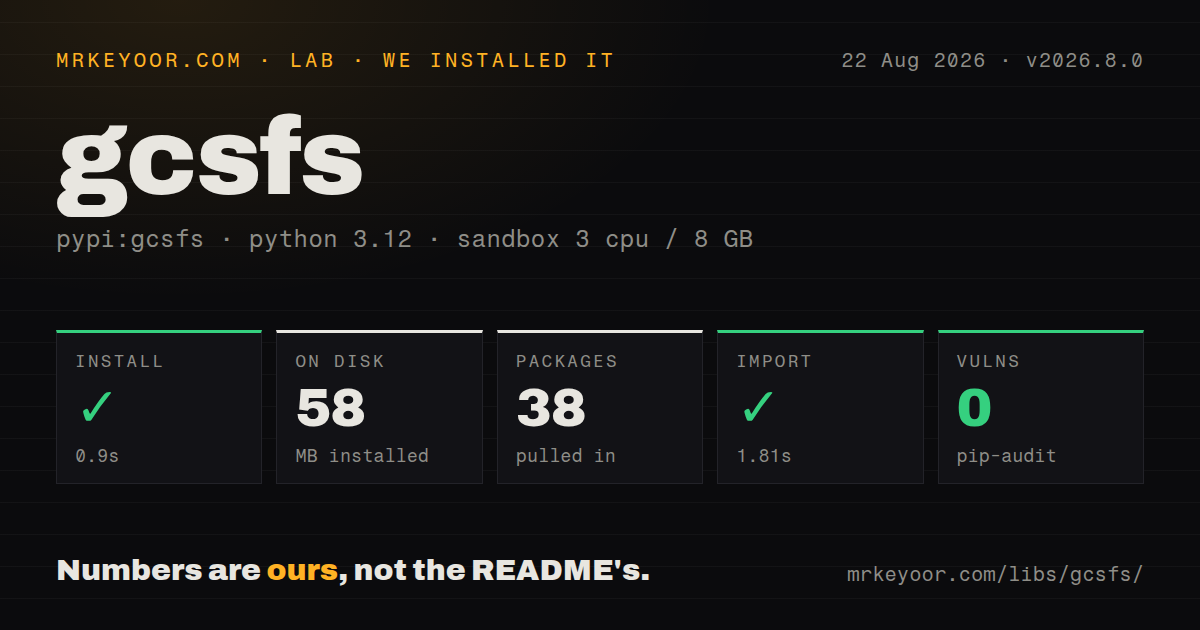
| Install | ✓ · 0.9s | 38 packages on disk · 58 MB |
| Import | ✓ | import gcsfs in 1.81s · pure Python · requires Python >=3.10 |
| Known vulns | 0 | (pip-audit) |
Answers from our run
Does gcsfs install cleanly?
Yes. In a fresh container with an empty cache, pip install gcsfs finished in 0.9s, leaving 38 packages and 58 MB on disk. pip-audit reported no known vulnerabilities.
What does gcsfs need to run?
Python >=3.10, and nothing compiled: it is pure Python. In our run import gcsfs succeeded in 1.81s.
gcsfs or google-cloud-storage: which should you use?
google-cloud-storage: Use it for GCS-specific bucket and object code that does not need an fsspec filesystem. gcsfs 2026.8.0 installed in 0.9 seconds but occupied 58 MB across 38 packages, and its import took 1.81 seconds in our sandbox.
When should you not use gcsfs?
Your service performs direct bucket and object administration without any fsspec consumer; google-cloud-storage exposes Google's resource API with less indirection
Use it if
- Pandas, Dask, PyArrow, Xarray, Polars, or Zarr should read and write gs:// paths through the fsspec protocol
- One data pipeline needs nearly the same filesystem calls for local files, GCS, S3, and Azure storage
- Code needs recursive globbing, tree transfers, range reads, or a mutable mapping over a GCS prefix
- Sequential model or dataset reads can benefit from the new adaptive parallel prefetch path and its memory use is bounded deliberately
- Your service performs direct bucket and object administration without any fsspec consumer; google-cloud-storage exposes Google's resource API with less indirection
- Dependency count matters in a small worker or function; our clean install left 38 packages and 58 MB for a filesystem adapter
- The process has tight memory limits or many concurrent readers; version 2026.8.0 enables an in-memory adaptive prefetch buffer by default unless you select another cache or disable it
- You expect POSIX behavior from a standard flat bucket; prefixes are directory-like, and moves may require copying and deleting objects rather than one atomic rename
- Your environment pins several fsspec backends independently; gcsfs releases track fsspec closely, so old s3fs, adlfs, and fsspec constraints can become one resolver conflict
Setup reality
Our clean Python 3.12 install of gcsfs 2026.8.0 succeeded in 0.9 seconds. It left 38 packages using 58 MB, and pip-audit found no known vulnerabilities. The package declares 18 direct dependencies, requires Python 3.10 or newer, and is pure Python. It does not ship py.typed. Importing gcsfs in the lab completed in 1.81 seconds.
Authentication needs an explicit decision. token=None checks application default credentials and the metadata service before anonymous access. token='cloud' selects metadata credentials, token='anon' is for public objects, and a credential object or service-account JSON path can be supplied directly. Give project when listing or creating buckets. A requester-pays bucket also needs requester_pays set to the billing project. Service-account key files should stay outside the repository.
Version 2026.8.0 enables adaptive concurrent prefetching when cache_type is unset. Sequential reads can open several range requests and retain predicted bytes in memory. Set user_max_prefetch_size to cap that buffer, pass use_experimental_adaptive_prefetching=False to open(), choose an explicit cache_type, or use the documented environment switch when the default does not fit. Directory listings have their own cache; call invalidate_cache() or set cache_timeout when other writers add objects.
The client uses aiohttp underneath. Async callers construct GCSFileSystem(asynchronous=True), call coroutine methods whose names begin with _, and close the session when finished. open() itself has no async counterpart in the documented interface. aiohttp ignores proxy environment variables unless session_kwargs includes trust_env=True. fsspec can also reuse filesystem instances based on constructor arguments, so tests that rotate credentials should call clear_instance_cache() or construct with skip_instance_cache=True.
Patterns
Create a filesystem and inspect objects create-filesystem
import gcsfs

fs = gcsfs.GCSFileSystem(project='analytics-prod')
for item in fs.ls('events-bucket/daily', detail=True):
    print(item['name'], item.get('size'))
Filesystem-object paths omit the gs:// scheme. Give project for bucket-level operations and clearer quota attribution.
Read an object through a file handle read-object
with fs.open('events-bucket/config.json', 'rt', encoding='utf-8') as source:
    config_text = source.read()
Version 2026.8.0 may prefetch future ranges unless you select another cache behavior.
Write and close an object write-object
with fs.open('events-bucket/output/result.json', 'wb') as target:
    target.write(payload)
Use a context manager so buffered data is finalized and the remote handle closes after an exception.
Let pandas resolve a gs URL read-with-pandas
import pandas as pd

frame = pd.read_parquet(
    'gs://events-bucket/date=2026-08-24/',
    storage_options={'project': 'analytics-prod'},
)
pandas passes storage_options to GCSFileSystem. gcsfs must be installed even though this code never imports it.
Choose credentials explicitly select-auth-mode
public_fs = gcsfs.GCSFileSystem(token='anon')
cloud_fs = gcsfs.GCSFileSystem(token='cloud', project='analytics-prod')
service_fs = gcsfs.GCSFileSystem(
    token='/run/secrets/gcs-service-account.json',
    project='analytics-prod',
)
token=None can eventually try anonymous access. Explicit modes make a missing production identity easier to diagnose.
Bill access to your project use-requester-pays
fs = gcsfs.GCSFileSystem(
    project='analysis-project',
    requester_pays='analysis-project',
)
rows = fs.cat('shared-bucket/sample.csv')
The billing project needs the required serviceusage permission or GCS rejects the request.
Refresh a directory after another writer refresh-listing-cache
prefix = 'events-bucket/incoming'
old_view = fs.ls(prefix)

fs.invalidate_cache(prefix)
fresh_view = fs.ls(prefix)
GCS object consistency does not refresh gcsfs's local directory-listing cache. Invalidate the exact prefix used by the reader.
Cap adaptive prefetching bound-prefetch-memory
with fs.open(
    'events-bucket/models/checkpoint.bin',
    'rb',
    user_max_prefetch_size=64 * 1024 * 1024,
) as source:
    restore(source)
The cap applies to the prefetch buffer for this reader. Choose it against total worker count and the process memory limit.
Turn off the new read default disable-adaptive-prefetch
with fs.open(
    'events-bucket/random-access.bin',
    'rb',
    use_experimental_adaptive_prefetching=False,
) as source:
    inspect_offsets(source)
An explicit cache_type is another documented way to avoid the automatic adaptive path.
Copy a local directory to GCS transfer-directory
fs.put(
    'build/artifacts/',
    'release-bucket/artifacts/',
    recursive=True,
)
Object stores do not commit a recursive tree as one transaction. A failure can leave a partially copied prefix.
Expose a prefix as a mapping open-key-value-mapper
store = fs.get_mapper('arrays-bucket/run-42.zarr')
store['status.json'] = b'{"state":"ready"}'
print(store['status.json'])
Each mapping entry is a separate object. Formats that update many keys should tolerate partial progress and retries.
Use the underlying async interface call-async-methods
async def list_names():
    fs = gcsfs.GCSFileSystem(asynchronous=True, project='analytics-prod')
    await fs._set_session()
    try:
        return await fs._ls('events-bucket/daily')
    finally:
        await fs._session.close()
Async method names begin with _. The documented open() file interface is synchronous, so async code may prefer _cat_file or a temporary local download.
Alternatives
| Package | Registry | Pick it when |
|---|---|---|
| google-cloud-storage | PyPI | Use it for GCS-specific bucket and object code that does not need an fsspec filesystem |
| s3fs | PyPI | Use it when the same fsspec-oriented workload stores data in Amazon S3 |
| adlfs | PyPI | Use it when fsspec consumers need Azure Blob or Data Lake paths instead of GCS |
More data guides
numpy · pandas · fsspec · pyarrow · lxml · sqlalchemy · the whole shelf →
How this guide is made: grounded in the library's documentation, release notes, changelog, and issue history, on a fixed rubric — not a hands-on install of every release. The 50 most-downloaded entries are additionally install-verified in clean containers. Corrections: contact the desk.