firebase-admin review
Our fresh Node 22 install of firebase-admin 14.3.0 took 10.1 seconds and occupied 78 MB across 190 packages. This is Google's privileged server SDK for Firebase Auth, Firestore, Realtime Database, Cloud Messaging, Storage, App Check, Remote Config, and SQL Connect. Its calls use trusted credentials and can bypass client security rules, so the package belongs only in developer-controlled backends. The current release updates its Firestore and Storage clients and adjusts routing headers sent by SQL Connect.
firebase-admin 14.3.0 is the right server SDK when a Node 22 backend already depends on Firebase identity or services. Avoid it in client code, for a single narrow Google API, or where a 190-package install and six moderate audit findings fail your deployment rules.
We installed it
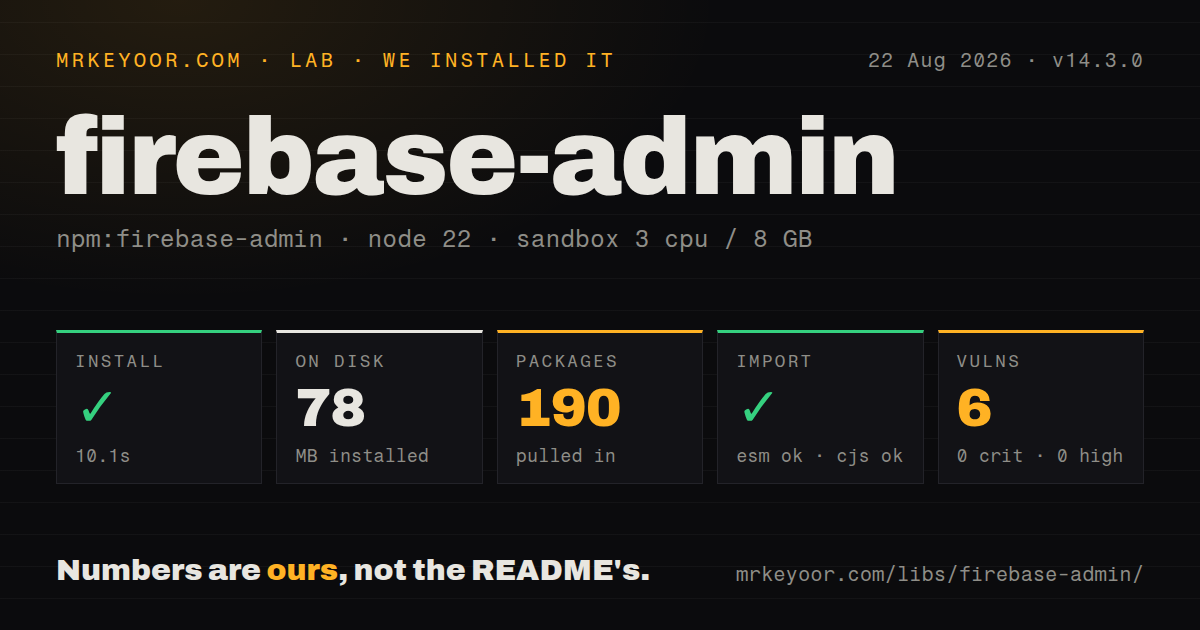
| Install | ✓ · 10.1s | 190 packages on disk · 78 MB · 3 deprecation warnings |
| Import | ✓ | ESM import works · require() works · CommonJS package with exports map |
| Browser | n/a | could not be bundled for the browser (Node-only code, most likely) |
| Types | ✓ | TypeScript types bundled |
| Known vulns | 6 | 0 critical · 0 high · 6 moderate · 0 low (npm audit) |
Answers from our run
Does firebase-admin install cleanly?
Yes. In a fresh container with an empty cache, npm install firebase-admin finished in 10 seconds, leaving 190 packages and 78 MB on disk. npm audit reported 6 known vulnerabilities. The install printed 3 deprecation warnings.
Can firebase-admin run in a browser?
Not directly: esbuild could not bundle it for the browser in our run, which normally means it depends on Node built-ins. Use it on the server, or find a browser-targeted alternative.
Does firebase-admin work with both ESM and CommonJS?
Yes. Both import 'firebase-admin' and require('firebase-admin') worked in Node 22 in our run. The package is published as CommonJS with an exports map.
Does firebase-admin include TypeScript types?
Yes, type declarations ship inside the package, so no @types install is needed.
firebase-admin or firebase: which should you use?
firebase: Use the client SDK in browsers and mobile-facing JavaScript where Firebase Security Rules must enforce access. firebase-admin 14.3.0 is the right server SDK when a Node 22 backend already depends on Firebase identity or services.
When should you not use firebase-admin?
Any part of the code ships to a browser, mobile bundle, or user-controlled renderer. Admin credentials and rule-bypassing calls cannot be exposed there.
Use it if
- A trusted API must validate Firebase ID tokens, manage users, or revoke sessions.
- One worker needs administrative access to several Firebase products under the same project identity.
- Your service runs on Google Cloud and can obtain Application Default Credentials without shipping a key file.
- You accept Node 22 as the minimum runtime and want Google's supported server API for Firebase.
- Any part of the code ships to a browser, mobile bundle, or user-controlled renderer. Admin credentials and rule-bypassing calls cannot be exposed there.
- Production still uses Node 20 or older. Package 14.3.0 declares Node 22 or newer.
- You need one narrow Google Cloud client. Our empty install brought 190 packages and 78 MB onto disk before application code.
- Your policy blocks dependencies with known audit findings. npm audit found six moderate vulnerabilities in our clean tree, although none were high or critical.
- Vendor portability matters for identity, document storage, messaging, and authorization policy. Using several Admin SDK services ties those concerns to Firebase conventions.
Setup reality
firebase-admin@14.3.0 installed successfully in 10.1 seconds in our Node 22 container. npm left 190 packages totaling 78 MB and printed three deprecation warnings. The package lists seven direct dependencies, no peers, 2,088 KB unpacked, bundled TypeScript declarations, and an Apache-2.0 license. npm audit returned six moderate findings and no critical, high, or low findings. It is CommonJS behind an exports map; require() and ESM import both worked. Browser bundling failed on Node-only code, matching the server-only support boundary.
Authentication is the first operational decision. Google-hosted services can call applicationDefault(), while other environments need a configured ADC source or a service account with limited IAM roles. If a secret store escapes private-key newlines as \n, convert them before passing the value to cert(). Realtime Database may require databaseURL, and Storage operations must point at the intended bucket. Keep service-account material out of client builds and source control.
Admin calls are trusted. Firestore and Realtime Database operations do not rely on the client Security Rules that protect browser traffic, so handlers must check the caller and validate payloads before writing. Development hot reload can execute initializeApp() twice; reuse an existing app with getApps() or getApp(). Emulator routing uses separate environment variables for Auth, Firestore, Database, and Storage, so a partially configured test process can still reach a live service.
Version 14 needs Node 22 and removed older namespace access, Instance ID support, and some legacy Messaging types. Version 14.3.0 upgrades its Firestore and Storage dependencies and changes SQL Connect request headers rather than redesigning the main service APIs. Firestore transaction callbacks can run more than once after contention, so never send email or charge a card inside one. Token revocation checks and App Check replay consumption also add remote work; enable them where their security property is required.
Patterns
Start an app with ambient Google credentials initialize-default-credentials
import { applicationDefault, initializeApp } from 'firebase-admin/app';

export const app = initializeApp({
  credential: applicationDefault(),
});
Google Cloud can provide ADC automatically. Other hosts need an ADC source configured before startup.
Build credentials from deployment secrets initialize-service-account
import { cert, initializeApp } from 'firebase-admin/app';

export const app = initializeApp({
  credential: cert({
    projectId: process.env.FIREBASE_PROJECT_ID,
    clientEmail: process.env.FIREBASE_CLIENT_EMAIL,
    privateKey: process.env.FIREBASE_PRIVATE_KEY?.replace(/\\n/g, '\n'),
  }),
});
Keep the key in a secret manager. Many environment systems store its line breaks as literal \n sequences.
Avoid duplicate initialization during reloads reuse-initialized-app
import { applicationDefault, getApps, initializeApp } from 'firebase-admin/app';

export const app = getApps()[0] ?? initializeApp({
  credential: applicationDefault(),
});
Framework reloads may evaluate the module again. Named apps need an explicit lookup rather than the first array entry.
Check a bearer token and revocation state verify-id-token
import { getAuth } from 'firebase-admin/auth';

const header = req.headers.authorization ?? '';
if (!header.startsWith('Bearer ')) throw new Error('missing token');
const claims = await getAuth().verifyIdToken(header.slice(7), true);
console.log(claims.uid);
The true argument checks revocation and disabled-user state through extra remote work.
Provision an Authentication user create-auth-user
import { getAuth } from 'firebase-admin/auth';

const user = await getAuth().createUser({
  email: 'ada@example.com',
  displayName: 'Ada',
  emailVerified: false,
});
Treat auth/email-already-exists as a normal conflict, and grant the service identity only the needed IAM role.
Replace authorization claims for one user set-custom-claims
import { getAuth } from 'firebase-admin/auth';

await getAuth().setCustomUserClaims(uid, {
  role: 'editor',
  plan: 'paid',
});
This call replaces the complete claims object. Merge existing values first if they must survive.
Merge fields into a Firestore document write-firestore-document
import { FieldValue, getFirestore } from 'firebase-admin/firestore';

await getFirestore().collection('users').doc(uid).set({
  displayName: 'Ada',
  updatedAt: FieldValue.serverTimestamp(),
}, { merge: true });
The server client bypasses client Security Rules. Check authorization and input before writing.
Update a counter inside a transaction run-firestore-transaction
import { getFirestore } from 'firebase-admin/firestore';

const db = getFirestore();
const ref = db.collection('counters').doc('orders');
await db.runTransaction(async (tx) => {
  const snap = await tx.get(ref);
  tx.set(ref, { value: (snap.data()?.value ?? 0) + 1 });
});
Contention can rerun the callback. Keep payments, messages, and other outside effects after the transaction.
Apply a multi-path Database update update-realtime-database
import { getDatabase, ServerValue } from 'firebase-admin/database';

await getDatabase().ref().update({
  ['users/' + uid + '/displayName']: 'Ada',
  ['audit/' + uid + '/updatedAt']: ServerValue.TIMESTAMP,
});
Configure databaseURL when the app cannot infer which Realtime Database instance to use.
Send one Firebase Cloud Messaging notification send-fcm-message
import { getMessaging } from 'firebase-admin/messaging';

const messageId = await getMessaging().send({
  fid: installationId,
  notification: { title: 'Order shipped', body: 'Your package is moving' },
  data: { orderId },
});
Current version 14 code can target a Firebase Installation ID; older registration-token fields are deprecated for new integrations.
Exchange a recent ID token for a session cookie create-session-cookie
import { getAuth } from 'firebase-admin/auth';

const decoded = await getAuth().verifyIdToken(idToken);
if (Date.now() / 1000 - decoded.auth_time > 300) throw new Error('sign in again');
const cookie = await getAuth().createSessionCookie(idToken, {
  expiresIn: 5 * 24 * 60 * 60 * 1000,
});
Validate CSRF before the exchange, then return the value in an HttpOnly, Secure cookie.
Reject a replayed App Check token verify-app-check
import { getAppCheck } from 'firebase-admin/app-check';

const result = await getAppCheck().verifyToken(token, { consume: true });
if (result.alreadyConsumed) throw new Error('replayed token');
Token consumption adds backend work. Use it on operations where replay would cause meaningful harm.
Alternatives
| Package | Registry | Pick it when |
|---|---|---|
| firebase | npm | Use the client SDK in browsers and mobile-facing JavaScript where Firebase Security Rules must enforce access. |
| @google-cloud/firestore | npm | Use the narrower Google Cloud client when the backend only needs Firestore and not the rest of Firebase Admin. |
| @supabase/supabase-js | npm | Use it when hosted Postgres, row-level policies, and an open-source backend suit the product better. |
| google-auth-library | npm | Use it when Google credentials and signed requests are the requirement, without Firebase service clients. |
More infra guides
semver · boto3 · opentelemetry-api · @opentelemetry/api · psutil · distro · the whole shelf →
How this guide is made: grounded in the library's documentation, release notes, changelog, and issue history, on a fixed rubric — not a hands-on install of every release. The 50 most-downloaded entries are additionally install-verified in clean containers. Corrections: contact the desk.