firebase review
firebase 12.18.0 is the umbrella browser SDK for Google's hosted Authentication, Firestore, Realtime Database, Storage, Functions, Messaging, App Check, Analytics, Remote Config, Data Connect, and AI products. Applications initialize one Firebase app, then import individual products through paths such as firebase/auth or firebase/firestore. Release 12.18 adds HTTP status and URL details to FunctionsError, fixes App Check tokens in SQL Connect realtime requests, and removes Imagen methods because those models were shut down. It also updates the component packages shipped behind the top-level dependency.
firebase 12.18.0 took 14.8 seconds and 183 MB to install in our sandbox, while both root import styles and a broad browser bundle failed, so adopt it through tested product subpaths rather than as one generic SDK import. It earns its weight when Auth, rules, listeners, and managed Firebase services are an intentional platform choice.
We installed it
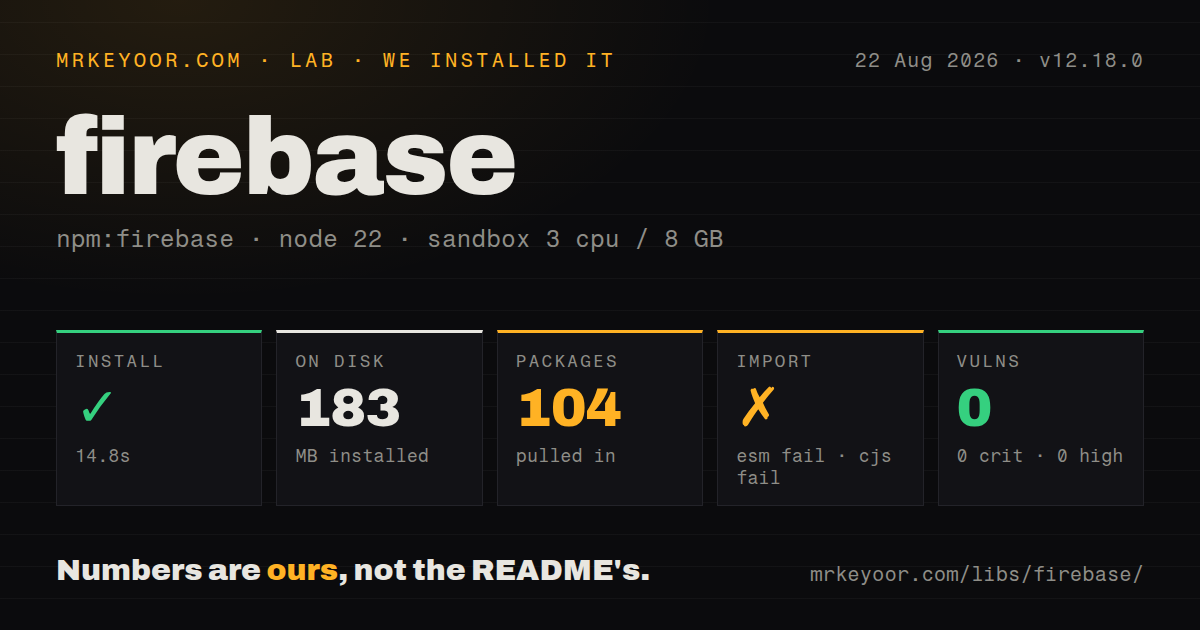
| Install | ✓ · 14.8s | 104 packages on disk · 183 MB |
| Import | ✗ | ESM import fails · require() fails · CommonJS package with exports map |
| Browser | n/a | could not be bundled for the browser (Node-only code, most likely) |
| Types | ✓ | TypeScript types bundled |
| Known vulns | 0 | 0 critical · 0 high · 0 moderate · 0 low (npm audit) |
Answers from our run
Does firebase install cleanly?
Yes. In a fresh container with an empty cache, npm install firebase finished in 15 seconds, leaving 104 packages and 183 MB on disk. npm audit reported no known vulnerabilities.
Can firebase run in a browser?
Not directly: esbuild could not bundle it for the browser in our run, which normally means it depends on Node built-ins. Use it on the server, or find a browser-targeted alternative.
Does firebase work with both ESM and CommonJS?
Neither plain import nor require succeeded in our sandbox, so it needs a bundler or extra setup.
Does firebase include TypeScript types?
Yes, type declarations ship inside the package, so no @types install is needed.
firebase or @supabase/supabase-js: which should you use?
@supabase/supabase-js: @supabase/supabase-js 2.x fits apps that want hosted Postgres, SQL-oriented data, authentication, and storage behind one client. firebase 12.18.0 took 14.8 seconds and 183 MB to install in our sandbox, while both root import styles and a broad browser bundle failed, so adopt it through tested product subpaths rather than as one generic SDK import.
When should you not use firebase?
A small client cannot absorb our measured 183 MB install tree with 104 packages and 28 direct dependencies before bundling.
Use it if
- firebase 12.18.0 fits a browser app that needs Firebase Auth plus one or more Firebase data or storage products under the same project identity.
- Firestore listeners, offline cache, and security rules match an application built around documents rather than relational joins.
- The team will test rules and client behavior against the Firebase Emulator Suite before deploying indexes and rules.
- A modular import per product is acceptable, and the build already has browser-specific entry handling for the Firebase SDK.
- A small client cannot absorb our measured 183 MB install tree with 104 packages and 28 direct dependencies before bundling.
- You need SQL joins or unrestricted aggregate queries in the browser. Firestore's document queries are constrained by indexes, and missing composite indexes fail at runtime.
- Self-hosting or a low-cost provider exit is mandatory. Auth identities, rules, indexes, listeners, Functions, and data models can all become Firebase-specific.
- The root package must load directly in Node 22.23.2. Both require() and ESM import failed in our test, so server code should use documented product paths or firebase-admin where appropriate.
- A broad package import has to bundle unchanged for the browser. Our esbuild attempt failed; tree-shaking depends on modular product imports rather than importing everything from firebase.
- The application treats its Firebase web config as a secret. API keys identify the project, while service rules and authenticated identity enforce browser access.
- You cannot track listener lifetime and read billing. A forgotten onSnapshot subscription keeps receiving document updates until its unsubscribe function runs.
Setup reality
We installed firebase 12.18.0 in a fresh Node 22 Bookworm sandbox. npm took 14.8 seconds, left 104 packages, and consumed 183 MB. The umbrella package reports 28 direct dependencies, no peers, and 54916 KB unpacked. npm audit found 0 known vulnerabilities, and TypeScript declarations are included. package.json describes CommonJS with an exports map, yet require() and ESM import both failed under Node 22.23.2.
Our esbuild browser test of a broad package import also failed. That result does not mean the Firebase browser products are Node-only; it means the root-import check is a poor fit for this multi-product package. Start with initializeApp from firebase/app, then import exact modules such as firebase/auth and firebase/firestore. Measure the entry points your application uses because the 183 MB installed tree says nothing about the final tree-shaken browser chunk.
Copy the registered web app config from the Firebase console. Those values will be shipped to users. Protection belongs in Firestore, Realtime Database, and Storage rules, with App Check as another abuse signal where supported. Enable each Auth provider separately. Compound Firestore queries may require an index deployed through the console or Firebase CLI. The Emulator Suite is installed through firebase-tools, outside this package.
Auth state restores asynchronously, and Firestore listeners stay live until unsubscribed. Connect emulators before the first product call, and initialize persistent cache before getFirestore creates the default instance. Release 12.18.0 removes Imagen APIs and changes callable Functions errors to include HTTP status and URL details, so code matching old error messages or importing Imagen symbols needs a focused upgrade test.
Patterns
Initialize one browser app initialize-app
import { initializeApp } from 'firebase/app';

export const app = initializeApp({
  apiKey: '...',
  authDomain: 'my-app.firebaseapp.com',
  projectId: 'my-app',
  storageBucket: 'my-app.appspot.com',
  appId: '...',
});
The web config identifies a Firebase app and is visible in browser code. Access control comes from identity and product rules.
Render after auth restoration observe-auth
import { getAuth, onAuthStateChanged } from 'firebase/auth';

const stop = onAuthStateChanged(getAuth(app), (user) => {
  renderRoute(user ? 'account' : 'login');
});

// later
stop();
currentUser may be null before the first callback because persisted credentials restore asynchronously.
Sign in with an enabled provider sign-in-password
import { getAuth, signInWithEmailAndPassword } from 'firebase/auth';

const result = await signInWithEmailAndPassword(getAuth(app), email, password);
console.log(result.user.uid);
Email and password sign-in must be enabled in the console. Otherwise this call returns auth/operation-not-allowed.
Merge selected Firestore fields merge-document
import { getFirestore, doc, setDoc } from 'firebase/firestore';

const db = getFirestore(app);
await setDoc(doc(db, 'users', uid), { plan: 'pro' }, { merge: true });
Without merge: true, setDoc replaces the document fields. Security rules evaluate the proposed write either way.
Run an indexed Firestore query query-documents
import { collection, query, where, orderBy, limit, getDocs } from 'firebase/firestore';

const q = query(collection(db, 'posts'), where('authorId', '==', uid), orderBy('createdAt', 'desc'), limit(20));
const snapshot = await getDocs(q);
This filter plus sort may need a composite index. The runtime error includes a Firebase console link to create it.
Dispose a live document listener listen-document
import { doc, onSnapshot } from 'firebase/firestore';

const unsubscribe = onSnapshot(doc(db, 'games', gameId), (snap) => {
  render(snap.exists() ? snap.data() : null);
});

// route cleanup
unsubscribe();
onSnapshot keeps reading changes until unsubscribe runs. Bind cleanup to the route or component lifecycle.
Upload an object and read its URL upload-file
import { getStorage, ref, uploadBytes, getDownloadURL } from 'firebase/storage';

const target = ref(getStorage(app), `avatars/${uid}.png`);
await uploadBytes(target, file, { contentType: file.type });
const url = await getDownloadURL(target);
Storage rules are independent of Firestore rules. Permission to a user document does not grant this object path.
Connect products before first use connect-emulators
import { connectAuthEmulator } from 'firebase/auth';
import { connectFirestoreEmulator } from 'firebase/firestore';

if (location.hostname === 'localhost') {
  connectAuthEmulator(auth, 'http://127.0.0.1:9099');
  connectFirestoreEmulator(db, '127.0.0.1', 8080);
}
Call emulator connectors before any network operation. The Emulator Suite itself comes from firebase-tools.
Alternatives
| Package | Registry | Pick it when |
|---|---|---|
| @supabase/supabase-js | npm | @supabase/supabase-js 2.x fits apps that want hosted Postgres, SQL-oriented data, authentication, and storage behind one client. |
| appwrite | npm | Use Appwrite when its self-hosting option and document database model matter more than Firebase's managed product depth. |
| pocketbase | npm | Use the PocketBase client for a small project backed by one deployable PocketBase server and a simpler operational footprint. |
More infra guides
semver · boto3 · opentelemetry-api · @opentelemetry/api · psutil · distro · the whole shelf →
How this guide is made: grounded in the library's documentation, release notes, changelog, and issue history, on a fixed rubric — not a hands-on install of every release. The 50 most-downloaded entries are additionally install-verified in clean containers. Corrections: contact the desk.