filing-cabinet review
filing-cabinet 6.0.0 resolves a source-file dependency string to an absolute path. It chooses logic from the importing file extension and understands Node imports, AMD, webpack, TypeScript path maps, Sass, Less, Stylus, Vue, and Svelte. Version 6 also handles package #imports and lets tools register another extension resolver. Our browser build failed, as expected for code that reads project files and configuration. This belongs in dependency analyzers and codemods, not application runtime code.
filing-cabinet 6.0.0 installed 36 packages and 34 MB in 3.5 seconds on our box, and its browser bundle failed while npm audit found 0 vulnerabilities. That cost makes sense for a mixed-language dependency analyzer, not for ordinary Node module lookup.
We installed it
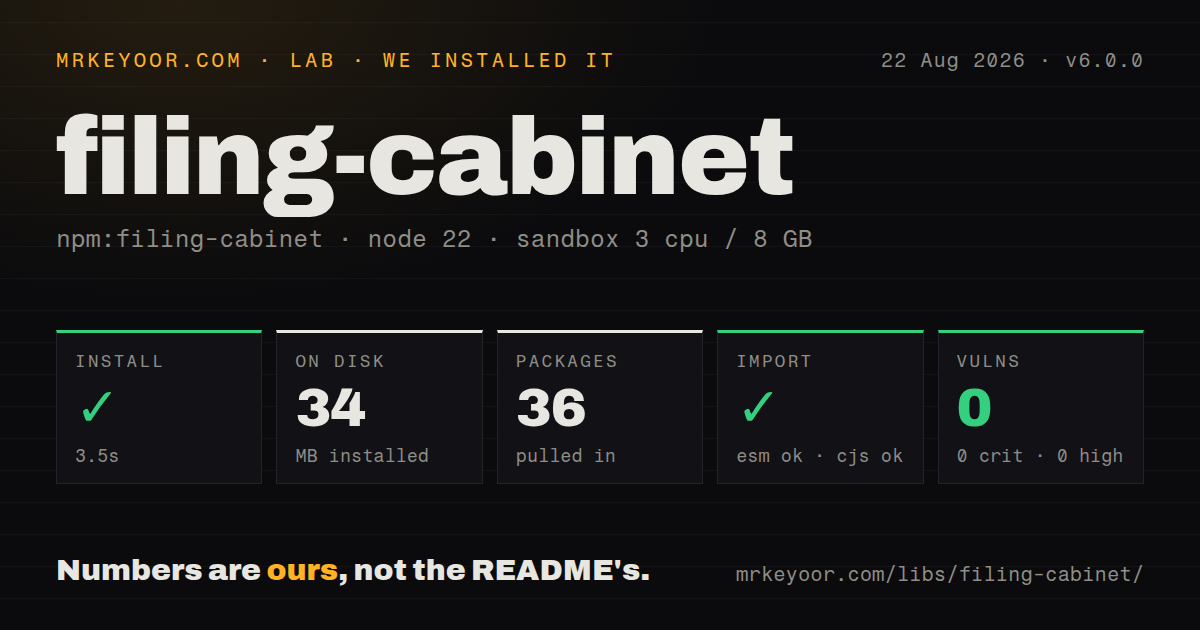
| Install | ✓ · 3.5s | 36 packages on disk · 34 MB |
| Import | ✓ | ESM import works · require() works · ESM package with exports map |
| Browser | n/a | could not be bundled for the browser (Node-only code, most likely) |
| Types | — | no TypeScript types found |
| Known vulns | 0 | 0 critical · 0 high · 0 moderate · 0 low (npm audit) |
Answers from our run
Does filing-cabinet install cleanly?
Yes. In a fresh container with an empty cache, npm install filing-cabinet finished in 4 seconds, leaving 36 packages and 34 MB on disk. npm audit reported no known vulnerabilities.
Can filing-cabinet run in a browser?
Not directly: esbuild could not bundle it for the browser in our run, which normally means it depends on Node built-ins. Use it on the server, or find a browser-targeted alternative.
Does filing-cabinet work with both ESM and CommonJS?
Yes. Both import 'filing-cabinet' and require('filing-cabinet') worked in Node 22 in our run. The package is published as ESM with an exports map.
Does filing-cabinet include TypeScript types?
No type declarations were found in our install, so TypeScript users need their own declarations.
filing-cabinet or resolve: which should you use?
resolve: Use it for the classic Node resolution algorithm and packageFilter control. filing-cabinet 6.0.0 installed 36 packages and 34 MB in 3.5 seconds on our box, and its browser bundle failed while npm audit found 0 vulnerabilities.
When should you not use filing-cabinet?
You only resolve standard Node imports; the 36-package install includes several language and bundler resolvers you will not use
Use it if
- A dependency graph must follow JavaScript, TypeScript, component files, and stylesheet imports through one API
- Your analyzer needs webpack configuration, RequireJS paths, tsconfig mappings, or a preferred package field
- A codemod needs synchronous absolute paths and can treat an empty string as an unresolved edge
- You need to add a resolver for another source extension while retaining the built-in lookup table
- You only resolve standard Node imports; the 36-package install includes several language and bundler resolvers you will not use
- Your process runs below Node 20.19 or 22.12; version 6 declares those minimum engine branches
- Your TypeScript project requires package declarations; our 6.0.0 install contained no TypeScript types
- Repository input is untrusted; a supplied webpackConfig can execute project code with the analyzer process permissions
- Callers need structured failure reasons or async I/O; the public operation is synchronous and returns an empty string on a miss
Setup reality
Our Node 22 sandbox installed filing-cabinet 6.0.0 in 3.5 seconds. The result was 36 packages and 34 MB on disk; the package itself is 48 KB unpacked and declares 11 direct dependencies with 0 peers. npm audit found 0 known vulnerabilities. It is ESM with an exports map, though require() and ESM import both worked in our test. No declarations were found. esbuild could not create a browser bundle, which confirms this is Node-only project-analysis code.
Every call needs partial, filename, and directory. filename is the importing source file, while directory is the project root used for package lookup. A failed resolution returns an empty string rather than an exception record. JavaScript detection may parse the importing file; reuse a supplied AST during a large crawl. TypeScript aliases need tsConfig, and an in-memory config also needs tsConfigPath so relative baseUrl and paths resolve from a real location.
webpackConfig is loaded as executable configuration, and an exported array uses only its first entry. Do not point it at an untrusted checkout inside the same privileged process. noTypeDefinitions changes TypeScript preference away from .d.ts. nodeModulesConfig can prefer a field such as module or apply a packageFilter, which may intentionally differ from Node resolution. register() and unregister() mutate a process-wide extension table, so test suites and concurrent jobs must restore custom registrations.
Patterns
Resolve one relative import resolve-relative-import
import path from 'node:path';
import cabinet from 'filing-cabinet';

const root = process.cwd();
const resolved = cabinet({
  partial: './button',
  filename: path.join(root, 'src/app.js'),
  directory: root,
});

if (!resolved) throw new Error('dependency not found');
A successful call returns an absolute filename; an unresolved dependency returns an empty string.
Pass project root and importer separately require-from-commonjs
const { default: cabinet } = require('filing-cabinet');

const resolved = cabinet({
  partial: './config',
  filename: '/workspace/src/index.js',
  directory: '/workspace',
});
filename identifies the file containing the import, while directory anchors project and node_modules lookup.
Follow a package subpath import prefer-package-module-field
const resolved = cabinet({
  partial: 'some-package',
  filename: '/workspace/src/app.js',
  directory: '/workspace',
  nodeModulesConfig: { entry: 'module' },
});
Version 6 recognizes package.json #imports for JavaScript and TypeScript sources.
Use a webpack configuration filter-package-entry
const resolved = cabinet({
  partial: 'some-package',
  filename: '/workspace/src/app.js',
  directory: '/workspace',
  nodeModulesConfig(pkg) {
    pkg.main = pkg.browser ?? pkg.module ?? pkg.main;
    return pkg;
  },
});
Loading webpackConfig executes that project configuration, and an exported array contributes only its first item.
Resolve TypeScript path mappings resolve-typescript-import
const resolved = cabinet({
  partial: '@app/models/user',
  filename: '/workspace/src/service.ts',
  directory: '/workspace',
  tsConfig: '/workspace/tsconfig.json',
});
An object tsConfig needs tsConfigPath when baseUrl or paths depend on the config location.
Avoid declaration-file results resolve-runtime-file
const resolved = cabinet({
  partial: 'some-library',
  filename: '/workspace/src/app.ts',
  directory: '/workspace',
  tsConfig: '/workspace/tsconfig.json',
  noTypeDefinitions: true,
});
noTypeDefinitions prefers executable files instead of allowing a .d.ts resolution result.
Prefer a package entry field use-parsed-tsconfig
const resolved = cabinet({
  partial: '@lib/math',
  filename: '/virtual/src/app.ts',
  directory: '/virtual',
  tsConfig: {
    compilerOptions: { baseUrl: '.', paths: { '@lib/*': ['src/lib/*'] } },
  },
  tsConfigPath: '/virtual/tsconfig.json',
  fileSystem: virtualFs,
});
nodeModulesConfig.entry can choose module or another package field instead of main.
Apply a package filter resolve-webpack-alias
const resolved = cabinet({
  partial: '@ui/Button',
  filename: '/workspace/src/app.js',
  directory: '/workspace',
  webpackConfig: '/workspace/webpack.config.cjs',
});
The function form receives package metadata and can make results differ from Node runtime lookup.
Reuse a parsed JavaScript AST resolve-package-imports
const resolved = cabinet({
  partial: '#internal/logger',
  filename: '/workspace/src/app.js',
  directory: '/workspace',
});
Supplying ast avoids reparsing the importer during JavaScript module-style detection.
Register another file extension resolve-vue-style-import
const resolved = cabinet({
  partial: './styles/theme.scss',
  filename: '/workspace/src/App.vue',
  directory: '/workspace',
});
register() changes the process-wide table and the resolver must return an absolute path or empty string.
Remove a custom extension register-custom-extension
cabinet.register('.py', ({ partial, filename }) => {
  return resolvePythonImport(partial, filename) || '';
});

try {
  const resolved = cabinet({
    partial: 'my_package.tools',
    filename: '/workspace/app.py',
    directory: '/workspace',
  });
} finally {
  cabinet.unregister('.py');
}
unregister() removes the global entry, so shared tests should restore any resolver they replace.
Inspect supported extensions inspect-supported-extensions
if (cabinet.supportedFileExtensions.includes('.tsx')) {
  const resolver = cabinet.getLookup('.tsx');
  console.log(typeof resolver === 'function');
}
supportedFileExtensions changes after register() and unregister(), reflecting the current global table.
Alternatives
| Package | Registry | Pick it when |
|---|---|---|
| resolve | npm | Use it for the classic Node resolution algorithm and packageFilter control. |
| enhanced-resolve | npm | Use it when webpack aliases and condition-based resolution are the sole requirement. |
| tsconfig-paths | npm | Use it when TypeScript baseUrl and paths are the only nonstandard rules. |
More cli & tooling guides
commander · chalk · typescript · esbuild · yargs · click · the whole shelf →
How this guide is made: grounded in the library's documentation, release notes, changelog, and issue history, on a fixed rubric — not a hands-on install of every release. The 50 most-downloaded entries are additionally install-verified in clean containers. Corrections: contact the desk.